One Punch Man: The Strongest Charged But Coupons Not Received After Top-Up: How to Fix
If your One Punch Man: The Strongest payment was charged but coupons did not arrive, do not top up again yet. Most cases are recoverable, and the problem is usually not permanent loss. The usual causes are simpler: the coupons are waiting in in-game Mail for manual claim, the payment is still pending review, the wrong UID or SID was used, or you reopened the game on a different account or server. Start by checking Mail for Please claim your Coupon, then verify your UID, SID, server, and payment status before contacting support.
Why was I charged but no coupons arrived in One Punch Man: The Strongest?
The key thing to understand is that payment success and coupon delivery are not always the same moment.
In One Punch Man: The Strongest, successful top-up rewards are commonly delivered through in-game mail rather than dropped straight into your inventory. Official guidance points players to the Mail button at the bottom left of the screen, where a successful transaction should appear as Please claim your Coupon. After tapping Claim, you can check the Bag through the backpack icon to confirm the coupons arrived.
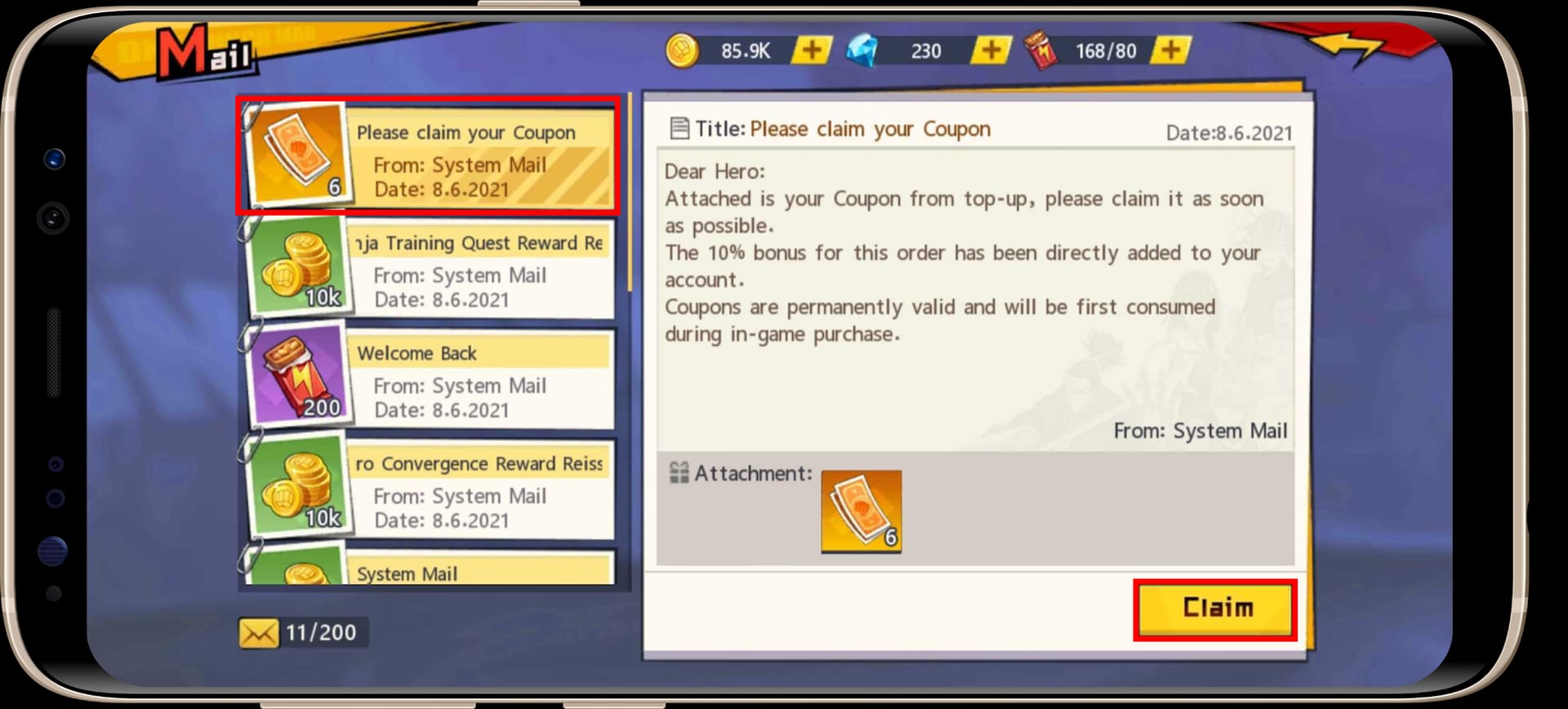
That one detail explains a large share of charged but not received reports. Players often look in the wrong place, assume the recharge failed, and consider buying again before checking the mailbox.
Beyond unclaimed mail, the next most common causes are account-side mismatches. External top-ups for SEA servers require the exact UID and SID shown in Mall > Recharge. If either number is wrong, the coupons can go to the wrong account. A similar problem happens when the payment was made for one login method, but the game is reopened under another, such as a guest account instead of a bound Google, Apple, or Facebook account.
There is also the timing issue. Community reports indicate that delivery can take around 5 to 30 minutes after payment. That means a completed payment with no immediate coupon mail is not automatically a failed top-up. It may simply still be moving through fulfillment.
Where did the top-up break? A practical diagnosis
When a One Punch Man The Strongest top up is not credited, the fastest way to solve it is to identify which stage failed: payment, fulfillment, or account matching.
If your receipt exists and the payment is marked completed, the first suspect is fulfillment delay or unclaimed mail. Open the game, check Mail, claim the coupon if the message is there, and then confirm in Bag. This is the low-risk scenario and often resolves without support.
If the payment appears charged in your wallet, card app, Apple Pay, or Google Pay, but the order itself still looks pending or under review, treat that differently. A pending or authorized charge is not the same as a fully completed top-up. In those cases, the money may simply be reserved while the payment is reviewed. That is why it is important to distinguish between these states:
- Pending / authorized / under review: payment is not fully settled yet
- Completed / captured / paid: payment finished, so now delivery and account checks matter
- Reversed / voided: the charge should fall away rather than produce coupons
Another common break point is identity mismatch. For external checkout, official instructions say to pull your UID and SID from Mall > Recharge, lower left. UID is your User ID and SID is your Server ID. If you entered those manually from memory, copied the wrong one, or switched servers before checking the result, the coupons may have been delivered somewhere else.
There is also a version of this problem that looks like a missing order but is really an account confusion issue. You pay while logged in one way, then later open the game through another route. A bound account and a guest account can look like the same player to you, but they are not the same delivery target. Community guidance consistently warns that guest accounts are risky, especially if you changed devices.
How do you verify the right account, UID, and server before escalating?
Before you conclude that the One Punch Man The Strongest payment successful no coupons issue is a true delivery failure, verify the recipient account carefully.
Start inside the game. Open Mall > Recharge and take a screenshot of the UID and SID shown there. This matters because those are the exact identifiers used for external top-ups on SEA servers. If you used a web checkout or another direct recharge route, compare the entered UID and SID against what the game currently shows.
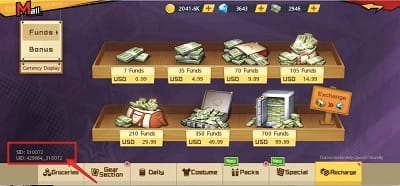
Then check the server itself. Community reports note that server changes can break the continuity of top-up history because a new server means a new UID/SID context. If you switched servers after paying, you may be looking in the wrong place for the delivery.
Next, confirm the login method. If the account is bound to Apple ID, Facebook, or Google, make sure you reopened the game with that same method. If you are on a guest account, be especially cautious. Guest accounts carry a known risk on device changes, and community advice strongly recommends binding before any top-up. A changed phone can make a delivered purchase look lost simply because the original account was not reopened correctly.
A good verification pass usually includes these screenshots before you log out, switch devices, or try another login:
- Mall > Recharge showing UID and SID
- Current server
- Mail inbox, especially whether Please claim your Coupon appears
- Bag after claiming
- Any visible purchase or quota update in the Mall if relevant
This is also the point where first-time buyers should slow down. New accounts may receive a first top-up double coupon bonus, and official guidance says new-account first top-ups should be checked through mail immediately. If the expected amount looks wrong, do not assume fraud first. Confirm whether the mail was claimed and whether the purchase landed on the intended account.
What should you check in Apple Pay, Google Pay, card, or app-store billing?
Platform confusion is one reason these cases feel worse than they are. A bank app, wallet app, and game client can all show different stages of the same transaction.
With Apple Pay or a credit card/debit card, the main question is whether the charge is only an authorization hold or a captured payment. A hold can look like a real charge even when the merchant has not fully completed the order. If the payment is still pending, wait before escalating as a missing top-up. If it is completed, move on to the in-game mail and account checks.
With Google Pay or Google Play, the same principle applies. A visible payment record is helpful, but what matters is whether the order is complete and tied to the same account you are currently using in-game. If the order is complete and nothing appears, verify the bound login and server. If you changed phones, use the available restore path and check app store history. For iOS specifically, the provided guidance is to open app store history and restore in-game if the phone changed.
For direct checkout or web recharge, your proof should be more than a bank screenshot. The useful evidence is the receipt or confirmation showing:
- Order ID
- Amount
- Currency
- Transaction time
- UID
- SID
A helpful cross-check from the facts provided is that the order ID from the receipt matches the in-game transaction time and amount. That gives support a cleaner trail than a generic money left my account screenshot.
If you used an external SEA route, remember that official guidance emphasizes exact UID/SID matching. Community reports also note that some local payment methods can be instant when details are correct, but that speed does not remove the need to claim through mail.
What changes for first-time buyers, overseas users, or changed-phone accounts?
These are the cases where a normal delay can easily be mistaken for a failed One Punch Man The Strongest recharge pending issue.
For first-time buyers, the game’s first-top-up bonus can create confusion. Players expect a visible jump in coupons immediately, but the delivery still follows the mail-claim process. If the amount looks missing, check the mailbox first, then Bag, then the Mall if you were buying for a pack that depends on coupon funds.
For overseas users, region mismatch is a real possibility in the provided facts. Community and single-source reports suggest overseas top-ups may fail under region lock, and SEA server users should use SEA-compatible routes. This does not prove every cross-border payment will fail, but it does mean region mismatch belongs on your checklist if the payment went through and nothing arrived.
Changed-phone cases are another classic trap. If the account was not properly bound before the purchase, the top-up may be attached to an account you are no longer opening. That is why account binding matters so much here. Community guidance recommends binding to Apple ID, Facebook, or Google before topping up, and warns that guest accounts risk loss on device change.
Shared devices can create a similar kind of confusion. Even without a technical failure, a family payment method or a reused device can leave you checking the wrong game account after the purchase. In support terms, this still looks like an account mismatch, not a missing delivery.
Should you ask for re-delivery or a refund?
This depends on what your evidence shows.
Ask for re-delivery when the payment is clearly completed, the UID and SID appear correct, you checked Mail and Bag, and you waited through the normal delay window. Community guidance suggests 5 to 30 minutes is a reasonable wait for mail delivery after payment. If that window passes and your proof is clean, a re-delivery request makes sense.
A refund is more appropriate when the merchant order did not complete, the charge was reversed or voided, or the payment provider shows a duplicate charge. Community reports describe charged-twice bugs as rare, and in those cases the payment provider may need to be involved for the refund side. The important distinction is simple: if the order completed and should have delivered, ask for re-delivery first; if the order never truly completed or was duplicated, refund logic becomes stronger.
When you contact support, send one complete evidence package instead of multiple partial messages. The most useful bundle includes:

- Current UID and SID screenshot from Mall > Recharge
- Current server
- Mail screenshot showing whether the coupon message exists
- Bag screenshot after claim attempt
- Receipt with order ID, amount, currency, and transaction time
- Your login method: Apple, Google, Facebook, or guest
- A short note stating whether the payment is pending, completed, reversed, or duplicated
If the purchase was made through an external checkout, official guidance says to contact that checkout’s support with the transaction ID. If the issue remains unresolved, community practice is to escalate to official Facebook support with UID, SID, and receipt screenshots.
A short, factual message works best: payment time, amount, UID, SID, server, and the fact that no coupon mail appeared after the wait period.
Before you buy again
Prevention matters because most One Punch Man The Strongest missing top up cases come from avoidable mismatches rather than true losses.
Before the next purchase, bind the account first. Then screenshot the UID and SID directly from Mall > Recharge instead of typing from memory. Stay on the intended server, use the same login method before and after payment, and keep the receipt until the coupons are claimed. After paying, check Mail immediately for Please claim your Coupon and then confirm the result in Bag.
If you use web and app top-up routes interchangeably, make sure the same UID and SID are used each time. The provided guidance notes that web and app top-ups should sync through the mail claim process when the account details match.
For players who want a repeat-buy route after resolving the current issue, this page may help: One Punch Man: The Strongest top up charged no coupons.
The bottom line is reassuring: most charged-but-not-received cases are not permanent losses. In One Punch Man: The Strongest, the fix usually comes from checking the mailbox, confirming the exact UID/SID and server, and matching your payment proof to the account that was supposed to receive the coupons.