
Mecha Break Top Up: Instant UID Corite Recharge
Equipping your combat unit with top-tier paint schemes, seasonal battle passes, and exclusive pilot cosmetics requires Corite, the core premium currency in Mecha Break. When you need to replenish your balance without dealing with in-game store connection drops or clunky overlay errors, VGTopup provides an efficient, direct top-up system using only your User ID and server selection.
Every order on VGTopup is processed directly to your account profile without requiring your password or third-party platform credentials. Select your desired Corite package, enter your game details, and return to the hangar with your balance ready for deployment.
What Is Mecha Break Corite and What Can You Buy With It in 2026
Corite serves as the primary currency for unlocking premium customization options and progression items in Mecha Break. While core gameplay balance relies on pilot skill and Striker mastery, Corite gives you direct access to visual upgrades and progression accelerators.
Striker Customization and Paintwork
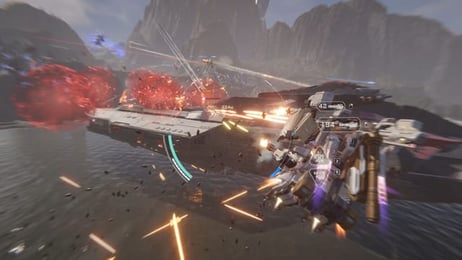
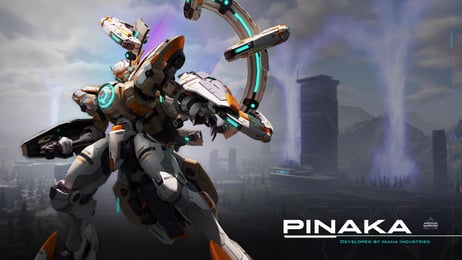
Personalize your mechas—including popular models like Falcon, Panther, Aquila, Pinaka, Welkin, and Tricera. Corite allows you to acquire:* Custom paint finishes, metallic textures, and matte coatings* Distinctive hull decals, squad emblems, and glowing accents* Weapon skins and specialized visual effects for combat abilities
Pilot Gear and Avatar Cosmetics
Customize your pilot persona in the pre-match hangar and profile screens. Corite unlocks flight suits, tactical helmets, casual streetwear, dynamic player cards, and unique victory poses.
Seasonal Battle Passes and Crates
Investing Corite into the active seasonal Battle Pass unlocks tiered progression tracks filled with exclusive blueprints, currency bundles, and limited-edition Striker variants that are only available during the active competitive season in 2026.
How to Top Up Mecha Break Corite on VGTopup (Step-by-Step UID Guide)
Ordering Corite through VGTopup takes less than two minutes. Follow these simple steps to ensure your currency arrives accurately:
- Choose Your Corite Amount: Browse the live product catalog on VGTopup and pick the package that fits your needs.
- Input Your User ID: Type your numerical Mecha Break User ID into the designated field. Double-check the numbers to avoid sending currency to an incorrect account.
- Select Your Server: Pick the server region where your character is located (Asia-Pacific, N.America, S.America, or Europe).
- Check Out: Confirm your order summary and proceed to the payment screen. Real-time pricing in your regional currency will be displayed at checkout.
- Receive Your Corite: Complete your transaction. Once processed, the Corite balance will be credited directly to your in-game wallet.
How to Find Your Mecha Break User ID and Server
Your Mecha Break User ID is a unique numerical identifier linked to your pilot profile. Because top-ups only require this ID and your server, you never have to share login passwords.
- Launch the Mecha Break client on your PC or console.
- In the main lobby screen, locate your pilot avatar in the upper-left corner and click it to open the Pilot Profile menu.
- Your User ID is displayed clearly below your pilot callsign.
- Click the small copy icon next to the number to copy your User ID to the clipboard.
- Confirm your active region (displayed on your launcher or top-right network info) to ensure you pick the matching server on VGTopup.
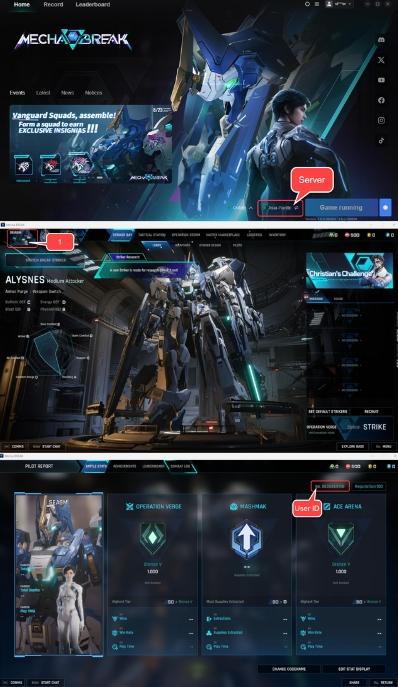
Supported Servers: Asia-Pacific, North America, South America, and Europe
Mecha Break features regional game servers to provide smooth, low-latency combat. When ordering a Corite recharge, selecting the matching server is mandatory because pilot profiles are locked to specific regional server clusters.
| Server Region | VGTopup Option | In-Game Region Name | Compatible Accounts |
|---|---|---|---|
| Asia-Pacific | Asia-Pacific | Asia-Pacific (APAC) | Accounts registered on Asian servers |
| North America | N.America | North America (NA) | Accounts registered on US & Canada servers |
| South America | S.America | South America (SA) | Accounts registered on Latin American servers |
| Europe | Europe | Europe (EU) | Accounts registered on European servers |
Note: If you play across multiple regions with different pilot profiles, make sure you enter the specific User ID associated with the selected server.
How to Resolve In-Game Mecha Break Recharge Server Errors
Purchasing currency directly through PC client overlays (such as Steam or platform stores) can occasionally fail due to network timeouts, overlay blocking software, or temporary server synchronization errors. Common symptoms include error messages stating "Recharge Server Error", payment loops where authorization hangs, or missing balances after a confirmed platform charge.
Troubleshooting Steps:
- Bypass In-Game Overlays: Using VGTopup allows you to bypass the in-game overlay entirely. Since the delivery is sent directly via your UID to the game servers, platform overlay bugs do not block your recharge.
- Restart Your Game Client: If you made a top-up while sitting in the hangar, close Mecha Break and relaunch it to refresh your server profile data.
- Verify Server Selection: Confirm that the server selected during checkout matches your current active region. An incorrect server selection will prevent the currency from appearing on your active pilot.
Safety First: Why UID-Only Top-Ups Protect Your Account
Account security is essential. VGTopup uses an UID-only delivery system designed to keep your personal data and gaming accounts completely safe.
- Zero Password Sharing: You never need to supply your Steam, platform, or game login passwords. No one gets access to your private credentials.
- No Account Linking Required: You do not have to link third-party social media accounts or grant broad account permissions to receive Corite.
- Safe and Compliant: UID recharges utilize standard server deposit channels, protecting your account from unauthorized access and keeping your progression secure.
Mecha Break Corite Recharge FAQs
How do I find my Mecha Break User ID and Server?
Open Mecha Break and head to the main hangar lobby. Click your pilot profile avatar in the top-left corner. Your User ID is the number listed directly beneath your pilot name. Your server region (Asia-Pacific, N.America, S.America, or Europe) is shown on the game launcher or the main lobby connection indicator.
Do I need to share my Mecha Break or Steam password to top up Corite?
No. VGTopup only requires your in-game User ID and your server selection. You should never share your account passwords, Steam Guard codes, or login credentials with anyone.
What should I do if I get a Recharge Server Error when buying Corite?
If the in-game store gives you a recharge server error, it is usually caused by overlay communication drops between the game client and platform stores. You can bypass this issue by purchasing your Corite on VGTopup using your UID, which credits your balance directly without relying on in-game overlay windows.
Which regional servers are supported for Mecha Break top-ups?
VGTopup supports all official Mecha Break game servers: Asia-Pacific, North America (N.America), South America (S.America), and Europe. Make sure to pick the region where your pilot profile was created.
What in-game items can I purchase with Corite in Mecha Break?
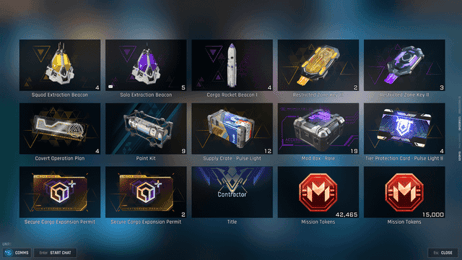
Corite can be spent inside the game store on Striker paint finishes, weapon decals, pilot avatars, mission outfits, seasonal Battle Passes, and cosmetic loot crates.
Is Mecha Break free to play or pay-to-win in 2026?
Mecha Break is a free-to-play competitive action title. Core mecha performance, weapon stats, and combat outcomes depend on pilot tactics, team composition, and mech mastery. Corite is used primarily for cosmetic customization, battle passes, and visual personalization rather than raw combat advantages.
Select Denomination
Tax, payment fees and eligible coupons are calculated at checkout.
| Package | Price |
|---|---|
| 100 Corite | USD 0.68 |
| 515 Corite | USD 3.42 |
| 1060 Corite | USD 6.85 |
| 2180 Corite | USD 13.70 |
| 3360 Corite | USD 20.55 |
| 5405 Corite | USD 32.18 |