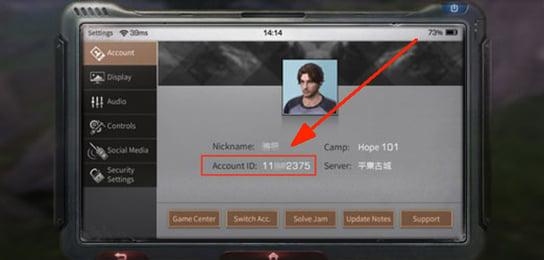

Step-by-Step Guide: Racing Master Top Up for Gems & Packs
Recharging your account with Gems, Monthly Cards, and special passes on VGTopup takes only a few moments. Follow this straightforward process to send your items directly to your game profile:
- Select Your Item: Choose the quantity of Racing Master Gems or the specific pack (such as the Monthly Card or Battle Pass) you want to purchase from the product catalog.
- Enter Your User ID (UID): Type your exact in-game UID into the required field. Make sure you select the correct server region if prompted.
- Proceed to Checkout: Select your preferred payment method on the checkout screen and complete the transaction.
- Receive Your Items: As soon as payment confirmation finishes, the purchased Gems or packs are credited directly to your Racing Master account. Launch or restart your game to see your updated balance.
Live pricing, promotional bundles, and active package options are displayed directly on the product selection grid above.
How to Locate Your Racing Master UID in the Game
To ensure your recharge reaches your profile without issue, you need to provide your exact account UID. Follow these steps inside the Racing Master app:
- Launch Racing Master on your mobile device or emulator.
- From the main garage screen, tap on your Avatar / Profile Icon located in the top-left corner.
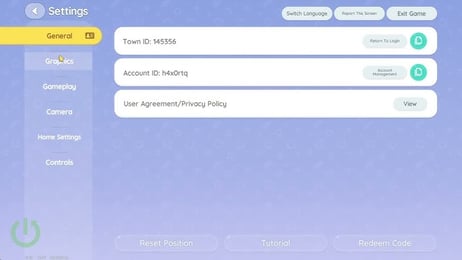
- In your personal profile overview, locate your UID displayed beneath your in-game name.
- Tap the Copy icon next to the number string to copy your UID directly to your clipboard.
- Paste the copied digits into the UID field on VGTopup before placing your order.
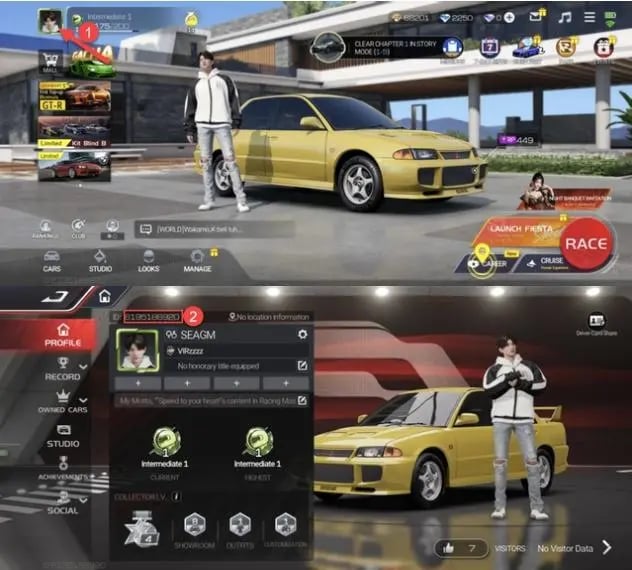
Double-check that all numbers match your in-game profile before submitting your order to prevent crediting delays.
Racing Master Currency Breakdown: Gems vs. Diamonds
Racing Master uses a dual-currency system to balance competitive progression, vehicle acquisition, and cosmetics. Understanding how each currency works helps you optimize your spending.
| Currency | How It Is Acquired | Primary Uses | Transferability |
|---|---|---|---|
| Gems | Premium direct purchase (VGTopup top-up) | Exclusive gacha pulls, limited-time car banners, vehicle body kits, premium crate keys, Monthly Card direct purchase | Can be converted directly into Diamonds at a 1:1 ratio |
| Diamonds | In-game events, rank rewards, daily missions, Gem conversion | Standard gacha pulls, ECU tuning parts, performance upgrade kits, cosmetic paints, stamina refills | Cannot be converted back into Gems |
Why Prioritize Gems?
- Gacha Banners: Top-tier licensed supercars and seasonal vehicle debuts often require premium pulls that rely on Gems or Gem-converted currencies.
- Direct Shop Exclusives: Legendary vehicle liveries, visual modifications, and select seasonal packs can only be bought directly with paid Gems.
- Conversion Flexibility: Gems act as universal currency because you can convert them to standard Diamonds whenever you need extra resources for immediate performance tuning.
Racing Master In-Game Packs: Monthly Card and Premium Pass Overview
Beyond standalone Gem denominations, Racing Master offers high-value subscription and milestone packages. These packs offer higher total resource returns over time compared to standard top-ups.
Monthly Card (Privilege Card)
- Immediate Reward: Receive an upfront grant of paid Gems upon activation.
- Daily Diamonds: Collect a steady daily grant of Diamonds every day you log into the game across the 30-day period.
- Active Buffs: Enjoy account perks such as bonus race experience, garage display privileges, and extra daily resource drop attempts.
Premium Racing Pass
- Milestone Progression: Earn points through daily, weekly, and seasonal driving challenges to unlock tiered rewards.
- Exclusive Vehicles & Blueprints: Unlocks premium track rewards containing vehicle blueprints, rare tuning components, tire sets, and exclusive cosmetics.
- Resource Multiplier: Provides significantly more Diamonds, upgrade parts, and crate keys than the free tier of the battle pass.
When choosing between standalone Gems and special passes, pick standalone Gems for immediate gacha banner spending, or choose the Monthly Card and Racing Pass for maximum resource accumulation over continuous play.
Safe Racing Master Top-Up: Password-Free Direct Account Crediting
Account safety is essential when buying game currencies. VGTopup relies strictly on direct API and server-side UID processing to credit your Racing Master account.
- No Password Required: You never share your login credentials, email passwords, or third-party social log-in tokens (Google, Apple, Facebook, or Twitter/X).
- Zero Account Sharing: Unlike peer-to-peer trading sites that require a third party to log into your profile manually, our system delivers directly via your UID while you retain total control of your device.
- Ban-Proof Crediting: Currencies are processed through official channels, ensuring your balance remains completely valid with zero risk of chargeback penalties or game suspensions.
- Privacy Protection: Your data is encrypted during checkout, protecting your personal details throughout the entire transaction.
Delivery Troubleshooting and Top-Up Verification Tips
If you have completed your purchase but do not see your Gems or pack immediately, use these troubleshooting steps:
- Restart the Game App: Completely close Racing Master from your background app switcher and relaunch it. A fresh server handshake updates your currency counters immediately.
- Check the In-Game Mailbox: Certain bundle rewards, pass activations, or bonus Diamond drops are delivered directly to your mailbox icon in the main lobby. Open the mail and tap Claim All.
- Confirm Your UID and Server: Verify that the UID submitted during checkout matches the exact account you are currently logged into, especially if you play on multiple regional servers (such as SEA or Global builds).
- Check Order Status on VGTopup: Look at your order dashboard on VGTopup to confirm payment completion.
- Contact Customer Support: If your order shows as completed but items have not arrived after a brief period, contact the VGTopup support team with your Order ID and UID for rapid assistance.
Frequently Asked Questions
How do I top up Racing Master with my UID?
Select the desired Gem package or in-game bundle on VGTopup, type your Racing Master UID into the required field, proceed to checkout, and complete the payment. Your items will be sent directly to your game profile.
Where can I find my Racing Master UID?
Open Racing Master, tap your profile avatar in the upper-left corner of the garage menu, and look directly below your display name. Tap the copy icon next to your UID digits to copy it to your clipboard.
Do I need to provide my Racing Master password for the top-up?
No. Top-ups on VGTopup require only your public UID. We will never ask for your game password, verification codes, or linked social media login details.
What is the difference between Gems and Diamonds in Racing Master?
Gems are the premium paid currency used for direct purchases, exclusive banner summons, and special store packs. Diamonds are standard in-game currencies earned through gameplay or converted from Gems to buy basic tuning components and standard draws.
Can I purchase Racing Master Monthly Cards and Passes using my UID?
Yes. You can select Monthly Cards, Racing Passes, and standalone Gem packs directly from the product selection list and credit them to your account using your UID.
How long does it take for Racing Master Gems to appear in my account?
Orders are processed automatically upon payment clearance. In most cases, currencies arrive immediately. Relaunching your game client helps refresh your resource display.
What should I do if my Racing Master top-up is delayed?
First, restart your game app and check your in-game mailbox. If the items do not appear, check your order confirmation status on VGTopup and reach out to our customer support team with your order number for fast resolution.
Select Denomination
Tax, payment fees and eligible coupons are calculated at checkout.
| Package | Price |
|---|---|
| -Novice Pack | USD 0.14 |
| -70 + 4 Gems | USD 0.66 |
| -Weekly Card | USD 0.71 |
| -Value Outfit Pack | USD 0.71 |
| Global-70 +4 Gems | USD 0.87 |
| Global-Value Outfit Pack | USD 0.87 |
| Global-Novice Pack | USD 0.87 |
| -140 + 7 Gems | USD 1.31 |
| -Monthly Card | USD 1.63 |
| -210 + 11 Gems | USD 1.96 |
| -Upgrade to the Premium MP | USD 3.11 |
| -350 + 18 Gems | USD 3.33 |
| -Deluxe MP | USD 3.61 |
| Global-350 +18 Gems | USD 4.37 |
| Global-Monthly Card | USD 4.37 |
| Global-Expo Pack (350 Gems + 3 Ruby Key) | USD 4.37 |
| -Growth Fund | USD 4.60 |
| -700 + 35 Gems | USD 6.61 |
| -Premium MP | USD 6.67 |
| Global-700 +35 Gems | USD 8.75 |
| Global-DELUXE MP | USD 8.75 |
| Global-Premium MP Upgrade | USD 8.75 |
| Global-Expo Pack (700Gems + 5 Ruby Key) | USD 8.75 |
| -1000 + 50 Gems | USD 9.33 |
| -Legendary Car Pack | USD 10.11 |
| Global-Growth Fund | USD 11.38 |
| -1400 + 70 Gems | USD 13.10 |
| Global-1050 +53 Gems | USD 13.12 |
| Global-Ruby Key Fund | USD 13.12 |
| -Upgrade MP | USD 13.34 |
| -MP Combo | USD 16.85 |
| Global-1400 +70 Gems | USD 17.50 |
| Global-PREMIUM MP | USD 17.50 |
| Global-Expo Pack (1400 Gems + 8 Ruby Key) | USD 17.50 |
| -2100 + 105 Gems | USD 19.69 |
| Global-2100 +105 Gems | USD 26.25 |
| Global-Legendary Car Pack | USD 26.25 |
| Global-Expo Pack (2100 Gems + 10 | USD 26.25 |
| -3400 + 170 Gems | USD 31.74 |
| Global-MP Combo Pack Upgrade | USD 35.00 |
| Global-3500 +175 Gems | USD 43.76 |
| Global-MP Combo Pack | USD 43.76 |
| Global-Expo Pack (3500 Gems + 12 Ruby Key) | USD 43.76 |
| -6600 + 330 Gems | USD 61.55 |
| Global-7000 +350 Gems | USD 87.51 |
| Global-Expo Pack (7000 Gems + 20 Ruby Key) | USD 87.51 |