"Just buy the biggest bundle, it's always the best value" — busted for most players
The most repeated line in any top-up thread, and it's wrong unless you're a whale. Yes, raw price-per-gem drops as packs grow. True. But that misses the lever that actually moves your spend: your first top-up doubles your Rose Orbs, confirmed in official CBT notes and repeated on Lootbar's listing.
Watch what the numbers do. As of 2026, EnjoyGM and Playsultan list 60 orbs at $0.98, 300 at $4.91, and 980 at $14.76.
| Pack |
Base Orbs |
Price (USD) |
Price/gem |
With first-buy double |
Effective price/gem |
| Small |
60 |
0.98 |
~$0.0163 |
120 |
~$0.0082 |
| Medium |
300 |
4.91 |
~$0.0164 |
600 |
~$0.0082 |
| Large |
980 |
14.76 |
~$0.0151 |
1,960 |
~$0.0075 |
Source: EnjoyGM / Playsultan top-up listings (2026), first-buy double per official CBT guide.
Look at that last column. Once everyone's double kicks in, the gap between tiers shrinks to fractions of a cent. The large pack's per-gem lead barely registers. So the real question isn't which pack is cheapest. It's how much you actually want to drop on the one purchase that doubles.
If your budget is a single mid pack a month, the 300-orb tier (around PHP 280 at current rates) sits right in the sweet spot. No need to push PHP 800+ out the door chasing a saving you'll never feel. I'd take the medium first, claim the double, and ignore any chart trying to shove me toward the headline bundle.
VERDICT: busted. Bigger wins by a hair, and the first-buy double matters way more than tier size.
"You need a credit card to top up Rose Gems" — confirmed false
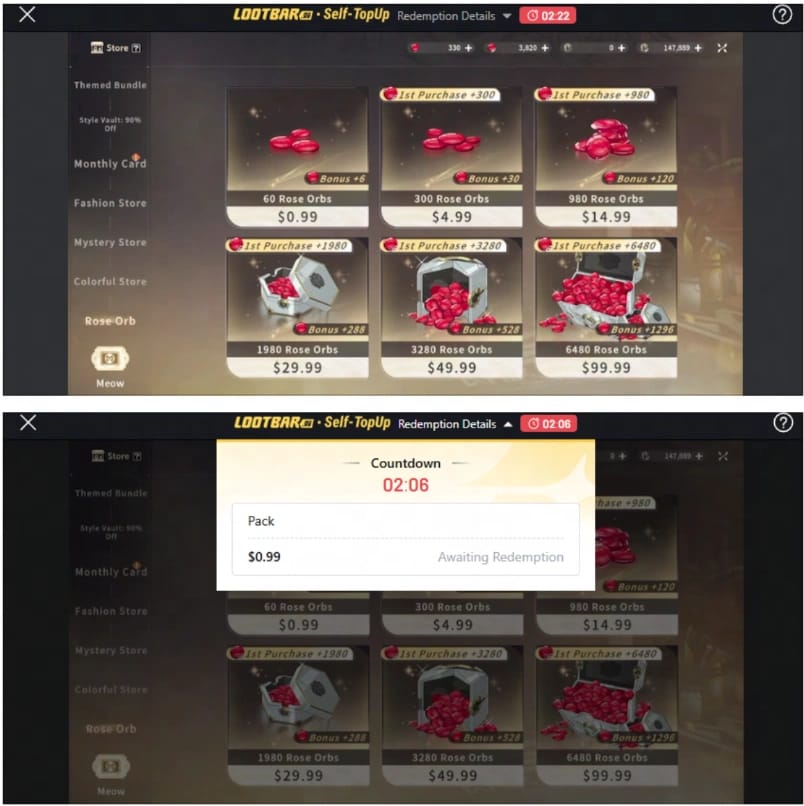
You don't. And for most Filipino players, a card is the slower lane, not the safer one. GCash is the sensible default for one dull reason: wallet reach in the Philippines towers over credit-card adoption, and confirmation lands instantly. Portals like SEAGM, LDShop, and Joytify back GCash and Maya as the no-card option for PH players, across several 2026 listings.
There's no trick to it. It's just how e-wallet rails behave. You pay the portal in pesos through GCash QR or send, the portal credits your UID in orbs, and no card number ever enters the picture. Global players on the official site lean on credit card or Razer Gold. PH players sidestep all of that through GCash, according to PH-focused listings like Alejandrawr and Joytify.
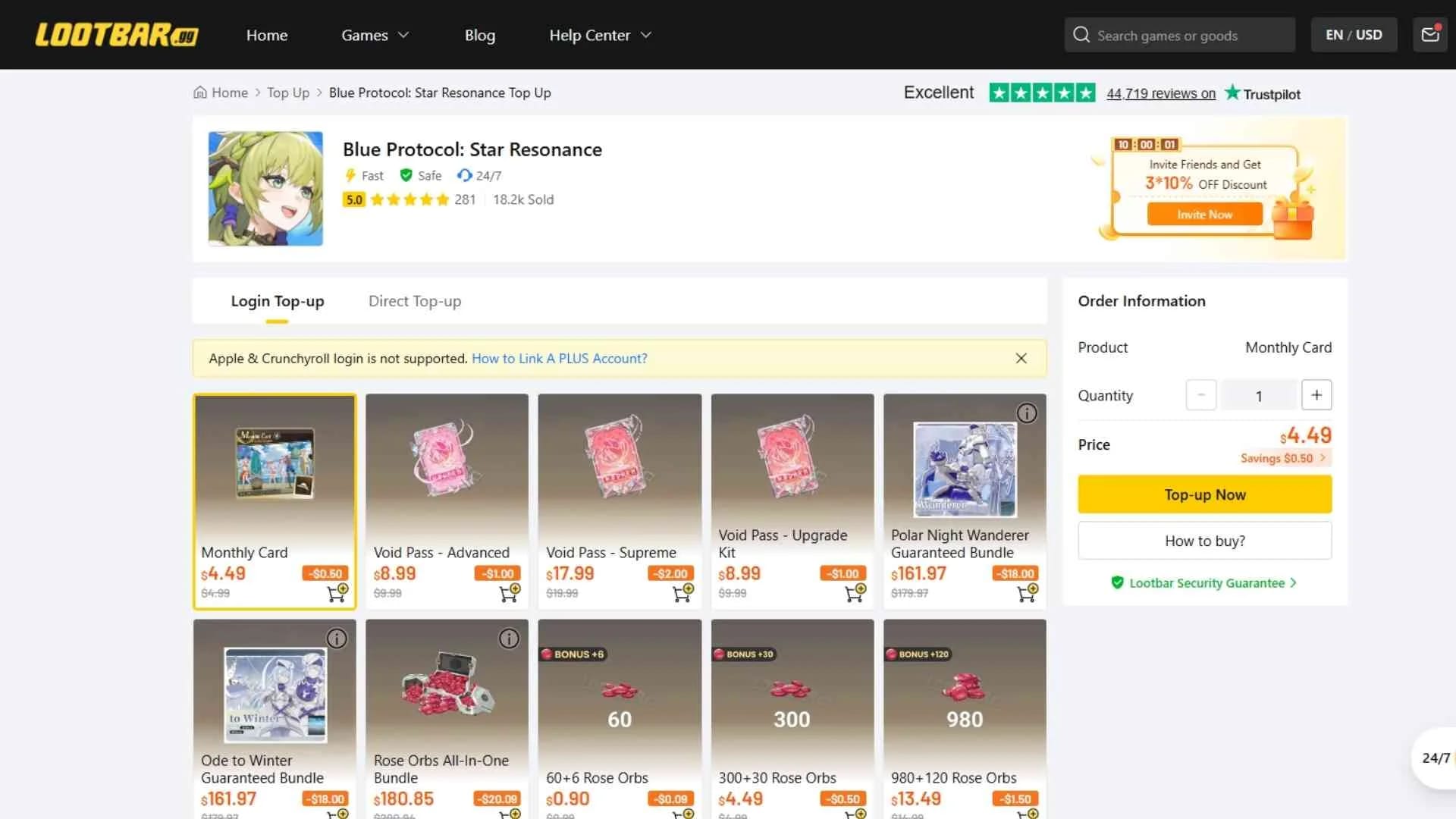
Two limits are worth knowing first. A Fully Verified GCash wallet holds up to PHP 100,000 at any time and lets you send PHP 100,000 per day, with no monthly cap, per the GCash Help Center. For orbs that ceiling means nothing. You'd have to buy thousands of dollars of gems in a single day to graze it. Send money costs zero, bank transfers run PHP 15 each. So the convenience-fee panic flooding comment sections is mostly noise for QR top-ups.
VERDICT: confirmed false. No card needed, and GCash beats the card route rather than settling for it.
"GCash convenience fees eat the third-party savings" — qualified

Partly fair, mostly inflated. The saving that does hold up is the 8% official-site discount. A $100 pack gives 6,480 orbs in-game, but those same orbs cost $90 on the website, per a June 2025 YouTube breakdown ("Website top-up saves 8% vs in-game"). That's real and repeatable. Posts on r/BlueProtocolPC consistently steer players to the official site over in-game buys for exactly this 8%.
Here's where folks tangle it up. They smush "official website discount" together with "GCash fee." Two separate animals. GCash send money carries no fee at all. The cost variable is whichever portal you pick and its FX or handling spread, not GCash clipping you on the way out.
So the honest framing: you're choosing between the official site's 8% (card or Razer Gold, awkward for PH players) and a GCash-friendly portal's instant, card-free convenience. If you've got no card, the speed and zero send fee almost always outweigh chasing that 8% through plastic you don't own.
Got card access and spend heavy? Then the 8% on big repeat buys stacks up. Take it. For everyone else, the friction you save beats the percentage you'd chase.
VERDICT: qualified. The 8% is real, but it's a card-route perk, not a GCash penalty.
"Top-up failed means you got scammed" — busted (and this one spreads real panic)
That knee-jerk "failed equals scam" is wrong most of the time. Comb through community failure reports and the cause is nearly always on the user's end: balance, a limit, or a botched server pick. Blaming the platform first just burns the twenty minutes you could've spent fixing the real thing.
The three actual failure modes, ranked by how often they bite:
- Empty balance or a hidden limit block. Even with cash in the wallet, a large pack can hit your daily send ceiling, though for orb-sized buys that's rare. More often the wallet's just underfunded. Cash in, retry.
- Wrong server or wrong UID. The silent killer. Pick the wrong server before paying and the gems can drop onto a character you can't reach. Payment "succeeds," yet nothing shows on the account you actually play. No error, no refund prompt, gems gone to a ghost. Confirm your server before you tap pay.
- Stuck or delayed delivery. Genuinely uncommon on solid portals, where delivery is immediate after payment per LDShop and SEAGM's own descriptions. If it truly hangs, your reference number (you kept it, right?) is your leverage.
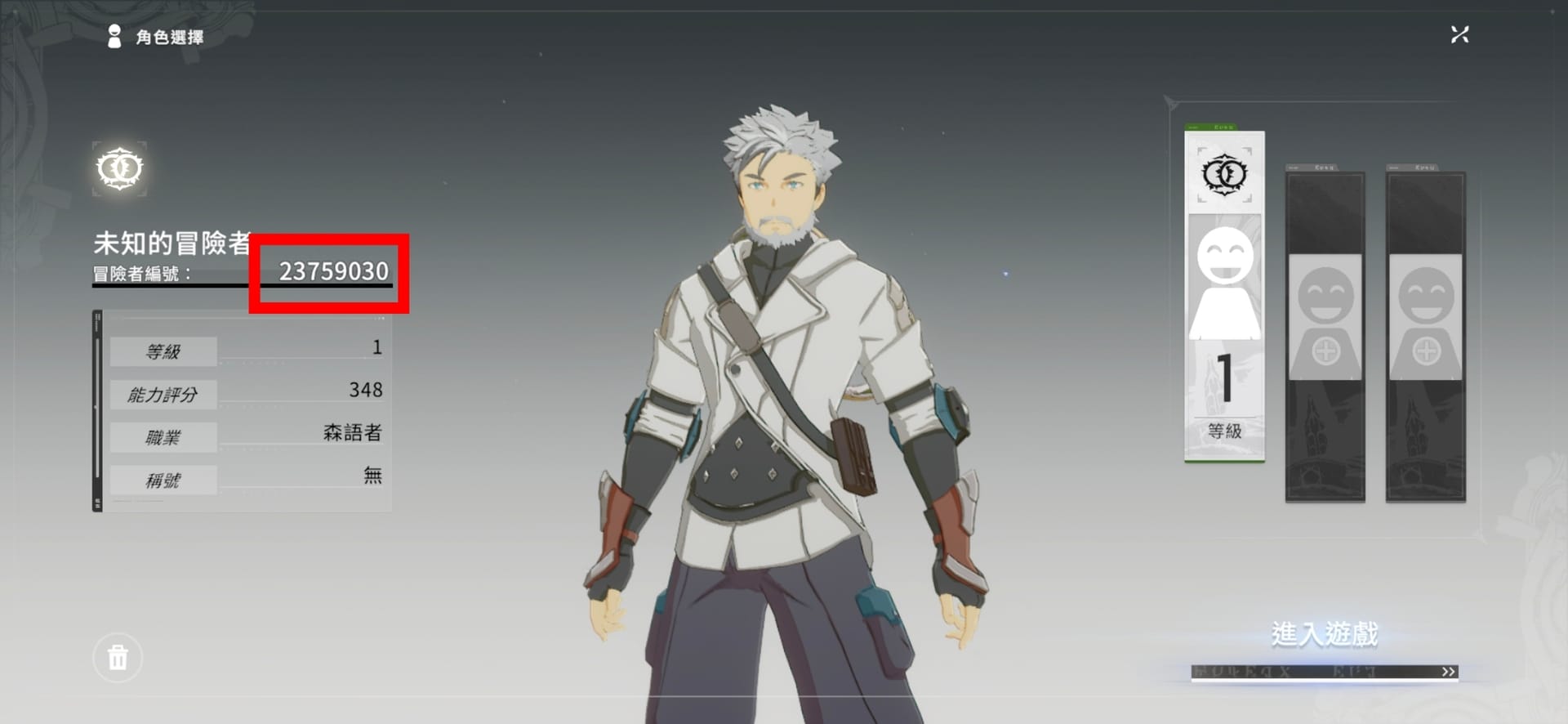
To grab your UID without fat-fingering it: on PC it sits left of the character-select screen, or bottom-left in-game, or through Settings → fourth icon → User Center, per the TopUpLive guide. Copy-paste it. Never retype.
VERDICT: busted. Most failures are balance, limit, or wrong server, not fraud. Fix the input before you fear the worst.
Your UID isn't the thing that gets you robbed
First-timers worry that handing over a UID hands over the whole account. It doesn't. Your UID is a crediting tag. Not a password, not a login, not a security key. A top-up service needs it the way a courier needs your street address. It can't log in with it.
The real safety habits live elsewhere, and they're boring:
- Stick to established portals. SEAGM, Joytify, LDShop and the like carry public listings and standing payment integrations. That's the bar.
- Hoard your GCash reference number. Screenshot it every single time. This is your strongest, often only, leverage in a dispute if delivery ever stalls. Skipping it is the top reason disputes die quietly.
- Never share a GCash MPIN or OTP. Ever. No legit top-up asks for these. That's the actual attack vector, not your UID.
Among Filipino players, GCash and Maya are the two main rails on PH-facing portals like SEAGM, with GrabPay on some, per their listed options. All three deliver instantly. GCash's zero send fee and 100k daily room make it the path of least resistance.
Full transparency: this piece runs on VGTopup, itself a GCash-friendly top-up portal, so weigh that as you read. The advice holds either way. Confirm your server, keep the reference, use a portal with a real public footprint. If skipping card setup entirely sounds good, Blue Protocol: Star Resonance Top Up top up via GCash is one low-friction route: enter your UID, pay, gems show in minutes.
VERDICT: busted. The UID isn't the risk. Guarding your MPIN/OTP and saving the reference number is.
What to actually do instead
Cut the noise and the playbook fits on a napkin. First top-up: buy the tier you genuinely plan to spend at (mid for most non-whales) and claim the double. That bonus outweighs any per-gem chart you'll ever read. Set your server before paying, because the wrong-server miss is a silent, refund-proof loss. Pay by GCash QR or send (no fee, instant), screenshot the reference, and check your in-game balance the moment gems hit.
Quick read by who you are:
- F2P-curious first-timer: smallest GCash top-up purely to trigger the first-buy double, then live off login rewards. r/BlueProtocolPC guides recommend exactly this entry move.
- Low-spender: one medium pack a month through GCash. Best blend of per-gem value and not overcommitting.
- Battle Pass / Season Pass spender: budget around the monthly card (~$5) and Season Pass (~$20), per 2025 Steam community figures, and time your double-up buy to the tier that covers your fixed monthly need.
Frequently Asked Questions
Can I buy Star Resonance Rose Gems with GCash if I've never verified my account fully?
You can move money on a basic-verified wallet, but Fully Verified is what unlocks the PHP 100,000 daily send and the matching wallet ceiling, per the GCash Help Center. For orb-sized buys, a basic wallet's lower limits are usually plenty. Verification level only bites if you're loading and spending unusually large sums on the same day.
How long does a GCash Rose Gems top-up actually take to arrive?
Minutes, normally. Solid portals list delivery as instant once payment confirms, per LDShop and SEAGM. The little lag you sometimes feel is GCash confirming the reference, not the gems being worked on. Once the reference clears, crediting to your UID is near-instant. If nothing lands after the payment reads complete, that's your signal to check you didn't fumble the server.
Is the smallest pack ever worth buying more than once?
Only the first time, to grab the double. Re-buying the 60-orb tier is the classic value trap. Community guides flag this directly and tell you not to grind the smallest pack when a higher first-purchase tier hands you more effective gems. After the first-buy bonus is spent, step up to medium or large for the better base price-per-gem.
Do Maya and GrabPay work as well as GCash for this?
Both run on PH-facing portals like SEAGM, with GrabPay on some, so they're solid fallbacks if GCash ever stutters. GCash's edge is the zero send fee against the PHP 15 bank-transfer cost, plus the widest acceptance across portals. Smart move: keep Maya as a backup rail in case a particular site's GCash gateway goes down for a bit.
My payment went through but no gems showed up — am I refunded automatically?
Don't bank on anything automatic. Your GCash reference number is the lever, so screenshot it before you ever tap pay. If gems are genuinely missing (and you've confirmed the right server), that reference plus your UID is what support needs to trace and fix it. Without the reference, a dispute usually stalls cold, which is exactly why keeping it isn't optional.











Comments