



Hopi Star Top Up for Voice Chat and Social Rooms
Hopi Star connects users worldwide through interactive voice chat rooms, casual social games, and live audio broadcasting. Whether you enjoy hosting community parties, singing in karaoke rooms, or participating in multi-mic discussions, maintaining a healthy coin balance gives you full access to all interactive features.
A Hopi Star top up allows you to send dynamic virtual gifts, unlock microphone effects, customize profile badges, and support talented creators during live audio battles. Please note that Hopi Star on VGTopup refers specifically to the international voice chat and social entertainment mobile app, distinct from any regional retail or customer loyalty programs sharing a similar name.
Recharging your account is straightforward, fast, and secure. With direct UID delivery on VGTopup, coins credit straight to your in-app wallet without requiring personal login credentials.
What Are Hopi Star Coins and How to Use Them
Coins serve as the primary in-app currency within the Hopi Star social ecosystem. Once added to your account, coins open up multiple interactive and personalization options across every voice room you visit.
Interactive Virtual Gifts
Sending gifts is the best way to show appreciation to room hosts, speakers, and friends. Hopi Star offers a wide catalog of virtual gifts, ranging from classic flowers and stars to large animated gifts such as luxury cars, yachts, and fantasy castles. Special seasonal and event gifts also appear during community celebrations.
Exclusive Room Entry Effects and Mic Frames
Active supporters and top contributors can display special animated entrance banners when joining popular voice rooms. You can also equip stylish microphone frames, glowing chat bubbles, and unique avatar borders that make your profile stand out on stage.
Creator Support and PK Battles
During live voice battles (PK competitions) between room hosts, participants send gifts using coins to boost their favorite creator's score. Contributing coins directly helps your preferred team win rounds and climb the community leaderboards.
VIP Status and Supporter Badges
Accumulating and spending coins increases your VIP level in Hopi Star. Higher VIP tiers grant special status privileges, exclusive customer service channels, and unique visual badges displayed beside your username in public chats.
How to Find Your Hopi Star UID
To ensure your coins arrive at the correct account, you only need to provide your numeric Hopi Star User ID (UID). Follow these quick steps to locate your UID inside the app:
- Open the Hopi Star app on your mobile device.
- Tap the Profile or Me icon located in the bottom-right corner of the main screen.
- Look beneath your profile picture and nickname at the top of the screen to find your UID (a sequence of numbers).
- Tap the copy icon next to your UID to copy it directly to your clipboard.
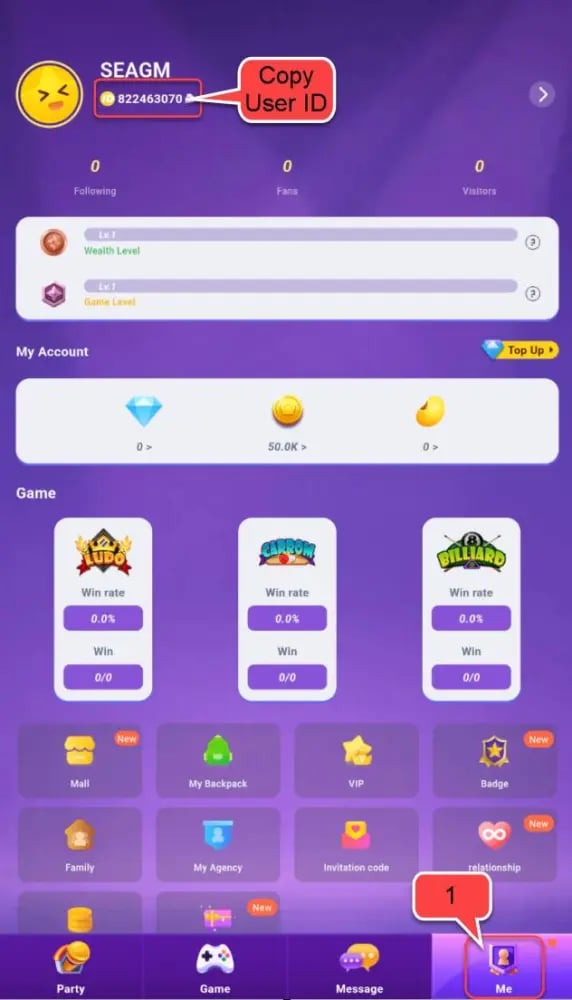
Double-check the copied number before submitting your order to prevent sending coins to the wrong account.
Step-by-Step Guide: How to Buy Hopi Star Coins on VGTopup
Getting coins on VGTopup is simple and requires only a few clicks:
- Select Your Coin Package: Browse the available coin denominations listed on the live checkout page and choose the amount you need.
- Enter Your UID: Paste your Hopi Star UID into the designated user field. Ensure every digit is accurate.
- Select a Payment Method: Choose from the available secure payment options provided at checkout.
- Review and Confirm: Verify your order details and complete the payment process.
- Check Your In-App Balance: Open Hopi Star, go to your profile wallet, and verify your updated coin balance.
Live pricing, package sizes, and special seasonal promotions are displayed directly on the selection menu above.
Safe Top Up Process: 100% Password-Free Security
Account safety is a top priority for social platform users. When you purchase coins on VGTopup, you never need to share your account password, email login, or two-factor authentication codes.
Why UID-Only Top Up Is Safe
- No Account Sharing: Recharges are processed directly through your public UID, meaning nobody else ever accesses your private account.
- Zero Risk of Compromise: Because no login credentials are exchanged, your chat history, private messages, and personal details remain completely secure.
- Official Delivery Format: Direct UID recharging complies with standard mobile app balance delivery practices, keeping your account in good standing.
Always protect your account security by never sharing your account login details or passwords with anyone online.
How to Send Hopi Star Coins to Friends
You can easily surprise friends, family members, or favorite room hosts by recharging coins directly to their accounts on VGTopup.
To top up for someone else:1. Ask the recipient for their numeric Hopi Star UID.2. Go to the Hopi Star recharge page on VGTopup.3. Select the coin package you want to gift them.4. Enter the recipient's UID instead of your own.5. Complete the payment.
The coins will transfer straight to their Hopi Star account wallet immediately upon order confirmation. It is the easiest way to send a gift without needing to log in to their device or execute complex in-app transfers.
Troubleshooting Delayed Recharges and Balance Updates
Orders on VGTopup process quickly under normal operating conditions. If you complete a transaction but your coin total does not reflect the new balance right away, follow these troubleshooting steps:
- Restart the App: Close Hopi Star completely from your device's recent apps menu and restart it. This forces the app to sync with the server and refresh your wallet balance.
- Check Your Internet Connection: Switch between Wi-Fi and mobile data to ensure a temporary network delay is not preventing your device from fetching the latest account data.
- Verify Your UID: Check your VGTopup order receipt to confirm that the UID entered matches your in-app profile ID exactly.
- Contact Customer Support: If your balance has not updated after following the steps above, reach out to VGTopup customer support with your Order ID and UID. Our team is available to assist you and verify transaction status.
Hopi Star Top Up Specifications
| Feature | Details |
|---|---|
| Platform Name | Hopi Star Voice Chat & Social Entertainment |
| Required Account Info | Numeric User ID (UID) only |
| Password Required | Never (100% Password-Free) |
| Primary In-Game Currency | Hopi Star Coins |
| Main Coin Uses | Virtual Gifts, Entry Banners, Mic Frames, VIP Tiers |
| Third-Party Gifting | Supported (enter recipient UID at checkout) |
| Delivery Method | Direct In-App Wallet Credit via VGTopup |
Frequently Asked Questions
How do I top up coins on Hopi Star?
To top up coins, select your preferred coin package on VGTopup, enter your Hopi Star UID in the input box, pick your preferred payment method, and complete the checkout. Coins will be credited directly to your in-app balance.
Where can I find my Hopi Star UID?
Open the Hopi Star app and tap the Profile icon in the bottom right corner. Your numeric UID is displayed directly beneath your avatar and nickname. You can tap the copy icon next to it to copy the number.
Do I need to provide my Hopi Star password to top up?
No. Recharges on VGTopup only require your numeric UID. You should never share your account password or login codes with anyone.
What can I buy with Hopi Star coins?
You can use coins to purchase virtual animated gifts for audio room hosts, unlock exclusive mic frames and entry effects, enter community contests, and increase your VIP supporter rank.
Can I top up Hopi Star coins for someone else?
Yes. Simply enter your friend's or favorite host's numeric UID in the checkout field on VGTopup instead of your own. The coins will be delivered directly to their wallet.
What should I do if my Hopi Star recharge is delayed?
First, restart the Hopi Star app to force a wallet refresh. If the coins still do not appear, verify the UID on your order confirmation and contact VGTopup customer support with your Order ID for prompt assistance.
Select Denomination
Tax, payment fees and eligible coupons are calculated at checkout.
| Package | Price |
|---|---|
| Hopi Star - Hopi Star*10000000 | USD 2.25 |
| Hopi Star - Hopi Star*50000000 | USD 11.25 |
| Hopi Star - Hopi Star*100000000 | USD 22.50 |
| Hopi Star - Hopi Star*5000000 | USD 1.13 |

































































