
Steam Gift Card Top Up: Quick Digital Balance for Gamers
A Steam Gift Card top up gives you instant access to thousands of PC games, downloadable content, in-game items, and community market purchases on the Steam platform. Instead of linking a credit card directly to your Steam client, purchasing a digital Steam Wallet code allows you to add prepaid credit directly to your account balance.
Whether you want to pick up newly released titles in 2026, stock up on seasonal sale discounts, or purchase weapon skins and battle passes, topping up via digital codes is one of the safest and most flexible payment methods available. With VGTopup, you can secure your digital code quickly without ever sharing your private account passwords.
What Is a Steam Gift Card and What Can You Buy With It?
A Steam Gift Card (or Steam Wallet Code) is a prepaid digital voucher containing a unique alphanumeric key. When redeemed, the exact currency value of the card is credited directly to your Steam Wallet balance.
Once funded, your Steam Wallet balance can be spent on:
- Full PC Games & Software: Purchase indie titles, AAA blockbusters, VR applications, and productivity software.
- Downloadable Content (DLC) & Expansions: Expand your base games with story packs, character passes, and season passes.
- In-Game Microtransactions: Purchase credits, cosmetics, and passes in titles like Counter-Strike 2, Dota 2, Apex Legends, and Team Fortress 2.
- Steam Community Market Items: Buy and trade weapon skins, trading cards, profile backgrounds, and emoticons directly with other Steam members.
- Steam Hardware: Apply wallet funds toward hardware accessories and devices available in supported regions.
How to Buy a Steam Gift Card Online via VGTopup
Getting a Steam Gift Card recharge on VGTopup is straightforward and requires zero sensitive account credentials:
- Select Your Voucher Value: Browse the available denominations and choose the card amount that matches your budget and account region.
- Fill In Required Details: Enter any requested reference information in the checkout field.
- Complete the Payment: Choose your preferred payment option from the live checkout interface. Live prices, fees, and currency options are calculated transparently at checkout.
- Receive Your Code: Once payment confirms, your digital Steam Wallet code displays on your order screen and arrives in your order history for immediate activation.
How to Find Your Account Identifier and Code Details
When purchasing a digital Steam Wallet code, you do not need to provide your Steam account password or private login details. The voucher is delivered as a standalone alphanumeric code ready for activation on your profile.
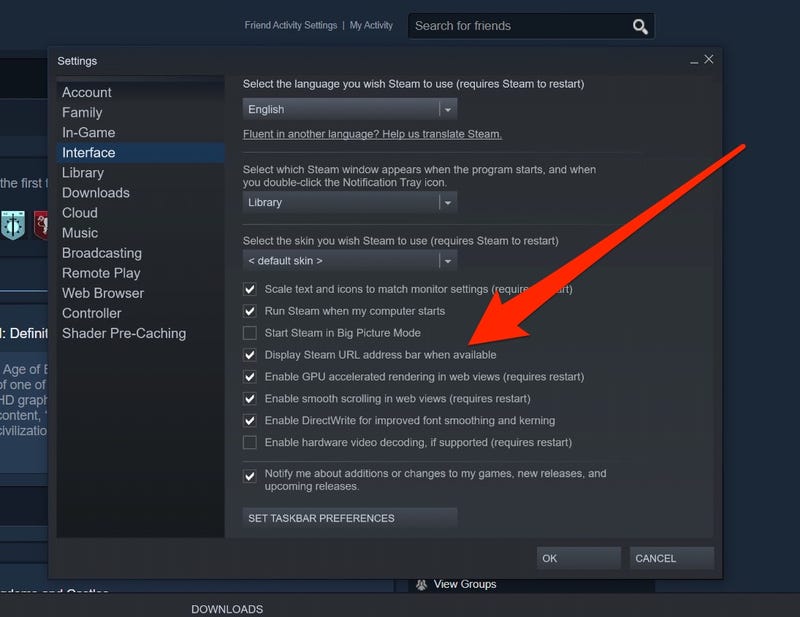
To view your Steam Account Name or verify your account details before redemption:
- Open the Steam client or log in via your browser.
- Click your profile name in the top-right corner of the window.
- Select Account details from the dropdown menu.
- Your Steam Account Name and current wallet balance will appear at the top of the page.
Step-by-Step Guide to Redeeming Steam Wallet Codes
You can activate your digital Steam Wallet code across desktop, web browser, or mobile applications.
Method 1: On the Steam Desktop Client
- Launch the Steam desktop application on your PC and log in.
- Click the Games tab in the top navigation bar.
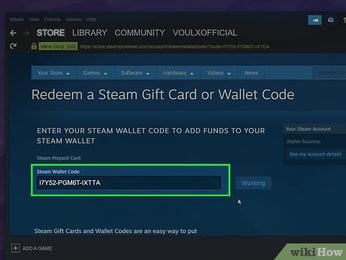
- Select Redeem a Steam Wallet Code.
- Type or paste your alphanumeric code into the Steam Wallet Code input box.
- Click Continue. The balance applies to your account immediately.
Method 2: Via Web Browser
- Visit the official redemption page at
store.steampowered.com/account/redeemwalletcode. - Log in with your Steam credentials.
- Enter your code in the text box and press Continue.
- If prompted, confirm your current residential address to establish your wallet currency.
Method 3: Using the Steam Mobile App
- Open the Steam app on your iOS or Android device.
- Tap your profile avatar or the menu icon.
- Navigate to Account details > Add funds to your Steam Wallet.
- Select Redeem a Steam Gift Card or Wallet Code.
- Enter your code and confirm the redemption.
Steam Currency Conversion and Regional Activation Guidelines
Steam applies strict regional currency policies to maintain marketplace stability. Review the table below before redeeming your code:
| Region / Currency Policy | Activation Rule | Currency Conversion Behavior |
|---|---|---|
| Matching Currency & Store Region | Fully Supported | The code value applies directly 1:1 to your Steam balance. |
| Mismatched Currency Codes | Region-Restricted | Steam restricts redeeming codes denominated in a currency that differs from your account's designated store region. |
| Global / Multi-Currency Codes | Supported where permitted | Converted automatically using daily interbank exchange rates upon activation. |
Important: Always ensure that the region or currency of the Steam Gift Card you buy matches the country settings configured on your Steam account.
Understanding the Steam $5 Rule and Unlocking Account Features
To protect the platform against spam, phishing, and automated bot networks, Steam designates new accounts as Limited User Accounts. Limited accounts cannot access key community features until a minimum of $5.00 USD (or the equivalent in your local store currency) is spent on the platform.
Tax, payment fees and eligible coupons are calculated at checkout.
- Sending friend invites to other players.
- Opening group chats and voice calls.
- Listing and buying items on the Steam Community Market.
- Posting discussions and submitting reviews in Steam Community hubs.
- Gaining Steam profile levels and trading cards.
- Accessing the Steam Web API for profile tracking and inventory tools.
Troubleshooting Common Steam Redemption and Balance Errors
If you encounter an error when activating your digital code, check these solutions:
- "The code you entered is invalid": Check for common character entry errors. Double-check confusing characters such as
0(zero) andO(letter),1(one) andI(capital i), or8andB. - "Code already redeemed": Refresh your Steam client or check your purchase history under Account Details > View purchase history. Sometimes the balance updates even if the confirmation screen hangs.
- "An unexpected error has occurred": Steam's redemption servers may be experiencing temporary maintenance. Wait 15 to 30 minutes before re-entering the code to prevent a temporary rate-limit lock.
- "Currency does not match account region": Verify your account's current store region. You cannot redeem a region-locked voucher on an account set to an incompatible country.
Why Buy Steam Wallet Codes on VGTopup?
- Zero Account Credentials Required: You never need to supply your Steam password or grant account access. Your purchase provides a clean digital voucher code that you redeem yourself.
- Fast Code Delivery: Codes are issued directly upon checkout confirmation so you can grab limited-time game sales without delay.
- Transparent Live Pricing: Current prices, available denominations, and processing options are displayed clearly on the live checkout screen.
- Secure Payment Options: Choose from an extensive selection of trusted localized and global payment options at checkout.
- Dedicated Support: Customer service is available to help resolve transaction inquiries quickly.
Frequently Asked Questions
How do I add money onto my Steam Wallet?
To add money to your Steam Wallet, buy a digital Steam Gift Card on VGTopup, log into your Steam account, navigate to the Redeem a Steam Wallet Code page, and enter your alphanumeric voucher code. The funds appear in your wallet instantly.
How do I top up someone else's Steam account?
You can purchase a Steam Gift Card on VGTopup and send the digital redemption code directly to your recipient via email, chat, or message. They can enter the code into their own Steam account following standard redemption steps.
What is the Steam $5 rule for limited user accounts?
Tax, payment fees and eligible coupons are calculated at checkout.
How can I check the balance of my Steam Wallet?
Log in to the Steam desktop client or website. Look in the top-right corner next to your profile name. Your current available wallet balance is displayed next to your account handle. You can also view detailed balance history under Account details.
Can I redeem a Steam Gift Card in a different region or currency?
Steam enforces currency and region restrictions. A Steam Wallet code must generally match the currency and regional settings of the Steam account where it is being redeemed. Make sure to purchase a voucher matching your account region.
What should I do if my Steam Gift Card code says invalid or already redeemed?
First, carefully re-enter the code while checking for common typos like 0/O and 1/I. If it states the code is already redeemed, check your Steam purchase history to verify if the funds were credited. If issues persist, contact VGTopup customer support with your order number.
Select Denomination
Tax, payment fees and eligible coupons are calculated at checkout.
| Package | Price |
|---|---|
| Steam Gift Card MYR 5 | USD 1.15 |
| Steam Gift Card MYR 8 | USD 1.86 |
| Steam Gift Card MYR 10 | USD 2.30 |
| Steam Gift Card TWD 100 | USD 2.87 |
| Steam Gift Card SGD 5 | USD 3.47 |
| Steam Gift Card MYR 16 | USD 3.73 |
| Steam Gift Card TWD 150 | USD 4.30 |
| Steam Gift Card MYR 20 | USD 4.53 |
| Steam Gift Card HKD 40 | USD 4.58 |
| Steam Gift Card MYR 24 | USD 5.60 |
| Steam Gift Card HKD 50 | USD 5.73 |
| Steam Gift Card TWD 200 | USD 5.74 |
| Steam Gift Card SGD 10 | USD 6.94 |
| Steam Gift Card TWD 300 | USD 8.61 |
| Steam Gift Card HKD 80 | USD 9.16 |
| Steam Gift Card TWD 350 | USD 10.04 |
| Steam Gift Card MYR 50 | USD 11.30 |
| Steam Gift Card HKD 100 | USD 11.45 |
| Steam Gift Card TWD 400 | USD 11.48 |
| Steam Gift Card HKD 120 | USD 13.73 |
| Steam Gift Card SGD 20 | USD 14.05 |
| Steam Gift Card TWD 500 | USD 14.35 |
| Steam Gift Card MYR 80 | USD 18.00 |
| Steam Gift Card HKD 160 | USD 18.31 |
| Steam Gift Card SGD 30 | USD 21.03 |
| Steam Gift Card MYR 100 | USD 22.54 |
| Steam Gift Card HKD 200 | USD 22.90 |
| Steam Gift Card TWD 800 | USD 22.95 |
| Steam Gift Card HKD 240 | USD 27.47 |
| Steam Gift Card TWD 1000 | USD 28.59 |
| Steam Gift Card HKD 300 | USD 34.33 |
| Steam Gift Card SGD 50 | USD 35.04 |
| Steam Gift Card MYR 200 | USD 45.05 |
| Steam Gift Card HKD 400 | USD 45.77 |
| Steam Gift Card SGD 75 | USD 51.59 |
| Steam Gift Card TWD 2000 | USD 57.18 |
| Steam Gift Card HKD 500 | USD 57.21 |
| Steam Gift Card HKD 600 | USD 68.64 |
| Steam Gift Card HKD 1000 | USD 114.41 |