
Tamashi: Rise of Yokai Top Up: Fast and Secure Sycee Delivery
Sycee is the primary premium currency in Tamashi: Rise of Yokai, granting access to top-tier summons, character stat growth, and exclusive event rewards. On VGTopup, you can top up Sycee directly to your character using only your User ID and server name.
Every order processed on VGTopup delivers Sycee straight to your in-game character profile without requiring your account login credentials. Select your server, input your numerical User ID, choose your Sycee denomination, and confirm your payment to receive your items directly in the game.
How to Top Up Sycee in Tamashi: Rise of Yokai
Completing a recharge takes just a few steps on VGTopup:
- Select Sycee Package: Choose the amount of Sycee or pack you wish to purchase from the product catalog above.
- Enter User ID: Input your Tamashi: Rise of Yokai numeric User ID in the User ID field.
- Select Server: Choose your exact server name from the dropdown list (such as AP, NA, or EU regional servers).
- Check Account Details: Double-check that your User ID and chosen server match your in-game profile.
- Proceed to Checkout: Click buy now and select your preferred payment method on the secure payment gateway.
- Receive Sycee: Once your payment is verified, Sycee credits automatically to your character in Tamashi: Rise of Yokai.
Step-by-Step Guide: How to Find Your User ID and Server
Finding your account credentials in Tamashi: Rise of Yokai takes less than a minute. Follow these steps:
- Launch the Tamashi: Rise of Yokai application on your mobile device or emulator.
- Select your server and log in to your active character.
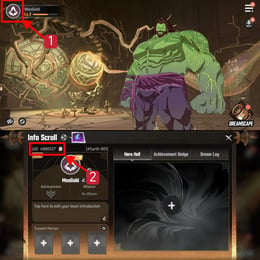
- On the main game interface, tap your Character Avatar located in the top-left corner.
- The User Information menu will open, displaying your character name, level, and numeric User ID.
- Note down your User ID number and your exact Server Name (for example, AP1-Kojiro or NA1-Kisaragi).
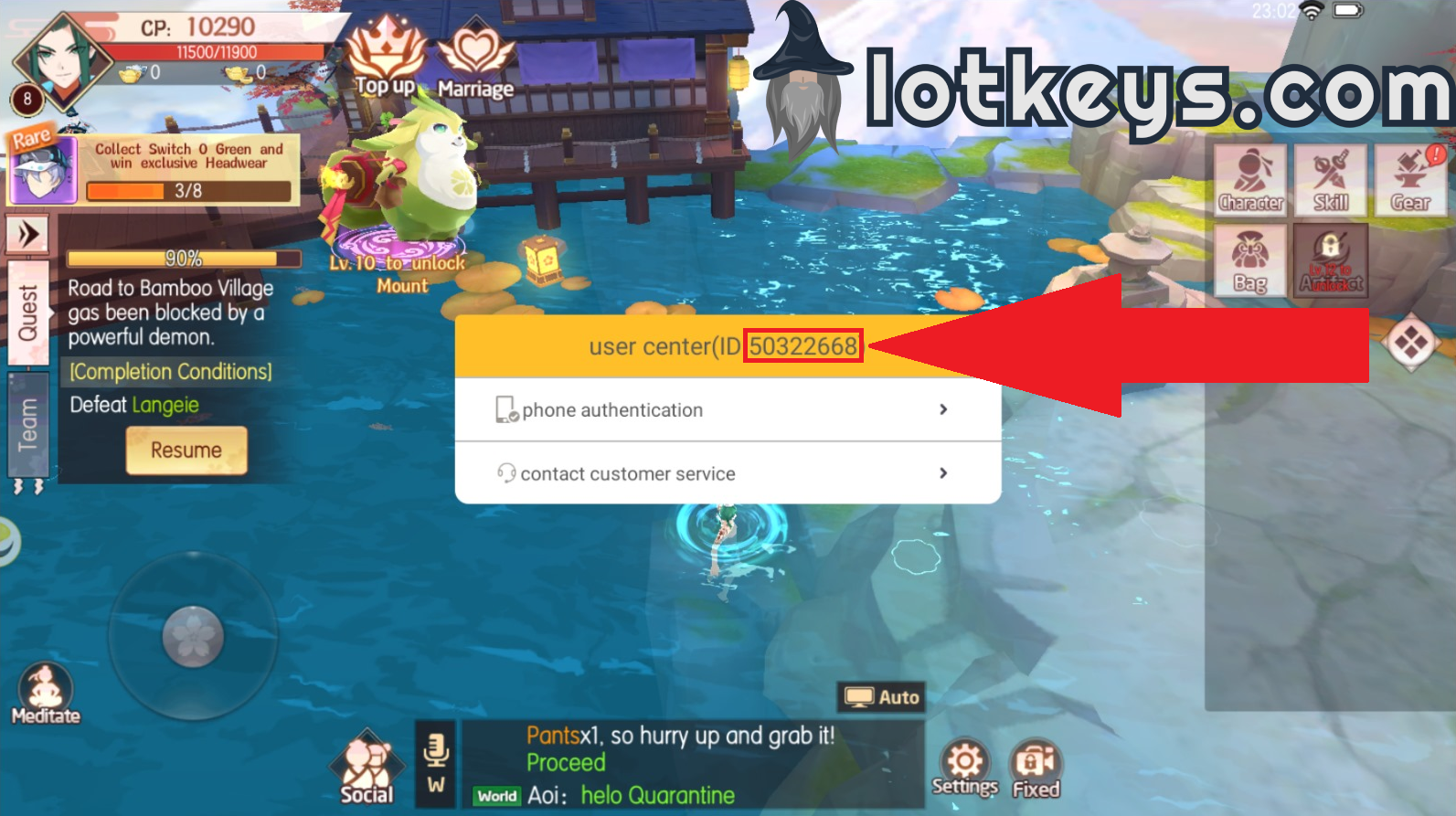
Always ensure that both your User ID and server name match the profile you intend to credit, as characters on different servers maintain independent inventories and balances.
Supported Server Regions: AP, NA, and EU Server Lists
VGTopup supports direct User ID recharges across all active global servers in Tamashi: Rise of Yokai. Characters are bound to their specific server partition, so selecting the matching server identifier is required for successful delivery.
| Region Code | Region Name | Server Range | Server ID Range |
|---|---|---|---|
| AP | Asia Pacific | AP1-Kojiro to AP482-Edani | 3 – 494 |
| NA | North America | NA1-Kisaragi to NA154-Souta | 200003 – 300003 |
| EU | Europe | EU1-Tsuyemon to EU120-Rie | 300004 – 300121 |
If you play on a recently merged or newer server cluster, verify the server name shown on your initial game login screen to select the matching option from the dropdown menu.
What is Sycee and How to Spend It in Tamashi: Rise of Yokai
Sycee functions as the premium resource in Tamashi: Rise of Yokai, enabling swift account progression and competitive strength across both PvE and PvP modes.
1. Yokai Summons (Gacha)
Sycee allows you to buy summoning talismans and perform direct pulls on premium summon banners. This helps you recruit high-rarity SSR and SP Yokai companions, expanding your elemental synergy and overall combat power (CP).
2. Gear Forging and Refinement
Upgrading high-tier gear sets requires rare enhancement materials, refining stones, and socket gems. Sycee can be exchanged directly for refinement items in the game store to accelerate your weapon and armor upgrades.
3. Mount, Wing, and Pet Evolution
Cosmetics in Tamashi: Rise of Yokai provide direct stat multipliers. Spending Sycee on mount training pills, wing evolution feathers, and pet development essences provides significant permanent boosts to your character's attack, defense, and health pools.
4. Extra Dungeon and Boss Attempts
Progression relies on daily farming limits. With Sycee, you can purchase extra entry tickets for World Boss raids, Demon Tower floors, and group material dungeons, doubling your daily loot acquisition.
5. Limited-Time Seasonal Events
Throughout 2026, special seasonal events and festival banners require Sycee to participate in exclusive reward wheels, bingo boards, and ranking contests for limited titles and costumes.
Direct ID Top-Up Safety: Zero Password Sharing Required
Account security is essential when recharging online game currencies. VGTopup uses direct-to-UID processing for Tamashi: Rise of Yokai, which provides distinct security advantages:
- Zero Password Sharing: You never provide your login password, Google Play credentials, Apple ID, or third-party social media access.
- No Risk of Account Takeover: Because no third party logs into your account, your personal settings, bound email addresses, and inventory items remain untouched.
- Official Delivery Pipeline: Direct UID top-ups credit straight to the character through the game's standard billing protocols, preventing chargeback bans or third-party credential flags.
- Encrypted Transactions: VGTopup uses modern payment encryption standards to safeguard your billing details during checkout.
How to Gift Sycee to Other Players Safely
Because the recharge process relies entirely on the player's User ID and server name, gifting Sycee to guildmates, friends, or family members is straightforward:
- Ask the recipient for their User ID and their active Server Name.
- Open the Tamashi: Rise of Yokai product page on VGTopup.
- Choose the amount of Sycee you wish to send them.
- Input their User ID and pick their server from the dropdown.
- Complete the checkout.
Once the order clears, the Sycee will automatically arrive in the recipient's character balance without them needing to share passwords or link third-party accounts.
Frequently Asked Questions
How do I find my Tamashi: Rise of Yokai User ID and Server?
Open Tamashi: Rise of Yokai and log in to your character. Tap your character avatar portrait in the upper-left corner of the screen to open the profile window. Your User ID is the numeric code listed beneath your character name. Your server name is displayed on the main login screen before entering the game world.
What is Sycee and what can I buy with it in Tamashi: Rise of Yokai?
Sycee is the premium currency in Tamashi: Rise of Yokai. You can spend it to pull for rare Yokai companions on summon banners, buy gear upgrade stones, evolve mounts and wings, buy extra dungeon entry tickets, and participate in limited-time event draws.
Do I need to share my game password to top up Tamashi: Rise of Yokai?
No. Top-ups on VGTopup only require your numeric User ID and your server selection. You never need to provide passwords, verification codes, or login credentials to recharge Sycee.
Can I top up Sycee for a friend in Tamashi: Rise of Yokai?
Yes. You can recharge Sycee for any player by entering their User ID and selecting their server during checkout on VGTopup. The currency will be credited directly to their character.
Which regional servers are supported for Sycee recharge?
VGTopup supports all active global regional servers, including Asia Pacific (AP1 to AP482), North America (NA1 to NA154), and Europe (EU1 to EU120). Simply select your region's server name from the dropdown menu.
What should I do if I select the wrong server during checkout?
Top-up deliveries are automated based on the User ID and server submitted during purchase. If you notice an error before the order completes, contact VGTopup customer support immediately with your order number, correct User ID, and correct server name to request an update.
Select Denomination
Tax, payment fees and eligible coupons are calculated at checkout.
| Package | Price |
|---|---|
| 60 Sycee | USD 0.73 |
| 300 Sycee | USD 3.60 |
| 600 Sycee | USD 7.24 |
| 900 Sycee | USD 10.91 |
| 1200 Sycee | USD 14.98 |
| 1800 Sycee | USD 21.81 |
| 3000 Sycee | USD 36.38 |
| 6000 Sycee | USD 72.79 |