
Saada Coins Top Up: Fuel Your Voice Chat Experience
Saada is a social voice chat application where users gather in live group audio rooms, build communities, sing, play games, and support their favorite broadcasters. Saada Coins serve as the primary in-app currency, enabling you to participate actively in voice rooms, express appreciation to content creators, and access exclusive room features.
Recharging your balance through VGTopup gives you immediate access to coins using only your numeric User ID (UID). With no account login or password required, you can top up your balance or send coins directly to friends and room hosts safely.
What Are Saada Coins and How Are They Used?
Saada Coins are virtual credits used across all live voice rooms and community interactions inside the Saada platform. Having an active coin balance allows you to participate in several social activities:
- Sending Virtual Gifts: Send animated gifts to room hosts, speakers, and friends on stage to show support during live audio streams and events.
- Activating Entrance Effects: Stand out when entering popular voice rooms with exclusive animated banners, vehicle effects, and spotlight announcements.
- Unlocking Profile Frames and Badges: Customise your profile with special room badges, avatar borders, and wealth rank tags that show your community standing.
- Supporting Voice Room Contests: Participate in audio battles, talent shows, and PK contests by gifting your preferred team or performer.
- Accessing In-Room Mini-Games: Use coins to engage in interactive activities and social games hosted directly inside group voice chat channels.
How to Find Your Saada User ID (UID)
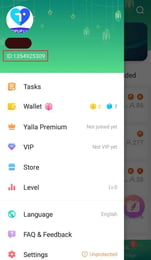
To complete a coin recharge, you only need your Saada UID. Follow these simple steps to locate your ID number in the app:
- Open the Saada app on your mobile device.
- Tap the Profile or Me icon located in the bottom right corner of the screen.
- Look directly beneath your display name and profile picture.
- You will see a numeric string labeled as ID or UID.
- Tap the copy icon next to the number to copy your UID accurately to your clipboard.
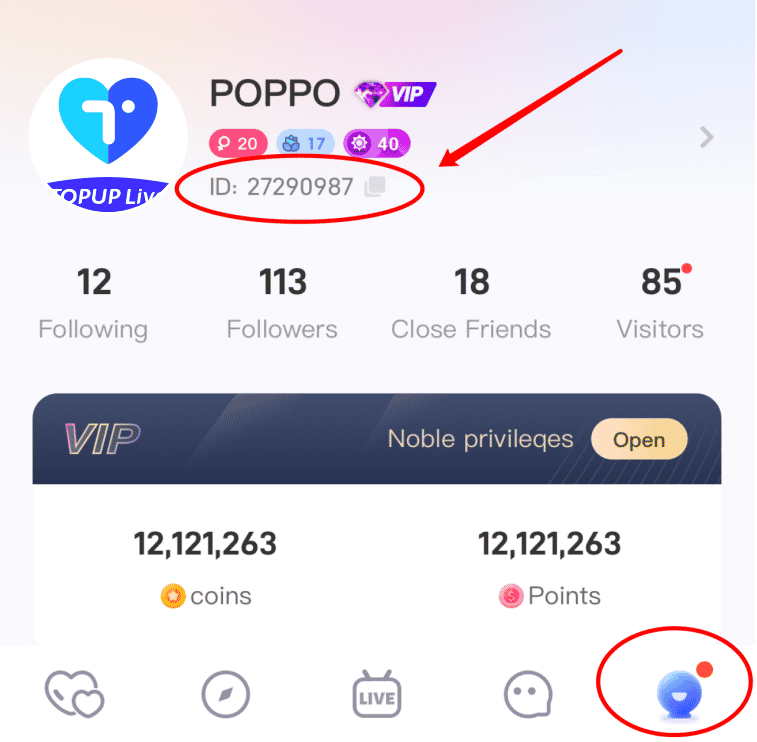
| Step | Action | Detail |
|---|---|---|
| 1 | Open Saada App | Launch the application on Android or iOS |
| 2 | Go to Profile | Tap the 'Me' tab in the lower navigation bar |
| 3 | Locate UID | Find the numbers shown beneath your username |
| 4 | Copy ID | Tap the copy symbol to prevent manual typing errors |
Step-by-Step Guide: How to Buy Saada Coins on VGTopup
To complete a top up for yourself or another user on VGTopup, follow this simple process:
- Select Denomination: Choose the package of Saada Coins that fits your needs from the available options shown on the product page.
- Enter Your UID: Paste your Saada User ID into the required input field. Double-check the number to make sure it matches your profile.
- Review Order: Confirm the selected coin amount and verify that the UID entered belongs to the intended account.
- Proceed to Payment: Select your preferred checkout option and complete the transaction.
- Receive Coins: Once payment verification finishes, the coins will be credited directly to the designated Saada account.
Check live prices, currency selections, and package options directly on the live checkout screen at VGTopup before placing your order.
Safe Top-Up Practices: Why UID Delivery Protects Your Account
Account safety is essential when purchasing digital currencies online. VGTopup operates strictly on a direct-to-UID delivery method, which offers clear security advantages:
- Zero Password Sharing: You will never be asked for your Saada password, phone number, verification code, or social login credentials. All orders are processed using public User IDs.
- No Account Takeover Risk: Because third parties never access your login credentials, your personal chat logs, friend lists, and account settings remain completely secure.
- Safe Gifting to Others: You can surprise friends or content creators by entering their UID directly at checkout without needing access to their devices or accounts.
- Clean System Delivery: Recharge transactions are routed directly to the account tied to the UID, ensuring clean fulfillment without policy violations caused by unauthorized logins.
Common Saada Recharge Issues and Troubleshooting
If you experience an issue or a delay during the top-up process, refer to the following troubleshooting steps:
1. Coins Not Appearing Immediately
After completing payment, restart your Saada application or pull down on your profile screen to refresh your wallet balance. During peak audio room events or routine maintenance, minor network delays may occur.
2. Typo in the User ID (UID)
If an incorrect UID was entered during checkout, contact customer support immediately. If the order has not yet been processed by the delivery system, support can correct the ID. If the order has already been fulfilled to an active incorrect UID, transactions cannot be reversed, making UID verification vital before payment.
3. Payment Processing Verification
If your payment was deducted but the order status shows pending, verify that your payment method completed the transaction without an open bank hold. VGTopup customer service is available around the clock to assist you with transaction tracking and order verification.
Frequently Asked Questions About Saada Coins Top Up
What are Saada Coins used for in the app?
Saada Coins are the virtual currency used inside the Saada social voice chat application. They let you send animated gifts to room hosts and speakers, purchase entrance vehicle animations, unlock customized profile frames, and participate in community audio room events.
Where can I find my Saada UID for top up?
You can find your Saada UID by opening the Saada app and navigating to the "Me" or profile screen at the bottom right. Your numeric UID is listed directly below your profile photo and display name.
Do I need to provide my Saada account password?
No. VGTopup only requires your numeric Saada UID to fulfill your coin recharge. Never share your password, SMS verification codes, or login credentials with anyone.
How long does it take for Saada Coins to arrive after payment?
Coin delivery begins immediately once your payment is confirmed. In most cases, the coins reflect in your in-app wallet balance shortly after checkout. You can refresh your app balance by reopening the profile tab.
Can I top up Saada Coins for another user or friend?
Yes. You can top up coins for any Saada user by entering their specific UID in the order field on VGTopup. The coins will be delivered straight to their in-app wallet upon payment.
What should I do if I entered the wrong Saada UID?
If you realize you submitted an incorrect UID, reach out to VGTopup customer support right away with your order number. If the order is still pending processing, the team can update the UID for you.
Is it safe to buy Saada Coins through VGTopup?
Yes. Purchasing Saada Coins through VGTopup is completely safe. The platform uses secure payment processing and requires only your public UID, ensuring your account credentials and personal data remain protected.
Select Denomination
Tax, payment fees and eligible coupons are calculated at checkout.
| Package | Price |
|---|---|
| 3,000 Saada Coins | USD 3.74 |
| 5,000 Saada Coins | USD 6.23 |
| 10,000 Saada Coins | USD 12.46 |
| 20,000 Saada Coins | USD 24.92 |
| 50,000 Saada Coins | USD 62.30 |
| 100,000 Saada Coins | USD 124.61 |