
Sausage Man Candy Top Up: Fast, Safe, and Direct In-Game Recharge
Sausage Man is a competitive, cartoon-styled battle royale game where tactical shooting meets wild, lighthearted gameplay. Players parachute onto Sausage Island as quirky animated sausages, scavenging for firearms, grappling hooks, transforming cards, and tactical equipment to battle against dozens of other players. While the core survival mechanics depend entirely on skill and strategy, customizing your character and collecting rare cosmetic items requires the game's premium currency: Sausage Man Candies.
Candies allow you to access premium content, seasonal progression tracks, and exclusive customization items from the in-game shop. When you purchase a Sausage Man Candy top up on VGTopup, the balance is transferred straight to your account using only your Character ID. You do not need to share login credentials or passwords, making the recharge process simple, safe, and efficient.
What Are Sausage Man Candies and How to Use Them
Candies represent the main paid currency in Sausage Man. While free-to-play participants can earn standard Supply Boxes and basic clothing through gameplay, premium cosmetic collections, legendary weapon skins, and battle pass tiers are unlocked using Candies.
Here are the primary ways players use Sausage Man Candies:
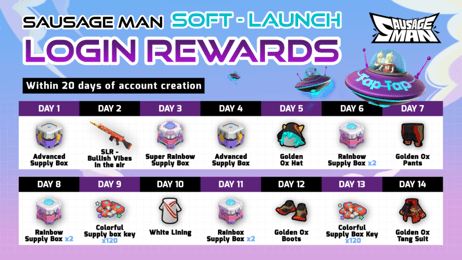
- Golden Season Pass Activation: Purchasing the Golden Season Pass unlocks the premium tier of the seasonal reward track. This gives you access to exclusive seasonal costumes, themed weapon skins, extra party cards, and bonus Rainbow Supply Box keys as you gain seasonal levels.
- Rainbow Supply Boxes & Colorful Supply Boxes: These gacha boxes contain rare and legendary character outfits, special melee weapon skins, unique kill broadcast banners, and animated tactical equipment.
- Direct Shop Cosmetics: The in-game store regularly features rotating outfits, silly headgear, stylish backpacks, gliders, and quirky accessories that can be purchased directly with Candies.
- Custom Party Cards and Nickname Cards: Change your profile card aesthetic, show off rare badges, or purchase Rename Cards to update your in-game identity.
- Tier Skips & Season Level Boosts: If you are short on time before a season concludes, Candies allow you to purchase level boosts to complete your Golden Season Pass rewards.
How to Locate Your Sausage Man Character ID
To complete your Sausage Man Candy recharge, you only need to provide your numeric Character ID. You do not need to submit your character name, email, or login provider.
Follow these steps to find your ID inside the game:
- Open Sausage Man on your mobile device or emulator and log in to your account.
- In the main lobby screen, tap your Avatar Profile icon located in the top-left corner.
- Your player profile page will open, displaying your basic stats and profile details.
- Look directly below your character nickname to locate your unique Character ID (a series of numbers and letters).
- Tap the Copy icon next to the Character ID to copy it to your clipboard.
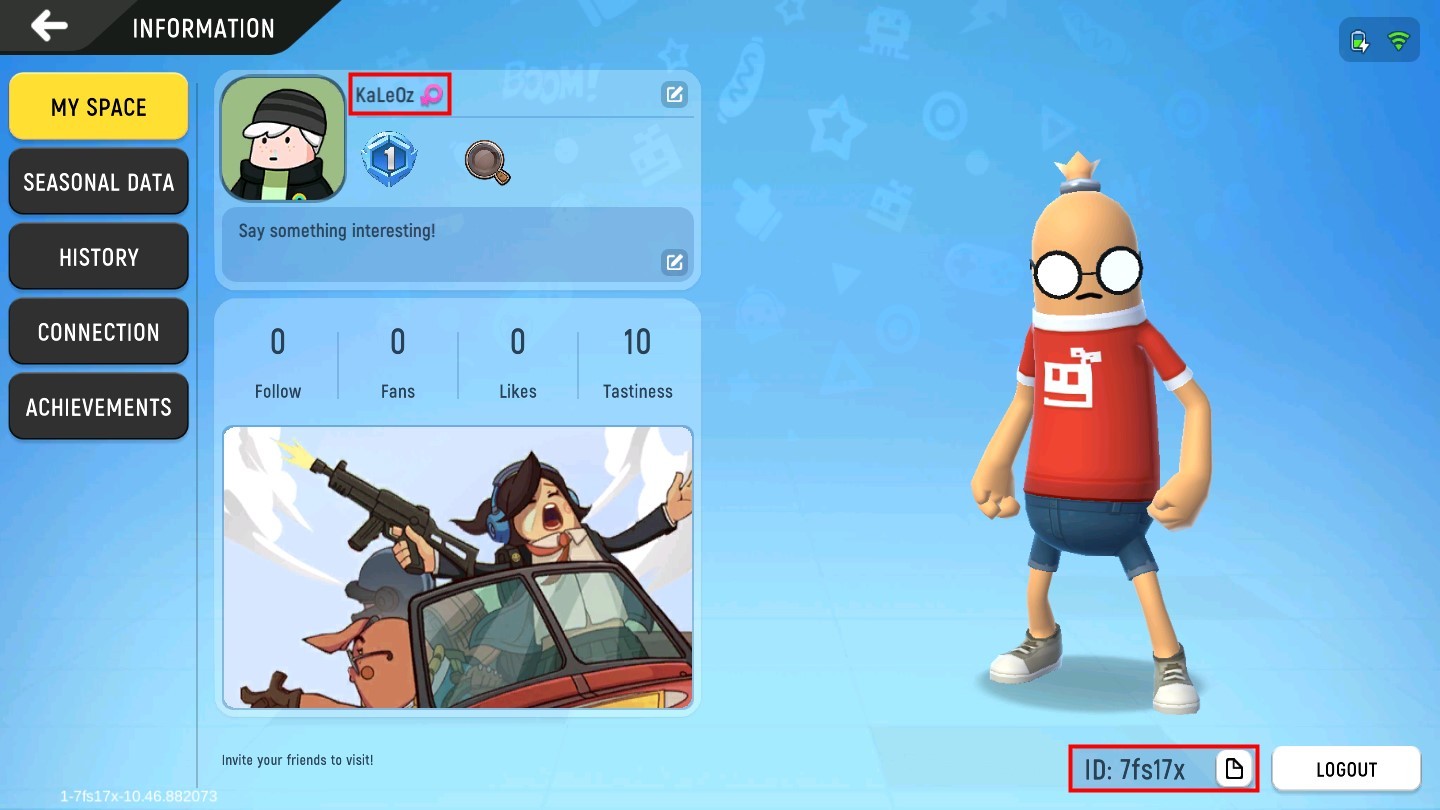
Once copied, paste your Character ID directly into the order field on VGTopup to ensure your Candies are sent to the correct account.
How to Top Up Sausage Man Candies on VGTopup
Recharging your Sausage Man account on VGTopup is straightforward. Follow these instructions to complete your order:
- Select Your Candy Pack: Browse the available Candy amounts on the product page and select the denomination you wish to buy.
- Enter Your Character ID: Paste your Sausage Man Character ID into the designated input field.
- Confirm Order Details: Verify that the Character ID entered matches your in-game profile.
- Proceed to Checkout: Check the live checkout pricing and select your preferred payment method.
- Complete Payment: Finalize the transaction. Once payment confirmation is received, our automated system processes the direct top-up.
- Receive Candies In-Game: Open Sausage Man and check your Candy balance at the top of the main lobby screen.
Sausage Man Candy Usage Overview
| Item / Feature | Candy Requirement Type | Primary In-Game Benefit |
|---|---|---|
| Golden Season Pass | One-time seasonal purchase | Unlocks premium seasonal tiers, exclusive skins, and keys |
| Rainbow Supply Box | Per-pull or 10x draw purchase | Grants chances at legendary outfits, vehicles, and weapon finishes |
| Direct Store Outfits | Fixed Candy price | Immediate access to specific cosmetic sets and accessories |
| Gliders & Drop Effects | Direct purchase or box drops | Custom visual animations during parachute drops and glides |
| Rename Cards | Fixed Candy price | Allows you to change your in-game display name |
Benefits of Direct ID Top-Up: Safety and Convenience
Using a direct Character ID top-up provides substantial advantages over third-party account sharing or manual seller trades:
- Zero Password Sharing: You never have to share your game password, Google account, Apple ID, or social media logins. Your personal credentials stay strictly with you.
- Automated Processing: Orders are handled automatically by system delivery, eliminating the need to wait in chat queues with individual sellers.
- Error Prevention: Identifying accounts via the unique numeric Character ID prevents errors caused by special characters or decorative symbols in player nicknames.
- Transparent Live Checkout: VGTopup displays clear pricing directly on the checkout screen so you know the exact cost before completing payment.
- Reliable Order Management: Every order comes with tracking through VGTopup, allowing you to check transaction statuses at any time.
Checking Your Candy Balance and Delivery Troubleshooting
Under normal conditions, direct ID top-ups are credited almost immediately after payment verification. If you have completed your purchase and want to check your balance, follow these verification steps:
- Restart the Game Client: If you were logged into Sausage Man during the transaction, close the application completely and relaunch it. This forces the game client to refresh data from the game server.
- Check the Top Menu Bar: Your updated Candy amount appears in the top navigation bar of the main lobby screen, right next to your Sausage Coins balance.
- Inspect the In-Game Mailbox: Some promotional bundles or event-related top-ups send items or bonus keys directly to your system mailbox. Tap the mail icon on the right side of the main lobby to claim any attached bonuses.
- Double-Check Your Submitted ID: If your Candies do not appear after a short period, check your VGTopup order history to confirm that the Character ID entered was accurate.
- Contact Customer Support: If you encounter any unexpected delay or entered incorrect information, reach out to VGTopup customer support with your order number for immediate assistance.
Frequently Asked Questions About Sausage Man Candy Top-Up
How do I find my Sausage Man Character ID?
Open Sausage Man and tap your avatar icon in the top-left corner of the main lobby. Your unique numeric Character ID is located below your character nickname. Tap the copy icon next to the number to copy it to your clipboard.
What items can I buy with Sausage Man Candies?
You can use Candies to unlock the Golden Season Pass, purchase Rainbow Supply Boxes and Colorful Supply Boxes, buy direct shop cosmetics, obtain gliders and parachute effects, acquire Rename Cards, and boost seasonal pass levels.
Do I need to provide my password for Sausage Man Candy top up?
No. VGTopup only requires your Sausage Man Character ID. You never have to provide your password, email login, or social media credentials for a top-up.
How long does it take for Candies to be delivered to my Sausage Man account?
Delivery begins automatically as soon as your payment is confirmed through the live checkout. Most direct ID recharges reflect on your account balance shortly after completion.
How can I check my Sausage Man Candy balance after purchase?
Launch Sausage Man and check the Candy counter located at the top of the main lobby screen. If your balance does not update right away, restart the game app to refresh the server connection.
What should I do if my Sausage Man Candy top-up does not arrive?
First, restart your game client to refresh the lobby balance. If the Candies still do not show, check your VGTopup order details to verify that the submitted Character ID was correct, then contact VGTopup support with your order ID for fast resolution.
Select Denomination
Tax, payment fees and eligible coupons are calculated at checkout.
| Package | Price |
|---|---|
| 61 Candy | USD 0.62 |
| 186 Candy | USD 1.88 |
| 318 Candy | USD 3.14 |
| 686 Candy | USD 6.28 |
| 1378 Candy | USD 12.57 |
| 2118 Candy | USD 18.75 |
| 3548 Candy | USD 31.33 |
| 7108 Candy | USD 62.78 |