
Lords Mobile Diamonds Top Up: Fast IGG ID Recharge
Lords Mobile Diamonds give players direct access to the in-game Mall without relying on mobile app store payment processors. When you purchase Diamonds through VGTopup, the balance credits straight to your account through your official IGG ID. You can immediately convert your Diamond balance into daily resource packs, monster hunting sets, hero chests, and war speed-ups.
Whether preparing for Kingdom vs. Kingdom (KvK), defending your guild wonder, or rushing Academy research for Tier 5 troops, having Diamonds on hand lets you claim time-limited Mall bundles instantly.
What Are Lords Mobile Diamonds and How to Use Them in the Mall
Diamonds act as an official universal exchange currency inside Lords Mobile. Rather than processing microtransactions individually through external app stores for every single pack, players hold a Diamond reserve on their game profile.
Here is how to use Diamonds inside the game:
- Log into Lords Mobile on your mobile device or PC client.
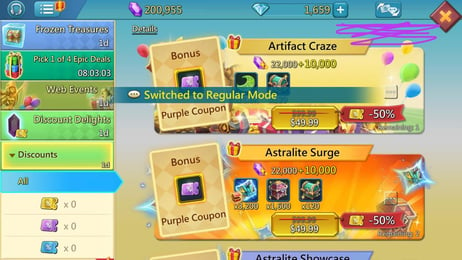
- Tap the Mall icon (the treasure chest icon on the top right side of your castle screen).
- Browse the store bundles, material chests, or special discount tabs.
- When viewing an eligible pack, the price displays in Diamonds rather than local fiat currency.
- Tap the pack and confirm purchase to deduct the required Diamond amount instantly from your balance.
Diamonds can be used for almost every standard in-game bundle, including daily deals, limited-time special events, and progressive milestone purchases.
Key Differences Between Lords Mobile Diamonds and Gems
Many new players confuse Diamonds with regular in-game Gems. While both currencies serve critical functions in Lords Mobile, their roles, acquisition methods, and spending paths are completely separate.
| Feature | Lords Mobile Diamonds | In-Game Gems |
|---|---|---|
| Primary Purpose | Buying Mall packs, bundles, and chests | Buying shields, speed-ups, VIP points, and instant completions |
| How to Obtain | Web top-up via IGG ID on VGTopup | In-game events, Colosseum ranks, Mystery Boxes, Treasure Trove |
| Mall Pack Purchase | Yes (converts directly to store packs) | No (cannot buy real-money bundle packs) |
| Balance Display | Inside the in-game Mall interface | Main upper UI resource bar |
| Treasure Trove Deposit | No | Yes (generates interest over 30 days) |
Diamonds serve as your pack-purchasing currency, while Gems are used for direct kingdom maintenance and emergency battle shields.
How to Find Your Lords Mobile IGG ID
To ensure your order arrives on the correct account, you only need to provide your numerical IGG ID. You never have to share your login credentials or social account bindings.
Follow these quick steps to locate your IGG ID:
- Launch Lords Mobile and view your main castle screen.
- Tap the Settings (Gear icon) located in the lower-right menu bar.
- Tap Account to open your user profile window.
- Your numerical IGG ID is displayed clearly near the top of the account details.
- Copy or write down this number for checkout.
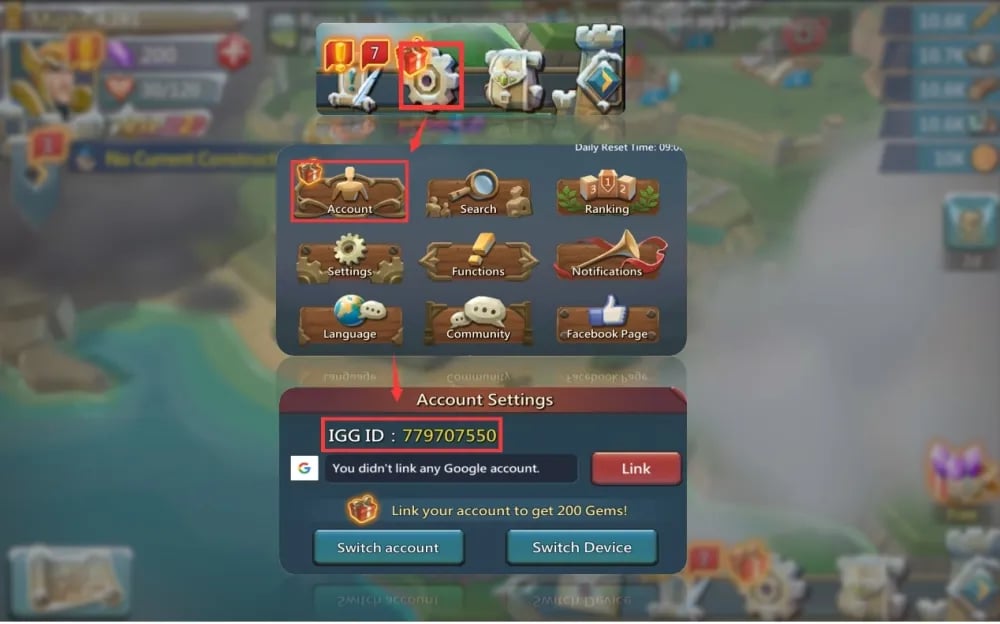
You can also find your IGG ID by tapping your player avatar on the top-left corner of the main screen and opening your player profile overview.
How to Top Up Lords Mobile Diamonds on VGTopup
Ordering Diamonds on VGTopup takes only a few moments:
- Select your desired Diamond pack size from the live product list on VGTopup.
- Enter your numerical IGG ID in the required account field.
- Check your order summary and current live price.
- Select your preferred payment method and complete the transaction.
- Launch Lords Mobile and open the Mall to view your updated Diamond balance.
Check the live checkout screen for current pricing and available package tiers.
Best In-Game Packs and Speed-Ups to Buy With Diamonds
Planning your Diamond expenditure ensures maximum return for your account development. Focus your Diamond purchases on high-impact areas:
- Monster Hunting Gear Bundles: Packs like Slayer Sets and Monsterbane Chests accelerate hunting efficiency, providing your entire guild with monster gifts, speed-ups, and rare materials.
- Research and Tomes: Archaic Tomes and Research Speed-up bundles are essential for unlocking Tier 4 and Tier 5 military trees, Sigils, and Wonder Research.
- Paid Hero Medals: Hero packs such as Lore Weaver, Witch Doll, and Berserker offer massive army boost stats and administrative perks that free-to-play heroes cannot match.
- Familiar Growth Packs: EXP potions, pacts, and merging speed-ups allow you to awaken Army Talents on high-tier Familiars like Gryphon, Trickstar, and Blackwing.
- Material Madness Packs: One of the most cost-effective packs in the game for obtaining rare equipment materials like Gargantua Eyes, Frostwing Hearts, and Blackwing Vials.
Account Safety: Direct IGG ID Delivery With No Password Required
Account security is critical when purchasing game currencies online. VGTopup relies strictly on direct server crediting using your public IGG ID.
- Zero Password Requests: You will never be asked for your Gmail, Facebook, Apple ID, or game login passwords.
- No Modified APKs Required: You do not need to download third-party clients, modded files, or security-compromising root software to receive Diamonds.
- Official Delivery Pipeline: Because Diamonds credit directly to your official IGG ID, your account remains completely secure and fully compliant with standard gameplay regulations.
Troubleshooting Common Lords Mobile Top-Up Questions
If your Diamonds do not reflect in your account immediately after completing checkout, follow these diagnostic steps:
- Restart the Game Client: Force-close Lords Mobile completely on your device and launch it again. This forces the game client to query the server for updated balance sheets.
- Open the In-Game Mall: The Diamond balance counter is located inside the Mall window. Open the Mall menu to trigger the balance display refresh.
- Verify Your IGG ID: Double-check your payment receipt to ensure the IGG ID entered matches your current account without typos.
- Check Linked Device Accounts: If you manage multiple alternative accounts (farms or rally leads), ensure you are currently logged into the specific account matching the IGG ID submitted.
- Contact Support: If your order remains pending, reach out to VGTopup customer support with your order number for fast verification.
Frequently Asked Questions
What are Lords Mobile Diamonds used for?
Lords Mobile Diamonds are used directly inside the in-game Mall to buy standard store packs, hero medal chests, material bundles, speed-ups, and special limited-time promotional packs without using mobile app store billing.
Where can I find my Lords Mobile IGG ID?
Open Lords Mobile, tap the Gear (Settings) icon at the bottom right of the screen, and select the Account tab. Your numerical IGG ID is listed at the top of the account window. You can also view it by tapping your player avatar in the top left.
Do I need to provide my Lords Mobile password to receive Diamonds?
No. VGTopup only requires your numerical IGG ID. You should never share your login password, Google Play details, Apple ID, or Facebook credentials to receive a top-up.
What is the difference between Diamonds and Gems in Lords Mobile?
Diamonds are an external currency used inside the Mall to purchase real-money bundles, hero packs, and material sets. Gems are an internal currency earned through gameplay or packs, used to activate shields, complete construction/research timers instantly, or invest in the Treasure Trove.
Where to buy diamonds for Lords Mobile safely?
You can purchase Diamonds safely through VGTopup. Enter your numerical IGG ID at checkout to receive your balance directly in your game profile without sharing your account password.
How do I spend Diamonds on in-game Mall packs?
Open the Lords Mobile Mall from your castle view. When you have Diamonds in your balance, the prices for eligible store packs switch to Diamond values. Select the pack you want and confirm the transaction to deduct Diamonds from your account balance.
Select Denomination
Tax, payment fees and eligible coupons are calculated at checkout.
| Package | Price |
|---|---|
| 195 Diamonds | USD 1.75 |
| Weekly Diamond Pass | USD 1.80 |
| 395 Diamonds | USD 3.61 |
| 785 Diamonds | USD 7.22 |
| 1179 Diamonds | USD 10.83 |
| 1964 Diamonds | USD 18.00 |
| Monthly Diamond Pass | USD 18.00 |
| 3928 Diamonds | USD 36.07 |
| 7857 Diamonds | USD 72.14 |
| 11785 Diamonds | USD 108.20 |
| 19642 Diamonds | USD 177.16 |