

How to Top Up Mobile Legends: Bang Bang Diamonds for Sending Live Stream Gifts?
To top up Mobile Legends: Bang Bang Diamonds for sending live stream gifts, first confirm the correct account, check that MLBB Live gifting is available on your account, and buy enough Diamonds for the gift you actually plan to send. You can recharge in-app through Google Play or the App Store, or use an authorized direct top-up page with your UID and Zone ID for faster, no-login checkout.
From repeated testing and checkout comparisons, I found the biggest mistake isn't payment failure — it's buying the wrong amount. If gifting still doesn't work after recharge, the usual causes are insufficient balance, app version issues, feature rollout limits, account restrictions, or a short balance-refresh delay. If you want a direct route, Mobile Legends: Bang Bang top up diamonds for streamer gifts is the kind of checkout flow that makes sense after you verify the gift cost.
Why do players top up Mobile Legends: Bang Bang Diamonds specifically for sending live stream gifts?
Because MLBB live gifts use Diamonds directly, and gifting has a few extra checks that normal Diamond spending doesn't.
Officially, live gifting is accessed through the MLBB Live tab on Android and iOS. Community testing shows common gift prices like these:
| Live gift | Diamond cost |
|---|---|
| Flowers | 2 |
| Jewellery | 3 |
| Roadster | 250 |
| Yacht | 1000 |
| Airplane | 5000 |
That price spread is why I always tell people to plan before paying. A skin buyer can often use leftover Diamonds later without caring. A live gifter usually has a specific moment in mind — a friend’s stream, a creator event, a ranked push celebration — so underbuying is more annoying than overpaying by a little.
One detail many guides miss: the streamer doesn't receive Diamonds 1:1 as spendable Diamonds. Community reports say streamers get 1 BB coin per gifted Diamond, and 5 BB coins convert to 1 Diamond. So if you're gifting to support someone, the visible gift cost and the creator's eventual Diamond value are not the same.
How many Mobile Legends Diamonds should you buy before sending a live stream gift?
Buy a pack that fully covers the gift cost, with a small buffer if you're sending more than once.
In my experience, the cleanest way to avoid a failed gifting attempt is to match the pack to the gift. If you're sending an Airplane, don't gamble on stacking tiny packs at the last second. Community experience consistently points to buying a denomination that already covers the target gift amount.
A simple planning table:
| Goal | Minimum Diamonds to hold |
|---|---|
| 1 Flower | 2 |
| 1 Jewellery | 3 |
| 1 Roadster | 250 |
| 1 Yacht | 1000 |
| 1 Airplane | 5000 |
What I personally verify before paying:
- Your current Diamond balance
- The exact gift cost
- Whether the gifting button is visible in MLBB Live
- Whether your account is the correct UID/server
- Whether your payment method is supported in your region
And here's what surprised me the first time I checked this flow closely: gifting can fail even when the recharge succeeds. That's usually not a top-up problem. It's often feature availability by region rollout, account status, outdated app version, age/account limits, or simply not having enough giftable Diamonds visible yet.
If you're price-sensitive, direct top-up is often better. Community experience widely reports that direct top-up pages are cheaper than in-app purchases because they avoid app store fees.
Is in-app purchase or direct top-up better for MLBB live gifts?
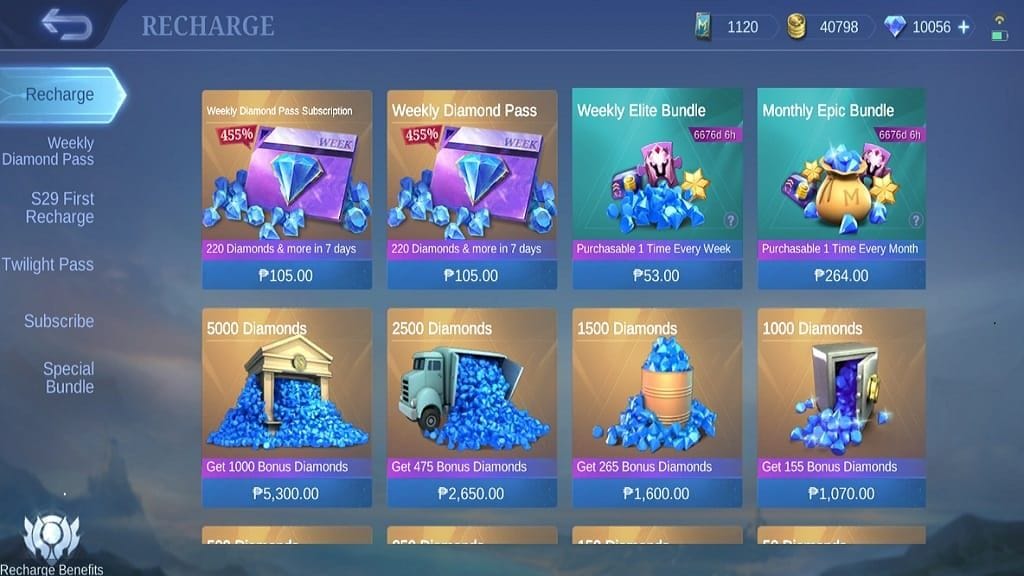
Direct top-up is usually better for value, while in-app purchase is simpler if you want store-native receipts.
Officially, both routes work:
- In-app: buy through Google Play or the Apple App Store
- Direct top-up: enter your MLBB User ID and Zone/Server ID on an authorized site, then pay without logging into the game account there
Authorized names officially associated with MLBB top-up include Codashop, SEAGM, Razer Gold, and MTCGAME. The key safety rule is simple: use official in-app checkout or Moonton-authorized partners. Community experience is clear that unauthorized sellers increase account risk, including ban risk.
My own preference depends on the situation:
| Method | Best for | What I check first | What I like | Trade-off |
|---|---|---|---|---|
| In-app | Users who want Apple/Google receipt handling | App store account and payment method | Familiar flow, easy purchase history | Often pricier |
| Direct top-up | Users who know UID/Zone ID and want speed | Correct UID/server and region | No login needed, often cheaper | Wrong ID entry sends to wrong account |
Regional payment support matters more than people expect. Officially supported examples include:
- Philippines: GCash, Maya
- Indonesia: OVO, DANA, GoPay
- Malaysia: GrabPay, Touch 'n Go eWallet
- US/overseas: credit/debit cards on global pages; Codashop US is officially noted for overseas use
If you're outside your home region, match the account server/region before paying. That's an easy miss, and honestly one of the most frustrating ones because the checkout can look fine until the final step.
How to Top Up Mobile Legends: Bang Bang Diamonds for Sending Live Stream Gifts?
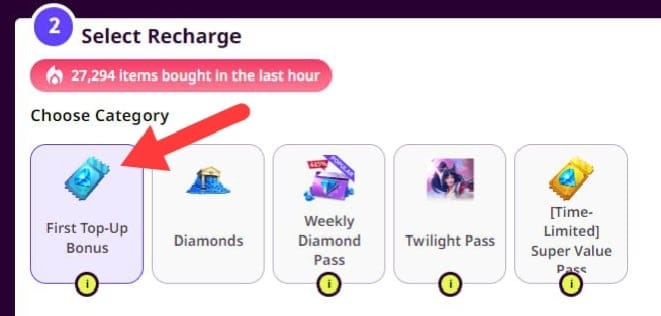
Use the route that matches your payment setup, but verify the account and gift amount before you spend.
Open MLBB and check the Live tab
- Confirm live gifting is available on your account.
- Make sure the gift button appears for the stream you want.
- Check your current Diamond balance.
Confirm the correct account details
- For direct top-up, you need the User ID and Zone/Server ID.
- Officially, correct UID/server entry is what prevents delivery to the wrong account.
- If topping up for a friend, use their UID and Zone ID carefully. Officially, there is no direct Diamond transfer system, but you can top up your own or another player's account by account details.
Choose your top-up method
- In-app: use Google Play, Apple Pay, Google Pay, credit/debit card, or your app-store-linked payment method.
- Direct: use an authorized page, enter UID + Zone ID, select a Diamond pack, then choose a supported local or card payment method.
Pick the right Diamond amount
- Match the pack to the gift cost.
- Add a small buffer if you may send multiple gifts.
- If you're a first-time buyer, community reports often note a first recharge double-Diamonds bonus, so check whether that applies before choosing a pack.
Pay and verify delivery
- Official flow: select denomination, enter UID/Zone ID, choose payment, confirm.
- Delivery is generally instant and commonly arrives within 3 minutes.
- If the Diamonds don't show, restart the game, log out and back in, and check in-game mail.
Send the gift
- Return to the live stream.
- Confirm you have sufficient Diamonds.
- Tap the gift and send.
If you already know your UID and want a straightforward checkout, Mobile Legends: Bang Bang recharge diamonds to send live gifts is a practical next step after you confirm the amount you need.
Why can't I send a live stream gift in Mobile Legends after topping up?
Usually because the issue is with gifting eligibility or balance visibility, not the recharge itself.
This is the part most generic top-up pages skip. After months of watching these cases, I believe more users get blocked by gifting conditions than by payment.
Check these in order:
Did the Diamonds actually arrive?
- Wait up to 3 minutes.
- Restart the game.
- Log out/in.
- Check mail and balance again.
Do you have enough Diamonds for that exact gift?
- A Roadster needs 250.
- A Yacht needs 1000.
- An Airplane needs 5000.
- Community reports also mention gift limits tied to recharged giftable Diamonds total.
Is the live gifting feature available on your account?
- Gift availability can vary by region rollout and account status.
- Some users have the Live tab but limited gifting options.
Is your app updated?
- Outdated app versions are a common cause of gifting and payment errors.
Are there account restrictions?
- Community reports mention age limits and account limitations in some cases.
Is there a temporary service issue?
- Server-side delays happen. If payment is confirmed, wait briefly before escalating.
A charged payment with no Diamonds is frustrating. When that happens, I first compare three things before assuming the order failed: receipt time, in-game balance refresh, and the exact UID/server used.
How do I fix a failed payment or charged-but-no-Diamonds order?
Start with proof, then use the official support path.
Common error labels users report include:
- Recharge failed
- No payment environment
- Payment declined
Try these fixes first:
| Problem | Fast check | Next action |
|---|---|---|
| Payment failed | App/network issue | Clear cache, update app, retry |
| Payment declined | Method issue | Use an alternate payment method |
| Charged but no Diamonds | Receipt exists | Restart game, relog, check mail |
| Still missing after refresh | Delivery/support issue | Submit in-game support ticket with proof |
Official support guidance for charged-but-not-received cases:
- Verify the receipt or payment confirmation
- Open in-game Customer Support
- Choose the relevant Payment/Gift Problem
- Submit proof
For in-app purchases, use the store receipt. For direct top-up, use the site confirmation email or order confirmation. On iPhone, restoring in-app purchases through App Store settings can help in some cases. Refunds are handled through support or your bank depending on the payment route, but for missing Diamonds, Moonton support should be your first stop.
What are the most common Mobile Legends Diamonds questions for live stream gifts?
How do I top up Mobile Legends Diamonds for live stream gifts?
Check the gift cost, confirm your UID and Zone ID if using direct top-up, choose in-app or an authorized direct page, pay, then verify the Diamonds arrive before opening the stream.
Can I use regular Mobile Legends Diamonds to send live gifts?
Yes. Live gifts use normal MLBB Diamonds as long as the live gifting feature is available on your account and you have enough balance.
How many Diamonds do I need to send a Mobile Legends live stream gift?
It depends on the gift. Community pricing commonly shows Flowers at 2, Jewellery at 3, Roadster at 250, Yacht at 1000, and Airplane at 5000 Diamonds.
Why can't I send a live stream gift in Mobile Legends after topping up?
Most often it's insufficient balance, delayed balance refresh, outdated app version, feature rollout limits, or account restrictions. The recharge may be fine even if gifting still fails.
What should I do if my Mobile Legends Diamond payment was successful but the Diamonds did not arrive?
Wait briefly, restart the game, relog, and check mail. If the balance still doesn't update, submit an in-game Customer Support ticket with your receipt or order proof.
Can I top up Mobile Legends Diamonds for another player's account?
Yes, if you enter that player's correct UID and Zone/Server ID on a direct top-up flow. Double-check the details, because wrong account entry is the easiest way to lose the order to the wrong destination.
To top up Mobile Legends: Bang Bang Diamonds for sending live stream gifts, the safest approach is simple: verify the account, verify the gift cost, then use in-app checkout or an authorized direct top-up page and confirm delivery before gifting. My clear recommendation is to plan around the exact live gift you want to send, because most wasted purchases come from bad pack sizing or feature checks skipped too early.