
Blockman Go Top Up: Direct GCubes Recharge Guide
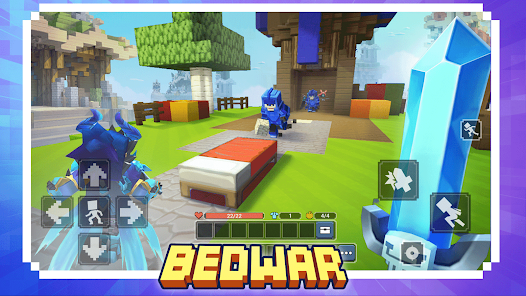
Blockman Go provides an expansive sandbox platform featuring hundreds of multiplayer minigames, including Bed Wars, Sky Block, Egg Wars, Jailbreak, and Hero Tycoon. To unlock premium customization, upgrade weapons, purchase exclusive gear, and access season passes, players rely on GCubes, the primary premium in-game currency. A direct Blockman Go top up through VGTopup allows you to credit GCubes straight to your account using only your numeric User ID, eliminating unnecessary login sharing and keeping your account secure.
Whether you want to dominate competitive Bed Wars matches or build elaborate structures in Sky Block, having a ready supply of GCubes ensures you can obtain essential items whenever limited-time events and shop rotations go live.
What Are Blockman Go GCubes and How to Use Them
GCubes act as the universal premium currency across the entire Blockman Go ecosystem. Unlike standard Gold and BCubes earned through gameplay, GCubes grant access to exclusive items, VIP privileges, and unique perks inside specific minigames.
Core Utility of GCubes in Popular Minigames
- Bed Wars: Purchase exclusive weapon skins, customized sword strike effects, special bed guard designs, teleport trails, and combat rune slots.
- Sky Block: Acquire rare construction materials, automated ore-generating machinery, high-tier farming tools, and expanded island blueprints.
- Hero Tycoon: Unlock premium superhero classes, advanced base security units, and fast-track resource collectors.
- Avatar & Dressing Room: Buy luxury fashion sets, rare animated wings, custom hats, profile backgrounds, dynamic chat bubbles, and emote packs.
- VIP Membership Activation: Convert GCubes directly into VIP, VIP+, and MVP subscription tiers to claim recurring daily rewards and lobby perks.
| Minigame / Feature | GCubes Application | In-Game Benefit |
|---|---|---|
| Bed Wars | Weapon Skins, Runes, Kill Effects | Visual prestige and strategic loadout customization |
| Sky Block | Advanced Builders, Rare Minerals | Faster resource generation and island expansion |
| Hero Tycoon | Premium Hero Unlocks, Speed Boosts | Quicker base completion and combat advantage |
| Global Avatar | Outfits, Wings, Lobby Vehicles | Account-wide cosmetic display across all game rooms |
| VIP Tiers | Monthly Privilege Pass Activation | Daily GCube claims, exclusive badges, queue priority |
How to Find Your Blockman Go User ID
To ensure your recharge arrives at the correct account, you only need to provide your numeric Blockman Go User ID. Follow these steps to find and copy it from your game client:
- Launch the Blockman Go application on your mobile device (Android/iOS) or PC client.
- In the main game lobby, tap your Character Avatar located in the top-left corner of the screen.
- Open the Personal Center profile summary page.
- Locate the numeric string labeled ID or User ID beneath your character name.
- Tap the Copy icon next to the number or record the exact sequence of digits.
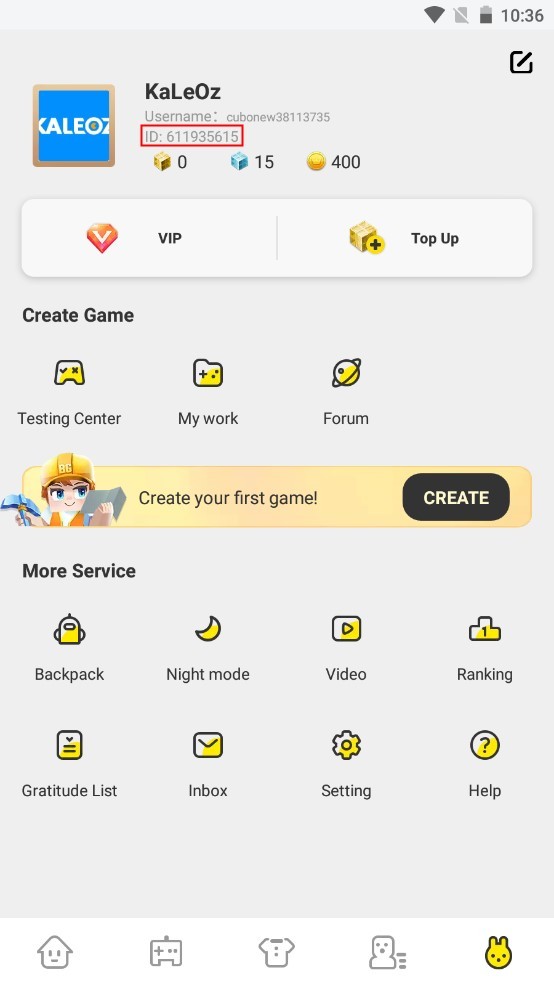
Important: Always submit your numeric User ID rather than your display nickname. Display nicknames can be changed and are not unique identifiers for direct payment fulfillment.
Step-by-Step Guide to Top Up Blockman Go on VGTopup
Recharging your Blockman Go account on VGTopup is straightforward and requires no account passwords:
- Select Your Package: Browse the available GCubes denominations on the live VGTopup checkout page and pick the amount you need.
- Enter Your User ID: Paste your numeric Blockman Go User ID into the designated player input field. Check the number carefully to prevent delivery errors.
- Choose a Payment Method: Pick your preferred payment option supported in your country or region from the checkout screen.
- Complete Checkout: Review your order details and finalize the payment through the secure payment processor.
- Check Your In-Game Balance: Open your Blockman Go client. Your GCubes will be credited to your account balance automatically upon transaction confirmation.
GCubes vs VIP Memberships and Monthly Packages in 2026
Players frequently decide between buying raw GCubes or investing in monthly VIP subscriptions. Both options offer distinct benefits depending on your playstyle:
Direct GCubes Purchases
- Immediate access to large sums of premium currency.
- Full freedom to spend currency on limited-time shop items, gacha draws, or specific minigame perks right away.
- Best choice when targeting a specific seasonal skin or high-cost cosmetic bundle.
VIP and MVP Memberships in 2026
- Provides recurring daily GCube rewards claimed upon logging in.
- Grants special name badges, custom text colors in global chat, and distinctive lobby entrance effects.
- Delivers marketplace fee discounts and weekly reward chests.
- Best choice for active daily players looking to maximize currency value over a 30-day period.
| Feature | Direct GCubes Recharge | VIP / MVP Subscription (2026) |
|---|---|---|
| Delivery Speed | Instant full amount | Daily claims over 30 days |
| Best For | Immediate item/skin purchases | Long-term daily active players |
| Chat & Lobby Perks | None (items only) | Custom chat color, badge, entrance effects |
| Minigame Discounts | Regular pricing | Exclusive VIP store discounts and fee rebates |
Account Safety: Why Password-Free User ID Top-Up Is Safer
Account protection is essential when buying in-game currency online. VGTopup uses direct numeric User ID processing for Blockman Go orders, ensuring a safe purchasing experience:
- Zero Password Sharing: You never have to disclose your account password, email login, or third-party authentication codes (Google Play, Apple ID, Facebook, or Twitter).
- No Risk of Account Takeover: Because third parties never access your login credentials, your inventory, friends list, and private account data remain entirely in your control.
- Direct System Delivery: Orders route straight through standard game ID fulfillment channels, keeping your account compliant with platform terms and avoiding unauthorized login flags.
Frequently Asked Questions About Blockman Go Top-Ups
How do I find my Blockman Go User ID?
Open Blockman Go, tap your avatar icon in the top-left corner of the lobby screen, and open your Personal Center. Your numeric User ID is displayed directly beneath your player nickname. Tap the copy icon to copy the digits.
What can I purchase with GCubes in Blockman Go?
GCubes can be spent on character outfits, rare wings, vehicles, profile frames, and chat bubbles in the global avatar shop. You can also spend them inside minigames like Bed Wars, Sky Block, and Hero Tycoon for exclusive equipment skins, runes, and building tools, or convert them into VIP membership passes.
How to become VIP in Blockman Go in 2026?
To become a VIP member in 2026, recharge your GCubes on VGTopup, launch Blockman Go, navigate to the in-game VIP Center, and activate the VIP or MVP subscription tier of your choice using your GCube balance.
Do I need to share my Blockman Go account password for top-ups?
No. VGTopup only requires your numeric User ID to deliver GCubes. You never need to share passwords, verification codes, or linked social media logins.
Are Blockman Go top-ups available globally for iOS and Android?
Yes. User ID top-ups work globally across all supported mobile operating systems (iOS and Android) as well as the official Blockman Go PC client, provided you submit the correct numeric User ID.
What should I do if my GCubes do not arrive immediately?
First, restart your Blockman Go app to refresh your account data from the game servers. If your GCubes do not appear after a short period, verify the transaction status on your VGTopup order page and contact VGTopup customer support with your Order ID and User ID for prompt assistance.
Select Denomination
Tax, payment fees and eligible coupons are calculated at checkout.
| Package | Price |
|---|---|
| 60 GCubes | USD 0.88 |
| 300 GCubes | USD 4.26 |
| Premium Monthly Card | USD 4.26 |
| Premium Pass | USD 5.97 |
| 600 GCubes | USD 8.52 |
| Luxury Monthly Card | USD 8.52 |
| Subscription LV.2 | USD 8.52 |
| Deluxe Pass | USD 11.09 |
| 1650 GCubes | USD 21.30 |
| Subscription LV.3 | USD 21.30 |
| 3600 GCubes | USD 42.61 |
| 8400 GCubes | USD 85.22 |