No, your wallet balance doesn't move
There's no "send money" button on Steam. People assume their wallet behaves like Venmo or a checking account, and it just doesn't. The Steam Wallet FAQ puts it flatly: "No, your Steam wallet funds cannot be moved or gifted to another Steam account."
Someone always brings up Family Sharing. The logic goes: if I can share my library, surely I can share funds. Nope. Family Sharing lends out games you own, not your balance. Treat them as the same feature and you'll burn an evening hunting for a transfer toggle that was never coded. Want your friend to have spendable credit? You buy a digital Steam Gift Card with an outside payment method, a card or PayPal, since the Steam Gifts FAQ confirms your existing wallet balance can't fund a gift card. They accept it, and the money lands in their wallet.
So the question was never whether to use a gift card. It's which delivery path keeps the cash out of a stranger's hands.
Pick an account from the list. Don't type an email.

If one sentence survives this article, it's this: gift through the Steam friend list, not the email field. The friend-list flow funds the selected account no matter what their display name reads, because there's no text box to fat-finger, no character to botch.
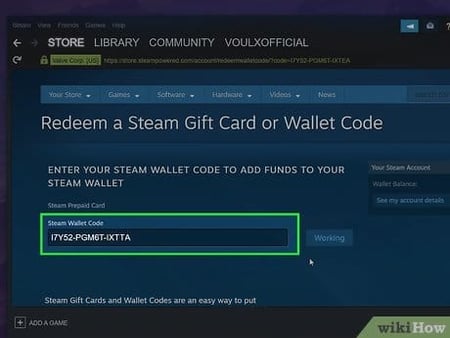
Emailing a code has a real upside. Maybe your friend isn't on your list yet, or you want a code they can stash for later. Reasonable enough. But that convenience is exactly where money evaporates. One wrong character in an email address fires a live, redeemable code into some stranger's inbox, and a screenshot of a code pasted into a loose chat can be grabbed by whoever reads it first. That theft vector shows up again and again in r/Steam reports. Once redeemed, it's gone. The Wallet FAQ leaves no daylight: redeemed codes can't be refunded or transferred.
Here's how I'd lay the options out for anyone about to pay:
| Method |
Wrong-recipient risk |
Region/currency risk |
Refundable if unredeemed? |
Friends first? |
| Friend-list gift |
Very low — pick from list, no typing |
Auto-converts to recipient's currency |
Yes, within 14 days if unused |
Yes — 3 days |
| Emailed digital card |
Higher — one typo misfires it |
Currency fixed at purchase, can mismatch |
Sometimes, if unclaimed |
No |
| Physical/wallet code |
High — code can be intercepted/claimed |
Currency match required to redeem |
No, once redeemed |
No |
Source: Steam Gifts FAQ, Steam Wallet FAQ, Steam community discussions (2026)
Notice the friend-list row wants a relationship at least 3 days old (72 hours), per the Steam Gifts FAQ. You can't add someone and immediately gift them a digital card. So plan a couple of days ahead for a birthday. When I first lined these methods up, that waiting period read like pure friction. Now I read it as a feature, since the picker is the thing that kills the typo risk haunting the email route.
And one mechanic the whole email-versus-list debate keeps ignoring: an unredeemed emailed gift can often be cancelled or re-sent from your Steam purchase history before the recipient claims it. So if you email, then immediately clock that the address was wrong, dig into your gift history right then. That window slams shut the second they redeem.
Verify the account name, not the display name
The single most valuable safety move here has nothing to do with denominations or payment. It's confirming you've got the right human. The trap is that Steam surfaces a display name, which isn't unique and changes whenever someone feels like it. Five accounts can all answer to "xX_Dragon_Xx" today and to something else by tomorrow.
Recognizing your friend's name isn't enough. Names aren't identifiers. What actually pins an account down is one of three stable signals. Community consensus on r/Steam (2026) lands in the same place every time: verify against the exact profile URL, the friend code, or the account username in your friends list before you send. Never the display name on its own.
What to check, where it sits, why it counts:
- Profile URL — open their profile, copy the URL. A custom URL (
/id/theirname) or the numeric /profiles/7656… ID belongs to that account alone. Display names don't.
- Friend code — the short numeric code under their profile or friends panel. Have them read it aloud and match it. Cleanest cross-check for a friend overseas.
- Username in your friends list — at the recipient screen you're picking a list entry tied to an account, not retyping a name. That's the entire safety advantage.
Emailing instead? This is where it turns dangerous. You have to match the exact inbox, with no list to catch you. Confirm the address character by character with your friend directly, not from memory, not from a stale chat. A display name typed into an email field is exactly how funds reach a stranger, a failure mode flagged across Steam community threads.
Sending it through your friend list, step by step
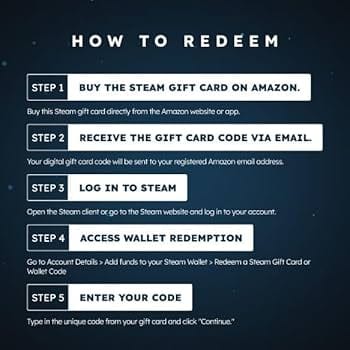
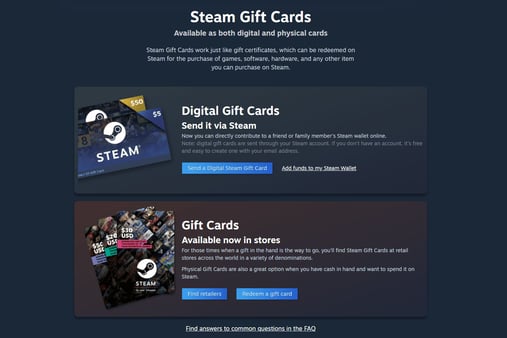
Short mechanics, by design. The Steam Digital Gift Cards page lays out the sequence:
- Log into Steam and head to
store.steampowered.com/digitalgiftcards.
- Pick a denomination — US cards come in $5, $10, $25, $50, $100.
- Choose your friend from the list (relationship aged past the 3-day mark).
- Review the recipient screen.
- Pay with an external method and send.
Step 4 deserves a beat. The recipient screen tells you who the gift is headed to. Read it, match it against the profile URL or friend code you confirmed earlier, then pay. Your friend accepts or rejects the gift, and funds hit their wallet on acceptance, per the same store page. Nothing's irreversible until they redeem, which is why verification belongs right here, ahead of checkout, instead of buried in a frantic support ticket afterward.
The denomination spread is deliberate. The full US tier runs a clean five-step ladder:
| Amount |
Delivery |
Requirement |
| $5 |
Friend list |
3-day friendship |
| $10 |
Friend list |
3-day friendship |
| $25 |
Friend list |
3-day friendship |
| $50 |
Friend list |
3-day friendship |
| $100 |
Friend list |
3-day friendship |
Source: Steam Digital Gift Cards page (2026)
For a casual gift I'd reach for the $10 or $25. Enough to cover a sale title without leaving some awkward orphan balance. The $100 is for splitting a big-ticket present, not a last-minute birthday afterthought.
Currency mismatch kills more gifts than typos do
Here's the read that runs against the grain: the wrong-account panic is overblown for the friend-list flow, and the real top failure mode is region and currency lock. A digital card's currency gets fixed the instant you buy it, and the recipient's account country has to line up. Buy a mismatched card and redemption is blocked, per Steam community discussions (2026).
The friend-list method eases this because it auto-converts to the recipient's currency, according to those same community threads, which is a real point in favor of the list over a physical code where currency match is mandatory. But "eases" isn't "erases." Steam's own gifting rules note that cards bought in one region "may convert or restrict based on the recipient's account currency," per the Steam Gifts FAQ. So gifting across borders is the scenario most likely to spit out an unredeemable code.
If your friend's in another country, say you're in the US and they're in the EU, UK, India, or Brazil, the safe play is matching the currency to their account from the start rather than betting on conversion. A card already denominated in their region removes the redemption gate entirely.
Disclosure: if matching the right regional currency is the hard part, third-party listings like Steam Gift Card top up let you browse cards by currency, so you can pick the one that fits your friend's account country before paying. Same currency-matching logic the official store applies, just easier to filter.
The neutral point holds no matter where you buy: the card's currency must match the account that redeems it. That's the check nobody warns you about.
The money's gone — except in one narrow window
If you funded the wrong place, recovery hinges on a single question: has the code been redeemed yet?
The line is sharp. Unredeemed wallet funds you bought on Steam are refundable within 14 days, provided you haven't touched any of them. The Wallet FAQ spells it out: "You may request a refund for Steam Wallet funds within fourteen days of purchase if they were purchased on Steam and if you have not used any of those funds." Once a code is redeemed into someone's wallet, the road ends. No refund, no transfer.
Mapped against the panic scenarios:
| Scenario |
Recoverable? |
| Emailed card, not yet claimed |
Often — cancel/re-send from purchase history before it's redeemed |
| Friend-list gift, not yet accepted |
Yes — within the 14-day unused window |
| Wallet funds purchased on Steam, untouched |
Yes — refund within 14 days |
| Code already redeemed (any path) |
No — funds are non-refundable, non-transferable |
Source: Steam Wallet FAQ, Steam Gifts FAQ (2026)
Steam Support can help in exactly one situation: the money hasn't been spent or redeemed. The instant it lands in a stranger's wallet and they touch it, policy hands you nothing. Don't build your plan around a sympathetic support agent. Build it around verifying before you pay, because that's the only stage where you hold any leverage.
Run this order every time
Do this and a misdirected or dead-on-arrival gift becomes nearly impossible. Gift through the friend list so you select an account instead of typing one. Confirm the recipient against their profile URL or friend code, not the display name. Make sure the card's currency matches their account country before paying. And treat the recipient screen at checkout as your last verification gate, because redemption is the point of no return. Two days of lead time covers the 3-day friendship rule. After that, the only call left is the denomination.
Frequently Asked Questions
Can you add money directly to someone else's Steam Wallet?
No. Steam allows no direct wallet-to-wallet transfers whatsoever, per the Steam Wallet FAQ. The only sanctioned way to fund a friend is sending a digital gift card they accept into their own wallet. There's no hidden "send balance" toggle, and Family Sharing shares games, not money.
Do you have to be friends on Steam before sending a gift card?
For the friend-list method, yes, and the friendship has to clear at least 3 days (72 hours), per the Steam Gifts FAQ. No instant-add-then-gift shortcut exists for digital cards. If you genuinely can't wait, a region-matched code bought elsewhere skips the friend requirement, but you forfeit the picker's anti-typo safety.
What happens if I send a Steam gift card to the wrong account?
If it hasn't been redeemed, you may still get it back. Cancel an unclaimed emailed gift from your purchase history, or lean on the 14-day refund window for unused funds. Once the recipient redeems the code into their wallet, it's permanently non-refundable and non-transferable. Speed decides everything here, so check your gift history the moment you suspect a slip.
Is a Steam Wallet gift card region locked for a friend abroad?
It can be. A card's currency is fixed at purchase and must align with the recipient's account country, or redemption gets blocked, per Steam community reports (2026). The friend-list gift auto-converts in plenty of cases, but cross-border gifts still fail most often. Buy a card already denominated in your friend's region to clear the gate.
Does a Steam Wallet code expire?
Steam's digital wallet codes are generally treated as non-expiring once issued, but the bigger constraint isn't expiry. It's redemption permanence. The second a code is redeemed it becomes balance that can't be refunded or moved, per the Steam Wallet FAQ. So the real deadline isn't a date on a calendar. It's the click that turns a recoverable code into locked funds.







Comments