
Knives Out Vouchers Top Up Guide and Overview
Knives Out is an intense battle royale game where tactical awareness, swift reflexes, and custom style determine your survival on the battlefield. Vouchers serve as the premium currency within Knives Out, giving players the ability to acquire exclusive character outfits, weapon skins, vehicle paint jobs, and seasonal battle passes.
Acquiring vouchers directly through your Character User Identification (UID) and selected game server allows you to bypass the need for third-party account log-ins. On VGTopup, the recharge process sends currency directly to your game account without requiring your account password or sensitive login credentials.
What Are Knives Out Vouchers and In-Game Benefits
Vouchers are the primary premium currency used across Knives Out servers. While regular battle points and silver coins can be earned through gameplay, high-tier cosmetic items and seasonal expansion passes require vouchers.
Key benefits of having vouchers in your balance include:
- Access to the Battle Pass: Unlock premium seasonal pass tiers to earn exclusive rewards, avatar frames, and bonus vouchers as you rank up.
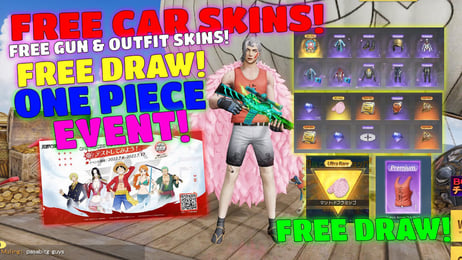
- Vehicle Customization: Knives Out is famous for its licensed supercars, custom sports coupes, and armored vehicle skins. Vouchers give you direct access to vehicle gacha draws and limited-time vehicle packs.
- Weapon Camouflages: Upgrade your arsenal with kill-counter weapon finishes, special reload animations, and holographic sights.
- Character Cosmetics: Stand out in the lobby and on the dropship with rare outfits, themed headgear, wingsuits, and parachutes.
- Supply Packs and Draws: Participate in limited-time collaboration events and themed lucky draws that feature special crossover items.
How to Top Up Knives Out Vouchers on VGTopup
Recharging your account on VGTopup takes only a few quick steps. Follow this straightforward process to complete your purchase:
- Select the Knives Out Voucher denomination you wish to purchase from the live product options.
- Enter your Knives Out UID in the specified player ID field.
- Enter your Server name (such as Global, North America, or Japan Server) exactly as it appears in your game client.
- Review the final order details and dynamic pricing displayed on the live checkout interface.
- Select your preferred local or international payment option and complete the transaction.
- Open Knives Out on your device to confirm your updated voucher balance.
How to Find Your Knives Out UID and Server
To ensure your vouchers arrive at the correct account, you must locate your specific numerical User ID and the exact server your character resides on.
Follow these steps inside the Knives Out application:
- Launch Knives Out on your mobile device or PC.
- On the main lobby screen, look at the top-left corner and tap on your Avatar / Profile icon.
- In your personal profile overview, locate your Character ID (UID), which is a sequence of numbers displayed under your character name.
- Tap the copy icon next to your UID to copy the digits directly to your clipboard.
- Note the Server name displayed at the login screen or within your profile settings (e.g., North America, Global, Japan).
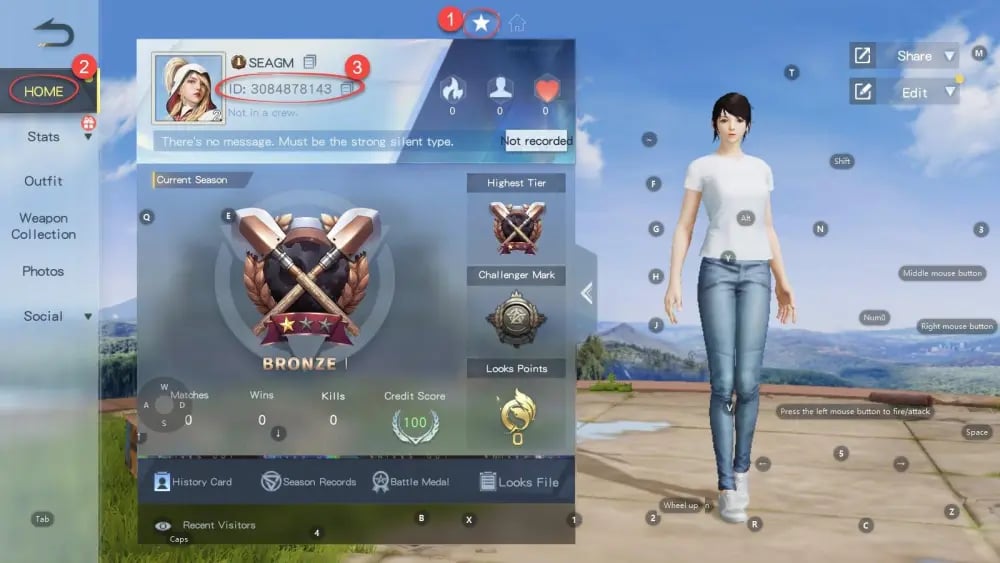
Always double-check your UID digits before placing an order to avoid delays or misdirected currency delivery.
In-Game Items to Unlock with Vouchers
Having an active balance of Knives Out Vouchers allows you to participate in all current 2026 events and customize your gameplay experience. Here is a breakdown of what you can acquire:
- Elite Season Passes: Purchasing the upgraded pass provides immediate access to high-value cosmetics and accelerates your level progression with exclusive missions.
- Legendary Weapon Skins: Enhance sniper rifles, assault rifles, and submachine guns with progressive skins that evolve appearance and kill-broadcast alerts.
- Exclusive Supercars and Sports Coupes: Drive across the map in high-performance vehicle skins that feature custom engine sounds, drift particle effects, and specialized garage displays.
- Collaborative Crossover Bundles: Knives Out frequently features anime, automotive, and pop-culture events with time-limited cosmetic bundles that can only be pulled with vouchers.
Direct UID Recharge vs Redeem Code Differences
Understanding how your top-up is fulfilled helps ensure a smooth buying experience. Direct top-up offers several distinct advantages over manual gift card code redemption.
| Feature | Direct UID Recharge (VGTopup) | Digital Redeem Code |
|---|---|---|
| Delivery Method | Automatic direct-to-account credit | Manual code entry via external website |
| Account Safety | Requires UID & Server only (No password) | Requires third-party account log-in to redeem |
| Input Errors | Verified at purchase before sending | Typo risks during 16-digit code entry |
| Regional Restrictions | Bound directly to selected Server | Codes can be strictly region-locked |
| Fulfillment Speed | Immediate balance update upon processing | Manual multi-step activation required |
Why Top Up Knives Out on VGTopup in 2026
VGTopup provides a dedicated platform tailored for mobile battle royale enthusiasts seeking safe and efficient account refills.
- Zero Account Risk: You never share your account login, password, or third-party social media bindings. All recharges process purely through public player identifiers (UID and Server).
- Transparent Live Checkout: Prices and localized checkout options are calculated live on screen so you know the exact cost before confirming your order.
- Global Server Coverage: Whether you play on global servers, North American regions, or regional servers, VGTopup accommodates your profile setup.
- Responsive Support: If you ever experience issues with server identification or order details, dedicated support is ready to assist you through resolution.
Frequently Asked Questions About Knives Out Recharge
How do I find my Knives Out UID and Server?
Open Knives Out, tap your profile avatar in the upper left corner of the main menu, and look directly below your username. Your numerical UID will be displayed with a convenient copy button. Your server is listed on the game launch screen and in your basic account settings.
How long does it take for Knives Out Vouchers to arrive after purchase?
Once your payment is confirmed on VGTopup, the system processes the voucher delivery directly to your account. In most cases, the vouchers reflect in your balance almost immediately. If you are currently logged in, restart the game client to refresh your currency counter.
Do I need to provide my Knives Out login password to recharge?
No. VGTopup only requires your in-game UID and Server name. You will never be asked for your login password, Apple ID, Google Play credentials, or social media bindings.
What in-game items can I buy with Knives Out Vouchers?
You can use vouchers to buy the seasonal Battle Pass, unlock weapon skins, pull for exclusive sports car camos, purchase outfit bundles, and participate in special collaboration gacha events.
Can I top up Knives Out Vouchers for a friend using their UID?
Yes. Because the top-up system relies only on the UID and Server, you can enter your friend's character details during checkout. The vouchers will be delivered straight to their in-game account.
What should I do if I entered the wrong UID or Server during checkout?
If you realize you entered an incorrect UID or server, contact customer support immediately before the order status updates to completed. Once an order is processed to a valid UID on the game servers, the transaction cannot be reversed.
Select Denomination
Tax, payment fees and eligible coupons are calculated at checkout.
| Package | Price |
|---|---|
| 60 + 5 Vouchers | USD 0.87 |
| 180 + 10 Vouchers | USD 2.63 |
| 300 + 16 Vouchers | USD 4.38 |
| 680 + 36 Vouchers | USD 8.71 |
| 1280 + 110 Vouchers | USD 17.43 |
| 1980 + 180 Vouchers | USD 26.15 |
| 3280 + 320 Vouchers | USD 43.58 |
| 6480 + 550 Vouchers | USD 87.17 |