
Harry Potter Magic Awakened Top Up for Global & Regional Servers
A Harry Potter Magic Awakened top up gives you direct access to premium in-game resources so you can stay competitive in Dueling Club matches, clear difficult Forbidden Forest levels, and collect the latest deck archetypes. Whether you need currency to pull on limited-time Card Study banners, spin the Mystery Wheel, or unlock the Magic Pass, refilling your balance through VGTopup provides an efficient way to get items straight into your account.
VGTopup offers direct user ID recharge services across all active NetEase global and regional servers in 2026. You can process your order without providing account passwords, logging into third-party portals, or navigating complex voucher redemption steps.
What Are Jewels and Starstones in Harry Potter: Magic Awakened?
Understanding the currency system helps you decide which pack fits your current in-game goals:
- Jewels: The primary paid currency in the game. When you buy Harry Potter Magic Awakened Jewels, they are credited directly to your balance. Jewels can be converted into Starstones at a 1:1 ratio or used to buy exclusive daily, weekly, and seasonal bundles in the Diagon Alley shops.
- Starstones: A converted premium currency used for direct card draws in Advanced Study banners, resetting shop inventories, purchasing cosmetic outfits, unlocking wand skins, and participating in the seasonal Mystery Wheel.
- Gems: The standard progression currency earned through daily activities, story chapters, and achievement milestones. While free gems support steady progression, high-tier cosmetic items and value bundles often require Jewels or Starstones.
- Magic Pass & Value Bundles: Monthly passes and limited-time supply packs provide bonus Clockturn Keys, Ruby Keys, Echo crystals, and Gold at a discounted rate compared to raw currency conversion.
How to Top Up Harry Potter: Magic Awakened on VGTopup
To complete your Harry Potter Magic Awakened recharge, follow these four simple steps:
- Select Your Item or Jewel Amount: Browse the live product catalog on VGTopup and choose the Jewel denomination or supply pack you wish to purchase.
- Enter Your User ID and Server: Type your in-game User ID into the input field and select your exact server name from the drop-down list.
- Proceed to Secure Checkout: Choose your preferred regional payment method and review the order details on the live checkout page.
- Receive Your Items: Once the payment is verified, the system transfers the items directly to your in-game profile via server sync. Open your game client to verify your new Jewel balance.
How to Find Your Game User ID and Server Name
To prevent delivery errors, ensure you submit your exact numerical User ID and the correct server name where your character lives. Follow these steps inside the game:
- Launch Harry Potter: Magic Awakened on your mobile device or PC client.
- Tap the Knapsack / Bag icon located in the bottom-right corner of the main screen.
- Tap the Info button on the bottom-left of the Knapsack menu.
- You will see your character avatar, display name, User ID (a series of numbers), and assigned Server Name.
- Tap the copy icon next to your User ID to copy it directly to your clipboard.
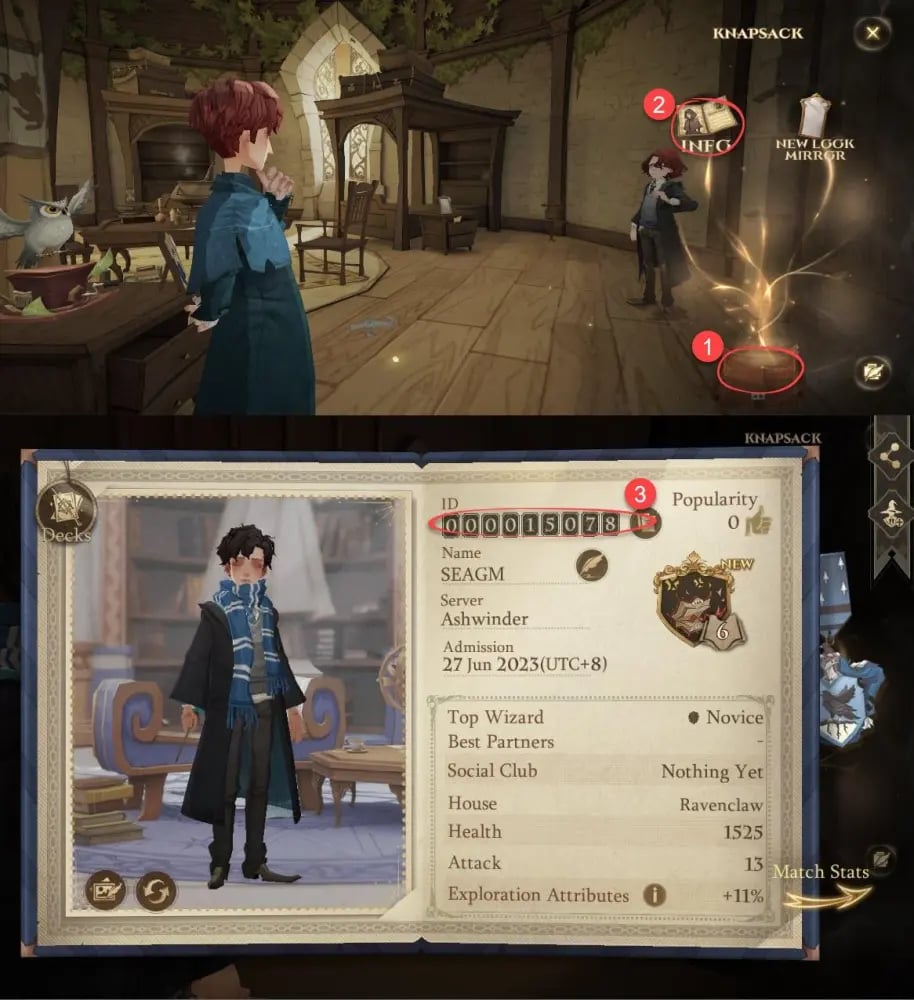
Double-check that the server selected on VGTopup matches the server name listed on your Info screen before completing your payment.
Supported Global and Regional Servers List
VGTopup supports top-ups across all active NetEase server clusters. If you migrated your account or created a profile on international servers, select your matching server cluster during checkout:
| Server Name | Cluster / Target Region | In-Game Language Support |
|---|---|---|
| Ashwinder | Global / Southeast Asia | English, Multi-Language |
| Sphinx | Global / Southeast Asia | English, Multi-Language |
| Rougarou | Global / Americas | English, Spanish, Portuguese |
| Erumpent | Global / Americas | English, Spanish, Portuguese |
| Kelpie | Global / Oceania | English |
| 不死鳥 (Phoenix) | Asia / Traditional Chinese | Traditional Chinese, English |
| 니플러 (Niffler) | Asia / South Korea | Korean, English |
| ユニコーン (Unicorn) | Asia / Japan | Japanese, English |
Selecting the correct server ensures that the NetEase database identifies your character profile immediately upon transaction confirmation.
Direct User ID Recharge vs NetEase Pay Redemption Codes
When purchasing in-game content, players typically choose between two payment routes:
- Direct User ID Recharge (VGTopup): You only enter your numeric ID and select your server. The items credit automatically to your game wallet without opening external websites or entering 16-digit codes. This eliminates typing mistakes and region-mismatch errors.
- NetEase Pay Prepaid Vouchers: Buying physical or digital voucher pins requires logging into separate redemption portals, selecting local currencies, and copying long alphanumeric keys. If a player purchases a voucher locked to a different region, the code may fail to activate.
Direct UID recharges eliminate these friction points, providing a streamlined way to acquire your resources without region-locking hurdles.
Safe and Password-Free Top-Up Protection
Account security is critical when managing your card collection and progression. VGTopup operates strictly on public identifier processing:
- No Password Required: We never ask for your NetEase login credentials, email passwords, or third-party social tokens (Google, Apple, Facebook, or Twitter).
- Official Delivery Protocol: Items are credited through standard server billing pathways, keeping your account fully compliant with game terms of service.
- Zero Risk of Account Lockouts: Because no third party logs into your profile to make purchases, your account remains free from suspicious login flags, dual-location IP blocks, or temporary security holds.
Troubleshooting Delivery Delays and Account Discrepancies
If your Jewels or pack items do not appear immediately after completing your order, check the following points:
- Restart the Client: Close the game completely and re-launch it to force a fresh data sync with the game server.
- Check the In-Game Mail: Certain special bundle items, bonus keys, or event compensation are delivered to your in-game mailbox rather than directly to the currency counter.
- Verify Submitted Details: Check your order confirmation receipt on VGTopup to confirm that the User ID and Server Name entered match your current profile exactly.
- Contact Customer Support: If the items do not arrive after a few minutes, reach out to VGTopup live customer service with your Order Number, User ID, and Server Name for immediate verification.
Frequently Asked Questions
How do I find my Harry Potter: Magic Awakened User ID and Server?
Open the game, tap the Knapsack (Bag) icon in the lower right, and click the Info tab on the bottom left. Your numerical User ID and current Server Name will appear on your character profile card. Tap the copy icon next to your ID to copy the number.
Which servers are supported for Harry Potter: Magic Awakened top-up?
VGTopup supports all active NetEase servers, including Ashwinder, Sphinx, Rougarou, Erumpent, Kelpie, 不死鳥, 니플러, and ユニコーン. Select your specific server from the checkout menu.
Do I need to provide my NetEase account password to buy Jewels?
No. You only need to provide your public User ID and your active Server Name. VGTopup will never ask for your account password, email access, or social login credentials.
What is the difference between Jewels and Starstones?
Jewels are the base paid currency purchased via top-up. Starstones are converted directly from Jewels at a 1:1 ratio and are used to pull cards in the Advanced Study banner, buy vanity items, and spin the Mystery Wheel.
How fast will the Jewels and supply packs be credited to my account?
Orders placed on VGTopup are processed automatically. In most cases, currency and bundles arrive in your in-game account shortly after payment confirmation. Refreshing the game client helps sync the new balance.
Can US and global players top up on NetEase servers through VGTopup in 2026?
Yes. Global and North American players playing on NetEase servers (such as Rougarou, Erumpent, Ashwinder, or Sphinx) can use VGTopup to make direct in-game purchases using international payment options without regional billing restrictions.
Select Denomination
Tax, payment fees and eligible coupons are calculated at checkout.
| Package | Price |
|---|---|
| 60 Jewels | USD 0.64 |
| 300 Jewels | USD 3.25 |
| Gold Supply Pack | USD 3.53 |
| Monthly Card | USD 3.53 |
| 680 + 70 Jewels | USD 6.51 |
| Ruby Key Pack | USD 7.07 |
| 980 + 165 Jewels | USD 9.76 |
| Clockturn Key Pack | USD 10.50 |
| 1280 + 270 Jewels | USD 13.01 |
| Golden Key Pack | USD 14.03 |
| 1980 + 380 Jewels | USD 19.40 |
| 3280 + 780 Jewels | USD 32.42 |
| 6480 + 2000 Jewels | USD 75.43 |