
Super Sus Top Up: Fast Space ID Goldstar Delivery
Super Sus is an intense social deduction party game where spaceship crew members complete maintenance tasks while identifying hidden impostors and neutral factions. To customize your character, gain early access to newly released roles, and unlock seasonal cosmetics, you need Goldstar—the primary premium currency in the game.
A Super Sus top up on VGTopup allows you to acquire Goldstars instantly without sharing your private account credentials. By using your in-game Space ID, our automated delivery system sends Goldstars directly to your game profile so you can resume playing without interruptions.
How to Top Up Super Sus Goldstar Using Space ID
Recharging your Goldstar balance on VGTopup is straightforward and requires only basic account details. Follow these simple steps to complete your purchase:
- Select Goldstar Amount: Browse the available Goldstar packages on the VGTopup product page and pick the denomination you wish to buy.
- Enter Space ID: Input your Super Sus Space ID accurately into the required field.
- Select Payment Option: Choose your preferred payment method on our checkout screen.
- Confirm Your Order: Review your details and finalize the payment. Current live rates and options are displayed in real time on the checkout interface.
- Check In-Game Balance: Once the transaction is confirmed, launch Super Sus on your device to see your updated Goldstar balance or collect the currency directly from your in-game system mail.
Where to Find Your Super Sus Space ID in the App
Your Space ID is a unique numerical identifier assigned to your account. You do not need to share your email or login password to make a purchase—your Space ID is all that is required.
- Launch Super Sus on your iOS or Android device.
- Tap your Avatar/Profile icon located in the upper-left corner of the main lobby screen.
- Stay on the main Personal Info tab.
- Look directly below your character's nickname to find your Space ID (a series of numbers).
- Tap the Copy icon next to your Space ID to ensure you paste the exact digits without typographical errors.
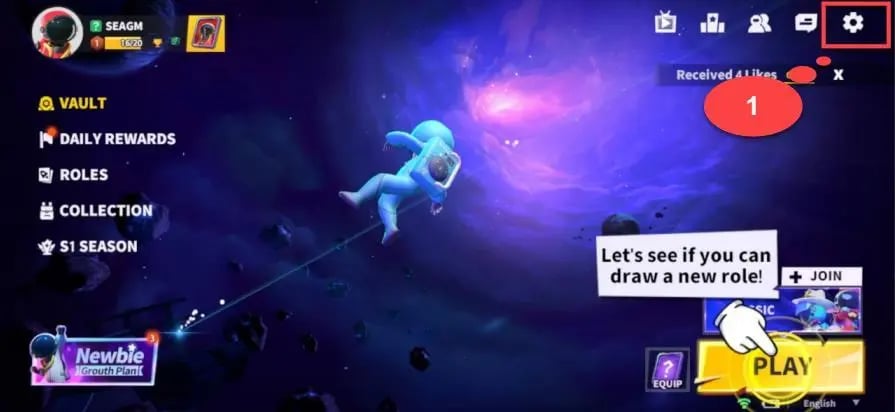
Always double-check that you have copied the complete number string before placing your order on VGTopup.
Super Sus Currency Guide: What You Can Buy with Goldstar
Goldstar is the core currency for unlocking premium game features, progressing through competitive seasons, and personalizing your social space. Here is an overview of what you can obtain using Goldstar:
| Feature / Item | Currency Used | Benefits & Unlocks |
|---|---|---|
| Super Pass | Goldstar | Unlocks premium seasonal reward tracks, exclusive outfits, and bonus Cookies. |
| Super Pass Plus | Goldstar | Grants instant tier skips, unique nameplates, and exclusive seasonal banners. |
| New Character Roles | Goldstar / Cookies | Direct early access to specialized Spacecrew, Impostor, and Neutral roles. |
| Lucky Wheel & Gacha | Goldstar | Access to limited-edition legendary costumes, weapons, and kill animations. |
| Profile Accessories | Goldstar | Custom chat bubbles, action cards, profile frames, and intro animations. |
| Name Change Card | Goldstar | Allows you to update your display nickname in the game lobby. |
Unlocking the Super Pass
The Super Pass is one of the most cost-effective investments in Super Sus. Purchasing the pass with Goldstar gives you access to dozens of tiers containing rare outfits, dance emotes, and bonus in-game resources as you complete daily and weekly challenges.
Character Roles and Early Access
While standard roles can often be acquired through regular gameplay and Cookies, new role releases frequently feature Goldstar options for immediate access. Unlocking roles like the Joker, Arsonist, Sheriff, or Janitor gives you broader tactical choices during matches.
Account Safety: Why You Never Need to Share Passwords for Top-Ups
Security is paramount when buying digital currencies online. Legitimate Super Sus top-up services only require your public Space ID to direct the purchase to your profile.
- Zero Password Requirements: VGTopup will never ask for your account password, social media logins (Facebook, Google, Apple ID), or verification codes.
- Protection Against Phishing: Third-party sites asking for login credentials put your account at risk of unauthorized access or permanent bans. Space ID-based top-ups ensure that your private data stays secure.
- Official Server Delivery: Transactions routed via user identification interact directly with the game's official balance system, maintaining compliance with user safety standards.
Order Troubleshooting and What to Do If Goldstars Do Not Appear
In rare instances where your Goldstar delivery does not show up immediately, run through the following troubleshooting steps:
- Restart the Game App: Force close Super Sus completely and relaunch it. This prompts the game client to refresh its connection with the central server and update your wallet balance.
- Check Your In-Game Mailbox: Certain promotional packages or bonus currencies are delivered as system messages. Check the envelope icon on the main menu to claim any pending attachments.
- Play One Quick Match: Completing a brief casual game or practice match can trigger an account sync with the game server.
- Verify Space ID Accuracy: Check the receipt sent to your email from VGTopup. Ensure the Space ID you entered matches your current profile ID.
- Contact VGTopup Support: If your balance does not update after 15–30 minutes, reach out to VGTopup customer support with your Order ID and Space ID. Our support team can verify the delivery status on the network.
Why Choose VGTopup for Super Sus Recharge
VGTopup provides a streamlined platform for mobile gamers looking for reliable currency top-ups:
- Direct ID Processing: Safe transactions handled using only your Space ID.
- Clear Pricing: All live prices and regional payment methods are visible directly on the checkout screen without hidden platform fees.
- Fast Automated System: Orders are processed immediately by our dispatch servers to get you back into the match quickly.
- Dedicated Assistance: Multilingual support agents are ready to assist you if you have questions regarding your order status.
Frequently Asked Questions About Super Sus Top Up
Where can I find my Super Sus Space ID?
You can find your Space ID by tapping your profile avatar in the upper-left corner of the Super Sus home screen. Your Space ID is the numeric code shown directly beneath your player nickname.
Do I need to share my Super Sus password to top up Goldstar?
No. You never need to share your password, email login, or verification codes. VGTopup only needs your Space ID to process your Goldstar recharge.
How fast will the Goldstar be credited to my Super Sus account?
Most orders are processed automatically and credited to your account within minutes of successful payment confirmation. During peak network times, restarting your game app can help reflect the balance.
Can I use Goldstars to unlock the Super Pass in Super Sus?
Yes. Once the Goldstars are delivered to your balance, you can open the in-game Super Pass menu and purchase the regular Super Pass or the Super Pass Plus bundle.
What should I do if I entered the wrong Space ID during purchase?
Top-up transactions are processed automatically to the ID provided. If an order has already been completed to an active, valid Space ID, it cannot be reversed. If the ID was invalid or the order is still pending, contact VGTopup support immediately with your transaction details.
Which payment options can I use to top up Super Sus on VGTopup?
VGTopup supports multiple local and international payment methods, including credit cards, e-wallets, and regional banking systems. Available payment methods and real-time prices are listed on the live checkout page.
Select Denomination
Tax, payment fees and eligible coupons are calculated at checkout.
| Package | Price |
|---|---|
| Weekly Card | USD 0.66 |
| 100 Golden Stars | USD 0.66 |
| 310 Golden Stars | USD 1.97 |
| 520 Golden Stars | USD 3.29 |
| Super Pass | USD 3.29 |
| 1060 Golden Stars | USD 6.63 |
| Super Pass Bundle | USD 6.63 |
| Monthly Card | USD 7.15 |
| Super VIP Card | USD 7.98 |
| 2180 Golden Stars | USD 13.62 |
| 5600 Golden Stars | USD 34.94 |