The deadline isn't where you think it is
Nearly every missed-event sob story I've come across boils down to one mistake: people read the timer like a rolling 24-hour stopwatch when it's actually a fixed server-reset cutoff. Take the CP Ferris Wheel run, which handed out 1500–2000 diamonds weekly through tasks from Feb 5–28, 2026 per BitTopup's event coverage. That window closed on a server schedule. Not on the day you happened to join.
Two moves before you so much as glance at a payment page:
- Read the in-app countdown, then translate it into your local time. The figure on screen hangs off server reset, and for a MENA-leaning app that usually means an Arabian-region timezone rather than wherever your couch happens to be.
- Carve out your buffer. Store closes at midnight server time and you're three hours behind? Your personal deadline sits earlier than the clock implies, minus whatever cushion the table below recommends.
Now the bit worth tattooing on the inside of your eyelids: these timers fire off the daily server reset, and a pending payment can technically deliver after the timer dies. But the store may already be locked, which leaves you clutching Diamonds you bought for a prize you can no longer claim. The Diamonds survive. The chance doesn't.
How early to actually stop
Buffer logic, built by adding up typical gateway processing and the delivery lag that follows it.
| Your situation |
Stop buying before cutoff |
Why |
| Standard card / wallet checkout |
15 min |
Covers normal gateway confirmation + a sub-5-min delivery window |
| First payment on a new platform |
25–30 min |
Add account/region verification on top of normal lag |
| Gift-card redemption route |
30 min |
Code redemption plus in-app wallet crediting are sequential steps |
Source: synthesized from delivery-window descriptions per MooGold and EnjoyGM (2026); buffer recommendations are editorial.
Fifteen minutes is my floor. Thirty is the ceiling I'm comfortable with. Buying at T-minus-two is just asking for it, since gateways and delivery confirmation routinely swallow that window whole, and nobody runs an appeals desk for a clock that already hit zero.
How to buy, in the order that prevents mistakes
Short flow. But the order carries weight, because the things that go wrong cluster at the front (wrong ID) and the back (wrong timing).
Start with your player ID. Open the app, tap the Me icon down in the bottom right, and your UID sits tucked under your nickname. Copy it exactly, per the Yaahlan App Store description. Fumble one digit and your Diamonds go to a complete stranger, with no way back.
Then pick a route. Two on the table:
- In-app IAP — the App Store version, full sticker price, zero region-mismatch headaches.
- Direct-ID third-party top-up — you paste the UID into the platform, grab a pack, pay, and Diamonds drop onto that account. EnjoyGM, BitTopup, MooGold and the rest all run this model, and it's where the discounts hide (per the EnjoyGM top-up flow, 2026).
Third, and this is the step deadline panic loves to erase: confirm delivery before you call it done. Reopen the app, eyeball your Diamond balance. A "complete" banner on the platform isn't proof, not when an event store is seconds from locking.
Prefer to skip in-app checkout altogether? Yaahlan top up runs the identical direct-ID flow. Keep your player ID handy and check the in-game balance before the timer runs out. (Disclosure: VGTopup publishes this article. The buying advice holds up on its own, and the neutral price arithmetic below is what ought to settle your decision.)
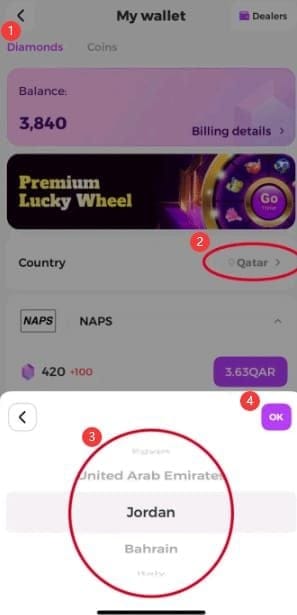
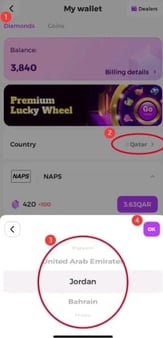
Gift-card holders take a different road: launch the app, head to My Wallet → Wallet-Diamond, choose your country, redeem the code, per the Razer Gold catalog flow (2026). Pay attention to that country picker. It's the precise spot where region locks sink their teeth in.
Which pack actually wins on cost-per-Diamond
The official store hands you a clean baseline. Here's the App Store IAP ladder.
| Pack |
Diamonds |
Price (USD) |
Cost per Diamond |
| Small |
840 |
$1.99 |
~$0.00237 |
| Medium |
1,680 |
$3.99 |
~$0.00238 |
| Mid |
6,300 |
$14.99 |
~$0.00238 |
| Large |
21,000 |
$49.99 |
~$0.00238 |
| XL |
67,200 |
$159.99 |
~$0.00238 |
Source: Yaahlan App Store IAP list (2026).
Look what falls out: the official tiers barely budge on per-Diamond cost. That $1.99 entry pack and the $159.99 behemoth settle at essentially the same rate, somewhere around $0.00237–$0.00238 apiece, with the $14.99/6,300 bundle pegged near $0.00237 per the EnjoyGM and App Store cross-reference (2026). On the App Store by itself, "buy bigger to save" is a fairy tale. There's no volume discount worth chasing.
The arithmetic only cracks open over on the third-party discount side. Eyeball the EnjoyGM snapshot.
| Pack |
Diamonds |
Price |
Discount vs IAP |
| Entry |
3,000 |
$5.61 |
44% |
| Mid |
10,800 |
$20.21 |
33% |
| Large |
29,000 |
$54.27 |
23% |
| XL |
55,000 |
$102.93 |
32% |
Source: EnjoyGM (2026-05).
Two things to chew on. The cuts run roughly 30–44% against equivalent IAP packs, and they refuse to scale in a tidy line. The smallest listing carries the steepest reduction at 44%, while that 29,000 "Large" is the flabbiest deal of the bunch at 23% off. Which neatly inverts everything whale logic tells you. Spending to clear an event store? The contrarian move is usually the entry or mid-tier discounted pack, not the headline bundle the storefront wants you to grab.
When I first stacked the App Store ladder against that discount table, the size of the gap is what grabbed me. But it was the non-linear discount that genuinely rewired how I'd buy. The smart play isn't "round up to the next big pack, just in case." It's matching Diamonds to your real event-store cost and buying the tier that clears it at the lowest blended rate.
Community guides keep referencing event-period double-diamond and recharge bonuses. I don't have a sourced, current multiplier to hand you, and I'm not about to fabricate one. The principle survives anyway: any live bonus drags effective cost-per-Diamond downward, and a mid-tier pack riding one can flat-out beat a larger pack bought cold. Spot a double-bonus window in-app? Recompute before you reflexively reach for the big bundle. The number, not the pack name, picks the winner.
What to do when delivery stalls or a payment fails
Most of the "Yaahlan top up not working" hysteria is timezone confusion wearing a broken-transaction costume. That's my read, watching how these complaints bunch up right around event endings. Real stalls do happen, though, so here's the triage for those closing minutes.
Pending and failed are not cousins. A pending payment still sits in the gateway's hands and might resolve, sometimes after the timer's gone. A failed one bounced and won't fix itself. Don't re-buy on a pending order in the last five minutes, or you risk paying double for a single reward slot.
Payment pending with time still on the clock:
- Lay off the refresh-spamming. Wait out the platform's stated delivery window (minutes, going by the cross-platform descriptions, 2026), then re-check your in-app balance.
- Screenshot your UID and order confirmation. If support gets involved, that's your paper trail.
Outright failed and the clock's tight? Switch payment methods rather than hammering the same one. And remember what the buffer was for: it exists so a failure at T-minus-20 still leaves elbow room for attempt number two.
One trap worth saying out loud: region mismatch. Gift cards bought for the wrong market die at redemption and stay non-refundable under seller policies, per BitTopup's testing (2026). Pricing and packs skew toward MENA/Arabic users, and while global gift cards do exist, community tests have flagged region locks. Match the card's region to your account before paying. There's no undo button.
The last-day plan, by how much you spend
There's no single answer to the last-day top-up question. It splits cleanly by spend level.
F2P / zero-spend. Skip the top-up for most events outright. Live off free login rewards and task payouts like the Ferris Wheel's weekly haul; community guidance is blunt that free players shouldn't recharge unless a specific limited gift truly demands it (per BitTopup's persona guidance, 2026). And if you do crack the seal for one reward, buy exactly the Diamonds the store wants. Not a sliver more.
Low-spender / first-timer. A live first-purchase bonus is the single most valuable Diamond you'll buy the whole event, so don't squander it on the 840-Diamond entry pack. Drop it on a tier that both triggers the bonus and clears your target. (Handy to know: these bonuses sometimes re-fire per pack tier instead of once globally, so the structure may reward a deliberate choice. Read what your in-app offer actually says.)
Mid-spender clearing the full store. Here's where the discount table pays rent. Tally your event-store cost in Diamonds, then assemble it from the cheapest blended combination, leaning on those deep-discount entry/mid packs over the weaker large bundle. Overbuying a 29,000 pack at 23% off to clear a store that wanted 12,000 is how you incinerate value at the buzzer.
The common thread across all three: buy to a target, with a buffer, on a route whose region lines up with your account. Speed never was the hard part.
Frequently Asked Questions
How long does a Yaahlan diamond top-up take to arrive?
Usually a few minutes, often near-instant once a payment clears on direct-ID platforms, per MooGold and EnjoyGM descriptions (2026). Read "instant" as marketing, not a promise, because gateway confirmation can tack on a few minutes before delivery even starts. That's the whole reason the buffer exists. If nothing's credited after the platform's stated window, re-check your in-app balance before declaring it dead.
What time does the Yaahlan event end in my region?
At the server-reset cutoff, never your local clock, and for this MENA-focused app reset tends to track an Arabian-region timezone. Read the in-app countdown, convert it to local time, then shave off your buffer. Sit west of the server timezone and your practical deadline arrives earlier than the displayed number lets on.
Why didn't my Yaahlan diamonds show up after paying?
Three usual suspects, ranked by likelihood: you read local time instead of server reset and the store locked; the payment's pending rather than complete; or the UID went in wrong. Check the in-app balance first. If Diamonds landed but the event store's already closed, that's a timing miss, not a delivery failure, and re-buying solves nothing.
Is the Yaahlan first-purchase bonus available every event?
No official word says it resets per event, so don't build plans around recurring access. What community guidance hints at is that bonus offers can re-trigger per pack tier instead of firing once globally, which means the shape of your buy matters. Read the exact terms on your in-app offer before you commit. Wording shifts by account and promotion.
What happens if I pay during the last minute of an event?
A real shot at losing the reward window. A pending payment can still deliver after the timer ends, but the store may already be locked, so you'd hold the Diamonds without the thing you bought them for, and gift-card-style purchases stay non-refundable per seller policies (per BitTopup testing, 2026). Don't gamble the final two minutes. The buffer rule isn't caution, it's the entire strategy.










Comments