
Arena of Valor Top Up: Quick and Secure In-Game Balance
Arena of Valor (AOV) delivers intense 5v5 MOBA action where quick decision-making and mechanical skill decide every match. Having an adequate balance of Arena of Valor Vouchers allows you to customize your favorite heroes, access exclusive seasonal rewards, and bypass the gold-farming grind for new roster additions. VGTopup provides an efficient platform to complete your Arena of Valor top up directly through your Player ID.
Every order placed on VGTopup is processed automatically through your numerical account identifier. You never need to supply your login credentials, password, or third-party authentication tokens. Select your voucher denomination on the live checkout interface, input your Player ID, and receive your balance straight into your account.
What Are Arena of Valor Vouchers and In-Game Uses
Vouchers serve as the premium currency in Arena of Valor. While standard gold and gems can be earned through daily missions and match victories, premium cosmetics, seasonal passes, and special event draws require vouchers.
2026 Voucher Utility Breakdown
| In-Game Content Category | Primary Voucher Uses in 2026 | Value & Player Benefits |
|---|---|---|
| Valor Pass | Premium tier activation and level skips | Unlocks seasonal hero skins, recall animations, and avatar frames |
| Hero Skins & Effects | Direct shop purchases and limited cosmetics | Provides Legend, Heroic, and special edition visual overhauls |
| Hero Acquisition | Immediate hero roster unlocks | Grants instant access to newly released ranked meta heroes |
| Lucky Draws & Gacha | Magic Crystal purchases and themed lotteries | Grants chances to obtain rare Mythic skins and evolution stones |
| Account Utilities | Rename cards, exp cards, and Arcana pages | Enables profile adjustments and customized rune loadout pages |
Using vouchers for the seasonal Valor Pass remains one of the most resource-efficient choices for active players, returning multiple skin tiers, dance animations, and gold bonuses across its duration.
How to Find Your Arena of Valor Player ID
To ensure your vouchers are credited to the correct profile without delay, you must provide your exact Player ID from within the game client. Your Player ID is a distinct numerical sequence tied to your server profile, separate from your display nickname or OpenID.
Follow these steps inside the Arena of Valor application:
- Launch the Arena of Valor app on your mobile device and log in to your account.
- Tap your Avatar / Profile Icon located in the upper-left corner of the main lobby screen.
- Stay on the primary Profile overview tab.
- Locate your Player ID (a series of numbers displayed near your account details).
- Tap the small Copy icon next to the number to copy it directly to your clipboard.
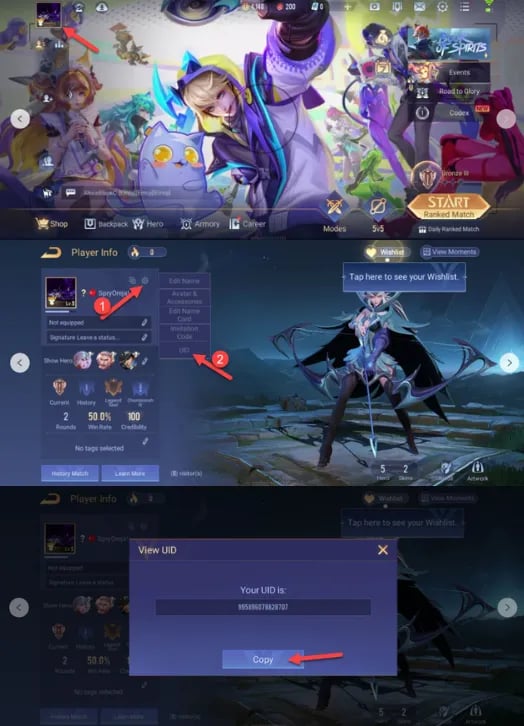
Important Note: Do not submit your in-game nickname or openID string. Using the numeric Player ID copied directly from your profile tab prevents delivery mismatches.
Step-by-Step Guide to Buy Arena of Valor Vouchers on VGTopup
Recharging your account balance on VGTopup takes only a few moments:
- Select Voucher Amount: Review the available voucher denominations on the VGTopup product page and choose the pack that matches your in-game needs.
- Enter Player ID: Paste your numerical Player ID into the designated input field on the order screen.
- Verify Account Details: Double-check your entered ID to confirm there are no missing digits or accidental spaces.
- Proceed to Checkout: Choose your preferred payment option from the live checkout screen and complete the transaction.
- Check In-Game Balance: Open your Arena of Valor client to see your updated voucher total. If the app is already open, restart it to refresh your server profile.
Account Security: Why Player ID Top-Up Protects Your Account
Account safety is essential when purchasing digital currencies online. Traditional top-up methods that require account sharing, login credentials, or temporary passwords expose players to serious security risks, including unauthorized account access, compromised linked social media profiles, and potential platform bans.
VGTopup uses direct-to-ID fulfillment:
- Zero Password Requirements: You will never be asked for your Level Infinite, Facebook, Google, or Apple ID passwords.
- No Account Sharing: Your profile remains strictly under your control on your own device throughout the entire transaction.
- Server-Level Crediting: The vouchers are sent directly to your account's public server ID, matching standard digital fulfillment practices.
- Privacy Protection: Your personal login details remain completely private and unexposed to third parties.
Supported Regions, Server Requirements, and Account Link Verification
Arena of Valor operates on distinct regional servers across Asia, North America, Europe, and Latin America. Before purchasing vouchers, verify that your account is registered on an active regional server matching your client version.
Guest Accounts vs. Linked Accounts
If you are playing on a temporary Guest account, link your profile to a permanent login method (such as Level Infinite Pass, Apple ID, or Google Play) before placing an order. Linking your profile guarantees that your Player ID is permanently registered on the game servers, preventing balance discrepancies if you switch devices or reinstall the game.
Troubleshooting Delivery Status and In-Game Balance Refresh
VGTopup processes voucher orders through direct automated systems. In rare instances where your balance does not update instantly, follow these troubleshooting steps:
- Restart the Game Client: Close the Arena of Valor application completely from your device task manager and relaunch it. This forces the client to fetch updated data from the game server.
- Verify In-Game Mail: Certain bonus vouchers or promotional items linked to specific top-up milestones may appear in your in-game mailbox rather than directly on your balance counter.
- Check Order Confirmation on VGTopup: Review your order status on VGTopup to confirm payment completion.
- Contact Customer Support: If your balance does not update after restarting your client, reach out to VGTopup customer support with your Order Number and Player ID for rapid assistance.
Frequently Asked Questions About Arena of Valor Top Up
How do I find my Arena of Valor Player ID?
Open Arena of Valor, tap your profile avatar in the top-left corner of the main lobby, and locate your numeric Player ID on the main overview screen. Tap the copy icon next to the number to copy it without typing errors.
How to top up Arena of Valor Vouchers on VGTopup?
Select your voucher package on VGTopup, enter your Player ID in the required field, proceed to the live checkout to complete payment, and open your game client to access your new voucher balance.
Do I need to share my game account password to recharge vouchers?
No. VGTopup only requires your public Player ID. You should never share your account passwords, verification codes, or social media logins to purchase vouchers.
What can I buy with Arena of Valor Vouchers in 2026?
You can use vouchers to buy the seasonal Valor Pass, unlock premium Legend and limited-time skins, purchase new hero releases instantly, spin in Lucky Draws, and acquire account utility items such as rename cards.
What should I do if my AOV Vouchers are not delivered immediately?
Restart your game client completely to sync your balance with the server. If your vouchers are still missing, check your in-game mailbox and verify your order status on VGTopup before contacting customer support with your transaction details.
Can I top up Arena of Valor for a friend using their Player ID?
Yes. Because the checkout process only requires a Player ID, you can enter your friend's numeric Player ID at checkout on VGTopup to send vouchers directly to their game account.
Select Denomination
Tax, payment fees and eligible coupons are calculated at checkout.
| Package | Price |
|---|---|
| 130 + 20 Bonus Vouchers | USD 0.96 |
| 650 + 98 Bonus Vouchers | USD 4.81 |
| 1560 + 234 Bonus Vouchers | USD 11.66 |
| 3250 + 488 Bonus Vouchers | USD 24.01 |
| 8450 + 1268 Bonus Vouchers | USD 62.93 |
| 18200 + 2730 Bonus Vouchers | USD 135.23 |