Why the UID is the only number worth sweating
There's no in-app gift button. The shop inside Destiny Rising tops up your logged-in account, and that's where it ends. So funding a friend's stash means going through a third-party service that takes a UID and credits that account straight away (no login to their account, no password handoff), per top-up flows documented across services like LDShop.gg.
The UID is a unique numeric tag bolted to one Guardian profile on one server. Username, display name, friend code, none of those swap in for it. Drop a display name into the UID field and the order just dies, per warnings posted across top-up sites including LootBar (2026). And honestly, that's the kind failure. The nasty version is a numeric slip that happens to land on a real, valid account belonging to somebody you've never met.
Now the bit quick guides love to skip: a UID means nothing on its own. It only resolves when paired with the right server region. Accounts in Destiny Rising bind to whatever region you pick at login, and the game is region-locked. A PSA thread on r/destinyrisingmobile laid it out plainly: your save is chained to that choice. So a UID that looks dead-on but sits behind the wrong server can still misfire, or land somewhere you didn't intend. Checking region isn't polish. It's half of getting the ID right.
Pulling your friend's UID and reading it back before anything else
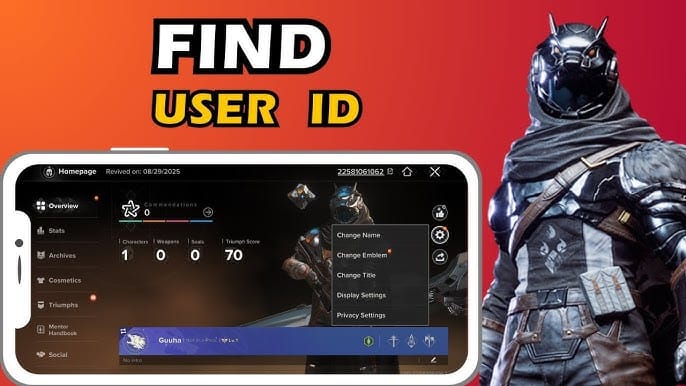
Short menu walk. Have your friend run this on their own device:
- Tap the ghost icon in the top-right of the main screen.
- Open Profile from the top-left of that menu.
- Read the UID in the top-right of the profile page.
That path comes straight from a community walkthrough on YouTube, and it's identical on mobile or PC. The UID is all digits. If what they send you has letters in it, they grabbed the display name by mistake.
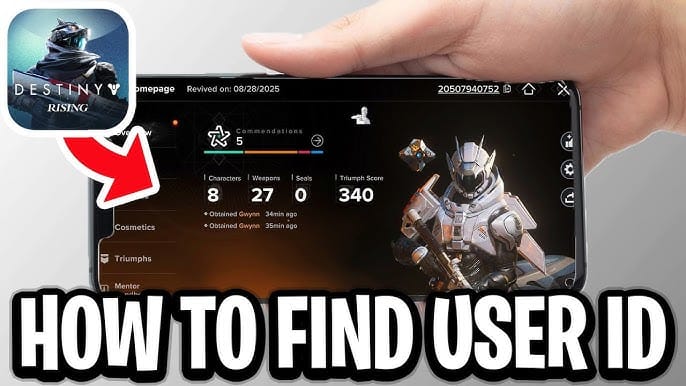
Ask for two things, not one: the UID and the server they play on. I'd push for a screenshot of the profile page over a number typed into chat. Typos sneak in whenever a human re-keys a long string by hand, and a screenshot wipes out that whole failure surface. Costs your friend three seconds, kills the biggest risk in the deal.
If they're foggy on which region they're on, the login screen's region selector is the tell. Whatever's selected there is the binding. Don't guess at it. A confident wrong guess on region is exactly the error that looks fine right up until the confirmation screen, and then doesn't.
The actual top-up flow, end to end
With a verified UID and server in hand, the rest runs on rails. Standard route for gifting is a UID-based third-party service:
- Open the top-up page for Destiny Rising.
- Pick the Silver pack you want.
- Enter your friend's UID and select their server/region.
- Pay through the gateway.
No login, no password, none of the friend-code shuffle. The order wants the UID and server, and on some flows a login method selector plus a display-name confirmation, per the field breakdown on LDShop.gg (2026). The Silver drops onto whatever account that UID points at.
The login-versus-UID split is the cleanest way to see why gifting works like this at all:

| Method |
Requires login |
UID-only |
Can gift a friend |
| In-app purchase |
Yes |
No |
No |
| Authorized third-party (UID top-up) |
No |
Yes |
Yes |
Source: LDShop.gg and playdestinyrising.com (2026)
It's also why a password request should freeze you on the spot. Every legit UID service is upfront that it never needs your password; ImmortalBoost and others say flatly that everything's UID-only. If anyone (a "friend," a seller, some rando in a Discord) insists they need your login to send you Silver, that's credential phishing dressed up as a present. You don't hand over the keys to take delivery of a package. Turn it down, every single time.
When you're on a UID service, the confirmation screen is where all that verification cashes out. Some flows show you the target account's display name before you pay, which is a quietly excellent safety net, because it lets you catch a numeric typo with your own eyes. If the name on screen isn't your friend's, congratulations, you just caught a mistake the second before it set in concrete. Read it. Slowly.
Disclosure: this piece runs on VGTopup, itself a UID-based option. You enter your friend's verified UID directly and the same rule travels with you, double-check the number on the confirmation screen before paying. Doesn't matter which channel you pick, the buyer owns the UID check. Not the platform.
One mechanic worth filing away if your friend's account is brand new: first-purchase Silver bonuses stick to the receiving account, not to you, the payer. Funding a friend's very first top-up means the bonus drops in their lap, a nice quirk when you're deliberately seeding a new player, and a total non-event if they've already spent. These purchase incentives show up in the official cadence too; the Weekly Patch Notes on playdestinyrising.com (2026) reference them without ever rolling out native gifting, which is the whole reason the UID route stays the answer.
Most cheap top-up guides bail before this section, and it's the one that actually guards your wallet. Wrong-UID mistakes aren't all the same animal. Sorting them by what's actually recoverable is the most useful thing I can hand over:
| Error type |
What happens |
Realistic recoverability |
| Letters / username in the UID field |
Order fails outright |
High — nothing was charged to a real account |
| Numeric typo, no matching account |
Order fails or rejects |
High — failed transaction, retry |
| Valid UID, wrong server/region |
May fail, or land on a different account |
Low |
| Valid UID, real stranger's account |
Silver delivered to that stranger |
Very low |
Source: synthesized from LDShop.gg, LootBar and r/destinyrisingmobile (2026)
The top two rows are the good news. The system bounced you before a cent moved. The bottom two wreck your afternoon. A typo that resolves to a real, valid stranger means the Silver is genuinely theirs now, sitting pretty in a profile you can't touch.
And the blunt truth about getting it back: there's no documented wrong-UID refund policy for Destiny Rising. Digging through official support turns up no specific FAQ on it, and the broad read is inferred from how Bungie's Destiny Silver purchase guidance treats purchases plus what players actually report. Nobody official has promised to claw back a misdirected transfer.
You can still take a swing. If Silver doesn't arrive, or lands wrong, hit the third-party service's support or open an in-game ticket with your order ID, which community consensus on r/destinyrisingmobile (2026) points to as the only real channel. But it's no sure thing, especially once the currency settles on a valid stranger's account. The "just contact support" chorus that floods these threads quietly oversells your chances. A genuine typo to a real account, or a region mismatch, tends to be permanent.
Which is why I keep beating the input drum. The win isn't tucked inside the refund process. The win is never needing one.
The 60-second check that makes wrong-UID transfers nearly impossible
Run this before your thumb hits pay. Every row maps to a real failure mode from above:
| Check this |
Where to confirm |
What it prevents |
| UID is purely numeric |
Friend's profile screenshot |
Username-in-UID failure |
| Each digit matches the screenshot |
Re-read against the source image |
A valid-stranger typo |
| Server/region is correct |
Friend's login region |
Right number, wrong account |
| Display name (if shown) |
Confirmation screen |
Catching a typo before payment |
| You were never asked for a password |
The whole flow |
Credential phishing |
Source: compiled from LDShop.gg checklist and LootBar warnings (2026)
Two habits turn this list from decoration into actual armor. One, work off a screenshot of your friend's profile, never a number they typed into chat, because it murders the re-keying error. Two, screenshot your own confirmation screen before paying. If things go sideways and you wind up filing a ticket, that image is proof of exactly what you entered and when. Free to do, and it's the gap between "here's my order" and "trust me, bro."
Common reasons Silver doesn't surface after a successful-looking order come down to three things, per community reports: wrong UID or server, a payment-processing delay, or a region mismatch (fixable, when it's fixable at all, by hitting support with the order ID), according to threads on r/destinyrisingmobile (2026). Two of those three are input errors. The third is just waiting it out.
My read, after doing this more than a handful of times: the entire risk of gifting Silver compresses into the ten seconds you spend on the UID and region. Nail those and the deal is genuinely safe, with players reporting hundreds spent through reputable UID services and zero drama. Botch them and no platform, official or otherwise, owes you a reversal. So spend your attention where it counts, on the number. Everything else takes care of itself.
Frequently Asked Questions
Do I need my friend's password to top up Silver for them?
No, and treat any request for it as a scam outright. Legit UID top-ups are credential-free by design; services like ImmortalBoost say plainly they're UID-only (2026). Anyone claiming they need your login to "send" you Silver is fishing for account access, not gifting anything. A real gift needs only the receiving UID and server.
What if I enter a UID that's valid but on the wrong server region?
This is the sneakiest miss, because it sails past every surface check. Accounts bind to the region chosen at login, per the region-lock PSA on r/destinyrisingmobile (2026), so a correct-looking UID stuck behind the wrong server can fail or land on a different account. Recovery odds are slim. Confirm region the same beat you confirm the number.
Can I actually get a refund if Silver goes to the wrong account?
Don't bank on it. No specific wrong-UID refund policy is documented in official support for Destiny Rising, and the failed-transaction cases (letters in the field, no matching account) are the only ones that reliably reverse, because nothing got delivered. Once Silver lands on a valid stranger's account, your best shot is a support ticket with the order ID, and even that comes with no guarantee.
Does the first-purchase Silver bonus go to me or my friend?
To your friend. Purchase bonuses attach to the receiving account, not the payer's, so funding a friend's first-ever top-up parks the bonus with them. Worth timing on purpose if you're seeding a new player, let their first Silver arrive through the gift instead of a small self-purchase that torches the bonus early.
Why hasn't my friend's Silver arrived even though the order went through?
Usually one of three culprits: wrong UID or server, a payment-processing delay, or a region mismatch, per community reports on r/destinyrisingmobile (2026). Give a genuine processing delay a little breathing room. If it's an input error, hit the service's support with your order ID, and this, right here, is why screenshotting the confirmation screen before paying earns its keep.










Comments