
Goddess of Victory: Nikke Top Up on VGTopup
Stock up on Gems for your next high-priority recruit in Goddess of Victory: Nikke. Whether you are targeting limited Pilgrim banners, securing essential burst units, or expanding your Synchro Device, VGTopup provides direct Player ID recharges across all major game regions.
Direct top-ups eliminate the need to share account passwords or log in through third-party devices. Enter your numerical Player ID, pick your regional server, and select your desired gem denomination. Orders process directly through the game system to deposit your gems right into your balance.
How to Top Up Goddess of Victory: Nikke Gems Online
Recharging your Nikke account takes only a few simple steps. Follow this guide to submit your order correctly:
- Select Your Gem Pack: Review the available Gem denominations on the live checkout menu. Current prices and active denominations reflect real-time catalog availability.
- Enter Your Player ID: Type your numerical Player ID accurately into the field provided.
- Select Your Server: Choose the exact server where your account resides: KR, JP, Global, SEA, or NA.
- Proceed to Payment: Select your preferred payment method and complete the transaction.
- Receive Your Gems: Your purchased gems credit directly to your in-game account balance or arrive in your in-game mailbox once the transaction clears.
Where to Find Your Nikke Player ID and Server Region
To ensure your gems arrive without delay, you must provide your exact in-game Player ID and match your server region.
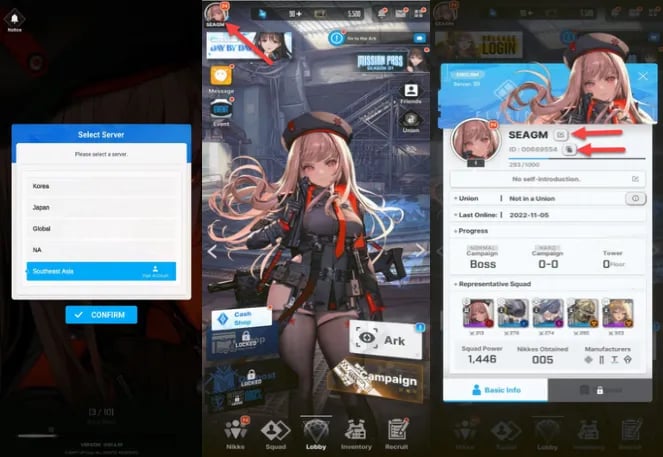
Follow these steps inside the game client:
- Launch Goddess of Victory: Nikke on your mobile device or PC client.
- Complete your login and reach the main lobby screen (Command Center view).
- Tap your Commander Profile icon located in the top-left corner of the screen.
- In the profile overview window, locate the Player ID / ID field displayed below your Commander name.
- Tap the Copy icon next to the number to avoid manual typing mistakes.
- Check your server region on the initial login title screen or in your account settings before finalizing your order.
Supported Regional Servers: Global, NA, SEA, JP, and KR
Goddess of Victory: Nikke segregates player data across distinct regional server infrastructures. Top-ups must target your specific server to credit successfully. VGTopup supports all primary operational server regions:
| Server Region | Server Code / Identifier | Intended Player Regions |
|---|---|---|
| Global | Global | Europe, South America, Oceania, and International regions |
| NA | NA | North America (United States, Canada, Mexico) |
| SEA | SEA | Southeast Asia (Singapore, Malaysia, Philippines, Indonesia, Thailand) |
| JP | JP | Japan |
| KR | KR | South Korea |
Selecting an incorrect server will cause the transaction to fail or deliver to an unintended account bound to that ID on a different server. Double-check your server region on the title screen if you run multiple regional profiles.
Uses of Nikke Gems: Rate-Up Recruitment, Ordinary Banners, and Supplies
Gems serve as the primary premium currency in Goddess of Victory: Nikke, providing crucial resources to advance your squad and build competitive teams for Campaign, Interception, and Union Raids.
Paid Gems vs. Free Gems
When you top up through VGTopup, you receive direct gem currency. In Nikke, gems function across distinct banner types:
- Paid Gems: Specifically required for guaranteed-SSR recruitment banners, special step-up draws, and exclusive periodic promotional packages that do not accept free currency.
- Free Gems: Earned through campaign clears, daily missions, outpost defense, and dispatch missions. Used for standard Rate-Up Pick Up banners and Ordinary Recruitment.
Banner Pulls and Mileage Accumulation
- Special Pick Up (Rate-Up Banners): Spend 300 gems per pull (or 3,000 for a 10-pull) to recruit limited characters and Pilgrims. Each pull grants Gold Mileage Tickets. Collecting 200 Gold Mileage Tickets lets you directly purchase the featured character from the Mileage Shop without relying on RNG.
- Ordinary Recruitment: Expand your roster and work toward breaking the Level 160 wall. Using gems on the standard banner generates Silver Mileage Tickets, which allow you to buy spare bodies for Limit Breaks.
Infrastructure and Progression
- Synchro Device Slots: Spend gems to unlock extra character slots in the Synchro Device, raising your entire squad's level without grinding separate upgrade materials for every Nikke.
- Outpost Defense Wipeouts: Instantly claim 2 hours worth of Core Dust, Credits, and Battle Data to push past campaign power gates.
- Event Stamina Recharges: Purchase event attempts during story events to farm shop currency, Advanced Recruit Vouchers, and skill growth manuals.
Account Safety: Why Direct Player ID Top-Up Requires No Passwords
Account integrity is paramount. VGTopup uses direct Player ID and server targeting to credit your purchases.
- Zero Password Requirements: You never share your login credentials, Level Infinite pass, Google account, Apple ID, or social logins.
- No Remote Account Access: No third party logs into your account to perform purchases, eliminating risk from unauthorized access or IP flag issues.
- Direct System Delivery: All currency transfers use standard game catalog IDs mapped straight to your unique account identifier.
Keep your login details private at all times. A legitimate top-up requires only your public numerical Player ID and your assigned server selection.
Troubleshooting Common Nikke Top-Up Issues
If you experience an issue with your order, review these standard troubleshooting steps:
1. Gems Not Showing Immediately
- Exit the game completely and restart the application to force a synchronization with the game server.
- Check your in-game mailbox (envelope icon in the top right of the lobby). Some top-up items arrive as claimable mail attachments rather than direct balance additions.
- Verify that your internet connection is stable and not dropping packets during lobby load.
2. Mismatched Server or Typo in Player ID
- If you submitted an incorrect Player ID or selected the wrong regional server, check your order confirmation details immediately on VGTopup.
- Contact customer support with your order number, the submitted details, and your correct in-game profile screenshot before processing concludes.
3. Payment Cleared but Order Pending
- Payment verification can occasionally take a few moments depending on the payment channel selected. Check your order status page on VGTopup for real-time processing updates.
Goddess of Victory: Nikke Top-Up FAQs
How do I find my Goddess of Victory: Nikke Player ID and Server?
Open the game, tap your Commander profile avatar in the upper-left corner of the lobby screen, and locate the numerical ID under your name. Use the copy button next to it. Your server (KR, JP, Global, SEA, or NA) is displayed on the initial login screen before entering the lobby.
Do I need to provide my login password for a Nikke top-up?
No. VGTopup requires only your Player ID and Server selection. You do not need to share passwords, email authentications, or social login credentials.
Which servers are supported for Goddess of Victory: Nikke recharges?
VGTopup supports all 5 operational game servers: Global, NA (North America), SEA (Southeast Asia), JP (Japan), and KR (Korea).
What is the difference between Paid Gems and Free Gems in Nikke?
Paid Gems come directly from real-money top-ups and can be used on special guaranteed SSR banners, step-up banners, and standard draws. Free Gems come from gameplay rewards and work on standard Rate-Up and Ordinary recruitment banners.
How quickly will the purchased Gems appear in my Nikke account?
Once your payment completes, orders are processed directly through the delivery system. Most recharges reflect in your account balance or in-game mailbox within moments of transaction confirmation.
What should I do if I selected the wrong server or entered an incorrect Player ID?
Double-check your order details immediately. If you notice an error, reach out to VGTopup customer support with your order ID and correct account information as soon as possible.
Select Denomination
Tax, payment fees and eligible coupons are calculated at checkout.
| Package | Price |
|---|---|
| 60 Gems | USD 0.63 |
| 120 Gems | USD 1.28 |
| 320 Gems | USD 3.22 |
| Monthly Pass | USD 3.22 |
| 720 Gems | USD 6.46 |
| Technical Master Pack | USD 7.16 |
| 1500 Gems | USD 12.93 |
| Class Research Set | USD 14.33 |
| Grow Selection Set | USD 14.33 |
| 2300 Gems | USD 19.29 |
| 2370 Gems | USD 20.07 |
| Manufacturer Research Set | USD 21.50 |
| 4200 Gems | USD 36.12 |
| Enhanced Module Set | USD 39.42 |
| Manufacturer Backup Pack | USD 39.42 |
| Technical Support S I | USD 39.42 |
| 6200 Gems | USD 51.65 |
| Technical Support S II | USD 71.68 |