
StarMaker Top Up: Instant Coins Delivery via SID
StarMaker is a global social singing and music recording platform where millions of music lovers sing karaoke, collaborate on duet tracks, and host live audio-video party rooms. StarMaker Coins are the core in-app currency used across the platform to show appreciation to live broadcasters, send animated 3D gifts, enter exclusive VIP rooms, and climb community leaderboards.
When you order a StarMaker top up on VGTopup, your coins are credited directly to your account using your StarMaker User ID (SID). There is no need to share account passwords or log into third-party verification portals. Simply choose your desired coin package, enter your SID, and complete your purchase to recharge your balance immediately.
What Are StarMaker Coins and How to Use Them
StarMaker Coins allow singers and room hosts to interact dynamically with audiences and unlock premium tools within the ecosystem. Recharging your coin balance enables several core features:
- Live Room Gifts: Send animated virtual gifts such as microphones, luxury cars, flowers, and custom stage effects to creators performing in party rooms and live streams.
- VIP Membership & Room Badges: Access exclusive VIP status icons, profile frames, special entrance effects, and elevated chat privileges.
- Room Popularity Boosts: Spend coins on room boosters to push your party room to the top of the platform's explore feed and attract new listeners.
- Interactive Party Mini-Games: Participate in live room challenges, draw lucky gifts, and join interactive community events.
- Song Production & Tuning Tools: Unlock specialized audio filters, VIP backing tracks, and studio-grade sound effects for your published covers.
StarMaker Coins Utility Overview
| Feature | Primary Coin Usage | Account Benefit |
|---|---|---|
| Live Virtual Gifting | Sending animated gifts in live streams | Supports creators & earns supporter badges |
| VIP Subscriptions | Unlocking monthly VIP privileges | Custom profile frames, badge perks, ad removal |
| Party Room Promotion | Activating room boost items | Higher discoverability on explore feeds |
| Audio Mastering | Premium sound presets and filters | Studio-quality vocal processing on published covers |
| Stage Entrance Effects | Custom arrival animations in live rooms | Standout visual presence upon entering rooms |
How to Find Your StarMaker SID (User ID)
To ensure your coins reach your profile without delay, you must provide your exact StarMaker SID (User ID). Your SID is a permanent numeric identifier linked to your profile.
Follow these steps to locate your SID inside the app:
- Open the StarMaker app on your Android or iOS device.
- Tap the Me icon located in the bottom-right corner of the main screen.
- Your profile page will load. Look directly under your profile photo and display name.
- You will see your numerical identifier labeled as SID: [Numbers].
- Tap the copy icon next to the number to copy your SID to your clipboard.
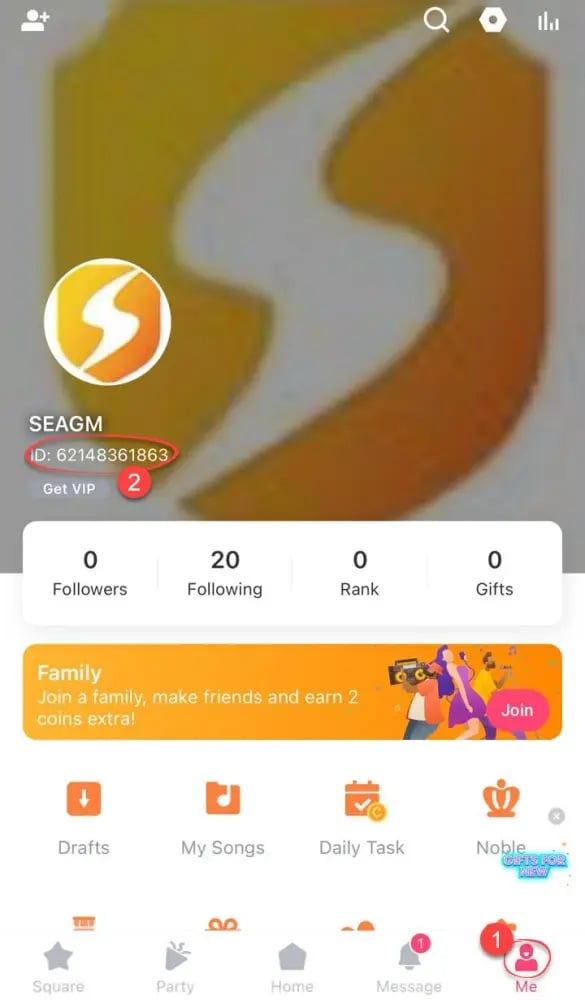
Note: Do not use your room ID, family ID, or your custom display name. Only the numeric SID located on your personal profile page will properly route coins to your account.
Step-by-Step Guide: How to Top Up StarMaker Coins on VGTopup
Recharging your StarMaker balance through VGTopup takes only a few moments. Follow this straightforward guide to complete your transaction:
- Select Your Coin Package: Browse the available coin denominations listed on the live checkout page and choose the amount you need.
- Enter Your StarMaker SID: Paste your numeric SID into the required input field. Double-check the digits to prevent delivery errors.
- Select Your Payment Method: Choose from the available regional and global payment options displayed at checkout.
- Review and Pay: Confirm that your SID and package details are correct, then complete the payment.
- Check Your In-App Balance: Once the payment completes, open the StarMaker app and check your wallet balance under your profile settings to view your newly credited coins.
Why Top Up via Direct SID Delivery Without Sharing Passwords
Account safety is a major priority for creators who have built an audience, recorded songs, and accumulated badges over months or years. Traditional recharge methods that ask for account login details expose users to security risks.
VGTopup uses a direct SID top-up protocol that eliminates these risks:
- Zero Password Sharing: You never disclose your password, linked social accounts (Google, Facebook, Apple ID), or verification codes. Your account stays entirely under your control.
- No Account Takeover Vulnerability: Because no login session is initiated, there is no risk of unauthorized profile changes, deleted recordings, or compromised private messages.
- Direct Balance Settlement: Coins are delivered straight to your account via your public user ID, ensuring smooth processing without triggering security lockouts.
Supported Payment Methods for StarMaker Recharge in 2026
VGTopup supports an array of global and localized payment gateways to give international StarMaker users flexible payment options. Depending on your country and region, available options dynamically appear at the live checkout page.
Available payment categories include:
- Major Credit and Debit Cards: Visa, Mastercard, and other international card networks.
- Digital E-Wallets: Leading regional digital wallets tailored for local currencies.
- Online Banking & Instant Transfers: Direct bank settlement systems for supported regions.
All live prices, exchange rates, and payment methods are updated automatically on the product selection page. Check the live checkout screen to see the exact real-time pricing and options for your location.
Troubleshooting StarMaker Coins Delivery and Wrong SID Issues
If you experience any delay or make an error during your transaction, use the following troubleshooting steps:
Delayed Coin Appearance
- Refresh Your Profile: Close the StarMaker app completely from your recent apps switcher and reopen it. Check your wallet under Me > Wallet.
- Check Transaction Status: Review your order history on VGTopup to confirm that payment processing was successful.
- Allow Brief Processing Windows: High network traffic during live platform events can occasionally delay server synchronization by a few minutes.
Entering an Incorrect SID
- Before Processing: If you realize you entered the wrong SID before the order is finalized, contact VGTopup customer support immediately with your order number and the correct SID.
- After Delivery: Because digital coin deliveries to valid user IDs are processed automatically by system queues, completed deliveries to an active third-party SID cannot be reversed. Always verify your numeric ID before clicking payment confirmation.
Frequently Asked Questions About StarMaker Top Up
How do I find my StarMaker SID for top up?
Open the StarMaker app, tap the Me tab in the bottom-right corner, and look directly beneath your profile avatar and username. You will see SID: followed by your unique numeric identifier. Tap the copy icon next to it to copy the numbers accurately.
Is it safe to top up StarMaker Coins using only my SID?
Yes. Recharging via your SID is safe because it only uses public account routing information to credit your balance. You do not need to provide passwords, phone numbers, or email access.
Do I need to share my StarMaker password to recharge coins?
No. VGTopup will never ask for your StarMaker password, connected social account credentials, or SMS verification codes. All recharges are completed using only your StarMaker SID.
How long does it take for StarMaker Coins to appear in my account?
Coin orders are processed via automated delivery systems. Once payment confirmation is received, coins typically reflect in your in-app wallet shortly after. Reopening your StarMaker app will refresh the displayed balance.
What can I buy with StarMaker Coins in the app?
StarMaker Coins can be used to send animated 3D gifts to singers during live streams, purchase VIP memberships, boost party room rankings, unlock special vocal audio effects, and buy entry animations for chat rooms.
What should I do if I entered the wrong StarMaker SID during checkout?
If you entered an incorrect SID, contact VGTopup customer support immediately with your order details. If the order has not yet been processed by the automated delivery system, support can update the delivery ID. Completed deliveries to an existing account cannot be recalled.
Select Denomination
Tax, payment fees and eligible coupons are calculated at checkout.
| Package | Price |
|---|---|
| 60 + 5 Bonus Coins | USD 0.63 |
| 300 + 25 Bonus Coins | USD 3.15 |
| 1,000 + 110 Bonus Coins | USD 10.74 |
| 1,200 + 150 Bonus Coins | USD 13.06 |
| 1,600 + 200 Bonus Coins | USD 17.42 |
| 2,100 + 300 Bonus Coins | USD 23.23 |
| 2,700 + 400 Bonus Coins | USD 30.00 |
| 3,000 + 450 Bonus Coins | USD 33.39 |
| 3,400 + 550 Bonus Coins | USD 38.22 |
| 5,000 + 850 Bonus Coins | USD 56.61 |
| 6,000 + 1,100 Bonus Coins | USD 68.71 |
| 6,500 + 1,200 Bonus Coins | USD 74.51 |
| 7,000 + 1,300 Bonus Coins | USD 80.32 |
| 10,000 + 1,900 Bonus Coins | USD 115.16 |
| 14,000 + 2,800 Bonus Coins | USD 162.58 |