
Destiny: Rising Top Up: Direct Silver Packs and In-Game Bundles
Destiny: Rising brings the iconic sci-fi shooter experience to mobile devices, featuring hero-based gunplay, cooperative strikes, and competitive multiplayer modes. To customize your characters, unlock weapon ornaments, and acquire premium battle passes, you need Destiny: Rising Silver. Silver serves as the primary premium currency across your account, allowing you to bypass long grinds and access exclusive store items.
VGTopup provides a direct top-up service for Destiny: Rising players. By using only your public User ID (UID) and Server region, you can recharge Silver directly to your character without sharing login credentials or passwords. Choose your desired Silver package, review current live rates on our checkout screen, and receive your balance straight to your in-game profile.
What is Destiny: Rising Silver and How to Use It
Silver is the official premium currency in Destiny: Rising. While standard currencies like Glimmer or seasonal materials can be farmed through daily missions, strikes, and campaign milestones, premium vanity and convenience items require Silver.
Here is how you can use Silver inside the game:
- Character and Weapon Cosmetics: Purchase exclusive exotic weapon ornaments, custom armor shaders, and character skins to personalize your loadout.
- Seasonal Battle Passes: Unlock premium reward tracks each season to earn high-tier upgrade materials, rare cosmetics, and bonus currency drops.
- Limited-Time Event Bundles: Access special store bundles during seasonal events that contain curated weapon packs, emotes, and flair items.
- Inventory and Convenience Expansions: Expand vault space or obtain consumable boosters to streamline your progression across difficult activities.
Silver credited to your account syncs across all supported devices connected to your profile, ensuring your items remain accessible on both iOS and Android.
How to Top Up Destiny: Rising Silver with UID and Server
Recharging your account on VGTopup is simple and requires no account sharing. Follow these steps to complete your purchase:
- Select Your Silver Package: Browse the available Silver denominations and bundle equivalents displayed on the product page.
- Enter Your Account Details: Input your Destiny: Rising UID and select your active Server from the dropdown menu.
- Double-Check Information: Verify that your UID and Server match your in-game profile exactly to ensure accurate delivery.
- Proceed to Checkout: Review the final pricing displayed on the live checkout interface and select your preferred payment method.
- Complete Payment: Finalize your order. Your Silver will be sent directly to your Destiny: Rising account or in-game mailbox.
How to Find Your Destiny: Rising UID and Server
Locating your player details takes only a few seconds within the game interface:
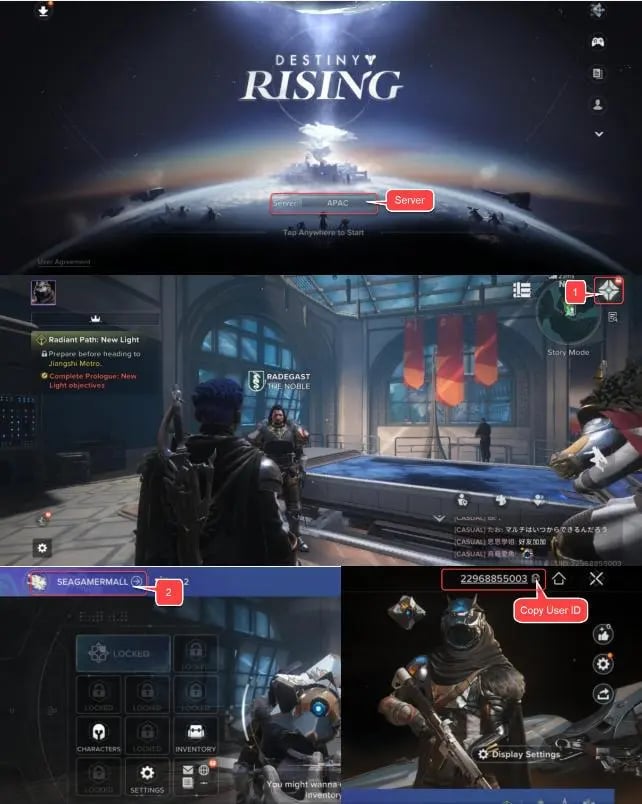
- Open Destiny: Rising on your device and log in to the main lobby.
- Tap your Avatar / Character Profile icon in the upper-left corner of the screen.
- Open the Basic Info tab in your profile menu.
- Locate your UID (a unique sequence of numbers) and your assigned Server name shown below your character name.
- Tap the copy icon next to your UID string to copy it directly to your clipboard.
Always ensure you copy the entire numeric string to avoid delivery delays.
Destiny: Rising Bundles, Battle Passes, and Silver Packs Breakdown
Destiny: Rising offers various Silver quantities depending on what items you plan to buy. The table below outlines typical pack categories and their utility in the game:
| Pack / Tier Equivalent | Primary In-Game Purpose | Delivery Method |
|---|---|---|
| Starter Silver Pack | Minor cosmetic draws, initial cosmetic item unlocks | Direct UID Credit |
| Standard Silver Bundle | Season pass activation, weapon ornament packs | Direct UID Credit |
| Premium Silver Vault | High-tier character bundles, exotic weapon skins | Direct UID Credit |
| Season Battle Pass Equivalent | Unlocks premium seasonal reward tracks and gear | Direct UID Credit (Used in-game) |
Note: Exact Silver quantities, bonus values, and regional prices are shown directly on the live VGTopup checkout selector before payment confirmation.
Safe Top-Up: Why Password-Free UID Recharge Protects Your Account
Account safety is critical when purchasing game currency online. Many unsafe third-party methods request login emails, social account passwords, or two-factor authentication codes, exposing your personal information and risking account suspension.
VGTopup uses direct UID top-up methods. This means:
- Zero Password Requirements: You never share your password, login credentials, or verification codes.
- No Account Access Risk: Third parties cannot access your inventory, modify your account settings, or trigger unauthorized security alerts.
- Cross-Platform Protection: Your account remains protected whether you play on mobile or via official cross-play clients.
- Compliance with Standard Delivery: Currency is deposited directly to your game ID through legitimate distribution pathways.
Troubleshooting Destiny: Rising Top-Up Delays and Delivery Issues
While most top-ups process quickly, occasional network congestion or game maintenance can cause minor delays. If your Silver has not appeared immediately, follow these troubleshooting steps:
- Restart the Game Client: Fully close the Destiny: Rising application on your device and launch it again to refresh your account data.
- Check the In-Game Mailbox: Some direct recharge items and bonus Silver deliveries arrive via the in-game mailbox tab rather than updating the balance bar directly.
- Confirm Account Details: Verify your payment receipt to ensure the UID and Server entered match your active character.
- Check Server Maintenance: Verify if the official Destiny: Rising game servers are undergoing maintenance, as deliveries pause until servers reopen.
- Contact VGTopup Support: If your order status is completed but your balance remains unchanged after restarting, reach out to VGTopup customer service with your order ID for immediate assistance.
Why Choose VGTopup for Destiny: Rising Top Up
- Strict Password-Free Checkout: Top up using only your public in-game UID and Server with zero risk to your login credentials.
- Transparent Live Checkout: View exact regional prices and clear payment options without hidden platform fees.
- Global Support: Access multi-language assistance ready to help resolve order inquiries promptly.
Frequently Asked Questions
Is Destiny: Rising free to play or pay to play?
Destiny: Rising is a free-to-play action shooter. Players can download and complete core story missions, cooperative strikes, and multiplayer activities without paying. The game includes optional in-game purchases, such as Silver, for cosmetics, battle passes, and progression conveniences.
What information do I need to provide to top up Destiny: Rising?
You only need your in-game User ID (UID) and the Server region where your character is registered. You never need to supply account passwords or linked social account details on VGTopup.
How do I find my Destiny: Rising UID and Server?
Tap your profile icon in the upper-left corner of the main lobby screen. Select the Basic Info tab. Your numeric UID and current Server name are displayed clearly beneath your character name. Tap the copy icon to copy your UID.
Is it safe to top up Destiny: Rising Silver via UID?
Yes. Direct UID top-ups are safe because they do not require account access, login credentials, or password sharing. Your character receives the purchased Silver directly without security risks.
What items can I purchase with Silver in Destiny: Rising?
You can spend Silver on weapon ornaments, character armor cosmetics, seasonal battle passes, vanity flair, custom emotes, and specialized event bundles available in the in-game store.
Is Destiny: Rising worth playing in 2026?
Yes. In 2026, Destiny: Rising offers an expansive mobile sci-fi shooter experience with regular seasonal updates, refined cooperative strikes, competitive PvP, and optimized touch and controller controls.
How long does it take for Silver to arrive in my Destiny: Rising account?
Silver is typically delivered directly to your account shortly after payment confirmation. In rare instances of high server traffic, delivery may take a few minutes. Restarting your game app helps refresh your balance display.
Select Denomination
Tax, payment fees and eligible coupons are calculated at checkout.
| Package | Price |
|---|---|
| 60 Silver | USD 0.84 |
| 300 Silver | USD 4.22 |
| 600 Silver | USD 8.45 |
| 1500 Silver | USD 21.14 |
| 3000 Silver | USD 42.28 |
| 6000 Silver | USD 84.57 |