
State of Survival Diamonds Top Up on VGTopup
State of Survival: Zombie War demands constant resource management, rapid construction, and strategic unit recruitment to keep your settlement safe from infected hordes and rival Chiefs. Diamonds serve as the universal premium currency in the game, giving you the flexibility to acquire essential items, trigger instant speedups, and claim high-value bundles without waiting.
VGTopup provides a straightforward State of Survival Diamonds top up service built around player security and speed. By completing your recharge through direct User ID entry, you avoid account sharing risks and receive your game balance directly on your server profile. Live pricing and available diamond packages are displayed in real time on the checkout interface, letting you choose the exact volume your settlement requires.
How to Top Up State of Survival Diamonds via User ID
Recharging your Chief balance takes only a few quick steps on VGTopup:
- Select Your Diamond Package: Review the available denominations on the live product page and pick the bundle that matches your in-game goals.
- Enter Your User ID: Type or paste your State of Survival User ID into the input field accurately.
- Proceed to Checkout: Confirm your order details and pick your preferred payment method on the checkout screen.
- Receive Your Diamonds: Complete the payment. Once processed, your diamonds will be delivered straight to your in-game account.
- Confirm In-Game: Launch State of Survival or refresh your current session to see your updated diamond total.
Where to Find Your State of Survival Chief User ID
Your User ID is a unique numeric identifier linked to your Chief profile and state. You do not need to share your login credentials or email address; only this ID is required to process your top-up.
Follow these steps to locate your User ID:
- Open State of Survival on your device.
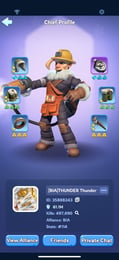
- Tap your Chief Avatar located in the top-left corner of the main settlement view.
- In your Chief Profile screen, look near your character name and current State number.
- You will see your User ID (e.g., a series of numbers such as
12345678). - Tap the small Copy icon next to the number to copy it directly to your clipboard and avoid typographical errors.
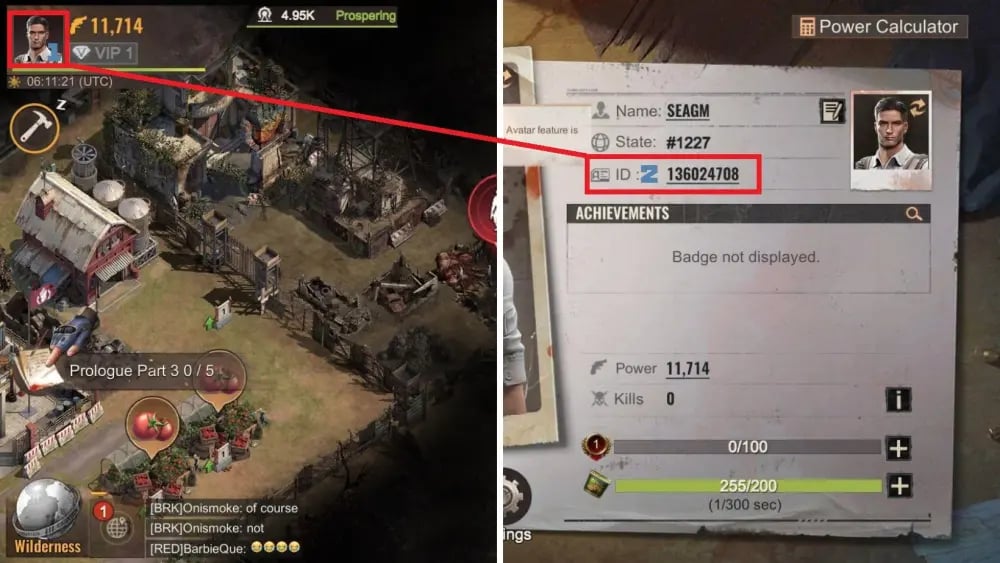
Paste this copied number into the User ID box on VGTopup before finalizing your order.
What State of Survival Diamonds Can Be Used For
Diamonds offer immense tactical value across every stage of your settlement progression. Having a solid reserve allows you to respond immediately during state warfare, alliance events, and defensive emergencies.
Core In-Game Uses
- In-Game Packs and Value Bundles: Convert your diamonds into daily, weekly, or special event bundles to collect hero fragments, badges, plasma cores, and research materials.
- Instant Building and Research Speedups: Bypass long upgrade timers on your Headquarters, Training Camps, and Research Lab during competitive events like State vs State (SvS) or Alliance Showdown.
- Chief Stamina and Energy Refills: Replenish stamina instantly to join extra Infected Fiend rallies, hunt high-level infected on the wilderness map, and complete Explorer Trail stages.
- VIP Level Progression: Purchase VIP points directly to unlock passive production increases, march speed boosts, and extra deployment slots.
- Troop Healing and Recovery: Rapidly restore wounded soldiers in your Hospital during intensive territory wars, Capital Clash, or Reservoir Raid matches.
| Diamond Application | Strategic In-Game Benefit | Priority Level |
|---|---|---|
| In-Game Bundles & Packs | Direct access to hero shards, gear materials, and plasma | High |
| Stamina Refills | Continuous rally participation and event point farming | High |
| Speedups & Construction | Rapid HQ milestone completion during scoring phases | Medium |
| VIP Points Activation | Permanent economic, training, and march buffs | Medium |
| Emergency Hospital Healing | Immediate troop recovery during Capital and Fortress fights | High |
Benefits of Direct UID Recharge vs Account Sharing
Choosing a direct User ID top-up provides clear security and convenience advantages over older, unsafe account-sharing methods.
- Zero Password Requirement: You never need to expose your Google Play, Apple ID, Facebook, or FunPlus login credentials. Your private login remains entirely in your hands.
- No Risk of Account Takeover: Third-party login access exposes players to unauthorized password changes or unwanted resource spending. UID recharges eliminate this risk entirely.
- No In-Game Disconnections: With direct UID delivery, you do not need to log out of your session while an external party logs in. Your game remains playable without interruption.
- Compliance and Safety: Direct server-credited recharges protect your Chief profile from integrity flags associated with suspicious multi-location login attempts.
State of Survival Diamonds Delivery and Troubleshooting Guide
Orders placed on VGTopup are processed automatically to deliver your diamonds as swiftly as possible. In case your balance does not update instantly, follow these troubleshooting steps:
- Restart the Game Client: Close State of Survival completely from your background apps and reopen it. This forces the client to sync with the game servers and refresh your balance.
- Check Your In-Game Mail: Some diamond deliveries or package redemptions appear as system claim mails in your inbox. Check both your System and Notice mail tabs.
- Verify Your Submitted UID: Review your VGTopup order receipt to ensure the User ID submitted matches your active Chief profile on the correct state.
- Check Network Connectivity: Ensure your mobile data or Wi-Fi connection is stable so the game client can complete its server handshake.
- Contact Support: If your diamonds have not appeared after completing these steps, reach out to VGTopup customer support with your Order ID and Chief User ID for prompt verification and assistance.
Frequently Asked Questions
How do I find my State of Survival User ID?
Tap your Chief Avatar in the top-left corner of the main settlement screen. Your User ID is displayed under your Chief name in the profile window. Tap the copy icon next to the number to copy it.
What can State of Survival Diamonds be used for in the game?
State of Survival Diamonds can be spent on in-game bundle purchases, speedups for construction, research, and troop training, stamina refills for rallies, hospital healing, VIP points, and event mini-games.
Do I need to provide my game account password to top up Diamonds?
No. VGTopup only requires your State of Survival User ID. You never need to share your password, email, or third-party login credentials.
How long does it take for State of Survival Diamonds to be credited?
Diamonds are credited directly to your account shortly after payment verification is confirmed. Simply restart your game app to view your updated diamond balance.
Can State of Survival Diamonds buy all in-game packs and bundles?
Diamonds allow you to purchase most standard diamond-eligible bundles, crates, and resource packs available within the in-game store. Specific direct-cash promotional offers must be checked in your game store for diamond exchange eligibility.
What should I do if my Diamonds do not appear in my account?
First, restart State of Survival to force a server refresh and check your in-game mailbox. If the diamonds still do not appear, verify the User ID on your order receipt and contact VGTopup support with your order details.
Select Denomination
Tax, payment fees and eligible coupons are calculated at checkout.
| Package | Price |
|---|---|
| 100 Diamonds | USD 0.68 |
| 500 Diamonds | USD 3.41 |
| 1,000 Diamonds | USD 6.80 |
| 2,000 Diamonds | USD 13.59 |
| 5,000 Diamonds | USD 33.96 |
| 10,000 Diamonds | USD 69.07 |
| 20,000 Diamonds | USD 135.83 |
| 50,000 Diamonds | USD 339.55 |
| 100,000 Diamonds | USD 690.62 |