
Spark Live Diamonds Top Up: Uses and In-App Benefits
Spark Live diamonds serve as the official digital currency within the Spark Live streaming and social entertainment platform. Broadcasters, content creators, and viewers rely on diamonds to interact during live video sessions, voice chat rooms, and multiplayer broadcast games. Recharging your diamond balance gives you direct access to interactive features across the application.
Interactive Virtual Gifting
Diamonds let you send animated gifts to your favorite hosts during live streams. These range from standard emoji animations and luxury entrance effects to dynamic full-screen gifts. Gifting increases host popularity rankings, triggers visual sound effects in the live room, and places your profile at the top of the stream contributor leaderboard.
PK Battles and Live Competition Boosts
Streamers frequently participate in head-to-head PK battles. Viewers use diamonds to purchase battle items, point boosters, and interactive reactions that determine the winner of each timed match. Contributing diamonds during a PK round directly boosts your host's battle score against their opponent.
Party Room and Voice Chat Upgrades
Spark Live features multi-guest audio party rooms where users play games, sing karaoke, and hold group discussions. Diamonds allow room hosts and participants to activate special mic effects, start prize wheels, send group room lucky bags, and unlock custom room themes.
VIP Status and Profile Customization
Spending diamonds contributes to your account wealth level. Higher account tiers unlock exclusive avatar frames, colorful username badges, luxury vehicle entrance animations when entering broadcast rooms, and special privilege tags in public chat channels.
How to Find Your Spark Live UID
To ensure your diamonds are delivered to the correct account, you only need to provide your Spark Live numerical User ID (UID). Your UID is unique to your profile and is located directly inside the mobile app.
Follow these steps to locate your UID:
- Launch the Spark Live app on your mobile device.
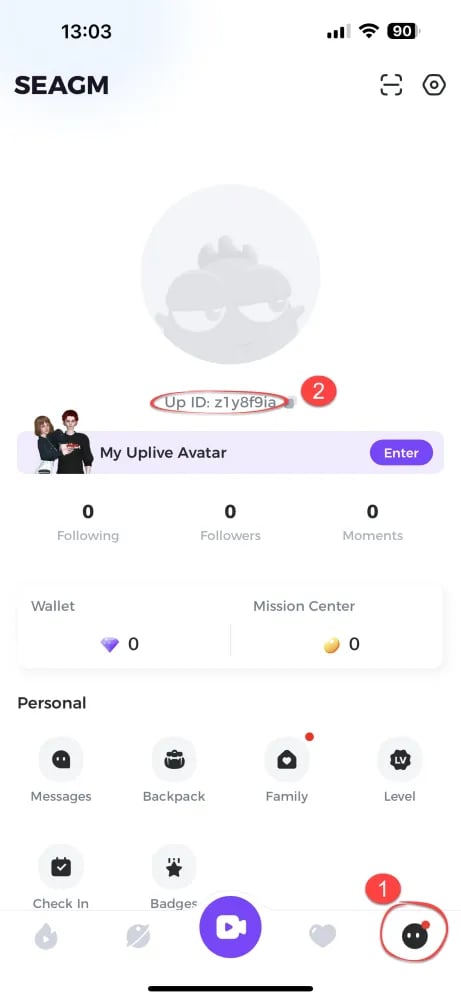
- Tap the Profile icon (labeled "Me") in the bottom right corner of the screen.
- Look directly beneath your profile picture and nickname at the top of the screen.
- Locate the numerical sequence labeled ID or UID.
- Tap the Copy icon next to the number to copy your UID directly to your clipboard.
Always copy and paste your UID rather than typing it manually to prevent transfer errors to unintended accounts.
Step-by-Step Guide to Top Up Spark Live Diamonds on VGTopup
Completing a diamond recharge on VGTopup takes only a few moments. Follow this walkthrough to credit diamonds to your Spark Live account:
- Choose Your Pack Size: Review the diamond package list on this page and select the amount that fits your gifting and platform needs.
- Input Your Spark Live UID: Paste your numerical Spark Live UID into the required player field.
- Verify Your Details: Double-check the entered UID to confirm that the numbers match your in-app profile.
- Select Payment and Checkout: Click the purchase button to proceed to the secure checkout screen. Select your preferred local or international payment option.
- Receive Your Diamonds: Once the transaction completes, your Spark Live diamond balance will update automatically in the app.
Spark Live Diamonds Delivery Process and Account Safety
Account security is essential when purchasing digital currencies online. VGTopup operates on a zero-credential direct recharge system designed to keep your personal data and gaming credentials secure.
- No Passwords Required: You never need to share your Spark Live account password, email login, or social login credentials. The entire process requires only your public UID.
- Direct System Top-Up: Orders are processed directly into the game database linked to your specified UID, eliminating middleman account handling or temporary logins.
- Safe Transactions: All checkout pathways use encrypted payment processing protocols, protecting your financial details across every transaction.
- Permanent Balance: Diamonds added to your account through direct UID recharge remain permanently available until you choose to spend them in the app.
Diamond Packs and Supported Payment Options
VGTopup provides multiple Spark Live diamond denominations to match different user needs, from casual chat room participation to major broadcast event support. Live pricing, regional currency rates, and available local payment channels are displayed on the checkout interface before you finalize your order.
| Diamond Package Tier | Typical In-App Use Case | Target Activity |
|---|---|---|
| Starter Packs (Small) | Daily check-in gifts, small chat reactions | Casual streaming viewers |
| Standard Packs (Medium) | Animated room gifts, mic seat animations | Voice party participants |
| Premier Packs (Large) | PK battle support, luxury entrance effects | Dedicated fan club members |
| VIP Packs (Bulk) | Leaderboard pushes, mega gift events | Top tier supporters and event hosts |
Review the live options on this page to select the diamond pack that matches your streaming schedule and community events.
Troubleshooting and Support for Spark Live Recharge Issues
If your diamond balance does not update immediately or you encounter an issue during checkout, follow these diagnostic steps:
Refresh the Spark Live App
If you completed your payment but do not see your updated balance right away, close the Spark Live app completely and restart it. Return to your profile screen or enter any live room to verify that the balance has refreshed.
Check Order Status on VGTopup
Log in to your VGTopup account and check the Order History section. Confirm that your payment status shows as completed. If the payment is still pending confirmation from your payment provider, the delivery will complete as soon as the transaction clears.
Incorrect UID Entered
Because direct UID recharges process automatically to the specified account, diamond transfers sent to a valid but incorrect UID cannot be reversed. If you notice a typo in your UID before the order completes processing, contact VGTopup 24/7 customer support immediately with your order ID and the correct UID.
Contacting Customer Support
If your balance has not updated after restarting your app and confirming order completion, contact the VGTopup customer service team via live support or ticket. Provide your order number, payment confirmation receipt, and Spark Live UID for fast investigation.
Frequently Asked Questions About Spark Live Diamond Top-Ups
Where can I find my Spark Live UID in the app?
Open Spark Live, select the "Me" or Profile tab in the bottom right corner, and view the numerical ID located directly beneath your avatar and display name. Use the copy button next to the ID to copy it.
Do I need to enter my account password to top up Spark Live Diamonds?
No. VGTopup only requires your public Spark Live UID to process your diamond recharge. Never share your password, SMS verification codes, or login credentials with anyone.
How quickly will the Spark Live Diamonds be added to my account?
Diamonds are credited automatically once your payment is confirmed at checkout. In most cases, the balance updates within moments of completing the transaction.
What features and items can I unlock with Spark Live Diamonds?
Diamonds can be used to send virtual animated gifts, boost streamers during competitive PK battles, buy entry vehicle effects, open audio party room features, and increase your overall account wealth level.
What should I do if I made a typo in my Spark Live UID during payment?
If you realize you entered an incorrect UID, reach out to VGTopup customer support immediately with your order number. If the order has already been processed and delivered by the system to that UID, the transaction cannot be refunded or transferred.
Are Spark Live diamonds connected to Uplive account balances?
Spark Live operates as an independent platform with its own dedicated user database and wallet system. Diamonds purchased for your Spark Live UID apply exclusively to your Spark Live account and balance.
Select Denomination
Tax, payment fees and eligible coupons are calculated at checkout.
| Package | Price |
|---|---|
| 315 Diamonds | USD 4.51 |
| 650 Diamonds | USD 9.31 |
| 1300 Diamonds | USD 18.62 |
| 1890 Diamonds | USD 27.05 |
| 3150 Diamonds | USD 45.12 |
| 6300 Diamonds | USD 90.23 |
| 12600 Diamonds | USD 180.46 |
| 18900 Diamonds | USD 270.70 |
| 31500 Diamonds | USD 451.16 |