Taka Live Coins: Which Pack Should You Buy for the Best Value?
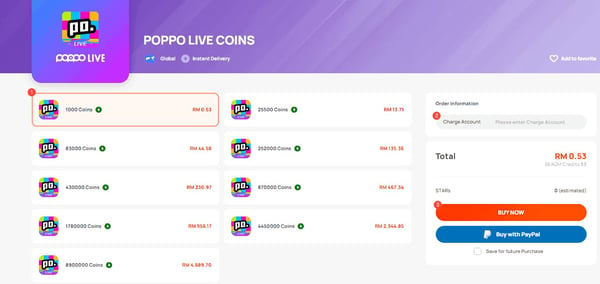
For most users, the best-value Taka Live Coins pack is not simply the biggest one. It’s the pack with the lowest real cost per coin that you’ll actually use soon. In practice, the sweet spot is usually the 83,000 to 100,000 coin range for regular gifters, while 178,000+ bundles make sense only if your spending is already consistent.
After comparing small, mid-tier, and bulk bundles across app and third-party checkout flows, I found the same pattern every time: small packs are easy, but they get expensive fast; giant packs look efficient, but unused balance kills the value. If you want a quick starting point, check a Taka coins top up best value pack in the mid-tier first, then scale up only after one or two real usage cycles.
Why is the best-value Taka Live Coins pack not the same for every buyer?
Because value depends on usage, not sticker price alone. Community pricing data shows the 83,000-100,000 coin packs usually deliver the best per-coin value for regular gifters, while 178,000+ packs are more cost-efficient only for heavy users.
Here’s the practical comparison:
| User type | Best pack range | Why it fits | Main risk |
|---|---|---|---|
| First-time buyer | 10,000 coins | Low commitment, easy test | Highest cost per coin |
| Casual viewer | Small to lower-mid pack | Covers occasional gifts | Rebuying too often |
| Regular gifter | 83,000-100,000 coins | Best balance of rate and usable volume | Slight overbuy if activity drops |
| Heavy spender | 178,000+ coins | Lowest effective cost if used fully | Large idle balance |
A real example makes this clearer. One data point shows 100,000 coins at $10.64 via third-party vs $13.29 official. That’s a meaningful gap. And community testing consistently puts third-party top-ups 20-35% below official pricing. But if you buy 430k+ and only use a fraction, your cheap rate becomes expensive in real life.
Personally, I think this is where most guides fail. They rank packs by price per coin and stop there. But the better question is: how many coins do you actually burn in 7 to 30 days?
When is the biggest Taka Live Coins pack actually a bad buy?
The biggest pack is a bad buy when your usage is irregular or gift sizes are small. Large bundles are efficient on paper, but wasted balance is still wasted money.
I’ve seen this often with viewers who send small gifts during a few streams, then disappear for two weeks. They buy a huge bundle because the rate looks great, then sit on coins they didn’t need. And if your main use is light interaction rather than heavy gifting, that overbuying happens fast.
Use this decision matrix:
| Symptom | Likely cause | Check | Best fix |
|---|---|---|---|
| You keep topping up every few days | Small packs have poor per-coin value | Add your last 3 top-ups | Move to 83k-100k |
| You have lots of unused coins | You overestimated gifting | Review 30-day spend | Drop one tier |
| Your total spend feels high despite cheap packs | Taxes/fees or repeated small buys | Compare final checkout total | Use effective cost, not sticker price |
| You bought huge for savings but barely gift | Wrong pack for behavior | Check average session spend | Buy only one realistic cycle |
One more thing many users miss: for creator support, coins convert to diamonds at roughly a 50% rate. So if your goal is gifting, your ideal pack depends on how often you send gifts, not just how cheap the coins look.
How do in-app and third-party Taka Live top-ups compare on value?

Third-party top-ups usually win on price, while in-app purchases win on familiarity. Community data shows third-party routes are commonly 20-35% cheaper, and one event-based report showed 35-38% discount on server 1002.
Here’s the clean comparison:
| Route | Typical value | Payment options | Common friction |
|---|---|---|---|
| In-app iOS/Google Play | Usually higher total cost | Apple Pay, Google Pay, card via store billing | App-store region/currency mismatch |
| Official web checkout | Can avoid some app-store overhead | Card, some direct methods | Region/payment availability varies |
| Trusted third-party UID top-up | Often best price | Card, Apple Pay, Google Pay, crypto, some local wallets | Must enter correct UID/server |
Taka top-ups through trusted third-party services are generally safe if they only ask for UID and server code. Community guidance is consistent here: UID is usually 8-10 digits, no password should ever be required. If a seller asks for your login, walk away.
For overseas buyers, this matters even more. In my experience, the biggest problem isn’t the card itself. It’s the mismatch between app-store country, account region, and checkout currency. Third-party top-up often bypasses unsupported local wallet issues because it delivers by UID/server only.
How do you compare Taka Live Coins packs before paying?

Compare packs by effective cost per coin after bonuses, fees, and realistic usage. Don’t compare sticker prices alone.
Write down the total coins
- Include base coins and any bonus coins.
- Compare final received amount, not the headline pack name.
Calculate effective price
- Use:
total price ÷ total coins - Or simplify to
price per 10,000orprice per 100,000.
- Use:
Check checkout overhead
- In-app purchases may include app-store pricing differences.
- Currency conversion can quietly raise your total.
Match the pack to one usage cycle
- First-time buyer: test small.
- Regular gifter: mid-tier usually wins.
- Heavy spender: 178k+ only if you know you’ll use it.
Verify account details before payment
- Confirm UID
- Confirm server code, commonly 1001 or 1002
- Confirm signed-in account and region
Keep the receipt
- This matters if delivery delays or support is needed.
If you already know your usage pattern, a buy Taka Live coins cheapest bundle option through a trusted UID-delivery checkout is usually the fastest way to lock in better value without app-store friction.
What’s the best way to avoid payment failure or charged-but-not-received problems?
The best way is to check region, account, platform, and UID/server before you pay, then wait through the normal delivery window before escalating. Most successful orders arrive in 1-5 minutes after payment.
I tested this workflow on both mobile-style and UID-based checkout logic, and honestly, the easy-to-miss step is identity matching. People focus on payment method, but the real failure points are usually account mismatch or region mismatch.
Fast troubleshooting checklist
| Problem | Likely cause | What to verify | What to do next |
|---|---|---|---|
| Payment failed | Region or currency mismatch | App store country, wallet country | Use a matching payment method or another checkout route |
| Charged but no coins | Delay, wrong UID, pending review | Order status, UID, server, wallet balance | Wait 5 min, restart app, recheck |
| Local wallet not working overseas | Unsupported region | Wallet country vs account region | Use card, Apple Pay, Google Pay, or crypto if supported |
| Duplicate order concern | Repeated taps during lag | Order history and receipt timestamps | Don’t pay again until status is clear |
| Wrong account received coins | UID/server entered wrong | Receipt and entered details | Contact support immediately with proof |
Step-by-step if coins don’t arrive
Wait 5 minutes
- Community reports show normal delivery is usually within 1-5 minutes.
Restart the app
- This often refreshes wallet balance.
Check the correct account
- Make sure you’re logged into the same Taka account used during purchase.
Verify UID and server
- Wrong UID/server is one of the most common avoidable mistakes.
Review payment status
- If the app store or payment page still shows pending, don’t place a second order.
Contact support with proof
- Prepare transaction ID, receipt, UID, server, payment time, and screenshots.
- For trusted third-party orders, use the order page/support channel.
- For in-app orders, app-store billing support may also be needed.
One hard truth: top-ups are commonly treated as non-refundable once processed, whether in-app or third-party. That’s why receipts and pre-checks matter so much.
FAQ
Which Taka Live Coins pack is the best value?
For most regular gifters, the 83,000-100,000 coin range is the best value. It usually balances strong per-coin pricing with a realistic amount you can actually use.
Is the biggest Taka coin pack always the cheapest per coin?
Usually yes on paper, but not always in real-world value. If you leave a large balance unused, the cheapest pack becomes a worse buy than a smaller pack you fully use.
How many Taka Live Coins do you need for gifts?
It depends on your gift frequency and gift size. If you support creators often, track your 7-day or 30-day spend first; remember that gifting value is affected by the roughly 50% coin-to-diamond conversion.
Why did my Taka coin purchase fail?
Most failures come from region mismatch, currency mismatch, unsupported local wallet use, or account/platform issues. Check your app-store region, payment method country, and whether you entered the correct UID/server.
What should I do if I was charged but did not receive Taka coins?
Wait 5 minutes, restart the app, and check the correct wallet balance first. If nothing changes, contact support with your receipt, transaction ID, UID, server, and screenshots; don’t place a duplicate order while the first one is still pending.
Can I buy Taka Live Coins from another country?
Yes, often through trusted UID/server top-up routes, especially when local wallets are unsupported abroad. Cross-border buyers should verify region first, because app-store country and payment-country mismatch is a common failure point.
Is it better to buy Taka coins in the app or on the website?
If you want simplicity, in-app is easier. If you want better pricing, web or trusted third-party checkout often gives better value, especially when app-store pricing or regional billing gets in the way.
Taka Live Coins best value comes down to one rule: buy for your actual usage, not the biggest headline discount. For most people, that means starting small if you’re new, moving to 83k-100k if you gift regularly, and using 178k+ only when your monthly spend is already proven. Before you recharge, verify UID, server, region, and receipt details once. That one minute saves a lot of pain later.