"NC top-up is instant" — true, but only inside the in-app store
Mostly accurate, with one footnote that earns its keep. Buying NC through Google Play or the App Store credits the second your payment clears, because there's no separate handoff step. The purchase and the credit are the same transaction. Third-party storefronts say it plainly too: official in-app purchases land the instant payment confirms, while ID-based orders take minutes to hours.
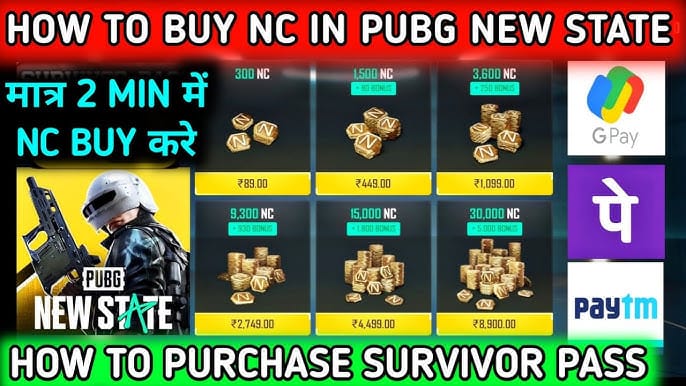
When a player swears "it was instant," they almost always tapped the store on their phone. Packs span NC 300 at $0.99 all the way to NC 30000 + 5000 at $99.99, per the Apple App Store listing. Across that whole spread, the delivery method doesn't change. The price climbs, the speed holds.
Now the footnote. "Instant" means "as fast as the payment network confirms," not literally zero seconds. Card authorizations, regional processors, the odd 3D-Secure prompt, each one tacks on a beat. For a human watching the screen that's still effectively instant, but it's why an order can sit at "processing" for thirty seconds and be perfectly fine.
The in-app store really is instant, and any rare lag belongs to your payment network, not the game.
Two minutes of silence proves nothing is broken
Panicking at the two-minute mark is premature, and acting on that panic is exactly how players make real trouble for themselves. Digital delivery has verification baked in. A brief pending state means the order is working, not dying.
NC can post on the server before your client ever re-syncs. The game keeps showing a cached balance until something forces a refresh, so the "missing NC" you're glaring at is often a stale screen and nothing more. A quick relog usually shows the credit was never late at all. It arrived. Your phone just didn't repaint the number.
Realistic wait thresholds, by scenario:
| Scenario |
Expected wait |
What to do |
| In-app store purchase |
Seconds to ~5 min |
Relog if not shown after 5 min |
| ID-based third-party top-up |
Often minutes, under 1 hour |
Wait, keep receipt, check mail/shop |
| Payment shows "pending" |
Until gateway settles (usually minutes) |
Do not repay — wait it out |
| During server maintenance |
Until servers reopen |
Delivery queues; deduction is real |
Source: synthesized from zamve.com (Apr 2022), kinguin.net (2026), and aggregated third-party storefront descriptions (2026).
That under-an-hour figure for ID-based delivery isn't plucked from thin air. Kinguin states delivery is often within minutes and always less than an hour for its PUBG New State top-up, while zamve.com's product page quotes a 5-minute to 24-hour outer band depending on method. Read that 24-hour number as a ceiling almost nobody touches, not a normal wait. In practice, orders cluster hard at the fast end.
Two minutes is nothing. The opening move is always a restart, never a support ticket.
Maintenance absolutely delays a purchase that already cleared
It can, and this is the most self-inflicted delay I run into. During a maintenance window your purchase can succeed, money leaves your account, yet delivery sits in a queue until the servers reopen. The deduction is genuine even while the NC stays invisible. Nothing's lost. You've bought something the server simply can't hand over until it's back online.
Krafton flags these windows in advance. The April 2, 2026 maintenance ran 02:00–07:00 UTC, a full five-hour block, and shipped with 10 Chicken Medals as compensation, per New State Mobile official news. Top up at 03:00 UTC that morning and it would have looked exactly like a "failed" purchase to anyone not tracking the schedule. Payment gone, NC nowhere.
So the rule writes itself. Before buying, glance at the official news page. If a downtime window is live or about to open, hold off until it clears. Those same announcements confirm purchases made mid-downtime hold until servers return. It's the cheapest fix in the whole piece, costing nothing but a little patience.
Maintenance does stall delivery, and topping up inside an announced window is a completely avoidable mistake.
"Money deducted but no NC means buy it again" — dangerously false
Don't pay twice. This is the one spot where bad advice drains real money. A deduction with no visible NC nearly always means the credit is queued or already applied server-side, waiting on a refresh. It does not mean your purchase evaporated. Pay again and you risk a real double charge for currency you'll then have to claw back.
The refund route is its own trap, mind you. Krafton's policy doesn't mince words. Per the Krafton NEW STATE Mobile Help Center, "If you get a refund for normally purchased items, your account may be suspended." So a double-charge dispute that ends in a refund can endanger the account itself. The second payment doesn't just cost more, it can balloon into a suspension over money you never meant to spend.
Walk the symptom-to-fix path instead:
| Symptom |
Likely cause |
Fix |
When to escalate |
| No NC, payment cleared |
UI not refreshed / server-side credit pending |
Force-close and relog |
After ~15 min with receipt in hand |
| Status stuck "pending" |
Gateway still settling |
Wait; do not repay |
After ~30 min if still pending |
| Deducted, nothing arriving, maintenance live |
Delivery queued |
Wait for servers to reopen |
If absent well after maintenance ends |
| ID-based order, no NC |
Wrong Character ID entered |
Verify ID on order vs in-game |
Immediately, with order details |
Source: built from Krafton Help Center payment FAQ (2026) and aggregated third-party top-up support guidance (2026).
What sticks with me about ID-based orders isn't the speed gap next to the in-app flow. It's how identical a wrong ID looks to a slow delivery. Same blank balance, same creeping dread. Only one of them gets solved by waiting.
Never repay. The fix is a relog and your receipt, in that order.
The receipt is non-negotiable, not optional
That receipt is the one thing that can settle a dispute, and binning it turns a five-minute fix into a support thread you can't win. Krafton's payment guidance is clear: without proof of the transaction, support has nothing to stand on when NC is truly gone. A screenshot of your in-game balance proves nothing. It shows what you lack. The receipt shows what you paid for. That difference is the whole ballgame.
This is where players keep misplacing their trust. They photograph the empty shop and call it evidence. But what support actually wants is the receipt: the store order number, the email confirmation, the third-party order ID. For anyone topping up for the first time, the discipline is dull and simple. Hold the receipt 5 to 60 minutes after payment before contacting a soul, and don't toss it until the NC is sitting in your account, per aggregated third-party support pages. Once it's verified, bin it. Not a moment sooner.
On the ID side, a single mistyped digit in your Character ID is a quiet failure that mimics a delay perfectly. The order processes, the NC lands in some stranger's account or vanishes entirely, and your screen stays empty. Check the ID on your order against the one in-game before you blame timing. If you're deciding where to buy and prefer a method keyed to your Character ID rather than store-locked pricing, PUBG: New State top up through a transparent third-party channel is a legitimate route. Just triple-check that ID before confirming, because any platform can only send NC where you point it.
The receipt is reader-protection, not paperwork. No receipt, no leverage.
What to actually do, in order
When NC doesn't show, run this instead of guessing:
- Check whether maintenance is live. Look at the official news page. If servers are down, the deduction is real and delivery is queued. Stop here and wait.
- Force-close and relog. This re-syncs the client and surfaces server-side credit that already landed. Most "missing NC" ends right here.
- Wait the window. In-app: 5 minutes. ID-based: up to an hour before worrying. Pending status: let the gateway settle, roughly 15 to 30 minutes.
- Confirm the order details. For ID top-ups, verify the Character ID matches. For store buys, check the order reads as completed.
- Escalate with the receipt only after about 15 minutes of genuine absence. Never the second payment.
For the first-timer, the lesson is patience plus proof. It almost certainly worked, and the receipt is your net. For the steady spender after the quickest dependable route, the in-app store wins on raw speed, while verified ID-based orders swap a few extra minutes for price and region flexibility. That's a trade worth making only when the flexibility genuinely matters to you. "Instant" is a feature. It just isn't the only one worth optimizing for.
Frequently Asked Questions
How long does NC take to arrive in PUBG New State after I pay?
In-app store purchases land effectively instantly, seconds out to about five minutes. ID-based third-party top-ups usually arrive within minutes and, per kinguin.net, always under an hour, with a rarely-hit 24-hour ceiling depending on method. Past those windows, you're looking at a refresh or a queue, not a lost payment.
Does restarting the game actually make missing NC appear?
Often, yes, and it's the first thing to reach for. The client can show a cached balance while the credit already rests on the server, so a force-close and relog triggers the re-sync that reveals NC which was never truly late. Costs nothing, and it clears the bulk of "NC not received" scares before any ticket gets opened.
Can a wrong Character ID cause what looks like a delay?
On ID-based top-ups, absolutely. One wrong digit sends NC to the wrong account or nowhere at all, and your screen looks dead identical to a slow delivery: blank balance, no error. That's exactly why checking the Character ID on your order against your in-game ID comes before you blame timing. Waiting won't rescue a misdirected order.
Is it safe to buy NC again if the first top-up hasn't shown?
No, and this is the priciest mistake on the list. The first purchase is nearly always queued or already credited server-side, so a second payment risks a real double charge. Worse, the refund road carries account risk: Krafton's Help Center states that refunding normally purchased items may lead to suspension. Wait and relog instead.
How do I prove a missing top-up to support?
Hold the transaction receipt: the store order number, the email confirmation, or the third-party order ID. In-game screenshots of an empty balance prove nothing, while the receipt proves what you paid for. Wait 5 to 60 minutes, rule out maintenance, then escalate with that proof. Discard the receipt only once the NC is confirmed in your account.











Comments