


Sama Chat Top Up: What Are Coins and How Do They Work?
Sama Chat is a popular mobile social voice app that connects users across the globe through dynamic audio rooms, live interactive broadcasts, and community games. Available on both Android and iOS devices, the platform allows people to socialize, sing together, participate in group discussions, and build digital communities.
To participate fully in the interactive elements of Sama Chat, users use an in-app digital currency known as Sama Chat Coins. These coins act as the primary medium of exchange inside the app. When you buy Sama Chat coins, you can:
- Send animated virtual gifts to your favorite room hosts and creators.
- Trigger custom room entrance animations, such as luxury sports cars, private jets, and fantasy creatures.
- Customize your profile with special avatar frames, dynamic chat bubbles, and prestige badges.
- Participate in voice room group mini-games like Ludo and lucky wheel challenges.
- Boost your gifting level on community leaderboards to increase your profile visibility.
Recharging your coin balance ensures that you never run out of funds during live events, birthday parties, or competitive room battles.
Step-by-Step Guide: How to Top Up Sama Chat Coins Using UID
Adding coins to your account on VGTopup is straightforward and requires only your numeric user ID (UID). You do not need to share passwords or link external accounts.
Follow these steps to complete your Sama Chat recharge:
- Select Your Coin Package: Browse the available coin bundles listed on the VGTopup product page and choose the amount you wish to purchase.
- Enter Your Sama Chat UID: Type your numeric account UID accurately into the required input field.
- Review Your Order Details: Double-check the entered UID to confirm that the balance reaches your specific profile.
- Choose a Payment Method: Select your preferred payment option from the choices provided at checkout.
- Complete the Transaction: Follow the on-screen payment prompts to finalize the purchase.
- Receive Coins in Your Wallet: Open Sama Chat and check your profile wallet to confirm the updated coin balance.
How to Locate Your Sama Chat UID on Android and iOS
Your Sama Chat UID is a unique numerical identifier assigned to your account upon registration. Because all coin credits are delivered directly through this ID, finding and copying the exact number is essential.
Here is how to find your UID on both Android and iOS devices:
- Launch the Sama Chat app on your phone.
- Tap the Profile icon (labeled "Me" or represented by an avatar icon) located in the bottom right corner of the main screen.
- Look beneath your avatar picture and display name.
- You will see the label ID: followed by a sequence of numbers.
- Tap the small Copy icon next to the number, or write it down carefully to paste directly into the VGTopup order field.
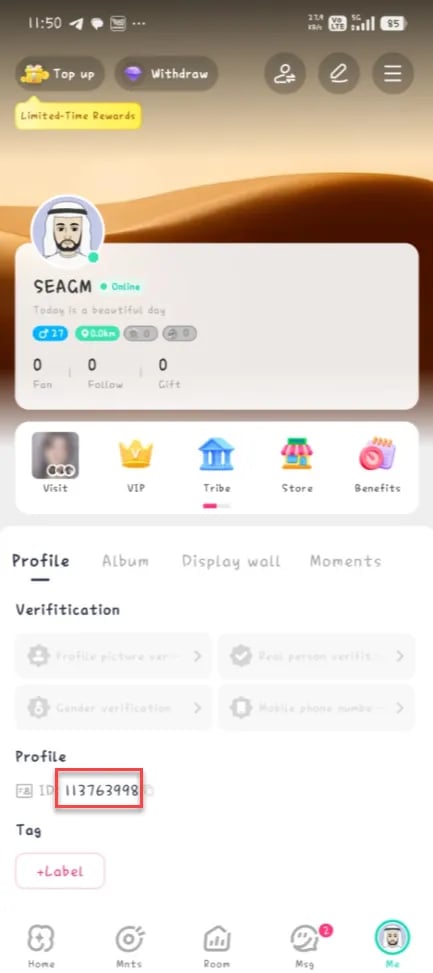
Tip: Always use the copy button whenever possible to prevent typographical errors before submitting your order on VGTopup.
Sama Chat In-App Perks: Virtual Gifts, Voice Parties, and Room Games
Sama Chat coins unlock a wide range of social features across the platform. Below is a breakdown of how coins are used within the app:
| Feature | Description | Coin Utility |
|---|---|---|
| Virtual Gifts | Animated 2D and 3D gifts sent to room hosts and friends. | Supports broadcasters and increases room popularity points. |
| Entrance Effects | Custom vehicles and arrival animations when entering voice rooms. | Showcases VIP status and grabs room attention immediately. |
| Profile Cosmetics | Animated avatar frames, text chat colors, and unique badges. | Personalizes your account presence across all public rooms. |
| Voice Room Mini-Games | In-room casual games such as Ludo, wheel spins, and dice. | Used for entry tickets and interactive game rewards. |
| Relationship Badges | CP (Couple) and Best Friend relationship rings and tags. | Unlocks shared profile showcases and exclusive couple effects. |
Using coins to support creators not only helps build relationships within voice communities but also raises your personal contributor rank, granting you exclusive chat perks and profile recognitions.
Safe Top-Up Best Practices: Protecting Your Account with UID-Only Checkout
Keeping your gaming and social accounts secure is vital. When purchasing Sama Chat coins online, follow these safety standards:
- Never Share Your Account Password: Direct coin top-ups only require your public numeric UID. No third-party platform ever needs your login password, phone SMS code, or social login credentials.
- Verify the UID Before Payment: Coins delivered to an incorrect UID cannot be recalled once processed on the server. Take a moment to verify the numbers.
- Avoid Third-Party Login Plugins: Never install modified APKs or unofficial client plugins that promise free coins, as these can compromise your device security and result in permanent account bans.
- Recharge for Friends Safely: You can send coins to friends or family members simply by entering their UID at checkout on VGTopup. Their account stays completely safe without requiring their login details.
Why Choose VGTopup for Your Sama Chat Coin Recharge
VGTopup provides a direct and dependable way to refill your Sama Chat wallet balance without complications:
- UID-Based Direct Delivery: Transactions are linked directly to your public ID for immediate account credit.
- Clear and Transparent Pricing: Coin package rates and available payment options are visible directly on the checkout screen without hidden platform fees.
- Cross-Platform Compatibility: Recharges work for Sama Chat accounts created on both Android and iOS systems.
- Dedicated Order Assistance: VGTopup customer service is on standby to help resolve questions regarding order status or UID submission.
Troubleshooting Common Sama Chat Balance and Delivery Questions
If you experience any delay or issue after ordering, use the following troubleshooting steps:
1. The Coins Have Not Appeared in My App Wallet
- Completely close the Sama Chat app from your recent apps switcher and reopen it.
- Navigate to your Me tab, open Wallet, and swipe down on the screen to refresh the balance display.
- Check your internet connection to ensure the app is communicating with the game servers properly.
2. I Entered an Incorrect UID During Checkout
- If the order has not yet been processed by the automated dispatch system, contact VGTopup customer support immediately with your order number and the correct UID.
- If the order has already been finalized on the blockchain or server network to an active account, completed deliveries cannot be reversed. Always double-check your UID prior to confirming payment.
3. My App Version Is Out of Date
- Older app builds sometimes fail to display updated coin balances or new gift assets. Visit Google Play Store or Apple App Store to update Sama Chat to the latest 2026 release.
Frequently Asked Questions
How do I top up coins on Sama Chat?
To top up, select your desired coin quantity on VGTopup, input your Sama Chat numeric UID, select your payment method at checkout, and complete the transaction. The coins will be credited directly to your in-app wallet balance.
Where can I find my Sama Chat UID?
Open the Sama Chat app, tap the Me / Profile tab in the bottom right corner, and locate the numeric sequence displayed right under your profile photo and nickname. Tap the copy icon next to it to copy your UID.
Do I need to share my Sama Chat password to recharge?
No. Recharging through VGTopup requires only your public account UID. You should never share your account password, SMS verification codes, or personal login information.
How quickly will the coins appear in my Sama Chat wallet after purchase?
Coin deliveries are initiated directly upon payment confirmation. In most cases, the balance reflects in your in-app wallet shortly after the transaction is processed. You can refresh your wallet screen inside the app to see the updated total.
What should I do if my Sama Chat coins do not arrive immediately?
First, force-close the Sama Chat app and reopen it to refresh your wallet data. If the balance has not updated, verify your transaction status on VGTopup and reach out to VGTopup customer support with your order ID for quick assistance.
Can I recharge Sama Chat coins for a friend using their UID?
Yes. You can purchase coins for any player by entering their specific Sama Chat UID in the order field on VGTopup. The coins will be delivered directly to their account wallet once payment is complete.

































































