
Free Fire Top Up Online: Direct Diamond Delivery via UID
Free Fire diamonds are the primary premium currency used in Garena Free Fire to acquire exclusive weapon skins, elite bundles, pets, cosmetics, and seasonal battle passes. Obtaining diamonds directly through player UID is the most secure method to boost your inventory without risking account access. On VGTopup, you can complete a Free Fire top up within seconds using your player ID. The process does not require your Garena, Facebook, Google, or VK login passwords, keeping your account safe from unauthorized access.
Live pricing and current bundle offerings are shown directly on the product checkout selection above. Choose your preferred diamond package, input your unique numeric Free Fire UID, and proceed through our encrypted payment system to receive your diamonds in-game.
How to Top Up Free Fire Diamonds Using Player UID
Purchasing diamonds on VGTopup is straightforward. Follow these steps to complete your order:
- Select Your Diamond Pack: Browse the diamond denominations listed in the catalog above and choose the amount you wish to purchase.
- Enter Your Free Fire UID: Type your numeric Player ID into the designated input box. Make sure you do not add extra spaces or letters.
- Select Your Payment Method: Choose from the available localized payment channels displayed during checkout.
- Complete the Transaction: Finalize your payment through the secure payment processor.
- Check Your In-Game Balance: Open Free Fire on your mobile device, log in to your account, and view the updated diamond counter in the top lobby menu.
Where to Find Your Free Fire Player UID in the App
Your Free Fire Player UID is a unique string of numbers assigned to your game account. You do not need to share your nickname or login information; only the numeric UID is required to route diamonds directly to your profile.
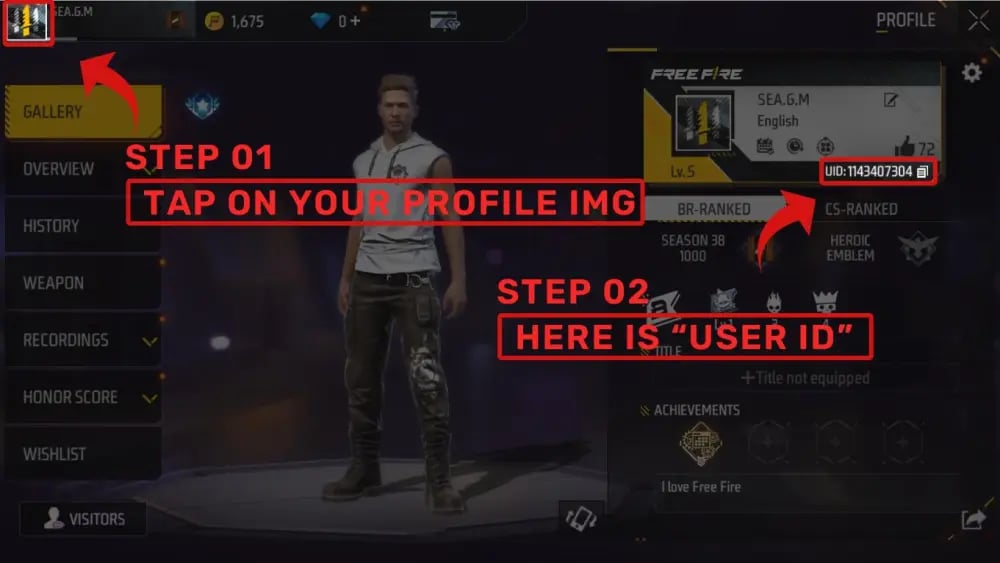
To locate your UID:
- Launch the Free Fire app on your Android or iOS device.
- Tap your profile banner (avatar icon) located in the upper-left corner of the main lobby screen.
- Stay on the Gallery / Basic tab inside your profile view.
- Look beneath your avatar and character nickname to find your UID (a sequence of 8 to 12 digits).
- Tap the yellow Copy icon next to your UID string to copy the exact numbers to your clipboard.
- Paste the copied UID directly into the order field on VGTopup.
Free Fire Diamond Uses: Bundles, Characters, and Weapon Skins
Diamonds give you access to limited-edition items and tactical advantages in both Battle Royale and Clash Squad modes. Here are the main ways players spend their diamonds in 2026:
- Booyah Pass & Seasonal Passes: Unlock premium tiers of the active monthly pass to claim exclusive outfits, weapon crates, vehicle finishes, and emotes.
- Weapon Royale & Luck Royale: Spin for legendary weapon skins with modified attributes such as increased rate of fire, armor penetration, or reload speed.
- Character Unlocks & Skill Slots: Acquire active and passive skill characters or instantly unlock skill slots to create tactical character combinations.
- Pets and Pet Skins: Purchase companion pets that provide tactical utility during matches, such as Gloo Wall regeneration or item detection.
- Custom Room Cards & Rename Cards: Buy room cards to host private tournaments with friends or change your display nickname.
| Item Category | Primary In-Game Purpose | Diamond Source |
|---|---|---|
| Booyah Pass | Seasonal leveling rewards, badges, and rare skins | Monthly progression tier upgrade |
| Luck Royale | Time-limited gun skins, incubators, and mythic bundles | Direct spin draws |
| Character Store | Tactical abilities and active/passive skill setups | Direct store purchase |
| Crates & Boxes | Weapon loot boxes, evolution tokens, and materials | Daily store packs |
| Emotes & Cosmetics | Victory animations, vehicle wraps, and parachutes | Event shops & store catalogue |
Why Top Up Free Fire on VGTopup: Safe, Password-Free UID Checkout
Account safety is paramount when purchasing virtual gaming currencies. VGTopup guarantees complete security by adhering to strict delivery standards:
- Zero Password Requirement: We only request your public numeric Player UID. We will never ask for your account password, email login, or two-factor authentication codes.
- Direct Delivery: All transactions are routed directly to the server ID matching your UID.
- Transparent Region Options: Checkout displays live, updated currency conversions and localized checkout options suited for your region.
- 24/7 Dedicated Support: If you ever encounter a question about your order, customer assistance is available to verify delivery status.
Supported Payment Methods and Delivery Timeline
VGTopup provides an array of localized and international payment options to make buying Free Fire diamonds simple wherever you play. Depending on your location, you can check out using credit and debit cards, secure digital e-wallets, bank transfers, and local mobile payment systems. The active payment methods and their current prices are displayed in real-time on the checkout page.
Once payment clears, orders process automatically. In most cases, diamonds are credited to your Free Fire account instantly. During peak server activity or scheduled game maintenance, processing may take a few extra minutes.
Troubleshooting Free Fire Diamond Top-Up and Balance Delays
If you completed a transaction but your diamond balance has not updated inside the game, work through these standard verification steps:
- Restart the Free Fire App: Fully close the game client from your phone's app switcher, wait 10 seconds, and reopen Free Fire. This forces the client to sync with the game servers.
- Check Your In-Game Mailbox: Some promotional top-up rewards, first-time recharge bonuses, or bundle tokens are sent to your in-game mailbox rather than directly to the top counter.
- Verify the Submitted UID: Check your order confirmation receipt on VGTopup to ensure the UID you entered matches your profile digits exactly.
- Check Server Maintenance: If Garena is currently deploying an update or patch, diamond balances may experience a short delay until maintenance concludes.
- Contact Support with Your Order ID: If your balance does not update after restarting, reach out to VGTopup customer support with your transaction reference number and UID for rapid assistance.
Frequently Asked Questions
How do I find my Free Fire UID for top-up?
Open Free Fire, tap your profile avatar in the top-left corner of the lobby screen, and view the Basic / Gallery tab. Your UID is the numeric sequence shown right under your nickname. Tap the copy icon next to it to copy your ID.
Do I need to provide my Free Fire password to recharge diamonds?
No. VGTopup only requires your numeric Player UID. You never need to share your game password, Facebook, Google, Apple ID, or Twitter login details.
How long does it take for diamonds to reflect in Free Fire?
Diamonds are typically credited automatically right after your payment is confirmed. In rare instances of high server traffic or network lag, it may take a few moments. Relaunching the app will refresh your balance.
Can I top up Free Fire diamonds for a friend using their UID?
Yes. You can recharge diamonds for friends, guildmates, or family members. Simply obtain their numeric Free Fire Player UID, paste it into the UID field on VGTopup, and complete the payment. The diamonds will go straight to their account.
What should I do if my Free Fire diamonds are not credited?
First, close and restart your Free Fire application to refresh your account data. If the diamonds still do not appear, check your order status on VGTopup to ensure payment succeeded, then contact our support team with your order number.
Can Free Fire diamonds be used across all servers?
Free Fire diamonds are bound to the specific game account and server region associated with your Player UID. Make sure you select the correct region or server pack during checkout if region-specific options are prompted, ensuring the diamonds deposit smoothly into your profile.
Select Denomination
Tax, payment fees and eligible coupons are calculated at checkout.
| Package | Price |
|---|---|
| LATAM-Loot Box - Boxed Burger | USD 1.32 |
| LATAM-Grenade - Burger Bang | USD 1.32 |
| LATAM-Weekly Membership | USD 1.85 |
| LATAM-341 Diamonds | USD 1.88 |
| LATAM-Gloo Wall - Burger Bang | USD 1.94 |
| LATAM-Backpack - Strapped Sub | USD 1.94 |
| LATAM-572 Diamonds | USD 3.13 |
| LATAM-Booyah Pass Card | USD 3.26 |
| LATAM-1166 Diamonds | USD 5.75 |
| LATAM-Monthly Membership | USD 8.82 |
| LATAM-2398 Diamonds | USD 11.41 |
| LATAM-6160 Diamonds | USD 29.05 |