
How to Complete Your Brawl Stars Top Up on VGTopup: Gems & Brawl Pass
To purchase Gems or activate your Brawl Pass, follow these direct steps on VGTopup:
- Select your item: Choose the Brawl Stars Gems pack denomination, standard Brawl Pass, or Brawl Pass Plus that fits your gaming needs.
- Provide your account email: Enter the verified email address linked to your Supercell ID. Make sure this email address matches the exact account you wish to credit.
- Review your order: Double-check your entered email address to prevent delivery delays or incorrect crediting.
- Proceed to payment: Select your preferred payment method on the secure checkout screen. Current prices, regional currency conversions, and applicable fees are displayed live during checkout.
- Receive your items: Complete your payment. The Gems or pass activation are credited directly to your account. You can monitor the real-time status of your order on VGTopup.
Brawl Pass vs Brawl Pass Plus: Which One Should You Buy in 2026?
In 2026, the Brawl Stars season pass runs on a monthly cycle. Understanding the specific rewards between the standard Brawl Pass and the upgraded Brawl Pass Plus helps you choose the right tier for your account progression.
| Feature / Reward | Free Track | Brawl Pass | Brawl Pass Plus |
|---|---|---|---|
| Pass Activation | Standard tier rewards | Premium Track Activated | Premium Track + Instant 20% XP Skip |
| In-Game Gems | 0 Extra | 50 Gems | 150 Gems (50 base + 100 bonus) |
| Bling | Base Tier Drops | 2,200 Bling | 5,700 Bling |
| Extra Coins & Power Points | Base amounts | Substantial progression boost | Maximum seasonal yield |
| Seasonal Brawler Skin | None | 1 Exclusive Skin | Exclusive Skin + 2 Color Chromas |
| Player Title | None | None | Unique Seasonal Player Title |
| Daily XP Quests | Standard | Unlocked | Unlocked + Faster Completion |
Deciding between the two options depends on your goals:- Standard Brawl Pass suits players who want steady monthly progression, the base 50 gems, and the exclusive seasonal skin.- Brawl Pass Plus suits players who want faster progression skips, cosmetic chromas, the exclusive title, and the maximum 150 gems to spend across the shop.
What Can You Buy with Brawl Stars Gems?
Because the season pass is purchased directly, Gems in Brawl Stars are used for high-value store purchases and cosmetic personalization:
- Brawler Skins: Buy Rare, Super Rare, Epic, Mythic, and Legendary skins to customize your favorite brawlers. You can also pick up Hypercharge skins during special event rotations.
- Hypercharges: Purchase Hypercharge abilities directly with gems during early release windows to strengthen your brawlers in competitive modes.
- Early Access Packs: Obtain newly released brawlers before they arrive on the Starr Road, alongside exclusive cosmetic pins and sprays.
- Resource Offers & XP Boosters: Speed up your progression through discounted coin bundles, extra Starr Drops, and token doubler packs in the daily shop.
- Profile Customizations: Purchase animated pins, sprays, custom player icons, or rename your account.
How to Find and Verify Your Supercell ID Email
To ensure your Brawl Stars top up credits the correct profile, verify your linked Supercell ID email inside the game before placing an order.
Follow these steps:1. Launch Brawl Stars on your mobile device.2. Tap the menu icon (three horizontal lines) in the top right corner of the lobby screen.3. Tap "Supercell ID" or select "Settings" and tap the "Connected" status banner.4. View your profile card on the Supercell ID dashboard. The email address displayed there is your linked account ID.5. Copy this exact email address and enter it on the VGTopup product page.
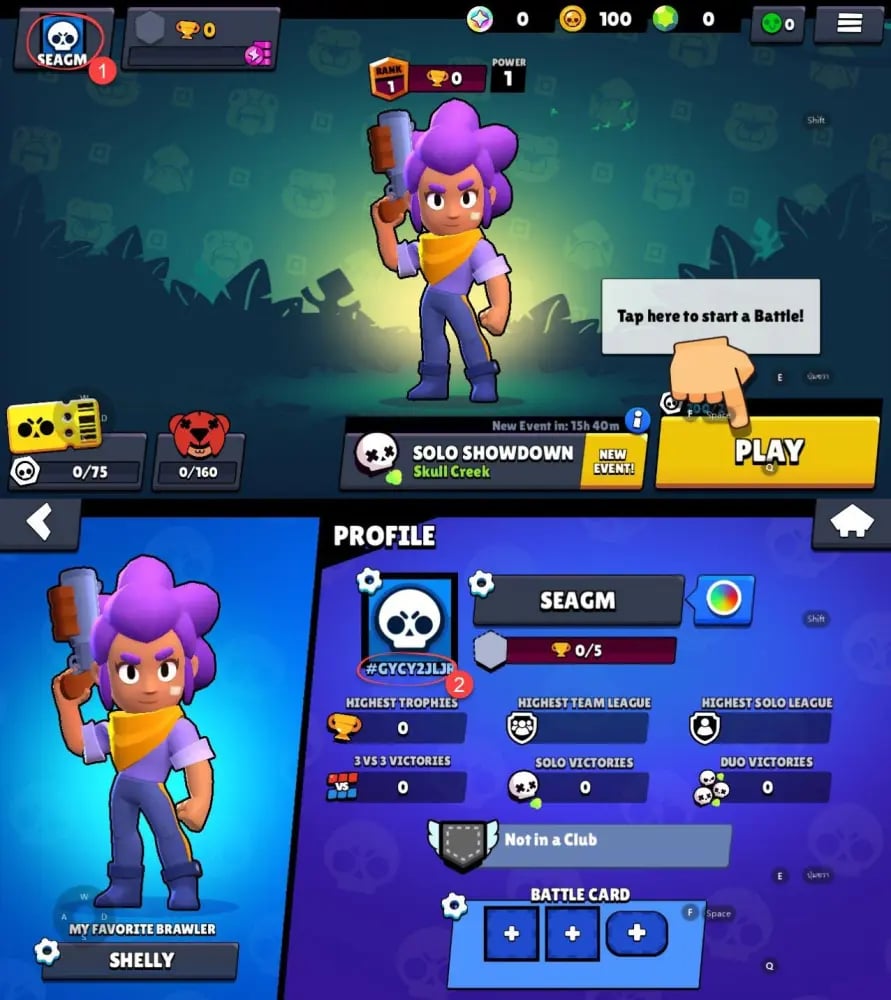
Make sure your account is registered with Supercell ID. If you are playing on a guest account, link an active email address inside the game settings first to secure your game data and enable top-up processing.
Safety First: Why Top Up Brawl Stars Without Password Sharing
Account safety is critical when purchasing digital gaming goods. VGTopup utilizes direct account crediting that only requires your linked Supercell ID email address. We never ask for your account password, email login credentials, or personal verification codes.
Key safety advantages include:- Zero Account Login Access: Your login credentials stay with you. No third party ever accesses your device or takes control of your profile.- Policy Compliance: Account sharing violates game service terms and can lead to permanent bans or temporary lockouts. Top-ups using direct account identification protect your standing.- Global Compatibility: Whether your Supercell ID account was created in Europe, North America, Asia, or South America, orders process smoothly across all regions.- Secure Data Handling: Your information is encrypted and used solely to fulfill your designated order.
Troubleshooting and Delivery Information for Brawl Stars Purchases
Orders on VGTopup are processed promptly once payment is verified. If your Gems or Brawl Pass do not reflect immediately in your account, follow these troubleshooting steps:
- Restart the game: Force close the Brawl Stars application completely from your device task manager and open it again to refresh your connection with the game server.
- Check your in-game inbox: Tap the envelope icon in the main lobby. Some promotional items, bundles, or pass activations arrive as claimable items in your inbox.
- Check Supercell ID messages: If an activation requires confirmation, verify whether a message was sent to your Supercell ID notification center.
- Verify your order details: Open your VGTopup order history. If the order is marked completed but you do not see the items after 10 minutes, confirm that the submitted Supercell ID email was entered without spelling errors.
- Contact customer support: If an incorrect email was provided or you experience an unexpected delay, contact the 24/7 VGTopup customer support team with your order number for fast resolution.
Frequently Asked Questions
Can I still buy Brawl Pass with gems?
No. The Brawl Pass in Brawl Stars cannot be purchased with in-game gems. Both the standard Brawl Pass and Brawl Pass Plus are direct purchases. Gems can be spent on skins, Hypercharges, early access bundles, and special store offers.
How many gems does a Brawl Pass Plus give you?
A Brawl Pass Plus provides a total of 150 Gems across the reward track, consisting of the 50 Gems found on the standard track plus 100 bonus Gems exclusive to the Plus tier.
How can I buy Brawl Stars Gems safely?
You can buy Brawl Stars Gems safely on VGTopup by choosing your preferred gem pack, entering your linked Supercell ID email, and completing checkout. Because passwords are never requested, your account security remains uncompromised.
Do I need to share my password to top up Brawl Stars?
No. You do not need to share your password or email verification codes. VGTopup requires only your registered Supercell ID email to deliver your Gems and passes.
How long does it take for Gems or Brawl Pass to arrive?
Delivery begins promptly after payment confirmation. Most orders credit to your account within a few minutes. You can check the live status of your order directly on your VGTopup account page.
What should I do if my Gems do not show up in my account?
First, restart the Brawl Stars app to refresh your data balance and check your in-game mailbox. If the gems do not appear shortly after, check your order status on VGTopup and reach out to 24/7 customer support with your order ID.
Select Denomination
Tax, payment fees and eligible coupons are calculated at checkout.
| Package | Price |
|---|---|
| 30Gems | USD 1.60 |
| Starter Pack! Brawl like a pro! | USD 2.41 |
| 80Gems | USD 4.02 |
| Brawl Pass Plus Upgrade | USD 4.02 |
| Brawl Pass | USD 7.25 |
| 170Gems | USD 8.06 |
| Brawl Pass Plus | USD 10.48 |
| 360Gems | USD 16.12 |
| Pro Pass Plus | USD 20.14 |
| Ultimate Collector's Pack | USD 21.76 |
| Collector's Pack | USD 22.57 |
| 950Gems | USD 40.31 |
| 2000Gems | USD 80.63 |