
Sky: Children of the Light Top Up: Buy Candles and Passes Fast
Candles form the heart of every interaction and cosmetic unlock in Sky: Children of the Light. Whether you want to unlock higher friendship tiers with your companions, send daily hearts, trade with visiting Traveling Spirits, or secure limited cosmetics from the active 2026 season, keeping a steady supply of candles is essential.
Forging candles manually through daily wax runs takes hours of flying across multiple realms. With a direct Sky: Children of the Light top up on VGTopup, you can bypass the repetitive grinding and top up your balance immediately using only your public Sky ID. All pack selections, live pricing, and regional payment methods update dynamically on the checkout menu above.
What Are Candles in Sky: Children of the Light and What Are They Used For?
Candles serve as the primary in-game economy across the kingdom of Sky. They enable your Sky kid to communicate, progress, and customize appearances. In-game currency breaks down into several key categories:
- Regular Candles (White Candles): Used for progressing through standard constellation spirit trees, buying permanent cosmetics (capes, hairstyles, masks, instruments), purchasing spells, and unlocking friendship interactions like high-fives, hugs, piggyback, and chat benches.
- Hearts: Converted from Regular Candles via spirits or gifted daily by friends. Hearts are required for high-tier capes, instruments, and constellation completion.
- Seasonal Candles (Orange Candles): Available exclusively during an active season. These are spent on limited-time seasonal spirit trees to unlock seasonal cosmetics, expressions, and music sheets.
- Ascended Candles (Red Candles): Earned primarily through the Eye of Eden and Shard Eruptions, used to unlock Wing Buffs (permanent Winged Light) and advanced friendship tiers.
Choosing to buy Sky Children of the Light candles directly ensures you never miss a bi-weekly Traveling Spirit visit or a time-sensitive seasonal event.
How to Top Up Sky: Children of the Light Candles on VGTopup
Recharging your Sky account on VGTopup is simple, fast, and does not require sharing your private account credentials.
- Select Your Package: Review the available packs listed above, including Regular Candle bundles, Season Candles, and active Season Passes.
- Enter Your Sky ID: Type or paste your unique alphanumeric Sky ID into the player field.
- Confirm Your Order: Check the real-time pricing and select your preferred local payment method at checkout.
- Receive In-Game Items: Once processed, the candles or passes are sent straight to your Sky profile on the game server.
- Verify Your Balance: Open or restart Sky: Children of the Light on your mobile device, PC, or console to see your updated candle wallet balance.
How to Find Your Sky ID in-Game
Your Sky ID is a unique player identifier tied to your game profile. You only need this public ID to complete your order.
- Launch Sky: Children of the Light on your mobile device (iOS/Android), Steam PC, or console.
- Tap the top-right corner of your screen (or open the main pause menu with your controller/keyboard) to open the Settings gear icon.
- Select the Account tab from the settings menu.
- Open Account Info (or Account Details).
- Locate your Sky ID. Use the on-screen Copy button to copy the alphanumeric string directly to your clipboard.
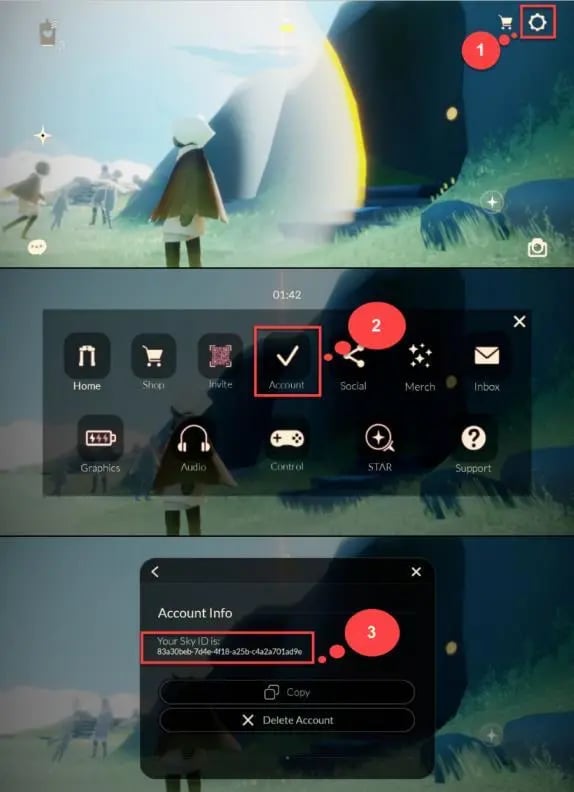
Tip: Paste the ID directly into the VGTopup order field to avoid mistyping uppercase letters, lowercase letters, or special dashes.
Seasonal Candles vs. Regular Candles vs. Season Passes Explained
Understanding how different Sky items behave helps you plan your purchases across current and upcoming events.
| Item / Currency Type | Primary In-Game Purpose | Carry-Over Behavior |
|---|---|---|
| Regular Candles | Standard Spirit trees, gifting hearts, friendship nodes | Permanent. Candles remain in your wallet indefinitely. |
| Seasonal Candles | Unlocking active 2026 Season Spirit cosmetics and items | Converts 1:1 into Regular Candles automatically when the season ends. |
| Season Pass | Unlocks Season Pendant, bonus daily candles, and Season Spirit items | Active only for the duration of the specific season purchased. |
| Ascended Candles | Unlocking permanent Wing Buffs and tier-2 friendship nodes | Permanent. Kept in wallet until spent. |
If you top up Seasonal Candles, any leftover balance is never lost; it converts directly into regular white candles the moment the active season finishes.
Nintendo Switch vs. Mobile/PC: Cross-Platform Candle Balance Guide
Sky: Children of the Light supports full cross-play and cross-progression across iOS, Android, Steam (PC), PlayStation, and Nintendo Switch. However, platform wallet rules handle paid candles differently:
- Earned/Forged Candles: Candles earned from collecting wax inside the game are universal and display on all linked devices.
- Web and Mobile/PC Purchased Candles: Candles bought through web ID top-ups or mobile/PC stores sync across iOS, Android, Steam PC, and PlayStation accounts. Due to Nintendo eShop policies, purchased candle balances do not show up on the Nintendo Switch wallet balance.
- Unlocked Items & Cosmetics: Any cape, mask, hair, prop, or friendship node you purchase using candles on PC or mobile is permanently saved to your global account and is immediately usable on your Nintendo Switch.
Recommendation for Switch Players: If you play on Switch, link your Sky profile to a Google, Apple, or Steam login. Complete your Sky COTL recharge on VGTopup, open the game on PC or mobile to spend your purchased candles on your desired spirit cosmetics, and then switch back to your console to wear your new items.
Is It Safe to Top Up Sky COTL with Sky ID?
Yes, topping up through VGTopup using only your Sky ID is safe and protects your account integrity.
- Zero Password Sharing: You never have to share your Google, Apple ID, Steam, Nintendo, or PlayStation passwords.
- No Login Takeovers: Because orders process via the public player ID, your personal login credentials and account recovery options stay entirely in your control.
- Official Game Delivery: Items are credited through direct server-side delivery, eliminating the risk of third-party account tampering.
- Order Support: If you accidentally mistype your Sky ID or experience delays during peak server events, VGTopup customer support is available to review your transaction status and assist you.
Frequently Asked Questions About Sky COTL Recharges
How do I find my Sky ID to complete a top up?
Open the in-game Settings menu via the gear icon in the top right corner of your screen. Select Account, go to Account Info, and tap the copy button next to your Sky ID string. Paste that code into the VGTopup order field.
Do I need to provide my account password to top up Sky: Children of the Light?
No. VGTopup only requires your public Sky ID. You do not need to share passwords, authentication codes, or linked social accounts.
Will candles bought on web top-up show up on my Nintendo Switch?
Purchased candle balances reflect across mobile (iOS/Android), Steam PC, and PlayStation. Nintendo Switch segregates purchased candle wallets. If you play on Switch, simply log into your linked Sky account on PC or mobile to spend your topped-up candles; all unlocked cosmetics and friendship tiers will sync to your Switch right away.
What is the difference between Regular Candles and Seasonal Candles?
Regular Candles are used year-round for base constellation spirits, friendship nodes, and spells. Seasonal Candles are used only during active seasonal events to unlock seasonal spirit trees. Any unused Seasonal Candles convert to Regular Candles at a 1:1 ratio once the season concludes.
How quickly will candles arrive in my Sky: Children of the Light account?
Deliveries are processed directly through the game server. Once payment completes, the items credit to your Sky ID. Re-launching the application will refresh your in-game wallet.
Can I buy a Season Pass using only my Sky ID?
Yes. When Season Passes or seasonal bundles are available in the live checkout menu above, entering your Sky ID allows the pass or pass gift pack to be applied to your account for the active season.
Select Denomination
Tax, payment fees and eligible coupons are calculated at checkout.
| Package | Price |
|---|---|
| 15 Season Candles | USD 4.59 |
| 15 Season Candles | USD 4.59 |
| 30 + 5 Bonus Season Candles | USD 8.71 |
| 60 + 12 Bonus Season Candles | USD 17.99 |
| 150 + 40 Bonus Season Candles | USD 41.18 |