How to Top Up Brawl Stars Gems for Your Friend's Account with the Correct Player Tag?
Yes—if the checkout flow supports Player Tag delivery, you can top up Brawl Stars Gems for your friend's account without their password. The key is to use the exact Player Tag from their in-game profile, review it before payment, and keep the receipt in case support needs to verify the order.
For most buyers, the decision is simple: official methods are safest, Player Tag top-up is easiest for another account, and cross-border buyers usually need the Player Tag route. If you're ready to buy, Brawl Stars top up for friend account only makes sense after you've confirmed the tag, region fit, and delivery method.
Why is the correct Player Tag the most important detail in a Brawl Stars Gems top up?
The Player Tag is the one identifier that actually points to the account. In Brawl Stars, it's the unique 8-character ID starting with #. The display name is changeable and not unique. Supercell ID is the email-based login system used for account recovery and official gifting, not the same thing as a top-up ID.
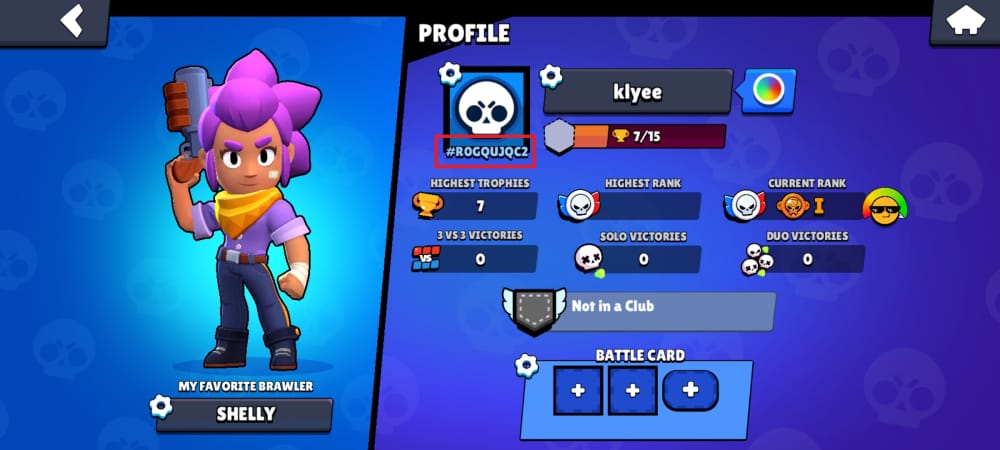
Officially, you can find the Player Tag like this:
- Open Brawl Stars
- Tap the Social button at bottom right
- Tap Friend Book
- The Player Tag appears under the search bar
From repeated testing and support-case review, the most common mistake is users sending a nickname instead of the tag. That fails fast with errors like "Player ID not found", or worse, sends the order into manual review. I always ask for a screenshot of the profile page first. It's boring, but it prevents the expensive kind of typo.
Which identifier should you enter: Player Tag, player name, or Supercell ID?
Enter the Player Tag when the checkout asks for account ID or player ID. Don't enter:
- Player name: not unique, can be changed
- Supercell ID email: used for login and official Pass gifting
- Login credentials: unnecessary for Player Tag-only top-ups
A lesser-known but important point: Player Tag-only services are generally safer than login-required services because you're not sharing account access. If a page asks for your friend's login for a Gems order, stop and verify why.
Can you top up Brawl Stars Gems for another person's account without their login?
Yes, in many Player Tag-based flows you can. But it isn't the official gifting method for Gems.
Officially, Gems cannot be directly transferred or officially topped up to another account using only Player Tag. Supercell's safer official route is different: Brawl Pass gifting through Supercell Store, which uses your friend's Supercell ID-linked account, not Gems. Officially, Brawl Pass Plus is priced at $8.99.
So the buyer decision looks like this:
| Goal | Best route | Why | Trade-off |
|---|---|---|---|
| Safest | Recipient buys in-app on their own device | Fully official | You can't pay directly without their device/account flow |
| Official gift | Supercell Store Pass gifting | Official gifting path | Pass only, not Gems |
| Easiest for friend account | Player Tag top-up | No password needed | Officially warned against |
| Fastest | Reputable Player Tag delivery | Community reports instant delivery after payment confirmation | Depends on correct tag and seller processing |
| Cheapest | Discounted Player Tag offers | Community/single-source discounts up to 21%-30% off some packs | Lower price doesn't remove policy risk |
| Best for overseas users | Player Tag top-up | Can bypass region restrictions in practice | Still verify account and delivery details first |
Personally, I think the Player Tag route is the practical choice for overseas gifting or last-minute season-end purchases, especially when the recipient can't buy locally. But for long-term account safety, official in-app or Pass gifting is still the cleaner option.
Can I top up Brawl Stars for a friend in another country?
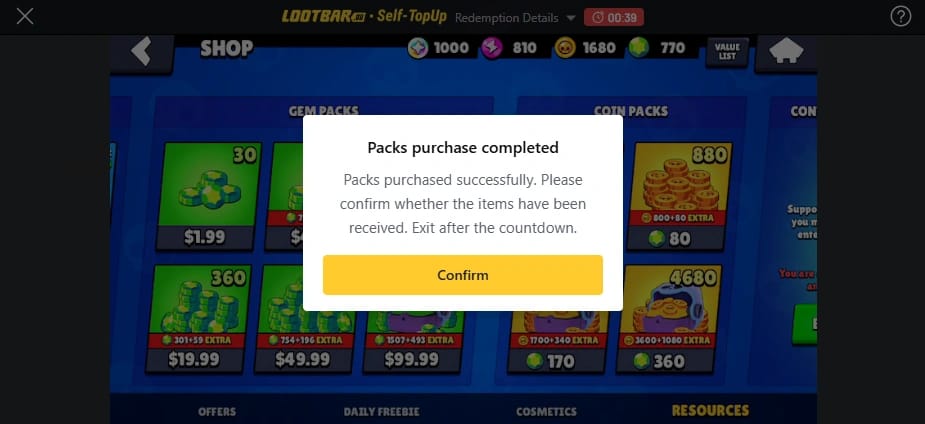
Yes, this is one of the main reasons buyers use Player Tag top-ups. Community and single-source reports show these orders can bypass region restrictions, including US-to-restricted-country purchases.
Still, check these before paying:
- Recipient account is the right one and linked to the expected Supercell ID
- Region mismatch isn't blocking checkout
- Payment method is supported
- You are not relying on platform-specific Gems transfer assumptions
One edge case many guides miss: community testing shows Gems bought through iOS don't transfer to Android accounts or vice versa under app store policy. If you're using official app-store purchases, platform matters. With Player Tag delivery, the account targeting matters more than your device, but I still verify the recipient account first because cross-platform confusion is easy to miss.
For no-card buyers, payment support varies. Some Player Tag services support Apple Pay, Google Pay, and in the Philippines, GCash is commonly supported on certain sites. I expected card checkout to be smoother, but in mobile testing, wallet-based payment often triggers fewer verification prompts.
How do you top up Brawl Stars Gems for your friend's account with the correct Player Tag?
Use a Player Tag-only checkout, verify the tag twice, pay once, then confirm the Gems inside the recipient account.
Ask your friend for the exact Player Tag
- It should start with
# - Ask for a screenshot from the in-game profile or Friend Book
- Don't accept just the nickname
- It should start with
Check the tag format carefully
- Match every character exactly
- Watch for easy mistakes like missing
#or swapped letters/numbers - Confirm the tag matches the intended account owner
Choose the Gems pack
- Compare value, not just headline discount
- Single-source pricing examples show 30 Gems at $1.69 (17% off) and 80 Gems at $4.19 (21% off) versus official pricing on some services
- Community reports also point to Hypercharge offers around 79-99 Gems as strong progression value in some cases
Review the order before payment
- Re-check Player Tag
- Confirm pack size
- Save the order summary
- If you're buying through a Brawl Stars player tag recharge for someone else, this is the moment to pause and verify everything one last time
Complete payment
- Common options include credit/debit card, Apple Pay, Google Pay
- In some PH-focused flows, GCash is supported
- No reliable Player Tag top-up source in the fact set shows USDT support, so don't assume crypto is available
Confirm delivery
- Community reports say delivery is usually instant after payment confirmation
- Ask your friend to check their Gems balance
- Also check any available order history or receipt page
In my experience, step 4 is where most mistakes happen. People rush because the order looks simple. Honestly, the extra 20 seconds of tag review saves far more time than any support ticket.
What's the best way to choose between cheapest, safest, fastest, and easiest?
It depends on what you care about most.
| Priority | Pick this | Best for | Watch out for |
|---|---|---|---|
| Cheapest | Discounted Player Tag top-up | Price-sensitive buyers | Verify the exact pack and final fee |
| Safest | Official in-app purchase on recipient device | Main-account buyers | Requires recipient to complete purchase |
| Fastest | Reputable instant Player Tag delivery | Urgent gifts, season-end buys | Wrong tag kills speed |
| Easiest | Player Tag-only checkout | Buying for a friend without login | Officially not the preferred method |
| Overseas-friendly | Player Tag top-up | Cross-border gifting | Region/payment mismatch can still block checkout |
My recommendation for ready buyers:
- Buying for your own main account? Use official in-app.
- Buying for a friend in another country? Use Player Tag top-up, but verify the tag with a screenshot.
- Want an official gift? Gift Brawl Pass through Supercell Store, not Gems.
- Need it before season end? Player Tag delivery is often the most practical route.
What should you do if the Brawl Stars Gems do not arrive or the Player Tag is wrong?

Start with seller support first for delivery issues. Use official support only for official-account problems like bans, negative Gems, or app-store billing issues.
If the payment was charged but Gems didn't arrive, what should you check first?
Check these in order:
Wait through the normal processing window
- Community reports say delivery is usually instant after payment confirmation, not always before confirmation
Verify the Player Tag on the order
- Wrong or invalid tags often trigger "Player ID not found"
Check the recipient account balance
- Ask your friend to reopen the game and confirm current Gems
Check order status and receipt
- Save order ID, payment proof, and the submitted tag
Contact seller support first
- Community experience says this solves most wrong-tag or no-delivery cases faster than going straight to Supercell
This is the support split that actually works:
| Problem | First contact | Why |
|---|---|---|
| Wrong Player Tag entered | Seller support | They can review the submitted order data |
| Charged but no Gems from Player Tag order | Seller support | They control fulfillment and order tracing |
| Ban or revoked/negative Gems | Supercell Support | Officially handles account sanctions and negative balance issues |
| App Store / Google Play charge issue | Billing support / purchase history | Official billing path for payment failures or refunds |
Officially, Supercell Support handles bans and negative Gems from refunded purchases, not third-party order corrections. If the issue came from Apple App Store or Google Play billing, check purchase history and billing support there. If needed, in-game you can also use Help & Support > Purchases > Restore for official purchase recovery.
FAQ
Can I buy Brawl Stars Gems for my friend's account with only the Player Tag?
Yes, on Player Tag-based checkout flows you often can. But officially, Supercell does not support direct Gems gifting by Player Tag, so this is a practical workaround rather than an official gift feature.
Where do I find the correct Player Tag in Brawl Stars?
Open Social, then Friend Book. The Player Tag appears under the search bar and starts with #.
What happens if I enter the wrong Player Tag for a Brawl Stars top up?
The order may fail with "Player ID not found", go into review, or be sent to the wrong account if the tag belongs to someone else. Contact seller support immediately with your order ID and the submitted tag.
How long does Brawl Stars Gems delivery take after payment?
Community reports say delivery is usually instant after payment confirmation on reputable services. If it doesn't arrive quickly, check order status, tag accuracy, and the recipient's Gems balance before escalating.
Do I need my friend's Supercell ID login to top up Brawl Stars Gems?
No, not for a Player Tag-only top-up. You only need the correct Player Tag; for official Pass gifting, Supercell ID-linked account verification is required.
Why was I charged but the Brawl Stars Gems did not arrive?
Most often it's a tag error, payment still processing, or a fulfillment delay. For Player Tag orders, contact seller support first; for app-store billing issues, use Apple or Google billing support.
Can I top up Brawl Stars for a friend in another country?
Yes, that's one of the main use cases for Player Tag top-up. Cross-border orders are widely used when official local purchase options are limited, but you should still verify the account and payment compatibility before paying.
Brawl Stars Gems for a friend's account are easiest to buy through a correct Player Tag, but the best route depends on your priority. Official in-app is safest, Pass gifting is the official gift option, and Player Tag top-up is the practical choice for overseas or no-login purchases. If you go with Player Tag delivery, verify the tag from an in-game screenshot, save the receipt, and contact the seller first if anything goes wrong.