
SuperLive Coins Top Up: Direct In-App Currency for Live Streams
SuperLive is a global live streaming platform where users connect with broadcasters, watch live talent showcases, and participate in interactive chat rooms. SuperLive Coins serve as the primary virtual currency within the platform. Recharging your balance allows you to send virtual gifts, back creators during live PK battles, unlock VIP badges, and stand out in any broadcast room.
On VGTopup, you can complete a SuperLive Coins top up using your unique User ID (UID). There is no need to share your account password, verify third-party logins, or link your private social profiles. Select your preferred package, enter your UID, and complete your order through our direct checkout system.
What Are SuperLive Coins and How Do They Work?
SuperLive Coins are in-app digital tokens purchased by viewers to interact directly with streamers. When you purchase coins, they are credited straight to your SuperLive wallet balance.
Here is how SuperLive Coins function across the platform:
- Gifting Streamers: Convert coins into digital gifts ranging from roses and applause to sports cars, rockets, and animated castles. Gifts notify the entire room and reward the broadcaster.
- PK Battle Contributions: During head-to-head PK challenges between two streamers, sending coin-based gifts adds points directly to your streamer's score counter.
- VIP Privilege Levels: Accumulating coin usage increases your account level, granting special chat bubble styles, entrance animations, and VIP icons next to your username.
- Audience Visibility: High-value coin gifts place your profile on the top contributor leaderboard for that broadcast session.
How to Find Your SuperLive UID in the App
To ensure your SuperLive Coins recharge reaches the correct account, you must provide your exact SuperLive UID. Your UID is a fixed numeric code assigned to your profile upon registration.
Follow these steps to locate your UID:
- Launch the SuperLive application on your mobile device.
- Tap the Profile (or My) icon located in the bottom right corner of the main screen.
- On your profile page, look directly below your profile picture and display name.
- Locate the numeric string labeled UID (or ID).
- Tap the copy icon next to the number, or write down the exact sequence of digits.
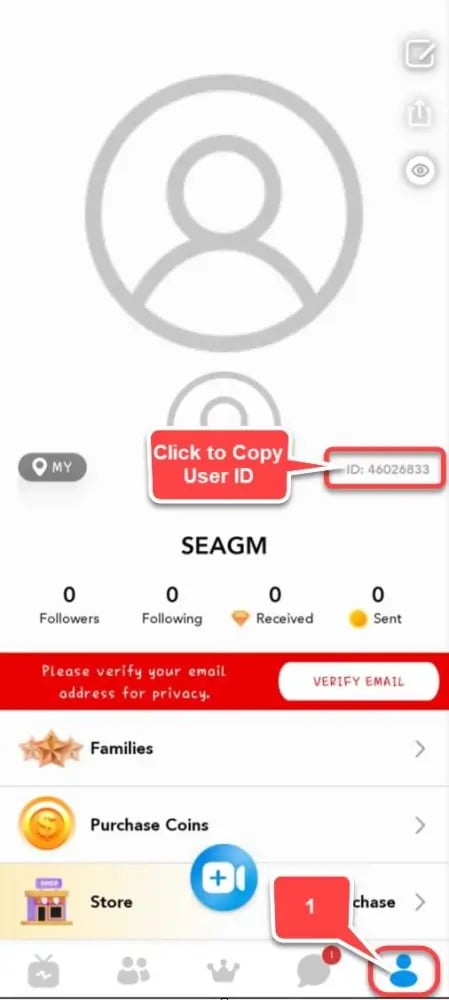
Always double-check the copied digits before submitting your order on VGTopup to avoid delivery to an incorrect profile.
How to Top Up SuperLive Coins on VGTopup
Recharging your SuperLive balance on VGTopup requires only a few basic steps:
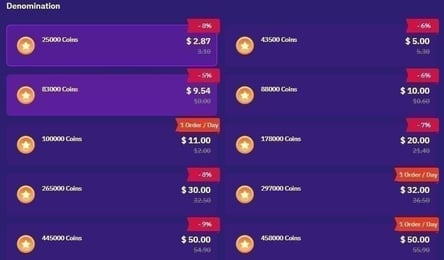
- Select Your Coin Package: Browse the available coin bundles on this page and choose the amount you wish to purchase. Live prices and current package tiers are displayed directly in the product selection area.
- Enter Your UID: Paste your numeric SuperLive UID into the required player field.
- Proceed to Checkout: Click the buy button to move to the secure payment screen.
- Complete Payment: Choose your preferred payment option and finalize the transaction.
- Verify Your Balance: Reopen or refresh your SuperLive app. The coins will be deposited directly into your in-app wallet.
Order Verification Overview
| Step | Action | Key Verification Item |
|---|---|---|
| 1. Select Package | Choose coin amount | Check live price at checkout |
| 2. Input Details | Enter numeric UID | Confirm digits match your profile page |
| 3. Payment | Complete transaction | Ensure payment status confirms success |
| 4. In-App Check | Open SuperLive wallet | Verify updated coin balance |
Uses of SuperLive Coins: Virtual Gifting, VIP Perks, and PK Battles
SuperLive Coins provide active utility throughout the live streaming experience:
1. High-Impact Virtual Gifts
Sending virtual gifts is the primary method for supporting content creators. SuperLive offers a diverse catalog of gifts, from low-cost daily emojis to full-screen 3D animated gifts. High-tier gifts trigger broadcast-wide announcements, drawing attention to your profile from both the streamer and other viewers.
2. Winning PK Battles
PK Battles pit two live broadcasters against each other in real-time popularity contests. Broadcasters rely on their audience to send gifts within a limited time window to win the match. Using your SuperLive Coins during these events directly contributes to your favorite streamer's ranking and leaderboard position.
3. Custom Entrance Effects and Badges
As you spend coins, your SuperLive account earns experience points that unlock tiered contributor badges. High-tier accounts receive custom entrance banners when joining live rooms, ensuring the broadcaster notices your arrival immediately.
UID Direct Recharge Security: Keeping Your Account Safe Without Passwords
Account safety is a critical priority when buying virtual currencies online. VGTopup uses a direct UID delivery system for all SuperLive recharges.
- No Passwords Required: We never request your SuperLive password, email verification code, or social media login credentials.
- No Account Sharing: Your profile remains fully under your control at all times.
- Direct Wallet Credit: Coin bundles are credited through official system channels directly to the specified UID.
- Global Account Compatibility: UID recharges work regardless of where your account was registered, supporting users worldwide in 2026.
Troubleshooting SuperLive Recharge Delays and Common UID Mistakes
If your coins do not appear in your account balance immediately after completing an order, review these common troubleshooting checks:
- Restart the SuperLive App: The app interface may hold cached balance data. Force close the SuperLive app completely and reopen it to refresh your wallet balance.
- Check the UID Entered: Verify the UID listed on your VGTopup order receipt against your profile page in the app. Entering a phone number or screen name instead of the numeric UID can cause processing issues.
- Network Sync Delays: During high-traffic periods, such as major streaming events or global holidays, platform servers may experience minor synchronization delays.
- Contact VGTopup Support: If your balance has not updated after restarting your app, reach out to VGTopup customer support with your Order ID and SuperLive UID for immediate assistance.
Why Choose VGTopup for SuperLive Coins Recharge
VGTopup provides an efficient, dependable platform for purchasing live streaming currencies. Here is why users trust VGTopup:
- Password-Free Checkout: Top up your account using only your UID, keeping your credentials private.
- Transparent Pricing: Check live rates directly on our checkout interface with no hidden fees.
- Global Accessibility: Recharges are supported across all active SuperLive server regions in 2026.
- Dedicated Support: Our customer support team is available to assist with order tracking, UID queries, and transaction updates.
Frequently Asked Questions About SuperLive Coins Top Up
What is a SuperLive UID and where can I find it?
A SuperLive UID is a unique numeric identifier linked to your specific account. You can find it by tapping the Profile icon in the bottom right corner of the SuperLive app. The numeric UID is displayed directly below your profile avatar and display name.
Do I need to share my SuperLive password to top up coins?
No. VGTopup only requires your numeric SuperLive UID to process your order. You should never share your password, verification codes, or login credentials with anyone.
What can I use SuperLive Coins for in the live streaming app?
SuperLive Coins are used to purchase virtual gifts for broadcasters, boost streamers during live PK battles, increase your profile contributor rank, and unlock special chat badges and entrance animations.
Can I recharge SuperLive Coins for a friend or favorite streamer using their UID?
Yes. Because the recharge system only requires a valid numeric UID, you can send coins directly to any user by entering their specific SuperLive UID during checkout.
How long does it take for SuperLive Coins to reflect in my account balance?
Coins are credited directly via UID once payment is confirmed. In most cases, the balance updates immediately. If the balance does not display right away, restart the SuperLive app to refresh your wallet.
What should I do if my SuperLive Coins do not appear after purchase?
First, verify that your payment went through successfully and restart your SuperLive app. If the coins are still missing, verify the UID on your order invoice. If the UID is correct and the balance has not updated, contact VGTopup customer support with your Order ID for prompt help.
Are SuperLive Coin recharges supported globally across all regions in 2026?
Yes. Direct UID recharges on VGTopup are compatible with SuperLive accounts registered across all supported international regions in 2026.
Select Denomination
Tax, payment fees and eligible coupons are calculated at checkout.
| Package | Price |
|---|---|
| 605 Coins | USD 3.67 |
| 1230 Coins | USD 7.70 |
| 3125 Coins | USD 18.94 |
| 6250 Coins | USD 37.87 |
| 10000 Coins | USD 60.60 |
| 13800 Coins | USD 83.63 |
| 20850 Coins | USD 126.35 |
| 43000 Coins | USD 260.57 |
| 50050 Coins | USD 303.29 |
| 71500 Coins | USD 433.28 |
| 100000 Coins | USD 605.98 |