Your UID sits one tap from home, and your nickname has nothing to do with it
You'll find your UID fastest in the profile panel, not three menus deep in settings. Tap the profile icon top-left of the main screen, and the eight-digit Role ID is right there beneath your nickname and level, sometimes echoed in the upper-right of the card, with a copy button next to it, per the Kaleoz guide.
Then comes the line I keep hearing: "my nickname's one of a kind, I'll just match on that." It isn't, and believing it is half the problem. The UID is a numeric identifier separate from both your nickname and your account email, shown on the profile and login screens, according to Codashop support (2025). A nickname is decoration. Two players on two servers can carry the identical name, so a nickname that "matches" tells you nothing about whether those cards reach your account.
What actually pins down your account at checkout is this:
| Identifier |
Identifies your account for top-up? |
What it actually is |
| UID (Role ID) |
Yes — the only one that does |
8-digit numeric ID under your nickname |
| Nickname |
No |
A display name; can be duplicated across servers |
| Account email |
No (it's for login/binding, not delivery) |
Your linked credential |
Source: Codashop support (2025); Official Top-Up Center FAQ (2026).
What got me the first time I held the profile panel up against a third-party top-up form was how breezily that form asks for a figure with zero room for slippage. Eight digits. One attempt. On most flows, no confirmation prompt waiting to catch you.
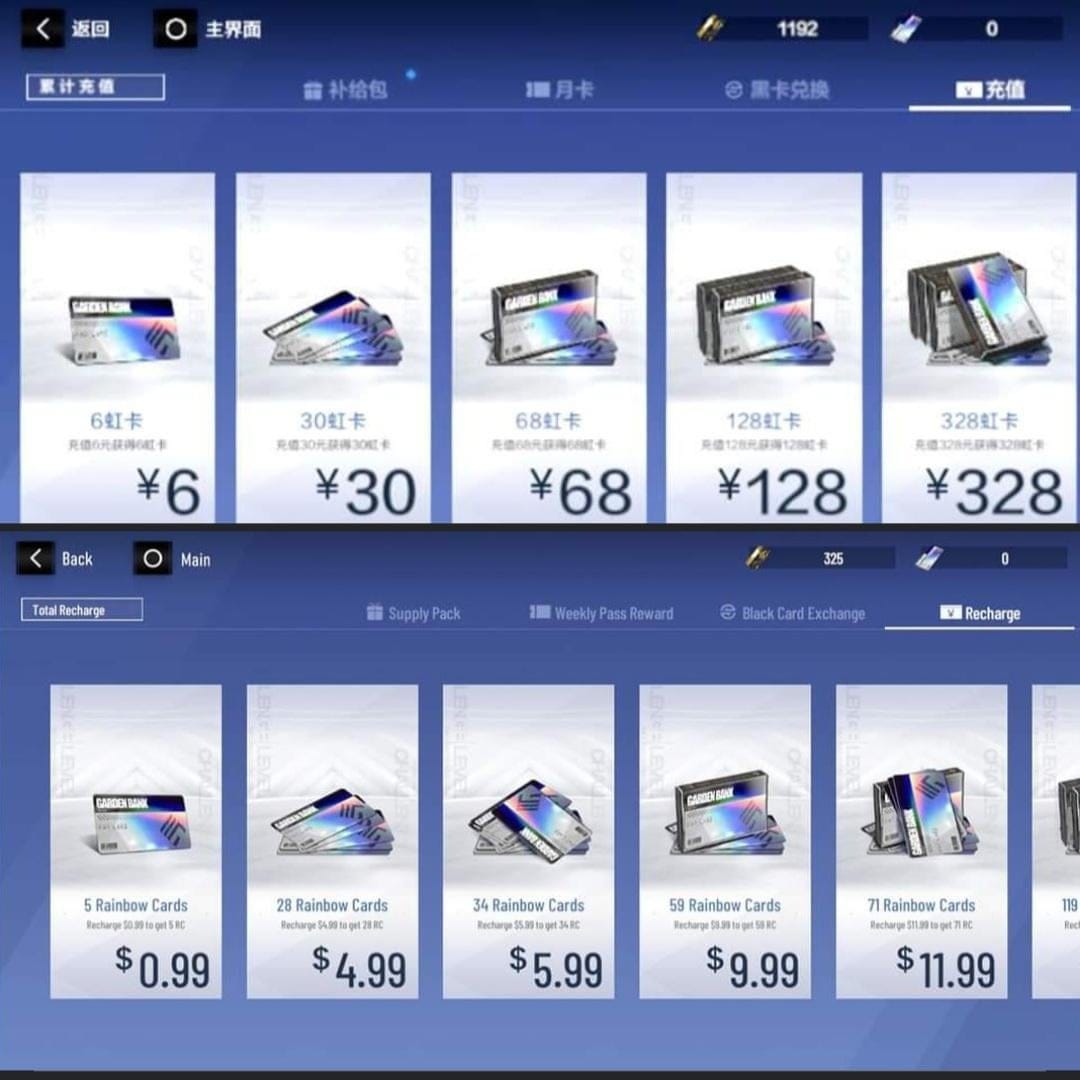
A UID typo is what everyone steels themselves against. The quieter wallet-killer is choosing the wrong server while a UID that looks completely fine glides on through. Purchases in PGR are region-locked. Asia Pacific, Europe and North America are the regions most third-party portals cover, with Traditional Chinese and a handful of others left out, per LDShop.
Sure, you could insist the typo is the bigger menace because it happens more, and yes, manual entry remains the number-one source of misdirected recharges. But a fat-fingered UID often resolves to no real account, or drops somewhere visibly broken. A wrong server hides better. Some forms validate the UID's format yet never check the region behind it, so an off-region payment can sail clear without a peep. Cross-server top-up flat doesn't exist. Wrong region either fails delivery or routes to a same-numbered account somewhere else, per multiple top-up site notices tracked by GameBar and Rushbuy (2026).
Three slip-ups account for nearly every loss thread worth reading:
- Swapping two digits while hand-typing the UID, sending the recharge to a stranger.
- Picking the wrong region when the UID checks out fine. The most poorly-communicated failure in the whole chain.
- Leaning on a nickname match instead of the number. Community reports across third-party guides and r/PunishingGrayRaven threads (2026) keep tracing wrong delivery to this exact move.
And here's the one that catches people: your UID never moves, but a server transfer changes which region you're supposed to select at checkout. If you've ever swapped servers, the region your fingers reach for out of habit may now be the wrong one, even though the number you paste hasn't budged.
A 30-second pre-payment routine that makes typos impossible
Quit typing your UID. That's the whole fix, and there's no negotiating it. Manual entry breeds transposed digits. Copy-paste deletes the failure entirely instead of begging you to be sharper-eyed than you were yesterday.
The official wording lays the discipline out flat. The notice printed before payment, per the FAQ, reads: "Please double-check that the logged-in account info is correct before completing your payment to avoid topping up the wrong account." On the official Center specifically, you sign in with your linked account (email, or an Apple/Facebook/Google credential), so the screen shows the bound account right in front of you. Check that binding under Settings → Account → Link Account before you begin.
For web and third-party flows where the details go in by hand, run this each time, no skipping:
- Copy the UID with the in-game button. Don't read it off the display and key it back in.
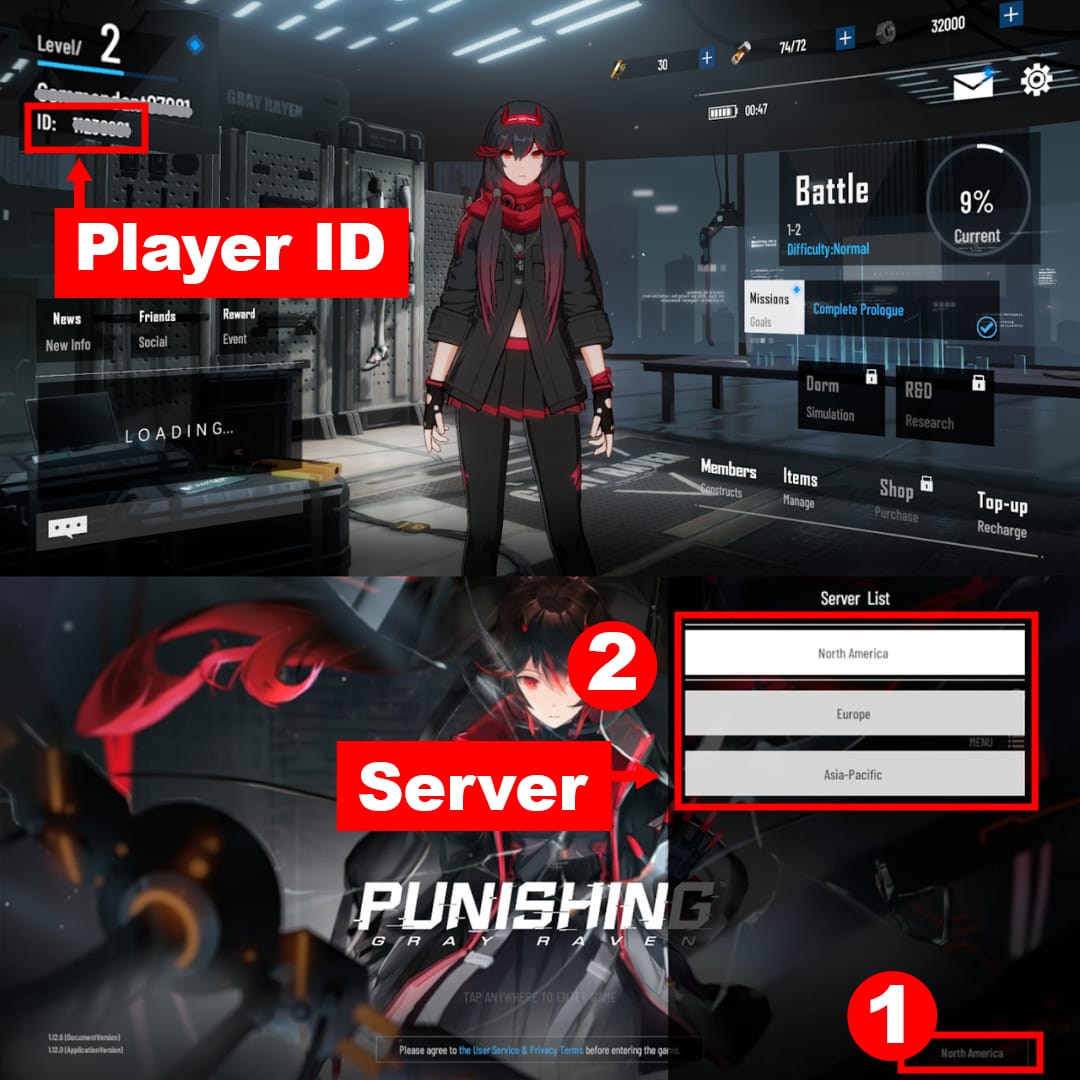
- Screenshot the profile panel before app-switching, so you've got a side-by-side for both the number and the nickname showing.
- Match the pasted UID to the screenshot digit by digit before you confirm.
- Re-check the server dropdown. Confirm Asia / America / Europe / SEA lines up with where your account actually lives. This is the field people set once and forget forever.
- Confirm the platform (iOS vs Android). Pick the wrong one and delivery fails even with a flawless UID, per LDShop and GameBar reminders (2026).
- Don't close the payment screen until the order ID or receipt is saved.
A boiled-down pre-payment checklist (UID copied exactly, right server/region, right platform, account linked) shows up across the Lootbar and LDShop (2026) guides too, which tells you the folks pushing these transactions all day landed on the same five checks independently.
The screenshot is the step most tutorials breeze past, and it's the one I'd go to the wall for. A pre-payment screenshot timestamps what you actually saw and entered, which beats an order email in front of support. The email only proves the transaction happened, not that it went where you meant it to.
Disclosure: among third-party options, VGTopup for a Punishing: Gray Raven Rainbow Cards top up shows the UID and server you've entered clearly on-screen before payment, which makes that final digit-by-digit match against your screenshot easier to pull off. The point holds with or without the link.
You already paid the wrong account — here's what realistically happens next
Blunt verdict up front: misdirected top-ups almost never come back, so treat every recharge as final the moment you hit pay. Harsh, I know. And yes, there are scattered reports of support stepping in on clear-cut cases. But the policy text promises nothing. Per the FAQ, a wrong top-up means contacting in-game or email customer service with your account info and receipt, and delivery is not guaranteed for payments sent astray. On third-party purchases the floor is even lower: enter a wrong UID or server, the Rainbow Cards land on the incorrect account, the service counts as complete, and no refund follows. That pattern is documented across Plati.market and EpicNPC listings (2026).
If it's done, move fast and in order:
- Stop. Don't fire off a "fixing it" second top-up. That usually just doubles what you've lost.
- Grab everything. Order ID, payment receipt, the exact UID/server you entered, the time. Close the screen before saving the order ID and you've thrown away your strongest evidence. Community consensus in Facebook PGR groups (2026) flags this as the single most common gap.
- File an official ticket through in-game Customer Service or email support_english@kurogames.com, receipt and real account info attached.
- Be exact. Spell out the intended UID/server against what actually processed.
- Set expectations. Pitch it as a request, never an entitlement.
Here's the reversibility map, lined up with what the sources actually back:
| Mistake |
Consequence |
Realistic reversibility |
| Wrong UID (typo / transposition) |
Cards delivered to another account |
Very low — "completed" service, no third-party refund |
| Wrong server, valid-looking UID |
Delivery fails or routes off-region |
Low — region-locked, not a recoverable error by design |
| Wrong platform (iOS vs Android) |
Delivery failure |
Case-by-case via support ticket |
| Order screen closed, no receipt saved |
No proof of error |
Near-zero — you can't evidence what happened |
Source: Official Top-Up Center FAQ (2026); Plati.market / EpicNPC (2026); LDShop / GameBar (2026).
To confirm a correct top-up landed, the Rainbow Cards turn up via an in-game pop-up or as an updated balance on the Top-up screen, per the same FAQ. If they don't surface within a reasonable window and you entered everything right, that is the legitimate support case. And it's the one where holding onto your order ID earns its keep.
Paste, screenshot, then look at the server twice
Change one habit and make it this: never type the UID, only paste it, and treat the server dropdown as a second compulsory check rather than something you glance at. A wrong-server payment can clear in silence where a wrong-UID payment tends to visibly choke, so the field you're most tempted to skip is the one most likely to drain you quietly. Screenshot before you pay, hang onto the order ID, and make peace with the recharge being final the instant it clears. Do that, and every flavor of regret in this article simply stops being on the menu.
Frequently Asked Questions
Where exactly do I find my UID in Punishing Gray Raven?
Tap the profile icon top-left of the main screen, and the 8-digit Role ID shows beneath your nickname and level with a copy button next to it, per the Kaleoz guide (2025). It's on the login screen too. Hit the copy button instead of reading it off, because that's what wipes out the typo risk completely.
Is my UID the same on every server?
The UID is one numeric identifier tied to your account, but the server region is a separate checkout field, and purchases are region-locked, per LDShop (2026). A server transfer leaves your UID untouched yet can change which region you have to pick. If you've moved servers, eyeball the dropdown even though the number's identical.
Can I get a refund if I topped up the wrong UID or server?
Realistically, no. Official policy doesn't guarantee delivery for misdirected payments and tells you to contact support with your receipt, per the Top-Up Center FAQ (2026). Third-party sellers count the service as completed with no refund, per Plati.market and EpicNPC listings (2026). Treat every recharge as final.
Will my nickname work instead of the UID for top-up?
No, and leaning on it is a documented cause of wrong delivery. Your nickname is a display name, distinct from the numeric Role ID, per Codashop support (2025), and the same name can sit on multiple servers. Only the UID identifies your account for delivery.
How long does a correct PGR top-up take to arrive?
Through the official Center, items reach the corresponding character on completion and appear via an in-game pop-up or an updated Top-up balance, per the FAQ. Third-party flows are usually instant after payment when UID, server and platform all line up. If nothing arrives despite correct details, open a ticket with your saved order ID.











Comments