"Pending" isn't a death sentence
Pending is a processing state. Not a verdict. The transaction was accepted and it's grinding through the pipeline. It hasn't failed, and the funds haven't evaporated. That gap matters because Yalla Live's in-app copy is mushy, and mushy copy manufactures panic far more reliably than the actual failure rate ever could. Almost every "Gold not received" scare I've watched unfold turned out to be a timing or display hiccup, not a lost transaction.
Three statuses get blurred together constantly. The clean version:
| Status |
What it means |
Your move |
| Pending / Processing |
Payment accepted, Gold not yet shown in wallet |
Wait, restart the app, check balance — don't re-buy |
| Failed |
Transaction did not complete |
Funds usually auto-reverse; safe to retry after confirming no charge |
| Completed |
Gold credited to the User ID at checkout |
Done — if you don't see it, suspect display lag or a UID typo |
| Refunded |
A stuck order was reversed |
Money returns via the original payment method on the gateway's timeline |
The trap sits between the first two. Failed and pending look identical on your screen, yet they call for opposite reactions. On a genuine failure you can retry once you've checked that nothing actually hit your account. On pending, retrying is the single dumbest thing available to you. I'll get to why.
There are only three places your Gold can be hiding while the status wheel spins:
- Still moving through the payment gateway. The processor is verifying the charge before it releases the order. Most common honest delay there is.
- Delivered, just not shown. Credited to your wallet while the app keeps displaying a stale snapshot. A hard restart drags the real number out.
- Sent to the wrong User ID. Mistype the UID at checkout and the Gold went somewhere, fine, just not to you. This is the one that won't fix itself.
How fast it's supposed to land
For the channels people actually buy through, near-instant is the floor, not the headline. Topuplive credits Gold within roughly a minute on its own, with light lag only at peak hours, per Topuplive. EnjoyGM pegs the usual window at 1 to 5 minutes after payment, according to the EnjoyGM blog. If you're glaring at a spinner two minutes in, relax, you're still well inside normal.
The ceiling stretches further than most folks expect. Chargerquick lists delivery anywhere from 5 minutes up to a maximum of 12 hours, per Chargerquick. That outer figure isn't a glitch. It's the manual-verification trapdoor a channel keeps around for orders that trip a fraud flag or a volume check. Almost never hit, but it explains why a top-up can sulk for hours without anything actually being broken.
So how do you size up your own situation against the clock? The thresholds I work from:
- 0–5 minutes: dead normal. Sit tight.
- 5–30 minutes: restart the app, open your wallet history, confirm the payment cleared. Probably gateway timing or cache lag.
- 30–60 minutes: still plausible, especially off-peak or on a chunkier amount, but start gathering evidence and drafting a support message.
- Past ~1 hour with a confirmed charge: escalate. "Be patient" has stopped being useful advice.
One quirk worth filing away: off-peak hours can work against you on bigger buys. That community line about topping up in off-peak windows for instant crediting (per EnjoyGM) swings both ways. Light traffic clears small orders fast, sure, but a large top-up arriving when fewer eyes are watching the manual-review queue can sit longer. Dropping a serious amount? Mid-traffic hours aren't a terrible call.
Why orders actually stall
Every guide on earth tells you to "check your bank." Not wrong, just secondary. The more frequent troublemakers live closer to the app and the checkout box than to your bank's servers.
Payment gateway holds. The processor wedged between your card and the order can pause to verify a charge, especially on a first-time buy, an odd amount, or an unfamiliar device. The order stays pending until the gateway gives the nod. Nothing on your end is broken, you're just stuck in a queue you can't see. Most of the legitimate 5-minutes-to-hours delays trace back here.

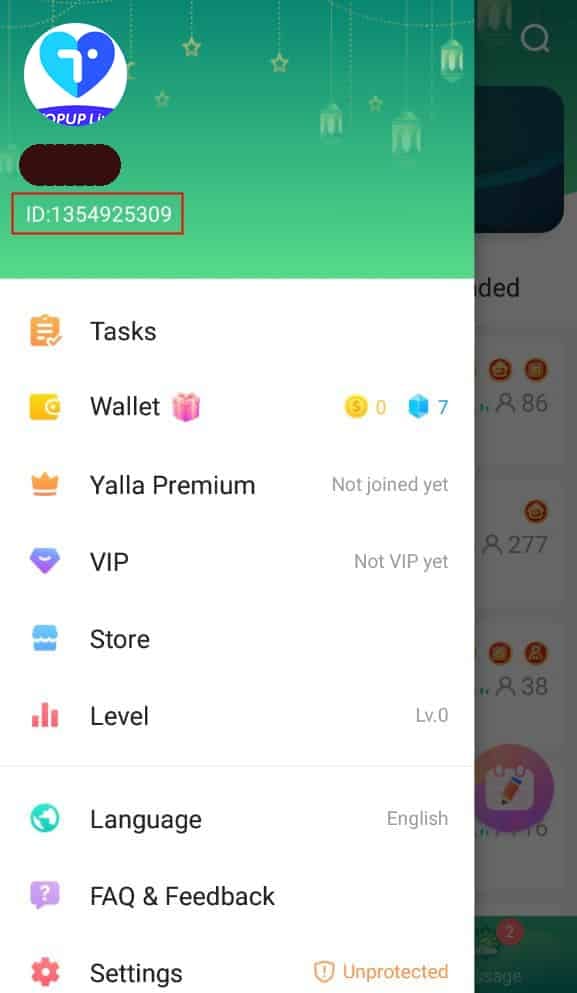
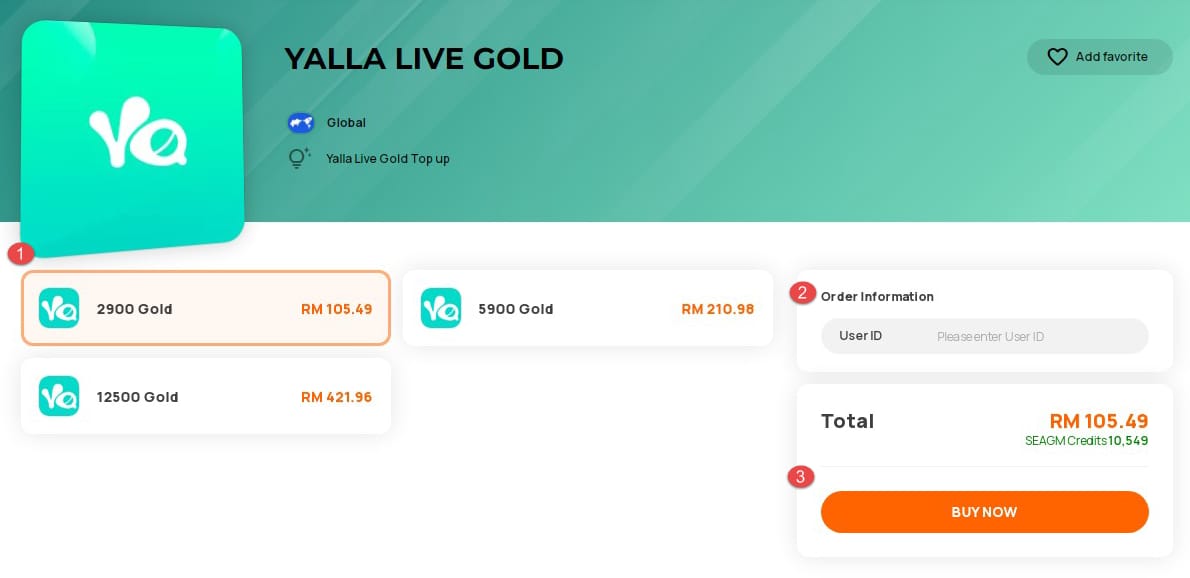
Region, currency, or User-ID mismatch. This is the cause nearly every walkthrough breezes past, and it's the one that does real damage. Gold gets credited to the User ID you typed at checkout, not the account you're logged into. Punch in the wrong User ID and the Gold delays or misdelivers, as the EnjoyGM blog flags outright. Sit with that for a second, because here's where it gets nasty. A one-digit slip doesn't bounce or throw an error. The Gold delivers flawlessly, to a complete stranger. On your screen it looks exactly like a stuck or failed top-up, and no restart on earth will surface it. Triple-checking the UID before you order is the cheapest insurance going.
App cache and display lag. The culprit in the biggest slice of "where's my Gold" meltdowns isn't a server at all, it's your local balance cache. The app clings to a stale snapshot of your wallet and won't refresh it unprompted. The Gold landed; your screen just didn't get the memo. Which is exactly why watching your balance after payment and forcing a hard refresh quietly resolves so many cases that never needed a ticket.
The symptom-to-action cheat sheet I keep in my head:
| Symptom |
Likely cause |
First fix |
Escalate after |
| Money deducted, no Gold, status pending |
Gateway hold or cache lag |
Full app restart → check wallet history |
~60 min |
| Money deducted, status "completed," no Gold |
Display lag, or wrong UID at checkout |
Restart; then verify the UID on your receipt |
Immediately if UID is wrong |
| No deduction, stuck on "processing" screen |
Payment didn't clear / network drop |
Confirm no charge, then retry once |
After confirming no charge |
| Partial Gold credited |
Split crediting or peak-hour delay |
Wait ~15 min, restart |
~30 min |
Source: synthesized from EnjoyGM blog (Feb 2026), Chargerquick, and Topuplive delivery guidance.
Run the check in this order, not the order you'll instinctively want to
Your gut says open a support chat first. Flip that. A forced restart resolves more cases than any ticket ever will, and it costs you fifteen seconds.
- Fully close and relaunch the app. Not minimize. Kill it from the recent-apps tray, then open it fresh. That forces a wallet re-sync, pulling your real balance off the server instead of the cached copy. A surprising number of "missing" top-ups simply appear right here. Still nothing? Log out and back in.

-
Open your wallet/balance history. Hunt for the credit entry, not just the big number up top. The history is the truth; that headline figure on the home screen is the part most prone to lag.
-
Dig out your order ID / confirmation receipt. Every channel issues one, in a confirmation email or SMS, or tucked in your purchase history. This reference is what turns a vague gripe into a fixable case, so grab it now even if you never end up needing it.
-
Match the User ID on that receipt to your account. The step almost everyone skips. If the UID is off by a digit, quit troubleshooting the app. The delivery already succeeded elsewhere, and this just became a support case rather than a waiting game.
-
Check your payment provider last. Confirm whether the charge actually posted or is itself still pending on the bank's side. If the bank shows nothing, the order may never have cleared the gate, and that changes the whole picture.
Notice where the bank check sits. Step five, not step one, because the app cache and the UID match are simply the likelier failure points.
Money gone, no Gold: the recovery playbook

Say you've restarted, scanned the wallet history, confirmed the UID, and a real charge posted, yet still no Gold past the hour mark. Now you move, and moving well means leading with evidence.
Gather first, message second. Screenshot the order ID, the payment confirmation, the deducted-amount receipt, and your current in-app balance showing the Gold's absence. Contacting support without the order ID drags out resolution for everybody. It forces the agent to identify your transaction from a cold start and slots you back at the end of the line. EnjoyGM's guidance is blunt about the habit that heads all of this off: track your balance after payment, and contact support on a delay. Just contact them armed.
Then reach support with one clear ask. State the order ID, the amount, the timestamp, and the UID, and ask them to confirm where exactly the Gold landed. If a channel processed the purchase, its support owns the fix; if a wrong UID is the problem, that's the precise detail an agent needs to trace the misdelivery.
Know when pending flips to refund. A truly stuck order that can't be completed gets reversed, and the money rolls back through your original payment method on the gateway's clock, which is usually slower than the original delivery would've been. That lag is the entire reason for the next rule.
Never re-buy while one is pending. This is the one I'd stencil onto the checkout screen. Re-purchasing while the first order still hangs invites a double-refund knot, and untangling two overlapping transactions takes far longer than just outwaiting the first. You don't get your Gold any sooner. You get two murky orders, a delayed reversal on one, and a fatter support thread. A 30-minute restart-and-wait beats a same-day second purchase nine times out of ten.
Wait, fix, or escalate
After watching this play out over and over, my read is plain. The overwhelming share of "stuck" top-ups are display lag or run-of-the-mill gateway timing, not lost money, which makes the instinct to re-buy the worst possible reaction and a forced restart the most underrated fix in the game. The fear is manufactured by vague status copy, not by some scary failure rate.
So the decision tree is short. Wait if you're inside the opening few minutes. Instant channels credit in 1–5 minutes (EnjoyGM) down to under a minute (Topuplive), and a spinner that early means nothing. Fix it yourself between roughly 5 and 60 minutes: full restart, wallet-history check, UID verification, which clears the cache-lag and false-alarm cases without a ticket. Escalate once a confirmed payment has sat past the hour with no Gold, or the second you spot a UID mismatch, since that one never self-resolves. And remember the 12-hour outer ceiling Chargerquick cites is a rare manual-review exception, not a target.
Is pending a scam sign? It isn't. It's a processing state, and treating it as fraud and bailing on the order before the normal window closes just torches the Gold you already paid for. Are voucher-style channels quicker than in-app? Often about the same speed, with the genuine edge being a clean, retrievable order reference that makes any dispute far easier to settle. If you'd rather dodge ambiguous pending states next time around, picking a delivery route that hands you a clear order ID matters more than shaving a few seconds off the window, and a Yalla Live Gold top up run through a channel that gives you a traceable reference up front is one transparent way to do exactly that. (Disclosure: VGTopup is one such channel.)
Two habits kill almost every flavor of this headache: verify your User ID before you confirm, and save the order ID by default instead of as an afterthought. Do those two things, and "pending" quits being a scary word and turns into a thirty-second checkbox.
Frequently Asked Questions
Why is my Yalla Live top up still pending after an hour?
Past the hour mark on a confirmed charge, you've left the normal window. Typical credit time runs 1–5 minutes per EnjoyGM, dropping under a minute on some channels per Topuplive. The usual hour-plus suspects are a gateway hold on a flagged or first-time charge, or a manual-verification queue on a larger amount, which can drift toward that 12-hour outer ceiling Chargerquick cites. Before you escalate, confirm the User ID on your receipt is right, because a misdelivery won't clear no matter how long you stare at it.
What do I do if money was deducted but I got no Gold?
Restart the app fully to force a wallet re-sync first, since display lag hides delivered Gold more often than any other cause. Still missing? Screenshot your order ID, payment receipt, and current balance, then hit support with that evidence and the timestamp. And don't buy again in the meantime, a second order while the first is pending invites a slow double-refund tangle rather than faster Gold.
How do I find my Yalla Live order ID?
It drops into your confirmation email or SMS the instant payment clears, and it's parked in your purchase or top-up history. Snag it even when your Gold arrives fine, it's the single detail that turns a vague support complaint into a traceable case, and reaching out without it bumps you to the back of the resolution queue.
Will a pending Yalla Live top up be refunded automatically?
A genuinely stuck order that can't complete does get reversed, with funds heading back to your original payment method, but on the gateway's schedule, which usually trails the original delivery time. That lag is precisely why re-purchasing while pending backfires: you can end up waiting on a refund for the duplicate while the first order finally lands.
Why does my top up show successful but coins are missing?
Two causes. The common one is the app's balance cache showing a stale figure, and a full close-and-reopen pulls your real balance so the Gold appears. The serious one is a User-ID typo at checkout: Gold credits to the UID you entered, not the account you're logged into, so a wrong digit ships it to a stranger while your screen happily reads "completed." Check the UID on your receipt before you write it off as lag.











Comments