Is card-free top-up genuinely as good as paying by card?
There's a folk belief that ditching a card means swallowing worse value or more risk. Turns out it mostly doesn't, with one method I'd slap a warning sticker on.
So here's how I sorted them. If a card-free method hands over the same CP for the same money, lands instantly, and rides an officially supported channel, it's a genuine swap and not a sacrifice. If a method slaps on a surcharge, drags out delivery, or shoves you onto some unverified site, that's a downgrade you're paying for in cash or in worry. Run that test and the methods split into two tiers cleanly. The line between them isn't "card vs no card" at all. It's official channel vs sketchy reseller.
The official COD:M web store already takes PayPal, Venmo, Cash App, Google Pay, and Apple Pay for CP tied to your Player ID, per the Official COD:M Store. That one fact knocks the whole premise over. Card-free payment is baked into the first-party flow, not some loophole you have to sneak through.
The methods that clear the bar, ranked by who they're for
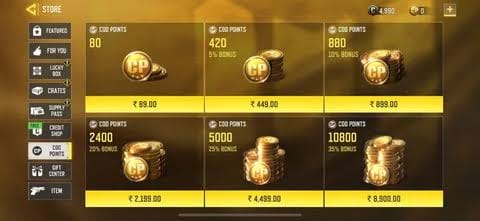
Five routes pass. They differ less in whether they work and far more in who they suit.
| Method |
Where it works |
Best for |
Watch for |
| Google Play / App Store gift card |
Global, region must match account |
Almost everyone |
Region-lock mismatch |
| PayPal / Venmo / Cash App |
Official web store |
Players with a funded wallet |
Needs a backing funding source |
| GCash / MoMo / Easypaisa & local e-wallets |
PH, GH, PK and more via authorized portals |
Unbanked players in supported markets |
Availability varies by country |
| Player-ID portal top-up |
Codashop, Carry1st, official store |
No-app-login buyers |
Verify the portal first |
| Carrier (phone-bill) billing |
Select operators/regions |
Convenience over price |
Usually the worst value |
Source: Official COD:M Store / Codashop / Carry1st (2026)
The gift-card route is my default grab, and the logic is dull in the best possible way. Store balance from a gift card carries no processor cut, redeems in seconds, and bankrolls an in-app CP purchase on any handset. There's a quieter detail that makes it bendier still: store balance stacks. Redeem a few smaller gift cards into one pool and spend it all on a single CP pack. That matters plenty when the denomination on the shelf doesn't line up with the pack you're after.
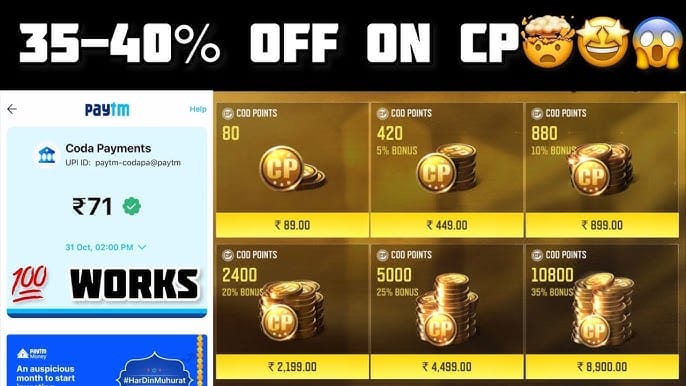
Now for the truly card-free crowd, players with no bank account rather than just no card, the calculation changes. PayPal seems like the obvious pick, but it's oversold for this exact group. It still wants a funding source behind it, and someone without a card often doesn't have a linked bank balance either. This is where regional e-wallets earn their keep. Codashop runs GCash, Maya, GrabPay, Coins.ph and bank transfers for CODM CP in the Philippines, per Codashop, while Carry1st takes MoMo and other local methods across African markets with no card needed, per Carry1st. Community guides keep nudging unbanked and F2P players toward this exact pairing, gift cards plus local wallets, as the workable card-free route.
Nobody publishes a clean cost-per-CP table across methods, so let's reason from what's documented. The Premium Battle Pass runs 220–560 CP depending on region, per a 2026 breakdown from Elite Dias. That's your most common CP drain by a mile. Knowing your target pack keeps you from overbuying balance you'll never burn.
Out on the open marketplace, third-party G2G listings show 880 CP from roughly $8.15 and 2,400 CP from roughly $17.90 (per a G2G marketplace snapshot, 2026). Treat those as a yardstick for what CP "should" run, not a buy signal. Marketplace pricing carries delivery and account risk that a face-value gift card simply doesn't.
Three value rules held up:
- Buy at the smallest unit that covers your goal. If your Battle Pass tops out around 560 CP, an 880-CP equivalent leaves a useless leftover sloshing around. Bigger packs usually offer a kinder CP-per-dollar rate, but only if you'll genuinely spend the surplus.
- A face-value gift card beats a "discount" reseller once risk gets priced in. That sticker discount on a shady site vanishes the first time a purchase fails to deliver.
- Carrier billing is the one I'd avoid on cost. Charging CP to a phone bill feels free since no card's involved, yet operator surcharges routinely make it the priciest path per CP. Published rates swing too wildly by carrier to quote one honest number, so the rule stays qualitative: if a cheaper card-free option exists for you, carrier billing is rarely the smart move.
One hidden mechanic in carrier billing worth knowing before you lean on it. Spend limits reset monthly and can block a large CP pack even when you technically have room left on the bill. Handy for a small top-up, maddening for a big one.
The player-ID flow, and the line that should make you bail
Top-up by Player ID is the standard, legitimate flow, and the part most fear-mongering guides botch. You never hand your password to anyone. The steps are short:
- Enter your Call of Duty Player ID on the official store or an authorized portal like Codashop.
- Pick the CP amount.
- Choose a payment method: PayPal, Google Pay, or a local e-wallet.
- Complete payment for instant delivery.
That sequence comes straight from the official store and Codashop documentation (2026). Notice what's absent. Nowhere does a legitimate Player-ID top-up ever ask for your account password. Anyone asking for your Activision password is the single clearest red flag going. The ID alone routes CP to your account; a password would only ever serve a takeover.
On whether third-party portals are safe at all, the evidence splits but lands somewhere firm. Codashop and Carry1st operate as authorized partners with instant delivery (per their official sites). Some players swear they find better headline deals on open marketplaces, though with a real scam and non-delivery risk that keeps surfacing on r/CallOfDutyMobile. Reina Patrice (Startup & Growth Consultant, Startups.com, 2026) said it plainly: "Safest way is official channels or trusted partners like Codashop, Razer Gold, UniPin; never share password." Using unofficial "discount" resellers risks an account ban or just losing your cash to a vendor that ghosts you (per a consultant Q&A on Startups.com, 2026). My read matches the weight of evidence: official store and authorized partners first, then treat marketplace "discounts" as a risk you're being paid a few pennies to absorb. Usually I decline it.
Quick legitimacy checklist for any portal before you pay. It validates your Player ID instantly, shows real contact details and reviews, lists supported payment methods openly, and never asks for your password (that last one's the deal-breaker). If you'd rather skip card setup entirely, services like Call of Duty: Mobile CP top up work from your Activision ID with card-free payment options; run the same checklist before trusting any of them. (Disclosure: VGTopup publishes this piece and is one such portal. Weigh it against in-store prices yourself.)
Region quietly decides your "cheapest" answer
Both of these flip the right answer, and most guides never breathe a word about them.
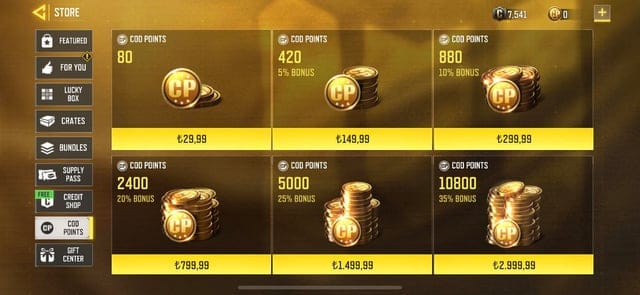
Region changes the cost-per-CP, not just the currency symbol on the price tag. Pack prices show up in local currency, and the same pack can ring up differently across markets (the Pass range above is itself region-dependent). A player in the Philippines, Indonesia, India, Brazil, or the US can each land on a different "cheapest" answer. That's why "buy the biggest pack" advice is half-baked: the biggest pack in a pricey region can lose to a smaller pack in your home one. Codashop leans on local rails (GCash in PH, Easypaisa in PK) while the US official store leans on PayPal and Google Pay (per the respective sites, 2026). The channels open to you are themselves regional.
Region-locking can quietly brick a gift card too. This is the most common own-goal I see. A Google Play gift card bought for one region won't redeem if your account region doesn't match, per a Google Play support thread (2026). For a traveler, or anyone grabbing gift cards online from a foreign retailer, that's the trap to check before paying. Match the card's region to your Google or Apple account region and you're clear.
For under-18 players, the clean path is a shared Google Play family account with parental approval, or a parent-bought gift card. And never sharing an Activision ID with a portal you don't trust. It keeps the spend visible to a guardian and avoids handing account access to a stranger.
Gift-card balance for most, e-wallets for the unbanked
If you've got any access to retail or a digital storefront, buy a region-matched Google Play or App Store gift card and fund the in-app purchase. No processor fee, instant balance, total device flexibility, and that stacking trick covers any denomination gap. It's the one I'd reach for first and recommend without hedging.
If "no credit card" also means "no bank account," route through a regional e-wallet on an authorized portal: GCash, MoMo, Maya, Easypaisa wherever your market supports them. That's the lane built for unbanked players, and it sits adjacent to first-party rather than off in workaround territory.
Use PayPal only when your wallet's already funded. It's a perfectly fine option, just not the universal answer it gets sold as. And carrier billing? Save it for tiny, urgent top-ups where convenience truly outweighs the surcharge. Never as your go-to.
Frequently Asked Questions
Can I really buy CP with PayPal if a card backs the PayPal account?
Technically you're still spending through a card in that case, so the purists have a point. But PayPal also pulls from wallet balance, linked bank funds, or money you've received, which is what makes it count as card-free for plenty of people. The official web store accepts it next to Venmo and Cash App, so if your PayPal balance comes from anything other than a credit card, you're genuinely card-free.
Is buying CP from a cheaper region against the rules, and can it ban you?
Buying through your own region's official store or an authorized local portal is fine. The risk lives in region-mismatched gift cards (which just won't redeem) and in marketplace resellers sourcing CP through methods that can trigger account action. Stick to authorized partners in your actual account region and you dodge both the redemption failure and the ban exposure.
Can minors buy CP without a parent's card?
Yes, with approval. The cleanest setups are a shared Google Play family account where a parent authorizes the purchase, or a parent buying a gift card the teen then redeems. Both keep the spending visible to a guardian. What a minor should never do is hand an Activision ID, and especially a password, to an unknown portal to "speed things up."
What's the actual cheapest no-card method?
For most folks, a face-value gift card, because it tacks on no processing fee and the discount on "cheap" reseller sites usually isn't worth the non-delivery gamble. In supported markets, a local e-wallet on an authorized portal is right there with it. The one to avoid on pure cost is carrier billing, where operator surcharges tend to puff up the effective price per CP.
How do I know a player-ID top-up site is legitimate before I pay?
Four signals: it validates your Player ID instantly, displays real contact info and reviews, lists its payment methods transparently, and never asks for your account password. The password request is the disqualifier. Player-ID top-up routes CP to your account with the ID alone, so a password demand only ever serves an account takeover.











Comments