Why "just retry the payment" can come back to bite you
The retry-now crowd isn't talking nonsense. A card that genuinely declines (expired, wrong CVV, a 3D Secure prompt nobody finished) gets fixed by re-entering the right details, and that fix lands in seconds. For a clean decline, they're dead right.
But the reflex collides with a billing truth almost nobody gets told. A failed-looking message in-app can be sitting right on top of a charge that's still working its way through. Paying again on that pending state is a documented way to eat a double charge, straight from general in-app purchase guidance on Google Play support. It holds for any store-billed subscription, SUGO very much included. The first time I watched a "renewal failed" message flip over to "VIP active" while I'd wandered off to refill my coffee, I stopped taking that banner at its word. The charge was already in motion. A second tap would've earned me a refund argument, not a membership.
So the honest read: retrying works for true declines and blows up in pending limbo. Trouble is, the in-app message almost never tells you which state you're staring at.
The three causes, ranked by how often they really hit
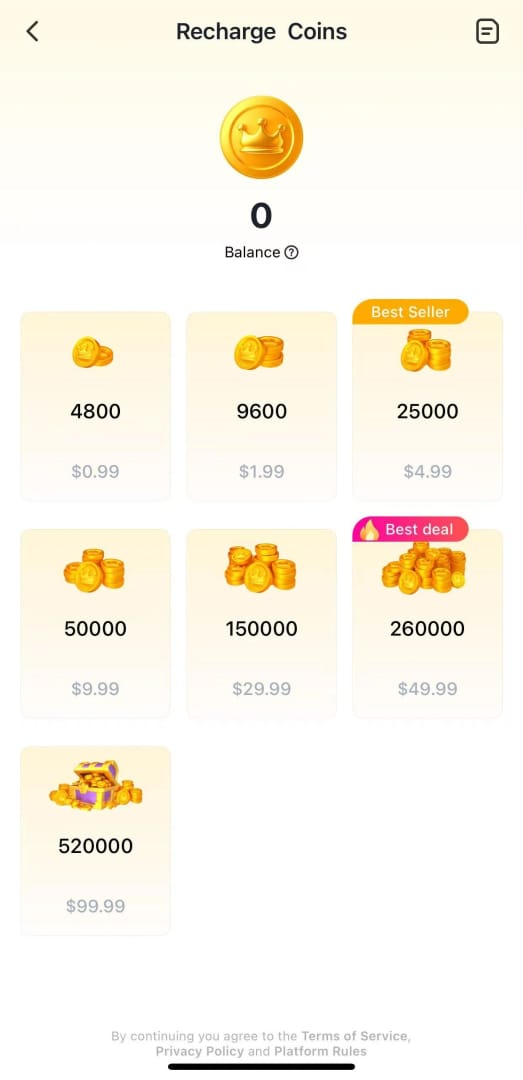
Sort your troubleshooting by likelihood, not by whichever button's easiest to reach:
- Payment method problems — declines, expired cards, a 3D Secure check that never cleared. This is the bulk of the genuine failures.
- Region / billing-country mismatch — your account's billing country and your payment instrument's region don't agree. This one blocks renewal silently even when the card itself is flawless, which is exactly what makes it such a headache to pin down.
- App-to-web sync lag — the charge went through somewhere in the pipeline, but your in-app VIP status hasn't caught up.
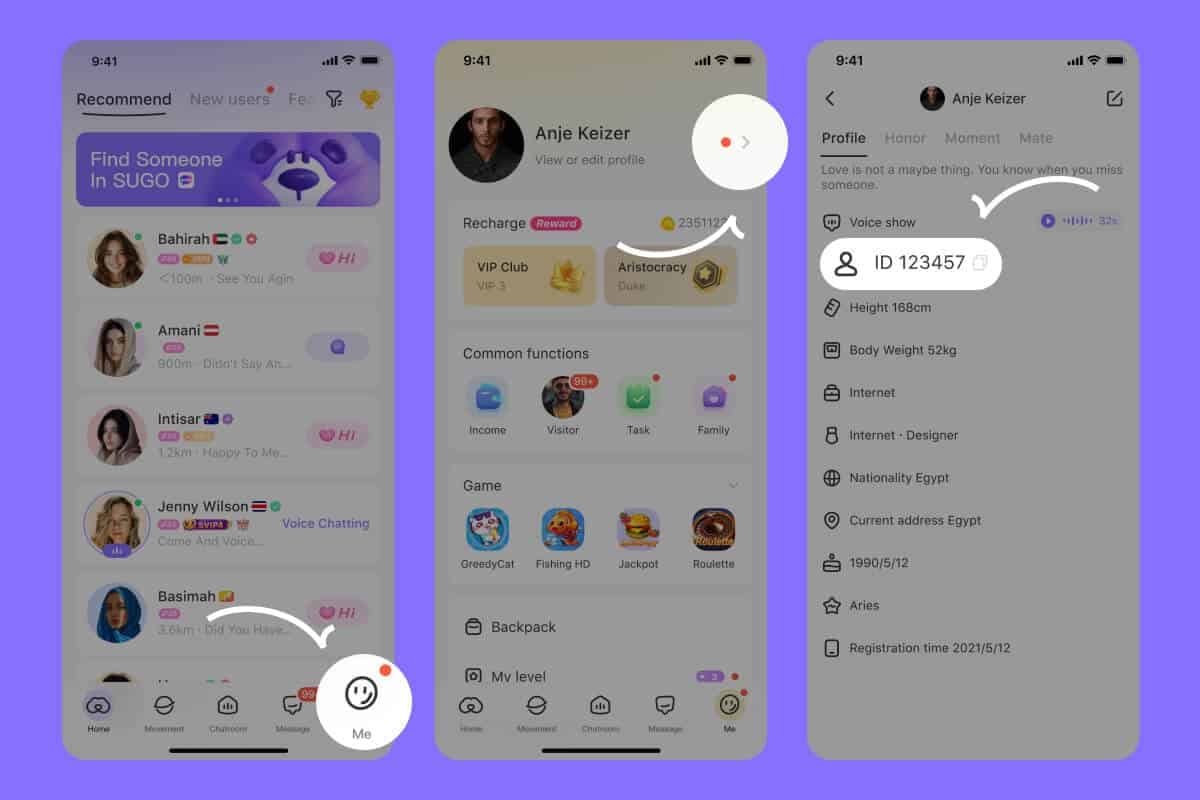
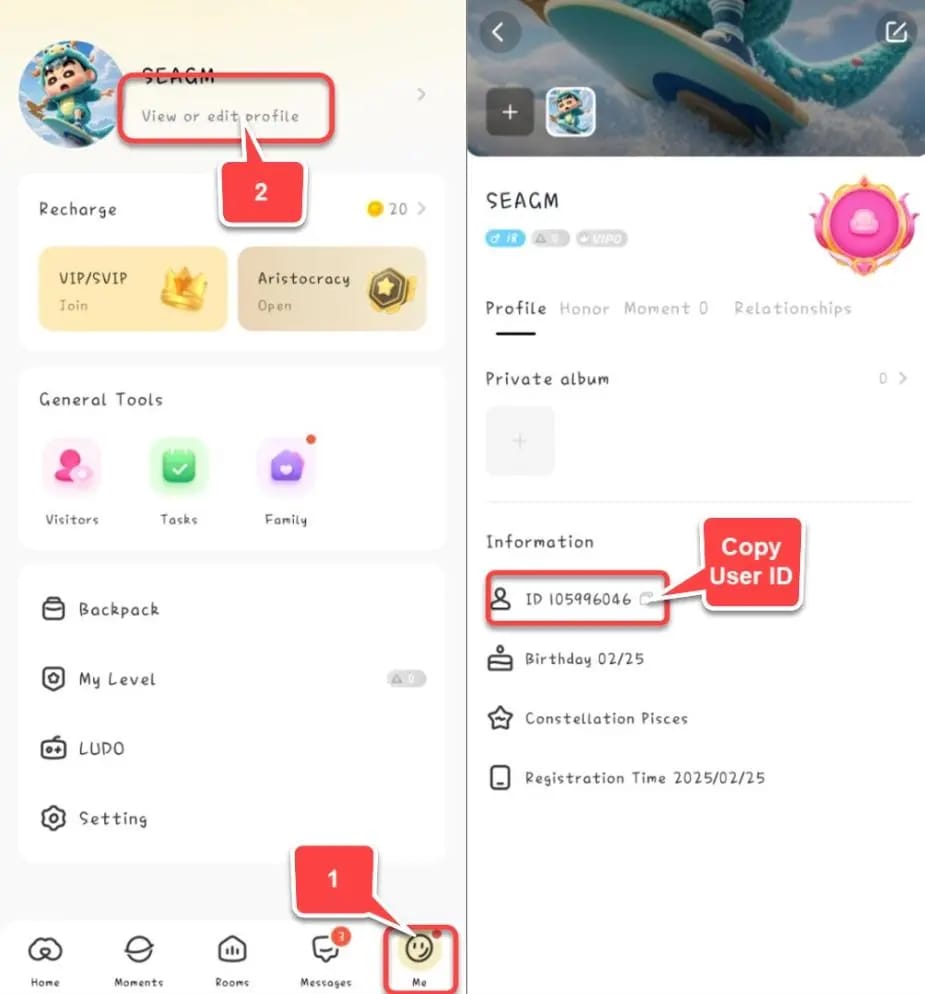
The User ID angle is worth a flag too. When you renew by topping up SUGO Coins instead of leaning on store auto-billing, the most common way it goes sideways is fat-fingering the User ID. Copy it straight off your app profile every single time, per the Buy SUGO Coins 2026 guide from Bittopup. A mistyped ID flings coins into nowhere or onto some stranger's account, and no retry undoes that once it's done.
The wait-and-verify camp holds the stronger hand
The loudest advice has always been "do something, fast." The case for sitting still first rests on a mechanic the retry crowd skips right over: a pending charge frequently sorts itself out. Give it up to 24 hours and a "failed" renewal often completes with no second payment at all. SUGO's own billing rules describe charges landing inside the 24-hour window before a period ends, per SUGO's Terms and Conditions, and that same window is precisely where pending limbo lives. Waiting isn't doing nothing here. It's the cheapest fix you'll ever apply.
The other thing holding this camp up is that you're rarely as time-cornered as the panic makes you feel. VIP status isn't forever, you do need to renew on a cycle to keep the perks (per blog.sugo.com's FAQ), but the benefits don't vanish the second a charge stutters. That breathing room is exactly what kills the urge to ram a risky re-payment through in the opening minute.
The order I'd actually run the fix in
Before you retry a thing, three checks:
- Confirm the card and billing region. Is the card current? Does its issuing region line up with your account's billing country? A mismatch is the silent killer no error code ever spells out.
- Hunt for a pending charge. Pull up your bank or store transaction history. If a SUGO charge is sitting pending, do nothing yet. Wait the window.
- Find your transaction ID or receipt. Have this in hand before you touch pay, not after a double charge drags you into a support ticket.
Only once those are done: if it's a true decline, swap the payment method or change the path entirely (store billing versus a coin top-up). If it's pending, wait. And if the charge cleared but VIP never showed, the answer isn't payment at all, it's a re-sync, which is the next section.
| What failed |
What you actually see |
First move (not "pay again") |
| Card decline / 3D Secure |
"Payment declined" or a verification prompt |
Correct card details or clear the 3D Secure check, then retry once |
| Region / billing mismatch |
Generic "renewal failed", card looks fine |
Align billing country with the card's region before retrying |
| Sync lag / pending |
"Failed" but money left your account |
Wait up to 24h; then restore purchases — do not re-pay |
Source: SUGO's Terms and Conditions (2021); Google Play support (2025).
Charged but VIP didn't renew: getting it back without paying twice
Money left your account and VIP still won't show? The answer is almost never a second payment. It's recovery. Start by pulling your transaction ID or receipt out of your store or bank record. That one string is your leverage for everything downstream: re-syncing, restoring, and any support ticket you end up filing.
Then reach for Restore Purchases. It re-syncs your entitlements against what you've already bought, with zero new charge. This quietly clears a big chunk of "paid but not activated" cases, the very ones people wrongly try to solve by buying the membership all over again. Restoring fixes more "not showing after renew" situations than retrying payment ever has, and it costs nothing to try.
The grace mechanic is your net while you untangle this. Since VIP runs on roughly a 30-day cycle per purchase (per blog.sugo.com, Apr 2026), a quick stumble at the boundary doesn't gut your account the moment a charge trips. SUGO doesn't publish an exact grace-period length in any source I'd trust, so I won't slap a number on it. But the practical takeaway stands: you've got enough room to verify a charge and restore rather than roll the dice on a frantic re-pay.
A quick way to frame the charged-but-not-credited situation:
- Charge still pending → wait up to 24h, then check VIP. Most clear right here.
- Charge cleared, VIP missing → run Restore Purchases first.
- Restored and still missing after the window → now you escalate, transaction ID in hand.
- Duplicate charge appeared → that's a refund conversation, not a renewal one.
Renewing SUGO premium safely — manual beats blind auto
Manual renewal is my default, and not because auto-renew is broken. It's because auto-renew breaks silently for the exact players who travel or swap payment methods. A region or billing-country mismatch can choke auto-renew even when your card's perfectly valid, and the failure hands you no useful warning. You just discover, later, that VIP lapsed. Manual renewal drags you back into the loop. You see the charge, you confirm the region, you own the timing.
To renew by topping up coins: buy SUGO Coins through an official partner, enter the correct User ID pulled from ME > View/Edit Profile, and finish payment. That's the flow documented on the Codashop SUGO page and echoed across the reputable 2026 top-up guides. The User ID step is where sloppy renewals die, so copy, don't type.
If store billing is the part that keeps tripping on a region or 3D Secure wall, a transparent official coin top-up routes around the part that's actually failing. As a disclosure, SUGO Coins Top Up recharge is one such channel. Verify your User ID and billing region first, and the value of going this way is simple: you control the payment path instead of handing it off to a subscription that can break out of sight.
| Renewal path |
Region flexibility |
Practical safety note |
| App-store auto-renew |
Low — region locks break it silently |
Convenient until you switch regions or cards |
| Manual coin top-up (official partner) |
High — you pick the path each cycle |
Safe if User ID and region are verified |
| Unverified third-party channel |
Irrelevant |
Risks account exposure — avoid entirely |
Source: SUGO Terms (2021); Codashop (2026); Enjoygm/Lootbar warnings (2025–2026).
Now the hard line on where you renew. Routing through an unverified third-party channel to "fix" a failure can expose your account, per Enjoygm and Lootbar warnings (2025–2026). The failed payment was never the actual danger. Panic-walking yourself into a sketchy renewal storefront is. Stay with official partners that run a verifiable User ID flow, and the failure shrinks to a five-minute nuisance instead of a security mess.
When to escalate, and the ticket that actually gets a reply
Escalate once you've waited out the pending window and Restore Purchases hasn't bailed you out. That tired belief that "support never replies" is mostly self-inflicted. Tickets stall when they show up without proof, not because nobody's reading them. Lead with your transaction ID. Then attach the receipt, your User ID, the exact error wording, and a timestamp. A ticket that hands the agent everything needed to look up the charge gets resolved far quicker than one that just whimpers "my renewal failed, help."
Set honest expectations on the outcome. A genuine duplicate charge is a refund conversation; a charge that cleared with VIP simply not synced is a re-credit conversation. The two get handled in completely different lanes, so say which one you're in. Don't bolt a refund demand onto a case that's really just a missing entitlement. It muddies the ticket and drags the fix out.
Turn auto-renew off and drive this yourself
For anyone who hops regions, travels, or rotates payment methods, I'd switch auto-renew off and renew by hand each cycle. You can disable it in Account Settings, and the system gives 24 hours' notice before a renewal charge lands, per SUGO Terms (2021). That notice window is your cue to renew on purpose instead of stumbling onto a silent failure after the fact. Auto-renew's fine for someone parked on one stable card who never leaves their billing region. For everybody else, the convenience isn't worth the blind spot.
The whole thing boils down to one rule. When a renewal "fails," verify before you pay, check the charge, wait the window, restore the purchase. The single priciest mistake in this entire process is re-paying on a charge that was only ever pending.
Frequently Asked Questions
Why does my SUGO VIP renewal keep failing even though my card works?
A perfectly valid card can still fail when its issuing region doesn't match your account's billing country. That mismatch blocks renewal silently, with nothing in the error pointing at the real cause. Line up your billing region with the card before retrying. And if you renew via coin top-up instead, a mistyped User ID is the other frequent offender, per Bittopup's 2026 guide. Copy it off your profile rather than typing it from memory.
I was charged but my VIP didn't renew — should I pay again?
No. Run Restore Purchases first. It re-syncs what you've already paid for without a new charge and clears a big share of these cases. Re-paying on a charge that's merely pending is a documented path to a double charge, per Google Play support (2025). Wait up to 24 hours, check your transaction ID, then escalate only if VIP still hasn't surfaced.
How long do I keep VIP perks after a renewal fails?
SUGO doesn't publish an exact grace-period length in its official billing terms, so treat any specific number you spot elsewhere with a healthy dose of suspicion. What is documented: VIP runs on roughly a 30-day cycle per purchase (per blog.sugo.com, Apr 2026), and a quick boundary stumble doesn't instantly wipe your status. That's enough room to verify a charge instead of panic-renewing.
Is it safe to renew SUGO premium through a top-up site?
Through an official partner with a proper User ID flow, yes. Through an unverified third-party channel, no, that risks account exposure, per Enjoygm and Lootbar warnings (2025–2026). The test is dead simple: does the channel ask for your User ID from ME > View/Edit Profile and let you confirm your billing region? If it gets cagey about either, walk away.
Can I get a refund for a failed SUGO VIP renewal?
Only if there's an actual duplicate or uncredited charge, and that hinges entirely on having your transaction ID. A charge that cleared with VIP simply not synced is a re-credit case, not a refund case, and Restore Purchases often settles it before refunds even enter the picture. Frame the ticket as one or the other, never both, and lead with the receipt.









Comments