
How to Complete Your Hawa Top Up Online
Recharging your balance for the Hawa social voice chat app takes only a few quick steps on VGTopup. You do not need to share login credentials or private passwords—only your numeric User ID (UID) is required to deliver your coins directly to your account.
Follow these steps to complete your order:
- Select the Hawa coin package you want to purchase from the product denomination list above.
- Enter your Hawa account UID into the required input field.
- Double-check your entered UID to make sure there are no typos.
- Click the purchase button and select your preferred payment option on the live checkout screen.
- Complete the payment. Your coins will be processed and credited directly to your Hawa account balance.
| Order Step | Action Required | Details |
|---|---|---|
| 1. Select Pack | Choose coin amount | Check live pricing on checkout |
| 2. Enter UID | Paste your account ID | Numeric ID found in profile |
| 3. Payment | Complete transaction | Secure checkout on VGTopup |
| 4. Verification | Check Hawa app | Balance updates automatically |
How to Find Your Hawa Account UID
To ensure your coins arrive at the correct account, you must retrieve your exact UID from inside the official Hawa voice chat app (note: this service is exclusively for the Hawa social voice party mobile application, not sliding hardware systems or unrelated brand products).
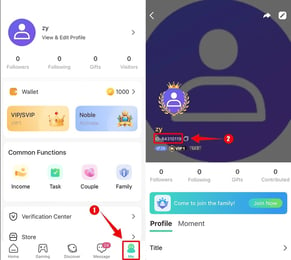
Follow this tap-by-tap guide inside the mobile app:
- Launch the Hawa app on your mobile device and log in to your account.
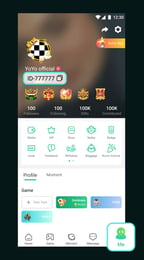
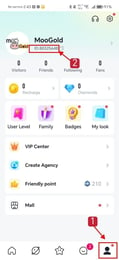
- Tap the Profile (or Me) icon located at the bottom right corner of the main screen.
- Look beneath your profile avatar and display name on your personal profile page.
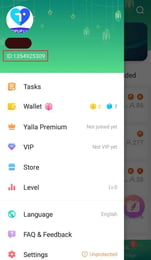
- You will see your unique UID (a series of numeric digits).
- Tap the copy icon next to the number, or write down the exact digits, and paste it directly into the UID box on VGTopup.
What Are Hawa Coins and What Can You Buy With Them?
Hawa is a popular interactive voice chat room community where users connect through audio rooms, live casual games, and group social activities. Hawa coins are the primary premium virtual currency used across the platform to participate in interactive features and support room hosts.
With Hawa coins in your balance, you can access:
- Animated Room Gifts: Send sparkling micro-gifts, luxury virtual cars, bouquets, and grand room-wide animations to broadcasters and friends inside active voice rooms.
- Entrance Effects: Unlock custom entrance animations and banners that announce your arrival whenever you join a voice party room.
- Profile Customisations: Equip exclusive avatar frames, chat text bubble styles, and profile nameplates to stand out in community lists.
- Honor Badges and Wealth Ranks: Sending coin gifts raises your user wealth tier, unlocking special social status badges displayed next to your username in chat rooms and global rankings.
- Interactive Mini-Games: Use coins to join in-room community games and activities with other voice room participants.
Why Choose Direct UID Recharge for Hawa on VGTopup
Recharging Hawa coins through direct UID input provides a secure, efficient alternative to in-app payment methods. Here is why buyers choose VGTopup:
- Strict Account Safety: You never need to link your social accounts, reveal your email login, or provide your Hawa account password. Recharges are processed strictly using public numeric UIDs.
- Clear Live Checkout: Coin denominations, order totals, and payment methods are clearly shown before you pay, so you always know what you are getting.
- Multi-Language Support: The VGTopup platform provides an intuitive, accessible layout for international users across different regions.
- Dedicated Support: If you have questions about your order or need assistance with UID verification, the VGTopup customer service team is ready to help resolve your inquiry.
Hawa Voice Chat Top-Up Delivery Time and Status Check
Direct UID orders on VGTopup are dispatched via automated systems. Under normal network conditions, coins appear in your Hawa balance shortly after your payment confirms.
How to Confirm Your Coin Delivery in Hawa
- Open the Hawa app on your phone.
- Tap the Me / Profile tab at the bottom.
- Open your Wallet or My Coins section.
- Check your updated coin balance. If your balance does not show the new total immediately, close the app completely from your background tasks and reopen it to force a server refresh.
Common Hawa Recharge Mistakes and How to Avoid Them
To prevent order delays or lost credits, keep these critical tips in mind before placing your order:
- Copying Display Names Instead of UID: Hawa display names and nicknames are changeable and cannot be used for direct top-ups. Always enter the numeric UID found under your avatar.
- Entering Spaces or Extra Characters: Ensure no extra spaces or symbols are copied along with your numeric ID.
- Typing Another User's UID: Double-check every digit before confirming payment. Because top-ups execute automatically to the account ID submitted, orders fulfilled to an incorrect valid UID cannot be reversed or transferred.
- Confusing Hawa with Other Apps: Ensure you are playing the Hawa voice chat and social party app before purchasing.
Frequently Asked Questions About Hawa Top-Up
What information do I need to top up Hawa coins?
You only need your Hawa account UID and your preferred payment method. You do not need to share your phone number, password, or third-party login credentials.
Where can I find my Hawa UID in the app?
Open the Hawa mobile app, tap the Me or Profile icon in the bottom right corner, and locate the numeric ID displayed directly under your profile photo and nickname.
Do I need to provide my Hawa account password to recharge?
No. VGTopup will never ask for your Hawa password or private login details. Coin top-ups are processed using your public numeric UID only.
What can Hawa coins be used for in voice chat rooms?
Hawa coins can be used to send virtual animated gifts to hosts and friends, purchase custom avatar frames, equip special entrance banners, unlock VIP chat bubbles, and participate in in-room mini-games.
How fast are Hawa coins added to my account after top-up?
Coins are dispatched automatically once your transaction on VGTopup is confirmed. In most cases, your coins appear in your Hawa wallet within moments.
What should I do if I submit the wrong Hawa UID during checkout?
If you entered an incorrect UID, contact VGTopup customer support immediately with your order number. If the order has already been processed by the system to a valid account ID, the transaction cannot be recalled. If the order has not yet finished processing, support will do their best to help correct the recipient ID.
Select Denomination
Tax, payment fees and eligible coupons are calculated at checkout.
| Package | Price |
|---|---|
| 13,000 Hawa Coins | USD 6.82 |
| 27,000 Hawa Coins | USD 14.16 |
| 42,500 Hawa Coins | USD 22.29 |
| 85,000 Hawa Coins | USD 44.59 |
| 100,000 Hawa Coins | USD 52.45 |
| 150,000 Hawa Coins | USD 78.68 |
| 180,000 Hawa Coins | USD 94.42 |
| 200,000 Hawa Coins | USD 104.91 |
| 250,000 Hawa Coins | USD 131.14 |
| 500,000 Hawa Coins | USD 284.13 |