
Heartopia Top Up: Direct Account ID and User ID Delivery
To purchase Heart Diamonds, monthly passes, or seasonal bundles in Heartopia, you only need your core account identifiers. VGTopup processes your order directly to the game servers without requiring your login credentials, personal passwords, or third-party platform authorizations.
Heartopia links character progression, home building assets, and cosmetics to a dual-identifier system: your Account ID and your User ID. Providing both numbers along with your active server region ensures that your purchased currency arrives in your in-game mailbox or balance immediately after checkout.
How to Top Up Heartopia with Account ID and User ID
Follow these steps to complete your Heartopia recharge on VGTopup:
- Select Your Currency Package: Browse the live product listing above and choose the amount of Heart Diamonds, membership bundles, or special packs you want to purchase.
- Enter Your Account ID: Paste your master Account ID into the first input field.
- Enter Your User ID: Input your in-game character User ID into the second input field.
- Select Your Server: Open the dropdown menu and pick the exact server where your character lives (Global, SEA, America, Asia, or TW,HK,MO).
- Check Pricing and Proceed: Review the live total shown at checkout, select your preferred payment method, and confirm the order.
- Receive Diamonds In-Game: Once the payment completes, open Heartopia on your mobile device or PC client to verify your updated balance.
Supported Heartopia Servers: Global, SEA, America, Asia, and TW/HK/MO
Heartopia maintains distinct server clusters across different geographic zones. In-game profiles, friend lists, neighborhood plots, and inventory items are locked to their respective server. Selecting the wrong region during checkout can delay delivery or route items to an unlinked profile.
Review the supported regions below before placing your order:
| Server Region | Target Coverage Area | Required Order Details |
|---|---|---|
| Global | International and European regional player base | Account ID, User ID, Server |
| SEA | Southeast Asian regional clusters | Account ID, User ID, Server |
| America | North America and South America game instances | Account ID, User ID, Server |
| Asia | East Asia and regional cross-play instances | Account ID, User ID, Server |
| TW,HK,MO | Dedicated Taiwan, Hong Kong, and Macau instances | Account ID, User ID, Server |
Always double-check your current login screen before submitting your order to make sure the server selected matches the region where you actively play.
Where to Find Your Heartopia Account ID and User ID In-Game
Heartopia separates your global account identifier from your specific character UID. You must locate both to ensure direct delivery.
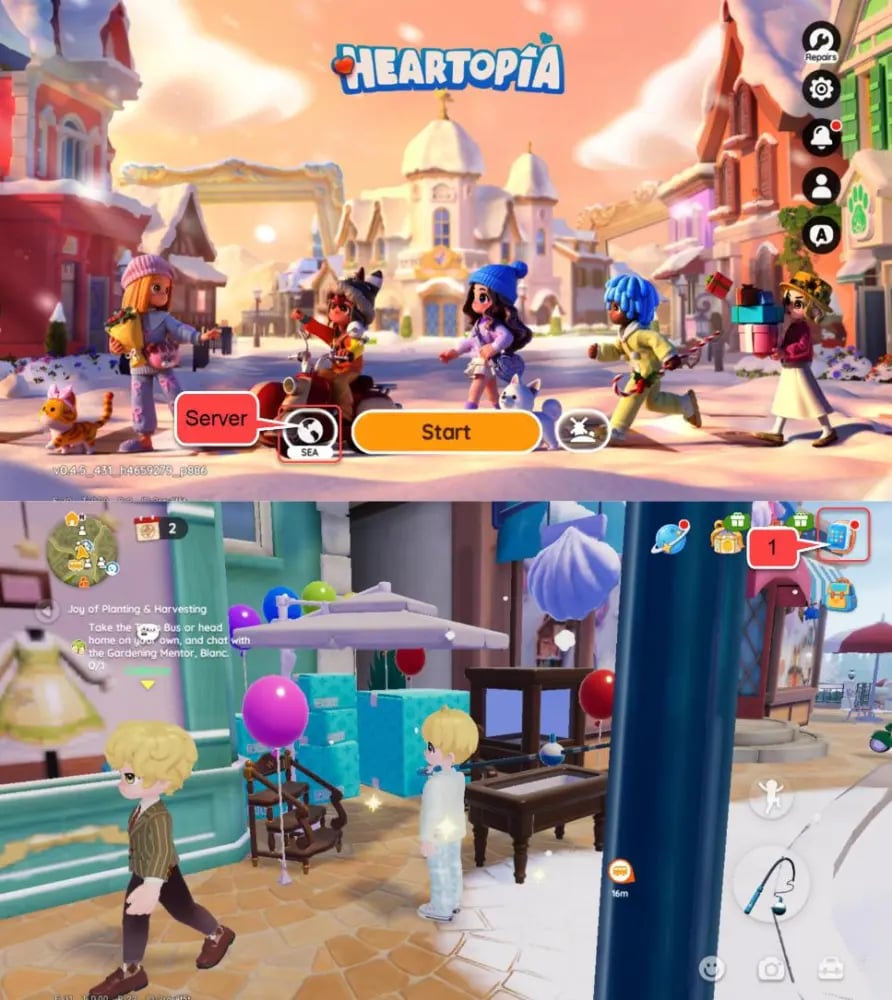
Finding Your User ID (UID)
- Open Heartopia and log into your main character.
- Tap your Avatar/Profile icon located in the top-left corner of the main screen.
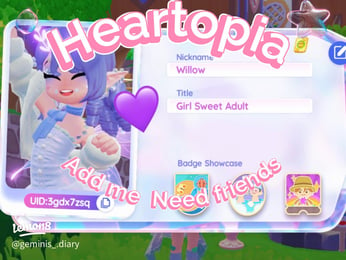
- Your User ID is displayed directly beneath your character name and profile title.
- Tap the copy icon next to the digits to copy the UID directly to your clipboard.
Finding Your Account ID
- From the main game screen, tap the Settings (Gear) icon in the top-right corner.
- Go to the Account tab on the left-side navigation bar.
- Locate the alphanumeric string labeled Account ID near the top of the account management panel.
- Copy this string and paste it into the Account ID field on VGTopup.
Heart Diamonds, GAMG Membership, and In-Game Packs Explained
Heartopia features multiple spending tiers and currencies designed for life-simulation gameplay, town construction, social fashion, and interior design. Understanding how each asset functions helps you choose the right package on VGTopup.
Heart Diamonds
Heart Diamonds serve as the primary premium currency in Heartopia. You use them to:- Buy exclusive furniture blueprints and premium structural building pieces.- Purchase limited-edition character outfits, hairstyles, and accessories.- Accelerate farming, crafting, and construction timers during extensive building projects.- Convert into secondary resources needed for high-tier village expansions.
GAMG Membership
The GAMG Membership operates as a sustained value subscription. Activating this membership grants an immediate lump sum of premium currency, daily login diamond rewards, bonus energy caps, and unique monthly cosmetic rewards. If you play daily, maintaining an active membership offers the most cost-effective path to acquiring ongoing resources.
Special and Event Packs
Heartopia frequently introduces seasonal festival packs featuring bundled decor sets, limited event tools, and discounted currency packs. Selecting these directly on VGTopup credits the entire bundle contents to your character.
Safe and Secure Passwordless Heartopia Recharge Guarantee
Account safety is critical when buying digital currencies online. Third-party services that ask for your game password, Apple ID, Google credentials, or social media logins expose your account to unauthorized access, progress loss, and potential security penalties.
VGTopup uses a direct top-up method:- Zero Password Sharing: We never ask for your account password, security questions, or verification codes.- Direct Server Delivery: All transactions are processed using your public Account ID, User ID, and selected server region.- Protected Data: Your transaction information is processed securely during checkout without retaining sensitive payment details on unencrypted systems.- Clear Pricing: The final price is displayed live at checkout before you submit payment, with no hidden surcharge surprises.
Troubleshooting Delayed or Missing Heartopia Diamond Deliveries
Most deliveries credit to your account shortly after payment confirmation. If your Heart Diamonds or packs have not appeared in your balance, follow these troubleshooting steps before making another purchase:
- Restart the Game Client: Completely close the Heartopia app or PC client from your task manager or app switcher, then reopen it. A fresh server handshake often forces balance updates.
- Check Your In-Game Mailbox: Event packs, promotional currency, and membership items are frequently sent directly to your in-game mailbox rather than being added straight to your top-bar balance.
- Verify ID and Server Accuracy: Check your order confirmation on VGTopup to ensure your Account ID, User ID, and Server match your in-game profile. A typo in the server or ID string can route the delivery to a secondary profile.
- Do Not Duplicate Orders: If an order is processing, do not immediately buy the pack a second time to prevent accidental double charges. Allow your initial order to finish processing or check your VGTopup order dashboard for live status updates.
- Contact Support: If your balance does not update after restarting, reach out to VGTopup customer support with your Order ID, User ID, and server details for swift resolution.
Frequently Asked Questions
Where do I find my Heartopia Account ID and User ID?
Your User ID is located in your character profile by tapping your avatar in the top-left corner of the screen. Your Account ID is located inside the in-game Settings menu under the Account tab. Both identifiers can be copied directly to your clipboard.
Which Heartopia servers are supported for top-up?
VGTopup supports all official Heartopia servers, including Global, SEA, America, Asia, and TW,HK,MO. Make sure to choose the server matching your active character at checkout.
Do I need to give my Heartopia password to top up?
No. You never need to share your password, login credentials, or verification codes. Top-ups on VGTopup require only your Account ID, User ID, and server region.
How long does it take to receive Heart Diamonds after top-up?
Deliveries are processed immediately upon successful payment. Once the transaction completes, your Heart Diamonds or bundles will credit directly to your account or appear in your in-game mailbox.
What happens if I select the wrong Heartopia server during checkout?
Selecting the wrong server may result in delivery failure or send the currency to an account instance on that alternate server if the ID exists there. If you realize you entered the wrong server, contact VGTopup support immediately before the order status updates to completed.
Can I top up Heartopia for PC and mobile on the same account?
Yes. Heartopia uses cross-platform account data. As long as you play on the same account and server, Heart Diamonds purchased through VGTopup will be available whether you log in from a mobile phone, tablet, or PC client.
Select Denomination
Tax, payment fees and eligible coupons are calculated at checkout.
| Package | Price |
|---|---|
| 60 Heart Diamonds | USD 0.95 |
| 300 + 20 Heart Diamonds | USD 4.82 |
| 680 + 50 Heart Diamonds | USD 10.04 |
| 1280 + 90 Heart Diamonds | USD 18.80 |
| 1980+150 Heart Diamonds | USD 28.45 |
| 3280 + 270 Heart Diamonds | USD 47.57 |
| 6480 + 570 Heart Diamonds | USD 91.41 |