Scenario 1: the payment that never fully cleared
The first thing to clear off the board isn't a YoHo bug at all. It's whether money actually left your account in a finished state. Open your Google Play or App Store purchase history and read the order status before you touch a single thing, per Google Play purchase-status help. Unglamorous, yes. And it's the exact step most rattled players blow past on their sprint toward a support ticket.
Now the part that surprised me. A charge that looks done on your banking app can still be parked in the payment processor's handoff queue, not yet passed to YoHo for crediting. So "my bank says it cleared" and "YoHo got it" are two separate events that people treat as one. Your store purchase history is the steadier signal between them. If Google Play or the App Store still reads the order as processing, those coins haven't been triggered at all, and there's literally nothing broken on YoHo's end.
This is the load-bearing point, because the whole panic-repurchase reflex assumes the first payment is dead. A pending charge is usually the reverse. It's live money still walking toward you. Read pending as good news.
Scenario 2: the wrong account or wrong region, the quiet number one
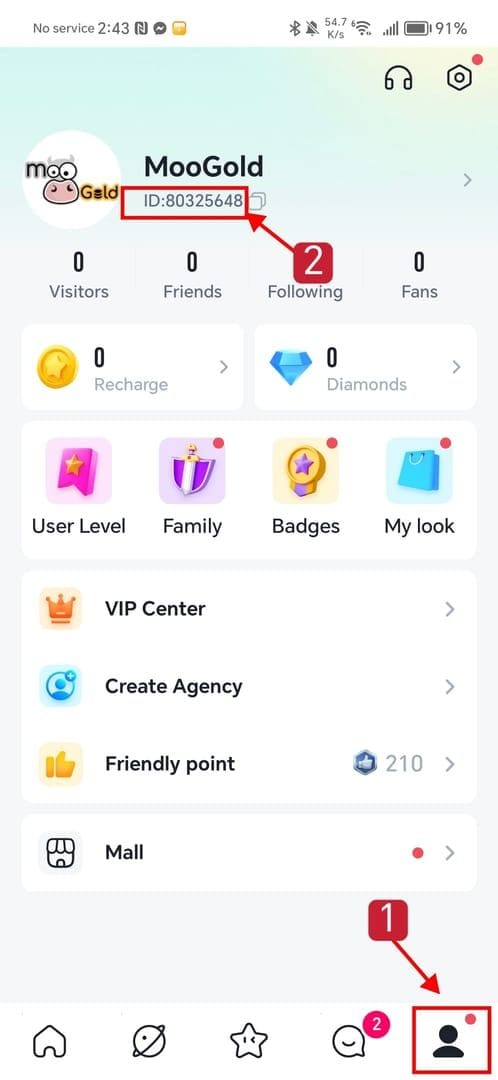
Here's where my list split off from most of the guides floating around. The top reason coins "don't appear" isn't a flopped payment. It's that they appeared somewhere you aren't looking. A wrong UID or a ME-server mismatch is the single most frequent culprit behind missing coins, per Buffbuff's YoHo guide, and the same point echoes across a pile of other top-up sellers.
The trap that catches people: coins deliver to the account and region that were active at the moment of purchase, not the profile you're glaring at now. Top up while logged into a guest or backup account, or fat-finger a UID by one digit, and the coins arrived perfectly fine. Just not on the face staring back at you with an unmoved balance. Nothing vanished. It got misrouted.
So before you escalate one inch, pull up your real YoHo UID inside the app, as the YoHo App Store listing directs. Hold that exact number, and the server region, against whatever you keyed at checkout. If you went through a third-party flow that asks for UID and server as separate fields, a region slip (say, picking the ME server when your account lives elsewhere) shunts the coins to an entirely different shard.
My honest read? This belongs at the very top of any troubleshooting list, not stuffed in a footnote like usual. Region mismatch breaks more hearts than actual payment failure does, and it's nearly always fixable the second you can hand support the precise UID you paid for.
Scenario 3: sometimes it's just lag, and a restart sort of helps
Payment cleared, UID and region both check out? Then you're almost certainly staring at processing-queue lag, not a fault. Coins usually land within minutes when the UID is right, per Enjoygm's YoHo guide. Minutes, realistically, not seconds. Occasionally a stretch longer when a maintenance window or a clogged processor queue wedges itself between your payment and the credit.
The thing that shifted my thinking here: "restart the app" is real advice, but wildly overrated next to its reputation. A plain restart only refreshes your client. What actually drags a stuck balance over the line is a re-login, which can fire a forced server-side sync a basic restart never touches. Restart and re-login to trigger sync for pending coins, as Enjoygm notes, and the re-login half is where the work happens. Restart alone left your balance frozen? Log all the way out and back in before you assume anything's busted.
Here's a clean read on the wait-then-act call:
| Status you see |
Most likely meaning |
What to do |
| Store shows "completed", UID correct |
Processing-queue lag |
Re-login; wait minutes to a couple hours |
| Store shows "pending"/"processing" |
Payment still in handoff |
Wait — don't repay; money is live |
| UID/region differs from checkout |
Misrouted, not lost |
Gather proof; this is a support case, not a wait |
| Store shows "failed"/no charge |
Top up didn't go through |
Safe to retry once you confirm no charge |
Source: delivery-window expectation per Enjoygm (2026); status meanings synthesized from Google Play and App Store purchase-status help (2026).
Scenario 4: when escalation is justified, and the proof that moves a ticket
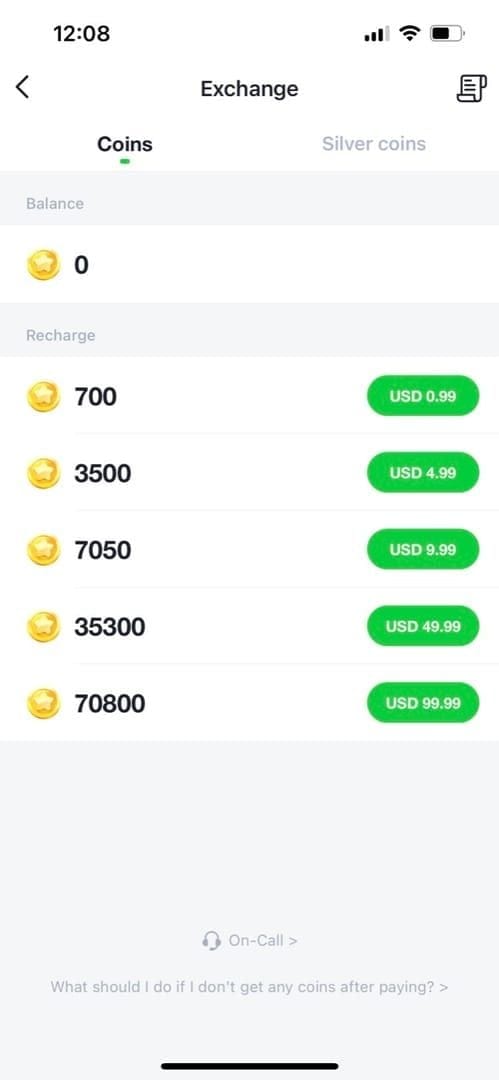
Payment cleared, account and region confirmed, a re-login plus a sane wait still leaves you short? Now you've got a legitimate support case, and YoHo's own policy stands squarely behind you. The YoHo Terms of Service state that "if the recharge is not credited or duplicate charges are deducted due to platform technical reasons, YoHo will process the matter after verification." That one word, verification, is your entire job inside the ticket.
Email cs@yoho.media with your order number and receipt when coins aren't credited after payment, per the developer guidance on the App Store listing (the same contact sits on the Google Play side too). But firing off "help, no coins" with nothing attached is precisely how tickets rot in a queue. Assemble the proof packet first. Screenshot your purchase history, receipt, transaction ID, and UID before you type a single sentence, as Enjoygm recommends, and hang onto the email receipt and transaction ID from your payment provider, which the Terms explicitly name as the basis for processing.
A reusable proof checklist, ranked by punch:
- Transaction ID / order number — the single most powerful recovery field, and the one players toss in the trash most.
- Payment receipt (email or store) showing a completed charge.
- Your exact UID and server region, screenshotted from inside the app.
- The unchanged balance, timestamped, proving the credit never arrived.
One quiet killer of otherwise-airtight cases: nuking the email receipt or losing the transaction ID before you ever reach support, a complaint that surfaces all over community reports. Strip that ID away and "verification" has nothing left to verify. Save it the instant you buy, well before you know whether you'll ever need it.
Scenario 5: the two reflexes that drain your wallet hardest
The two instincts that feel busy and productive while you're sweating are precisely the two that do real financial damage.
Topping up again before checking status. The priciest reflex of the lot. If that first payment was only delayed or misrouted, a second purchase creates a flat-out double charge. You've paid twice for one batch of coins. Community complaint reports name this exact outcome over and over. There is no version of events where repurchasing before you've read the payment status comes out cheaper. Confirm the first charge is genuinely dead (store reads failed, no money moved) before retry even crosses your mind.
Filing a bank chargeback before you open a support ticket. This one bites harder than a wasted dollar. A chargeback lodged ahead of a ticket risks an account lock, per community complaint reports, and the Terms are blunt that, refund policy aside, "all recharge actions are final and we do not accept any refund requests" outside the technical-failure route they handle after verification. So the sequence isn't up for debate. Ticket first, proof attached. Chargeback strictly as a last resort, knowing it can freeze the very account you were trying to fund. A chargeback is the nuclear button, never a tidy step two.
That whole "scam/failed" storyline the search results love? Most missing-coin reports are delays or wrong-account slips, not money gone. A pending charge comes back. A misrouted top up can be traced. Panic-repurchasing and trigger-happy chargebacks are how something recoverable mutates into an expensive, locked-account mess.
The check order that rescues the most people
The fix that clears the most cases isn't the famous one. Re-ordered by what actually drives real missing-coin panic, the flow runs: payment status → account & region → re-login sync → wait window → proof-backed ticket → (only if truly failed) a single careful retry or refund. Most guides bury region mismatch and lead with "restart the app." Backwards. Restart rescues a sliver of delay cases. The wrong-account and wrong-region checks quietly resolve a far larger chunk, and they cost nothing beyond thirty seconds spent reading your own UID.
Cleared every check above and the top up genuinely flopped, with the store showing no completed charge? Then a fresh attempt is fair game. Lining up that retry once this is sorted? Yoho Coins Top Up recharge is one transparent option; disclosure aside, the rule that holds no matter which channel you pick stays identical. Save your order ID the moment you buy, because that ID is the gap between a five-minute fix and a ticket stuck in limbo.
Frequently Asked Questions
How long should I actually wait before I assume something's wrong?
With the payment showing completed and your UID correct, credit is usually a matter of minutes per Enjoygm (2026). Give it a re-login and up to a couple of hours during busy stretches or maintenance before you treat it as a real case. A status still reading "pending" or "processing" means waiting longer is the right call, not the risky one. That charge is still live.
My coins showed up on my phone but not my tablet — is that a sync bug?
Usually that's not lost coins or a delivery flop, it's a client that hasn't pulled the latest balance. A full log-out and re-login on the second device forces the server-side sync that a casual app switch or restart skips. Coins live on your account, not your device, so confirm both devices are signed into the same UID before you suspect anything deeper.
I used a third-party top-up site — does the proof process change?
The recovery fields stay the same; where you dig them up shifts. Find your purchase history and order status inside the third-party account or payment gateway you used, then keep that transaction ID next to your in-app UID screenshot. If coins went missing over a server or UID entry at checkout, that's a routing issue to raise with the seller's order record in hand. Same advice still applies: don't repurchase to "test" whether it works.
Can I get a refund if the top up genuinely failed?
YoHo's Terms treat recharges as final and turn down general refunds, but they carve out one explicit exception: when a recharge isn't credited or you're duplicate-charged for platform technical reasons, they process it after verification, per the YoHo Terms of Service (May 2026). So a true failure goes through cs@yoho.media with your receipt and transaction ID, not through a chargeback, which risks locking the account first.
What's the single most common reason coins "vanish" that I should rule out first?
A wrong UID or server-region mismatch at checkout, which reroutes coins to a different account or shard instead of losing them, per Buffbuff (2026). Because coins deliver to the account and region active at purchase, this looks exactly like a failure from where you're standing, but it's fully recoverable the moment you can show support the precise UID you paid for.









Comments