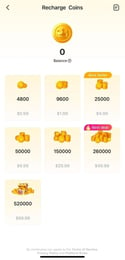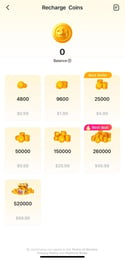

HiParty Coins Top Up: What Are Coins and How to Use Them
HiParty is a popular voice chat and social entertainment application where users join audio party rooms, sing karaoke, play interactive casual games, and connect with communities around the globe. HiParty Coins serve as the primary in-app virtual currency, allowing you to participate fully in every room interaction.
With HiParty Coins, you can:
- Send Virtual Gifts: Support your favorite room hosts, streamers, and friends with dynamic animated gifts, entry effects, and special reaction items.
- Unlock Voice Room Privileges: Access premium room themes, special seat banners, and customized chat bubbles that make your profile stand out during live discussions.
- Join In-Room Games and Activities: Use coins to participate in interactive social minigames and community contests hosted across public and private audio rooms.
- Upgrade Profile Flair: Equip limited-edition badges, avatar frames, and status effects that showcase your standing in the HiParty community.
Distinguishing HiParty from Other Party Apps
When looking for an online recharge, players sometimes confuse HiParty with other voice apps such as Party Star. HiParty uses a distinct user interface and a unique numeric User ID (UID) format. To ensure your coin recharge credits properly, always confirm that you are ordering for the authentic HiParty app and using your specific HiParty account UID.
How to Locate Your HiParty UID in the App
To complete a coin top-up on VGTopup, you only need your numeric User ID. You do not need to share your password or log in through third-party forms. Follow these steps to find your UID directly within the HiParty app:
- Launch the HiParty app on your mobile device and log in to your account.
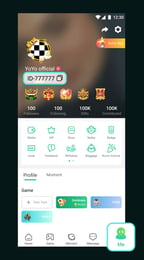
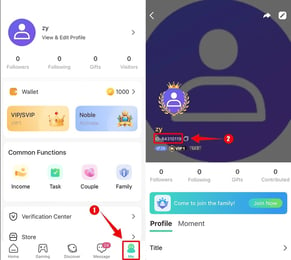
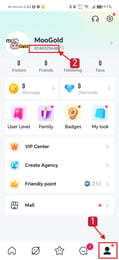
- Tap the Profile / Me tab situated in the bottom right corner of the navigation bar.
- Look beneath your avatar and display nickname near the top of your screen.
- Find the label marked ID or UID, followed by a series of numbers.
- Tap the copy icon next to the numbers to copy your UID directly to your clipboard.
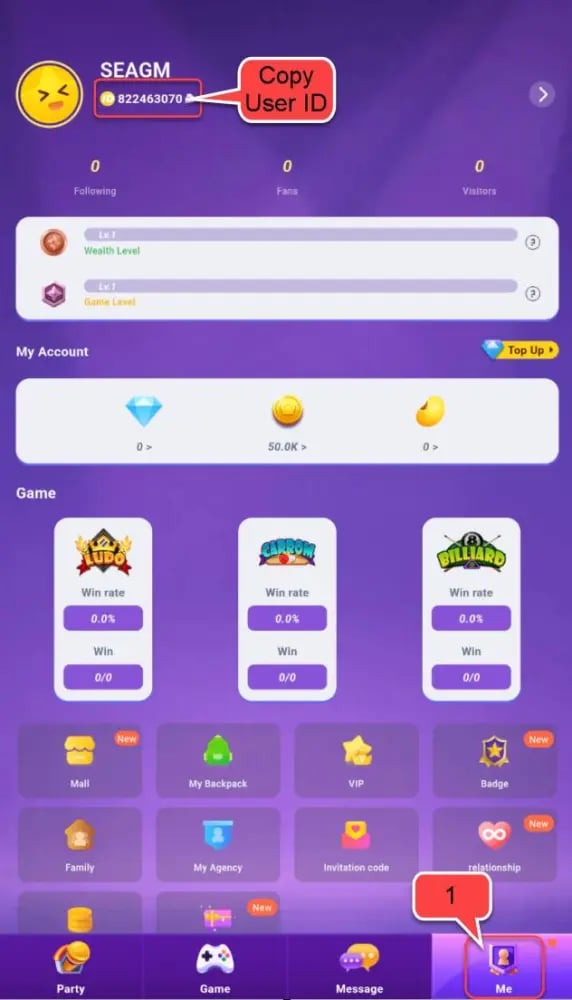
Always use the in-app copy button instead of typing the numbers manually. This avoids typographical mistakes and ensures your coins credit to the correct profile.
How to Top Up HiParty Coins on VGTopup via UID
Recharging your coin balance on VGTopup is simple, direct, and secure. Follow this step-by-step walkthrough to complete your order:
- Select Your Coin Package: Browse the available HiParty Coins denominations on the VGTopup product page and pick the amount you want to purchase.
- Input Your HiParty UID: Paste your numeric UID into the designated player field on the page.
- Review Your Information: Verify that the entered UID matches your in-app profile ID before proceeding.
- Pick a Payment Option: Select your preferred payment method from the available checkout choices.
- Complete the Transaction: Finalize your payment through our secure checkout system. Once the transaction is verified, your coins are credited directly to your HiParty account.
Why UID-Only Top-Up Keeps Your HiParty Account Secure
Account safety is essential when purchasing digital items online. VGTopup operates strictly on a direct UID recharge model. We never ask for your account password, email credentials, social login tokens, or two-factor authentication codes.
| Top-Up Method | VGTopup UID Direct Recharge | Account Login / Password Sharing |
|---|---|---|
| Credentials Required | Numeric UID only | Email/Phone + Account Password |
| Account Risk | Zero risk of account theft | High risk of unauthorized account access |
| Personal Privacy | Private messages and friend lists stay secure | Third parties gain full view of your private data |
| Verification Delays | Instant processing without login roadblocks | Delays caused by 2FA codes and security flags |
By keeping your password private and relying solely on your publicly visible UID, you eliminate the risk of compromised logins, unauthorized spending, or account suspensions.
Delivery Times and Resolving Delayed Coin Credits
Coin orders placed on VGTopup are processed automatically once your payment is confirmed. In standard conditions, coins reflect in your in-app wallet shortly after checkout completion.
If you have completed your payment and your coins have not appeared in your balance, follow these troubleshooting steps:
- Restart the HiParty Application: Force-close the HiParty app completely and relaunch it. This forces the app to refresh your profile balance with the central game server.
- Check Your In-App Wallet History: Go to your profile, open your wallet or coin history tab, and check if the latest transaction has posted.
- Check Your Order Status on VGTopup: Log into your VGTopup account and review the order status to ensure payment confirmation was completed by your payment provider.
- Verify the Submitted UID: Look at your order receipt and make sure the UID you entered matches your active HiParty profile.
- Contact VGTopup Support: If your order shows as completed on VGTopup but your balance has not updated after restarting the app, reach out to VGTopup 24/7 customer support with your Order ID and HiParty UID for immediate verification.
Supported Payment Methods for Global HiParty Coin Recharges
VGTopup provides access to a broad selection of verified, secure payment solutions to serve HiParty users across diverse regions. You can complete your purchase using global credit cards, debit cards, e-wallets, and localized online banking options.
All available payment options, real-time pricing, and applicable regional currencies are displayed live on the checkout screen. This transparent system ensures you see the exact total before confirming your payment, with no hidden checkout surprises.
Frequently Asked Questions About HiParty Coins Top Up
What are HiParty Coins used for?
HiParty Coins are the main in-app currency for the HiParty platform. You can spend them to send animated gifts to room hosts, unlock exclusive room decorations and entry effects, purchase avatar frames, and join interactive social activities inside voice rooms.
How do I find my HiParty UID for recharge?
Open the HiParty app, tap the Me icon in the bottom right corner, and look at the number string shown right under your nickname at the top of the profile page. Tap the copy icon next to your ID to copy it to your clipboard.
Do I need to provide my HiParty account password?
No. VGTopup requires only your numeric HiParty UID to deliver your coins. Never share your password, login codes, or linked social media accounts with anyone.
How long does it take for HiParty Coins to arrive after payment?
Coins are processed directly to your account as soon as your payment clears. In most cases, the balance updates right away. If you do not see the new balance immediately, restart the app to refresh your profile data.
Can I top up HiParty Coins for a friend using their UID?
Yes. You can purchase coins for friends or favorite hosts by entering their numeric HiParty UID in the player field instead of your own. Once payment completes, the coins are deposited straight into their account balance.
What should I do if I entered the wrong HiParty UID?
Because direct UID top-ups are processed automatically to the account specified during checkout, orders sent to an existing, active UID cannot be reversed once completed. Always double-check your UID before finalizing payment. If you realize an error occurred before payment processing completes, contact VGTopup customer support immediately with your Order ID.
Select Denomination
Tax, payment fees and eligible coupons are calculated at checkout.
| Package | Price |
|---|---|
| 35000 Coins | USD 3.27 |
| 70000 Coins | USD 6.54 |
| 170000 Coins | USD 15.89 |
| 350000 Coins | USD 32.72 |
| 700000 Coins | USD 65.43 |