The data-entry trap that costs more first-timers than any scam
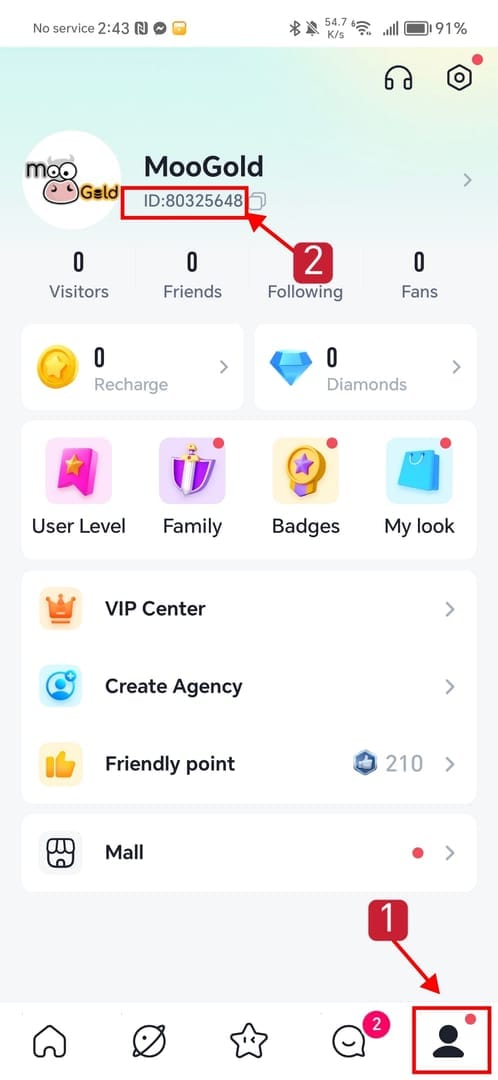
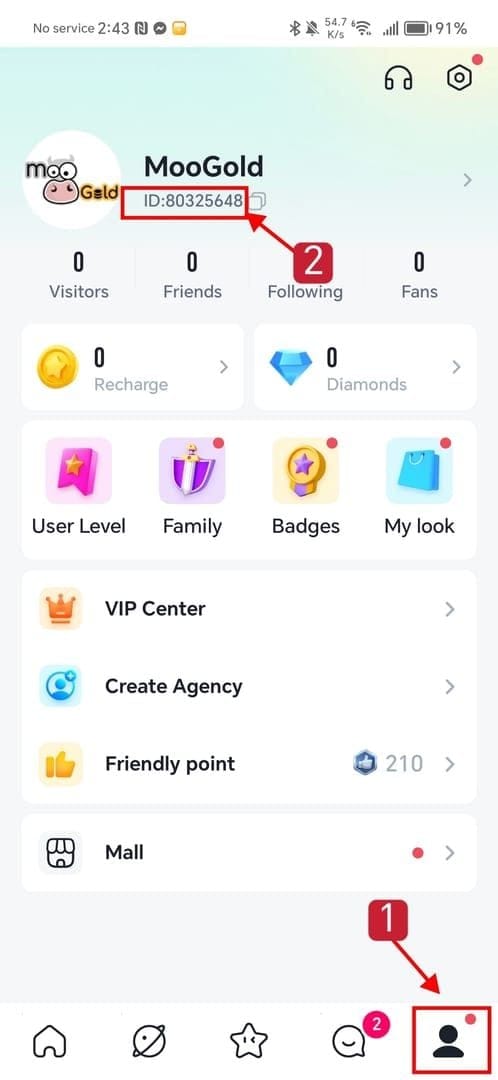
Your YoHo account answers to a UID, an 8 to 12 digit number, not the name on your profile. Open the app, tap into your profile (top-right or bottom-right, depends on your build), and the UID sits right under your character name, per the BuffBuff.com YoHo Top Up Guide. That string is the only thing routing coins to you.
The part nobody flags up front: the UID and your in-game nickname aren't interchangeable. Feed the nickname into a third-party form and, depending on how the platform reads it, the order either dies outright or matches some other account's identifier and delivers there instead. Enter the exact UID, never the nickname, or the coins don't show, and third-party sites carry no reversal.
Sit with that, because it flips the whole risk picture. A scam site can sometimes be disputed through your bank. A typo you fed into a legitimate site usually can't, since the platform did precisely what you instructed. So the highest-value habit for a first-timer isn't sniffing out scams. It's plainer than that: copy the UID, paste it, then read it back digit by digit against your in-app profile before you commit.
A clean pre-payment pass looks like this:
- UID — confirmed digit-for-digit against the profile screen, not typed from memory.
- Server / region — matched to where your account actually lives, since some platforms route delivery by region.
- Site security — the page is on HTTPS and hands payment to a recognizable gateway, not a raw form collecting your card number itself.
- 2FA — enabled on your YoHo account before the transaction, not after.
Botch either of the first two and no amount of payment protection bails you out. Skip the last two and you've propped open a different door entirely.
Why 2FA goes on before the purchase, not after
Locking the account first reads like overkill for a coin top-up. It isn't, and the logic is narrow. If your account gets compromised down the line and you want to dispute an unrelated unauthorized charge, the bank or platform reviewing your case weighs whether you took sensible security steps. No two-factor, a recycled password, plus a top-up history? That's a weak disputant. You're asking somebody to swallow the idea that a stranger raided your account while your front door sat unlocked.
So putting 2FA on first pulls double duty. It guards the account and it props up any later claim. I treat it as the one step I won't skip, even for a $2 trial buy. Password hygiene tags along too: a unique one your other logins don't share. None of this costs a cent. It just has to happen in the right sequence.
The walkthrough, and the one screen where people rush
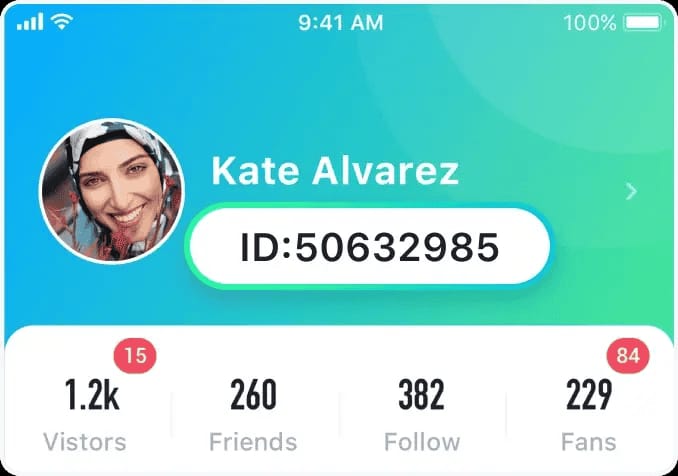
The buy itself runs short. On the official portal, YoHo's online recharge page is the channel the platform itself points to for security, or on a reputable third-party, the steps line up the same, per the Enjoygm.com YoHo Recharge Guide (2026): pick your coin package, key in your exact UID, choose a payment method, finish the transaction, then check order status for delivery confirmation.
Where first-timers floor it is the details screen. That's the one with the UID field. Crawl through there, hurry everywhere else.
A few package notes worth chewing on before you commit:
- Compare per-coin price, not headline price. Third-party pricing for YoHo coins sits roughly between $0.119 and $0.163 per 1,000 coins as of April 2026, according to BitTopup News. That band is wide. The same dollars buy noticeably more coins down at the low end. Do the division before you grab a pack.
- A "bonus" stacked on an inflated base price isn't a discount. Check the per-coin rate first. If the underlying price already runs padded, a loud first-recharge bonus can still leave you paying more per coin than a plainer rival.
- Don't waste a one-time bonus on a test. Here's the bonus quirk that stings people quietly: where a first-recharge bonus exists, it can be keyed per account lifetime, not per purchase. A tiny $1 "let me just see if this works" buy can swallow that one-time trigger, leaving the real purchase with nothing. If you're testing a platform, test it knowing the bonus might not outlive the test.
One honest caveat. No official, published first-time bonus rate turned up in YoHo's own materials that I'd stake a number on. Treat any first-recharge promo as platform-specific marketing, read the terms, and measure it against the per-coin price above, not the reverse.
Which payment method actually protects a first-time buyer
Judge a payment method by what happens when something breaks, not by which one shaves a tap off checkout. For a first-timer, that flips the usual ranking.
| Method |
Dispute / chargeback recourse |
Typical speed |
First-timer safety read |
| Credit card |
Strongest — bank-backed chargeback path |
Fast |
Best default for a first buy |
| E-wallet |
Moderate — depends on provider buyer protection |
Fast |
Fine, but recourse varies by provider |
| Gift card / prepaid code |
Weakest — generally no chargeback once redeemed |
Fast |
Treat with extra caution |
Source: payment-recourse comparison synthesized from BitTopup News (2026) pricing context and general gateway dispute mechanics.
My read: credit card takes the first buy on dispute protection alone. If a site that looks legitimate fails to deliver and stonewalls you, a card hands you a bank-backed avenue a gift card never offers. That's no slight on the quicker methods. It's about keeping a recovery lever in your fist the first time you touch a platform you've never used.
Which is exactly why gift-card-only checkouts get a flag from me. The worry isn't that the site's crooked. Plenty are perfectly fine. It's that paying via an irreversible code shreds your chargeback rights by design. The lowest sticker price tends to ride alongside the thinnest dispute support, so weigh protection next to price, not price by itself. Regional options can shift this too. Codashop, for one, supports YoHo top-up with local rails like MAE and Touch 'n Go in Malaysia, per Codashop, handy if those happen to be the wallets you already trust.
Telling a real recharge site from a trap
Reputable versus risky has nothing to do with how familiar the brand sounds. It comes down to a short list of concrete signals. Official guidance is blunt on the baseline: leaning on unofficial third-party sites carries some risk of account issues or non-delivery, and the official m.yoho.media portal is the security-first pick, per YoHo official (2026). That doesn't brand every third-party unsafe, since established platforms handle these orders fine, but it sets a bar each one has to clear.
Red flags worth walking away from:
- No HTTPS, or a checkout grabbing your raw card number on its own form instead of routing to a named gateway.
- No visible order ID or order-status page once you've paid. You need that confirmation trail.
- "Instant delivery" shouted loudly with no stated support path for the times delivery fails. Speed claims mean little without a failure plan behind them.
- Pricing way under that ~$0.119-per-1,000 floor with no reason given. Implausible discounts are usually the lure.
- Pressure tactics: countdown timers slapped on a "first-time bonus," nudges to skip verification.
To vet a seller before paying: confirm HTTPS, confirm a genuine order-status / order-history feature exists, confirm there's a reachable support channel, and confirm the per-coin price sits in a sane range. Fast delivery is a feature. A documented way to repair a broken delivery is the actual safety net. Several third-party platforms do advertise instant or fast top-ups, per LootBar.com (2026), useful, though I'd still weight a support trail above the speed promise.
Full transparency: this guide is published by VGTopup, itself a third-party top-up platform. The honest framing that falls out of everything above (verify the UID first, hang onto the order ID, pick a method with dispute recourse) holds no matter where you buy, this site included.
When the coins don't show up
First, don't panic on the clock. Most top-ups land within minutes, and third-party platforms broadly advertise instant or fast delivery. A short lag during a busy stretch is normal, not proof of a scam.
Here's the practical "when to worry" timeline and what each symptom usually means:
| Symptom |
Most likely cause |
What to do |
| Coins missing, minutes after paying |
Normal processing / queue delay |
Wait; refresh the order-status page |
| Order shows "complete," coins not in account |
Wrong UID entered |
Recheck the UID you submitted against your profile |
| Order stuck "pending" past a few hours |
Gateway or delivery routing delay |
Contact support with the order ID |
| Nothing after 24 hours |
Failed delivery or data-entry mismatch |
Open a dispute with the order ID; escalate via your payment method if unresolved |
Source: delivery-failure root causes synthesized from community top-up reports (2026).
Look at the second row. An order stamped "complete" with no coins in your account is the textbook UID-typo signature. The platform delivered exactly as told, just not to you. That's why the recovery checklist starts before the trouble does. The order ID and a screenshot of the UID you entered are the only evidence separating "the platform failed" from "I shipped it to the wrong number." Without the order ID, you're asking support to take your word. With it, most legitimate platforms can trace the transaction.
The recovery routine, in order:
- Confirm the order actually went through (order-status page, payment confirmation).
- Re-verify the UID you submitted — this catches the most common cause first.
- Gather the order ID, payment confirmation, and timestamp.
- Contact the platform's support with all of it.
- If a legitimate, paid, undelivered order goes unresolved, escalate through your payment method, which is exactly why the credit-card recommendation earlier matters.
The safest first-top-up routine, start to finish
If you do nothing else, hit these in sequence: turn on 2FA, copy the UID and read it back digit by digit, confirm the page is HTTPS with a named gateway, pick the package with the best per-coin price (not the loudest bonus), pay by a method that keeps a dispute lever in your hand, and save the order ID the second it appears.
For a day-one beginner on a first-ever top-up: don't chase cents. Chase recoverability. Credit card, official or clearly reputable site, UID checked three times. Value-hunting can wait until you know the flow.
For a cautious low-spender testing the waters with a small pack: smart instinct, with one trap to dodge. If the site dangles a one-time first-recharge bonus, a tiny test buy may eat it. Either test on a platform with no lifetime-bonus mechanic, or accept your "real" purchase won't carry the bonus afterward.
Disclosure once more, plainly: this piece is published by VGTopup. If you'd sooner buy through a platform that surfaces your order ID and supports dispute follow-up, Yoho Coins Top Up top up is one transparent option to weigh. Just verify the account ID before you confirm, same as anywhere.
Frequently Asked Questions
Do I really need my account ID, or will my username work?
You need the UID, the 8–12 digit number under your character name, per BuffBuff.com (2026). The username won't reliably work and can actively misfire: the UID and nickname aren't interchangeable, and typing the nickname can route coins to the wrong account with no reversal on third-party sites. Copy the number straight off your profile. Don't type it from memory.
Is it safe to top up Yoho Coins with a credit card?
Yes, and for a first-timer it's my default. A credit card hands you a bank-backed chargeback path if a paid order genuinely fails and the platform won't fix it, recourse a redeemed gift card just doesn't carry. Pair it with a site on HTTPS that routes through a real payment gateway instead of collecting your card number on its own form.
How long should I wait before assuming my top-up failed?
Most orders land within minutes, and platforms widely advertise instant or fast delivery, per LootBar.com (2026). A pending status for a few hours during a busy window is still normal. The 24-hour mark is your line. Nothing by then, treat it as a failed delivery, pull the order ID, contact support, then escalate through your payment method if it stays stuck.
Is the first-time top-up bonus worth using?
Only when the base per-coin price is already fair. Third-party rates run roughly $0.119–$0.163 per 1,000 coins as of April 2026 per BitTopup News, so check where your pack lands before the bonus tempts you. And mind the lifetime trigger: a tiny test buy can burn a one-time first-recharge bonus, so don't waste it proving the site works.
What's the one thing I should save from every top-up?
The order ID. It outranks any "trusted" badge a site flashes. It's the single piece of evidence that lets support trace your transaction, and it's what tells a genuine platform failure apart from a self-inflicted UID typo. Screenshot the order ID, the payment confirmation, and the UID you entered. That trio resolves nearly every "coins not received" case that's actually resolvable.









Comments