
What Are YoHo Coins and How Are They Used in Group Voice Chats
YoHo is an interactive social platform built around real-time group voice chat rooms, casual gaming, and virtual communities. Within the app, YoHo Coins serve as the primary virtual currency that powers social interactions, room engagement, and status enhancements. When you participate in voice rooms, coins allow you to send interactive animated gifts to broadcasters, trigger custom sound effects, unlock visual decorations, and participate in room-based multiplayer board games.
Understanding the in-app economy helps you get the most value out of your balance. YoHo maintains two distinct virtual assets: Coins and Beans. Here is how they differ:
| Currency | How It Is Acquired | Primary Use Cases | Cash Out Availability |
|---|---|---|---|
| YoHo Coins | Direct top-up via UID on VGTopup or in-app purchase | Sending virtual gifts, entering room games (Ludo, Dominoes), purchasing VIP tiers, microphone frames, and entry banners | Non-withdrawable; strictly for in-app spending |
| YoHo Beans | Earned by room hosts and broadcasters when receiving gifts | Tracking room popularity, leveling broadcaster rankings | Convertible to cash or exchangeable for coins via host settlement |
By keeping your coin balance funded, you can actively support your favorite room hosts, participate in community events, and stand out in crowded voice channels.
Step-by-Step Guide: How to Top Up YoHo Coins on VGTopup Using Your UID
Recharging your YoHo account on VGTopup is straightforward and requires only your numeric User ID (UID). Because our platform connects directly to your ID, you never need to share account passwords or link third-party social logins.
Follow these steps to complete your top-up:
- Select Your Coin Package: Choose the desired YoHo Coin denomination displayed on the VGTopup product page.
- Enter Your YoHo UID: Type your numeric YoHo User ID into the UID input field. Double-check the digits to ensure accurate routing.
- Proceed to Checkout: Click the purchase button and select your preferred payment method on our secure checkout screen.
- Receive Your Coins: Once payment is verified, the system processes your order automatically and credits the coins directly to your YoHo balance. Open your YoHo app and check your wallet under your profile.
How to Find Your YoHo User ID (UID)
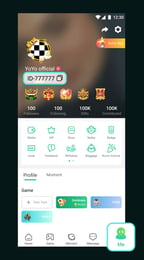
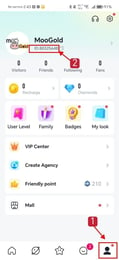
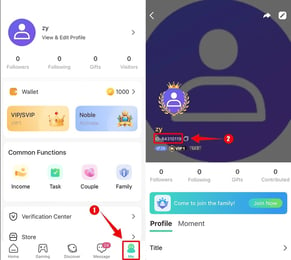
Locating your YoHo UID takes only a few seconds inside the mobile application. Ensure you copy the numeric ID directly from your profile to avoid typos.
- Open the YoHo app on your mobile device.
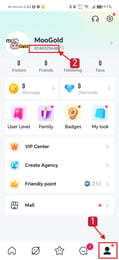
- Tap the Me (Profile) icon located in the bottom-right corner of the main screen.
- Look directly beneath your profile avatar and username. Your numeric ID is displayed there.
- Tap the small Copy icon next to your ID number to copy it to your clipboard, then paste it directly into the UID field on VGTopup.
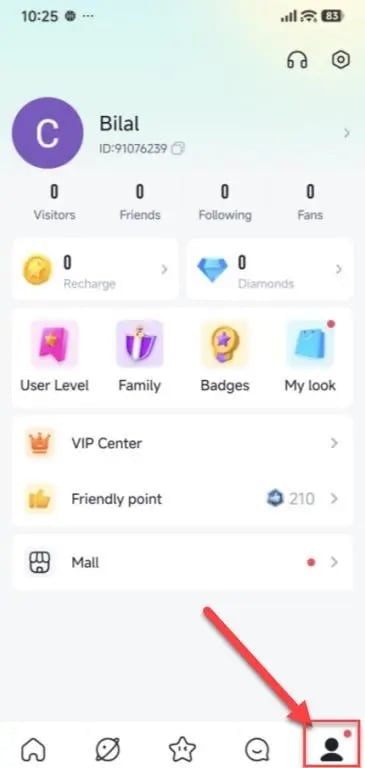
Double-check that the copied UID matches your profile before submitting your order on VGTopup.
YoHo VIP Levels, Audio Gifting, and Room Privilege Benefits
Using YoHo Coins unlocks high-tier account customizations and community recognition that distinguish regular listeners from top supporters. As you spend coins in voice rooms, your account accumulates growth points toward VIP standing and special room privileges.
VIP Status Tiers (VIP 1 to VIP 10)
Every coin spent on virtual gifts advances your progress through the YoHo VIP tiers. Higher VIP rankings unlock exclusive visual assets, including:* Custom Entrance Effects: Announce your arrival in any voice room with luxury animated sequences, such as sports cars, flying airships, or mythical creatures.* Distinctive Avatar Frames & Chat Bubbles: Display glowing borders around your profile picture and highlighted message bubbles in the public room chat.* Microphone Halo Effects: When speaking on stage, your seat highlights with special visual halos indicating your VIP level.* Exclusive Customer Support: High-tier VIP accounts gain priority queue handling for platform-related inquiries.
Interactive Audio Gifts
Unlike standard static stickers, YoHo audio gifts trigger full-screen animated graphics paired with unique sound effects that play across the entire voice room. Sending luxury gifts boosts the host's room ranking on the discovery page, attracting more active listeners and making your profile visible on the room's top contributor leaderboard.
Voice Room Mini-Games
YoHo integrates casual table games directly into voice channels, allowing friends to play while chatting. Coins allow you to enter rounds of:* Ludo: Classic four-player token racing with customizable room stakes.* Dominoes: Fast-paced tile matching against room participants.* Lucky Draw & Wheel Events: Seasonal in-room mini-games with coin prize pools and special avatar items.
Safe YoHo Coin Recharges in 2026: Why Passwordless Top-Up Matters
Account safety is critical when purchasing virtual items online. In 2026, credential-based recharge methods—where buyers share usernames, passwords, or temporary verification codes—pose severe risks, including account hijacking, unauthorized item transfers, and permanent account bans.
VGTopup eliminates these risks by using a 100% passwordless UID recharge system:* Zero Password Requests: We never ask for your YoHo login credentials, linked phone numbers, or social media logins.* Direct Account Crediting: Orders are processed directly to the public numeric UID you supply, preserving full account control on your device.* Safe Transactions: All transaction data is encrypted to protect your payment details from checkout to final processing.
Never share your login passwords or SMS one-time passwords (OTP) with anyone claiming to offer discounted coins. Utilizing UID-only recharges on VGTopup ensures your account remains secure.
Troubleshooting Common YoHo Top-Up Questions
If you experience any delays or issues with your coin delivery, review the troubleshooting guidelines below:
- Coin Balance Did Not Update Immediately: Close the YoHo app completely from your device's multitasking menu and restart it. Check your balance under Me > Wallet. In rare cases of network congestion, delivery may take a few minutes to reflect on the server.
- Entered an Incorrect UID: If you submitted an order with an incorrect UID that belongs to another active user, coins delivered to that account cannot be reversed. If the entered UID is invalid and the order fails processing, contact VGTopup 24/7 customer support immediately with your order number for assistance.
- Network Connectivity Errors: Ensure you have a stable internet connection when checking your updated balance in the YoHo application.
Frequently Asked Questions About YoHo Recharges
Where can I find my YoHo UID to complete the top up?
Open the YoHo app, tap the Me icon in the bottom-right corner, and locate the numeric ID displayed under your profile name and avatar. Tap the copy icon next to the number and paste it into the UID field on VGTopup.
Do I need to provide my YoHo password or login credentials?
No. VGTopup requires only your public numeric YoHo UID. We will never ask for your account password, email login, or SMS verification codes.
What can I buy or unlock using YoHo Coins?
YoHo Coins allow you to send interactive animated audio gifts, purchase room entry effects, unlock avatar frames and microphone badges, level up your VIP status, and join room mini-games such as Ludo and Dominoes.
How fast are YoHo Coins delivered to my account after payment?
Coin deliveries are handled automatically upon successful payment verification. Your updated coin balance will reflect in your YoHo wallet shortly after completing checkout.
What should I do if I entered the wrong YoHo UID during recharge?
If you realize you made an error before the order completes processing, reach out to VGTopup customer support immediately with your order ID. If the order has already successfully delivered coins to a valid UID, the transaction cannot be recalled.
Can YoHo Coins be converted into Beans or withdrawn as cash?
No. YoHo Coins are strictly an in-app spending currency and cannot be directly converted into Beans or cashed out. Beans are earned exclusively by room hosts through received gifts.
Select Denomination
Tax, payment fees and eligible coupons are calculated at checkout.
| Package | Price |
|---|---|
| Yoho Coins *20000 | USD 1.84 |
| Yoho Coins *35000 | USD 3.22 |
| Yoho Coins *70500 | USD 6.48 |
| Yoho Coins *353000 | USD 32.43 |
| Yoho Coins *708000 | USD 65.05 |