The two routes that survive a border crossing
Strip it all down and there are two ways to land coins on a YoHo account. They break for entirely separate reasons.
Route one, the in-app purchase. You buy coins inside YoHo Live and the charge runs through Apple or Google. This is the one that quietly comes apart the moment you travel. Your store account is still bolted to your home country, but the card you're paying with now (or the network you're paying under) reads as foreign. The gateway clocks the mismatch and bounces it.
Route two, the UID/web top-up. You feed in your account identifier and pay on a web page instead of inside the app. The official path is the recharge page at m.yoho.media, where you drop in your YoHo ID and a verification code, per the YoHo Online Recharge page. Third-party UID platforms run identical: choose a coin pack, type the UID, pick a payment method, done. According to BuffBuff and Enjoygm's 2026 top-up guides, coins arrive within minutes.
And here's the mechanic that actually decides this. UID top-up credits your account no matter which country your phone's store is signed into. It never touches Apple or Google. So a handset logged into some other region's store still gets its coins, because the only field the system reads is your UID. That single property is why, after the dust settled on my own move overseas, I treat the web route as the default and not the fallback.
| If this is your situation |
Then do this |
| In-app purchase keeps declining overseas |
Switch to UID/web top-up, it skips the store gateway entirely |
| You changed countries permanently |
Use UID top-up; don't bother flipping your store region |
| Charge went through but no coins |
Stop. Don't retry. Save the order ID first (see below) |
| Card declined, charge shows "pending" |
Open your bank app and approve it, it's almost always a fraud hold |
Why your top-up dies the second you leave home
A cross-border decline traces back to one of three causes, and only one has anything to do with YoHo.
Start with the app-store versus card-country mismatch. Apple and Google pin your store account to a region, and that region dictates which payment instruments count as valid. Pay abroad with a foreign-feeling card, or with a billing address that no longer lines up against the store's country, and the purchase gets kicked at the gateway before it ever reaches YoHo. This is the number-one killer of in-app top-ups overseas. It's also why "change my Apple region" sounds clever right up until it isn't. That disaster gets its own section.
Then there's the silent bank fraud hold. This is the one I'd check before anything else, because it's the most common and the quickest to clear. Your bank spots a game charge from an unfamiliar merchant in an unfamiliar country and freezes it as suspected fraud. The tell: the charge shows up as "pending", then reverses a day later. That's not a platform error, that's your bank quietly covering you. A 60-second approval tap inside your banking app rescues more of these cases than any in-game setting ever could. People torch a whole afternoon toggling VPNs when the real culprit was a notification they swiped away.
Last cause, the payment gateway itself. Some payment rails just don't reach every market. The UID route routes around this because third-party platforms layer in local options. Vpayfast, for instance, supports Global and MENA regions with local wallets specifically so players dodge conversion friction, per Vpayfast's 2026 article.
So before you change a single setting: open the bank app. Pending charge? Approve it, retry once. If it cleared and the coins still aren't there, that's a different animal, handled further down, definitely not by hammering the buy button.
The UID route, and what you need before you start
The reason I keep nudging people toward UID top-up instead of wrestling the store is plain. It deletes the single biggest failure point. The in-app path has to please your store region, your card region, and the gateway all at once. The UID path only wants your account number and a working payment method. Fewer locks, fewer ways to faceplant.
Two things to have ready before you pay:
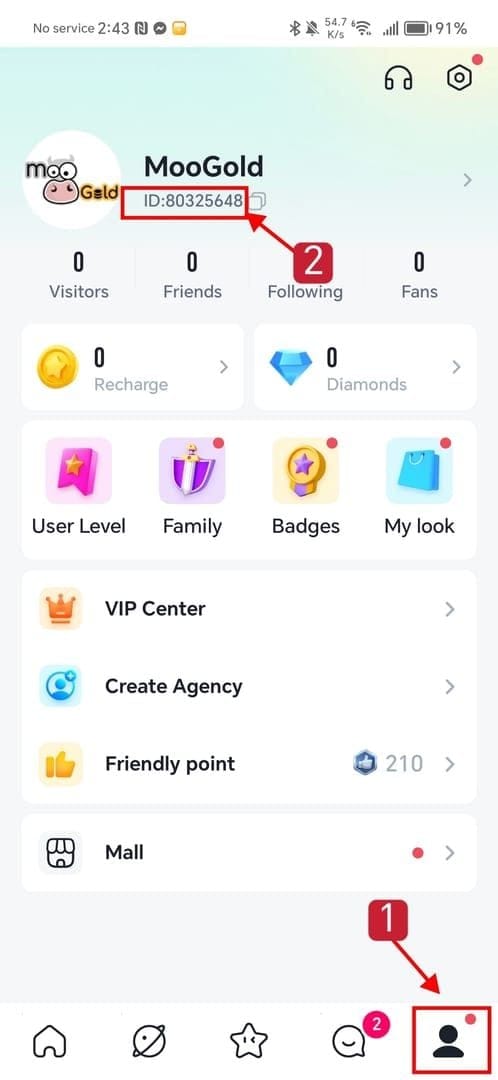
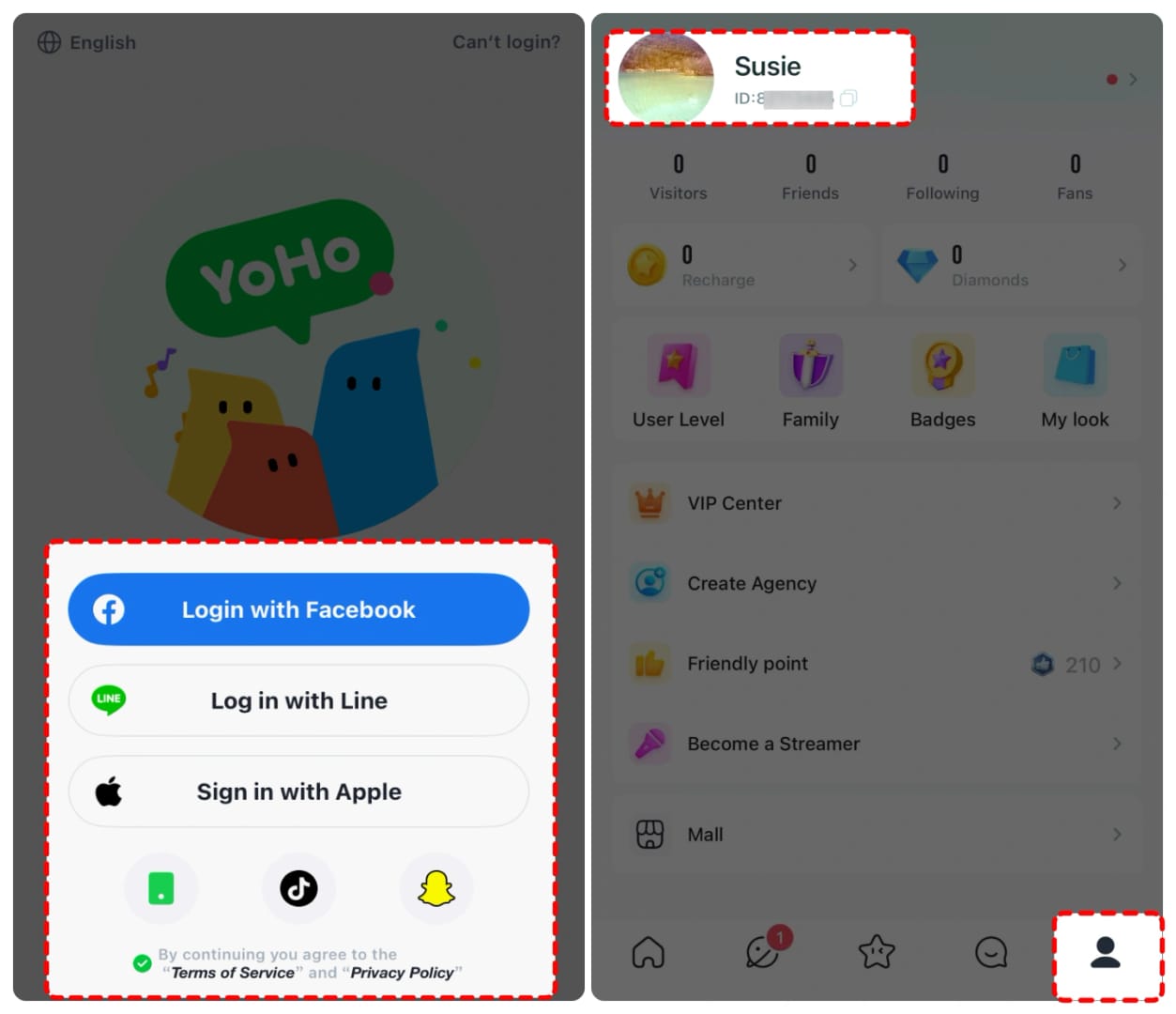
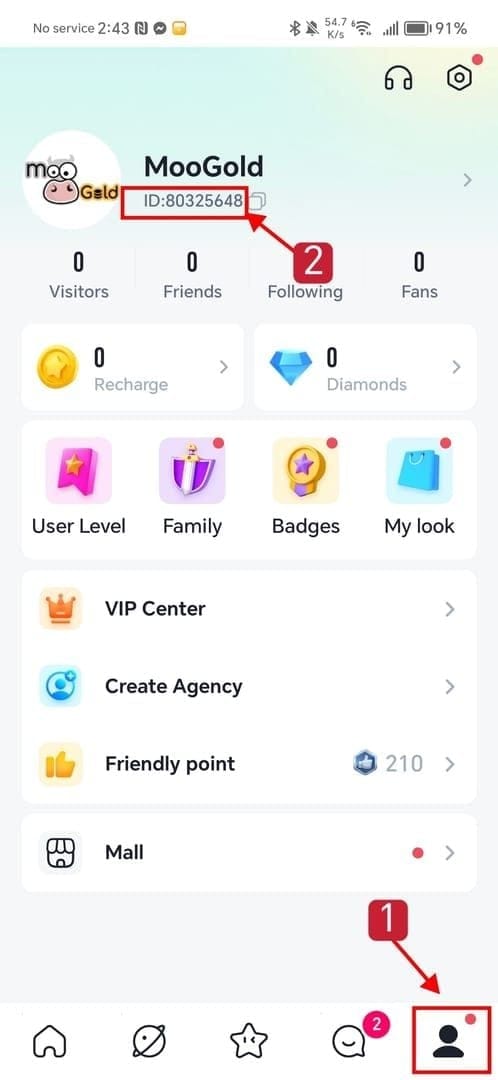
- Your YoHo UID. Open YoHo Live, tap your profile in the bottom-right (or the account-info icon top-right), and the UID sits under your character name, exactly where BuffBuff and Enjoygm both document it for 2026. Copy it dead-on. A transposed digit ships your coins to a stranger, and untangling that isn't anyone's favorite ticket on the support desk.
- A payment method that travels. Most UID platforms take Visa/Mastercard credit and debit, PayPal, and a spread of local wallets.
After that the flow's short:
- Go to the recharge page (official m.yoho.media, or a UID platform).
- Select your coin pack.
- Enter your UID, plus the verification code the official page sends.
- Pick your payment method and pay.
- Watch the in-game balance; coins generally land within minutes.
That's the whole dance. No store region, no app reinstall, no country-switch gymnastics.
What an overseas top-up actually costs

This is where the "cheapest method abroad" crowd has it inside out. Paying on a foreign card does pile on a little overhead. But that overhead's smaller than the hours you'd torch chasing exotic fee-free tricks.
Two costs stack on a cross-border card payment:
- An FX conversion markup, applied when your card flips the foreign-currency charge back to your home currency.
- A foreign transaction fee that plenty of banks bolt onto any charge processed abroad.
I won't quote you an exact percentage, because the real number rides entirely on your specific card and issuer, and an invented figure helps nobody. Read your own card's terms. The foreign transaction fee and FX markup are both printed there. A lot of travel-focused cards waive that foreign transaction fee outright, which is the one genuinely free lunch in here.
Now set that against the discount side. Third-party UID platforms routinely run promos, with a roughly 16% discount showing up across these sites, per Enjoygm's 2026 pricing. In practice it shakes out like this:
| Pack Size |
Discounted (BRL) |
Original (BRL) |
Discount |
| 20,000 Coins |
2.15 |
2.99 |
16% |
| 35,000 Coins |
4.24 |
4.99 |
16% |
| 70,500 Coins |
8.47 |
9.99 |
16% |
| 353,000 Coins |
42.43 |
49.99 |
16% |
Source: Enjoygm.com YoHo top-up page (2026-06).
First time I held a discounted UID pack up next to the full sticker, that ~16% gap is what caught my eye, and on most cards it comfortably eats the FX-plus-foreign-fee overhead. BuffBuff also advertises 16% off across multiple payment methods, flagging a small card processing fee in the order of a couple of cents on its 2026 page. Pay the modest FX fee on a card you already carry. Don't blow an hour hunting a "fee-free" workaround that ends up costing more in time than it ever rescues in currency.
If you do want to weigh where to pay, a UID-based platform like Yoho Coins Top Up top up is one option that doesn't lean on your store region, just confirm your UID first. (Disclosure: VGTopup publishes this guide and runs a UID top-up service, so weight that accordingly. The neutral point holds either way: UID routing ignores your app-store country.)
Traveler vs expat: the answer splits here
If you're a short-term traveler holding your home card, do basically nothing special. Use UID/web top-up, approve the charge in your bank app if it holds, swallow the small FX fee, carry on. Card and account stay exactly as they were.
For a relocated or expat player carrying a new local card, the UID route matters even more, because your store region and your new card's country now permanently disagree. Don't try reconciling them through store settings. The UID path ignores the conflict by design.
VPNs and "change your store region" are mostly a trap

Every thread on this eventually tells you to spin up a VPN. I'd pass. A VPN shifts your apparent IP location. It does nothing to your card's issuing country, and the card-region mismatch is what's tripping the decline. Route your traffic through five countries if you like; the bank still sees the same card. Worse, abrupt location jumps can read as account tampering and invite a security flag you never wanted.
Switching your Apple or Google account region is the larger landmine. It can strand any existing store balance, snap subscriptions and future purchases tied to the old region, and frog-march you through re-verification, all to solve a problem the UID route simply doesn't have. Changing your store country is a net loss for nearly everyone. The web top-up makes the whole question moot, which is the entire point.
The honest read on the controversy: VPNs and region-switching are cargo-cult fixes aimed at the symptom (apparent location) instead of the cause (payment routing). They occasionally appear to work, which keeps the myth breathing. When they "work," it's usually because the bank hold cleared in the background anyway.
When you're charged but the coins never show up
This is the scenario that triggers panic-retrying and accidental double-paying. Don't.
A charged-but-missing top-up almost always sorts itself out once the order gets matched to your account, so your first move is to save the receipt and order ID, not to buy again. YoHo's own terms spell it out: recharges that aren't credited, or duplicate charges caused by technical reasons, get processed after verification rather than refunded automatically, per the YoHo Terms of Service. So keep your proof, open a support ticket with the order ID, and wait for the match. Retrying blind is how one stuck charge becomes two real ones.
The pitfalls here are well-documented. One user reported a top-up charged to their mobile phone invoice instead of their bank card, which produced a surprise bill, per a Sikayetvar complaint from January 2026. Good reminder to confirm which payment instrument you're actually using before you tap pay. Billing surprises and double-charge spirals are the regrets I see most, and both fold to the same discipline: confirm the method, keep the receipt, don't re-pay before you've checked the order status.
So what's the actual lowest-friction move abroad?
Default to UID/web top-up the second you cross out of your home country. It bypasses the app-store region lock that murders most in-app purchases, it credits your account regardless of which country your phone's store is signed into, and it runs identically for a weekend tourist and a fully relocated expat. If a payment declines, check the bank app for a pending hold before you touch anything else. That single habit clears more "failed top-up" cases than every settings tweak put together. Skip the VPN, leave your store region alone, and if a charge clears with no coins, save the order ID and wait for the match instead of retrying. Boring, reliable, cheap. That's the whole game.
Frequently Asked Questions
Can I top up Yoho Coins while I'm traveling for just a week?
Yep, and you don't need to touch a thing on your account. Keep your home card, run the UID/web top-up route, and if your bank flags the unfamiliar charge as a hold, approve it in the banking app and retry once. For a short trip, fiddling with store regions stirs up more problems than it solves, since your setup snaps back to normal the moment you're home anyway.
Does using a VPN actually help my Yoho top-up go through?
Rarely. A VPN moves your IP location but not your card's issuing country, and that card-region mismatch is what fires most declines. It can also make your account look like it's being reached from several places at once, which risks a security flag. If you've already got a VPN running and a payment fails, the cause is almost certainly your bank or the store region, not your IP.
I paid but the coins haven't arrived, should I buy again?
No. Save the order ID and receipt first, then open a support ticket. YoHo's terms state that uncredited recharges and duplicate charges from technical issues are verified and processed manually rather than auto-refunded, per the YoHo Terms of Service (May 2026), so retrying before the match resolves is exactly how you end up genuinely double-charged.
Will a foreign credit card cost me more than topping up at home?
A bit. You'll typically see an FX conversion markup plus a possible foreign transaction fee, both printed in your own card's terms. But the ~16% promotional discounts common on UID platforms, per Enjoygm's 2026 pricing, usually more than cover that overhead. A travel card with no foreign transaction fee erases the difference entirely.
Do I have to switch my App Store or Google Play region to top up abroad?
No, and I'd actively steer you off it. Switching regions can strand your existing store balance and break future purchases tied to the old country. The UID/web top-up credits your account regardless of your store's region, so the conflict that tempts people into switching never even applies.










Comments