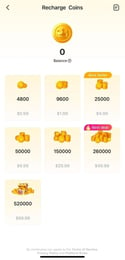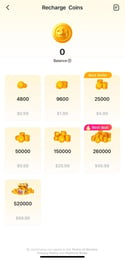

SUGO Coins Top Up: Instant Voice Room and Gifting Currency
SUGO is a voice chat and interactive social platform where users connect in real-time audio rooms, play party games, and build online communities. SUGO Coins serve as the primary premium currency across the entire app. With coins in your balance, you can send animated gifts to your favorite room hosts, activate special entry effects, unlock exclusive profile frames, and participate in community events.
Recharging your balance through VGTopup provides an instant balance update straight to your account. Because transactions process directly using your unique numeric User ID (UID), you never have to share account passwords or sensitive authentication tokens.
Comparison: SUGO Coins vs. SUGO Beans
Understanding the distinction between SUGO Coins and SUGO Beans prevents confusion when managing your in-app assets and gifting balance.
| Feature | SUGO Coins | SUGO Beans |
|---|---|---|
| Primary Purpose | Purchasing gifts, entry effects, games, and VIP perks | Tracking creator earnings from received gifts |
| How to Obtain | Top up directly via VGTopup using your UID | Earned automatically when other users send you gifts |
| Transferable | Spent on hosts and chat room interactions | Accumulated by hosts and broadcasters |
| Cash Out Eligibility | Non-withdrawable; used solely for in-app spending | Eligible for withdrawal/cash-out based on platform rules |
| Direct Purchase | Available on the VGTopup live checkout | Cannot be purchased directly; earned through engagement |
Step-by-Step Guide: How to Find Your SUGO UID
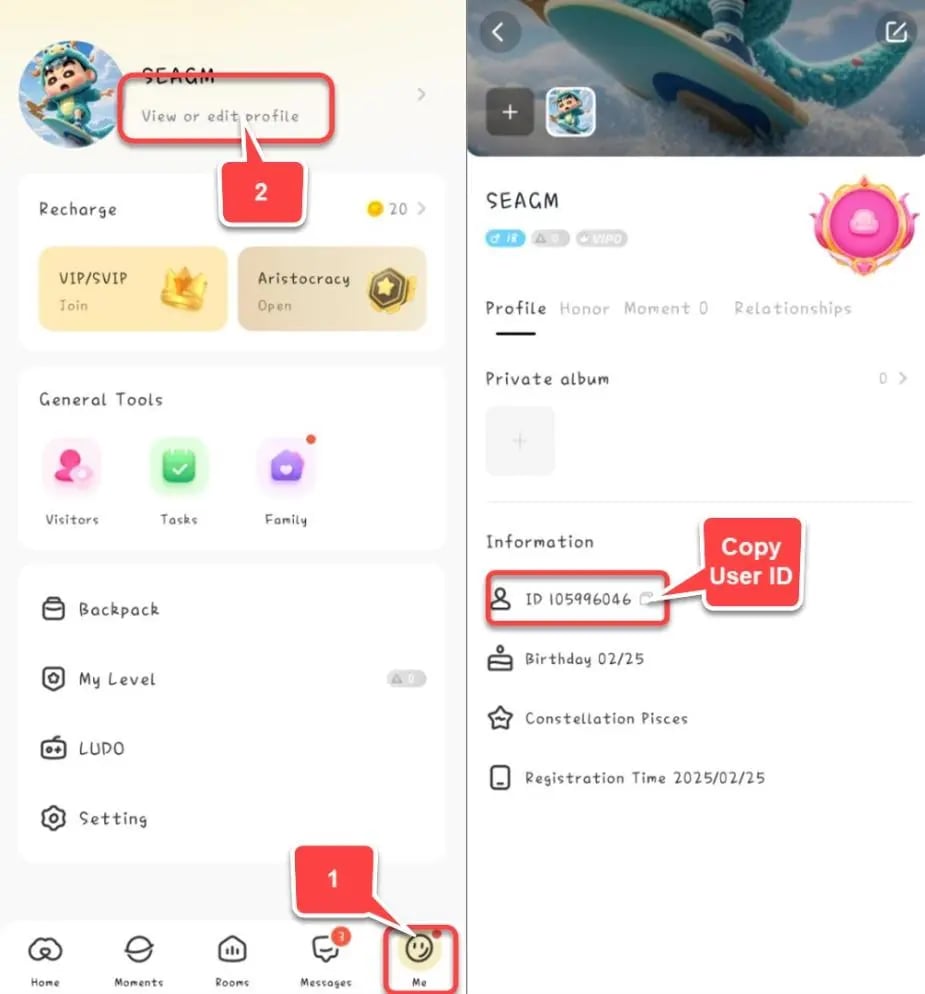
To ensure your coins arrive at the correct account, you must enter your exact numeric User ID during checkout. Follow these steps to locate your UID inside the app:
- Open the SUGO application on your mobile device.
- Tap the Profile icon located in the bottom-right corner of the navigation bar.
- Locate your profile avatar at the top of the screen.
- Your UID is displayed directly beneath your display name as a series of numbers.
- Tap the copy icon next to the number to copy your UID directly to your clipboard.
Double-check the copied digits before submitting your order on VGTopup to prevent misdelivery.
How to Top Up SUGO Coins on VGTopup
Buying SUGO coins online through VGTopup takes only a few moments:
- Select Coin Denomination: Review the available coin packages on the VGTopup live checkout and choose the amount that fits your gifting needs.
- Enter Your UID: Paste your numeric SUGO User ID into the required input field.
- Select Payment Method: Choose from the available regional and international payment methods supported at checkout.
- Complete Checkout: Confirm your details and authorize payment.
- Check In-App Balance: Open SUGO, head to your profile wallet, and verify your updated coin balance.
SUGO Gifting, VIP Badges, and Voice Room Perks
Having an active coin balance unlocks the full suite of interactive features across SUGO voice rooms:
- Animated Virtual Gifts: Send gifts ranging from simple roses to massive screen-filling luxury animations. Sending gifts boosts the room's popularity score and supports your favorite room hosts.
- VIP Badges and Chat Bubbles: High-tier contributors gain access to distinctive nameplates, custom chat bubbles, and glowing profile rings that stand out in active rooms.
- Custom Entrance Vehicles: Announce your arrival in any voice chat room with personalized entrance animations, luxury car banners, and arrival audio soundbites.
- In-Room Games & Mini-Events: Use coins to join platform-hosted interactive events, mini-games, and seasonal community competitions.
Safe Top-Up Practices: Why UID-Only Recharge Protects Your Account
Account safety is essential when purchasing digital goods. Unofficial sellers who request your login email, phone number, SMS verification code, or social login credentials put your private chats, contact lists, and profile ownership at risk.
- No Password Requirements: VGTopup processes your SUGO coins recharge exclusively through direct server-to-UID delivery. We will never ask for your password or verification codes.
- Protection Against Account Takeovers: Because you never share credentials, your linked phone numbers, third-party logins, and personal messages remain entirely private.
- Transparent Pricing: All unit prices, processing details, and coin amounts are displayed clearly on the live checkout interface before you pay.
Troubleshooting Delivery Issues and Coin Balance Checks
If your coins do not appear in your account immediately after completing your order, follow these troubleshooting steps:
- Restart the SUGO App: Fully close the SUGO app from your device's multitasking menu and reopen it. This forces the app to query the latest balance from the server.
- Verify the Submitted UID: Check your VGTopup order receipt to confirm that the UID entered matches your in-app profile ID.
- Review Network Connection: Weak internet connections can prevent the app's wallet interface from updating. Switch between Wi-Fi and mobile data to refresh.
- Contact Customer Support: If your balance does not update within standard processing windows, contact VGTopup support with your order number and SUGO UID for immediate tracking and verification.
Frequently Asked Questions
How can I buy SUGO coins online?
You can buy SUGO coins on VGTopup by selecting your preferred coin package, entering your numeric SUGO User ID (UID), and completing payment via our secure checkout.
How to recharge coins in SUGO using my UID?
Locate your UID in your SUGO profile, enter it on the VGTopup product page, select the desired coin bundle, and proceed through checkout. The system delivers coins directly to your account.
Where can I find my SUGO User ID (UID)?
Open SUGO, tap the Profile icon in the bottom-right corner, and locate the numeric ID displayed beneath your username at the top of the screen.
Do I need to share my SUGO password to recharge coins?
No. Recharging through VGTopup requires only your public numeric UID. You never need to share passwords, verification codes, or personal login information.
What is the difference between SUGO Coins and Beans?
SUGO Coins are purchased to send gifts, join events, and buy profile effects. SUGO Beans are earned by hosts when they receive gifts from other users and can be cashed out according to platform policies.
How long does it take for SUGO coins to arrive after purchase?
Coins are dispatched directly to your SUGO account immediately upon successful payment confirmation. Refresh your in-app wallet to view the new balance.
Can I recharge SUGO coins for a friend's account?
Yes. Enter your friend's numeric SUGO UID instead of your own during checkout on VGTopup. The coins will be delivered directly to their account balance.
Select Denomination
Tax, payment fees and eligible coupons are calculated at checkout.
| Package | Price |
|---|---|
| 1200 Coins | USD 0.74 |
| 2400 Coins | USD 1.47 |
| 6250 Coins | USD 3.70 |
| 12500 Coins | USD 7.41 |
| 37500 Coins | USD 22.23 |
| 65000 Coins | USD 37.39 |
| 130000 Coins | USD 75.33 |