Verify your User ID first and you prevent almost every "I paid and got nothing" story. Get it wrong and a correct payment still fails or lands in the wrong place. Enter the wrong User ID on Codashop and your top-up fails or misdirects, per Codashop's support guidance. The payment method rarely causes the problem. The identifier does.
Run this sequence:
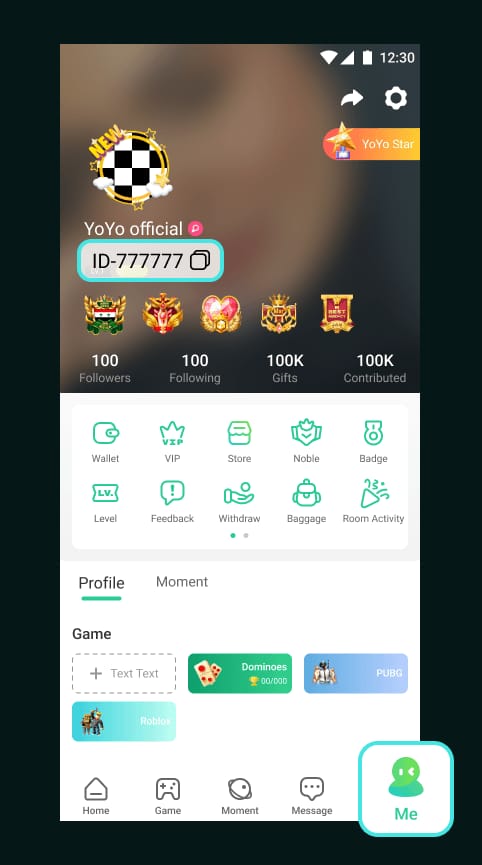
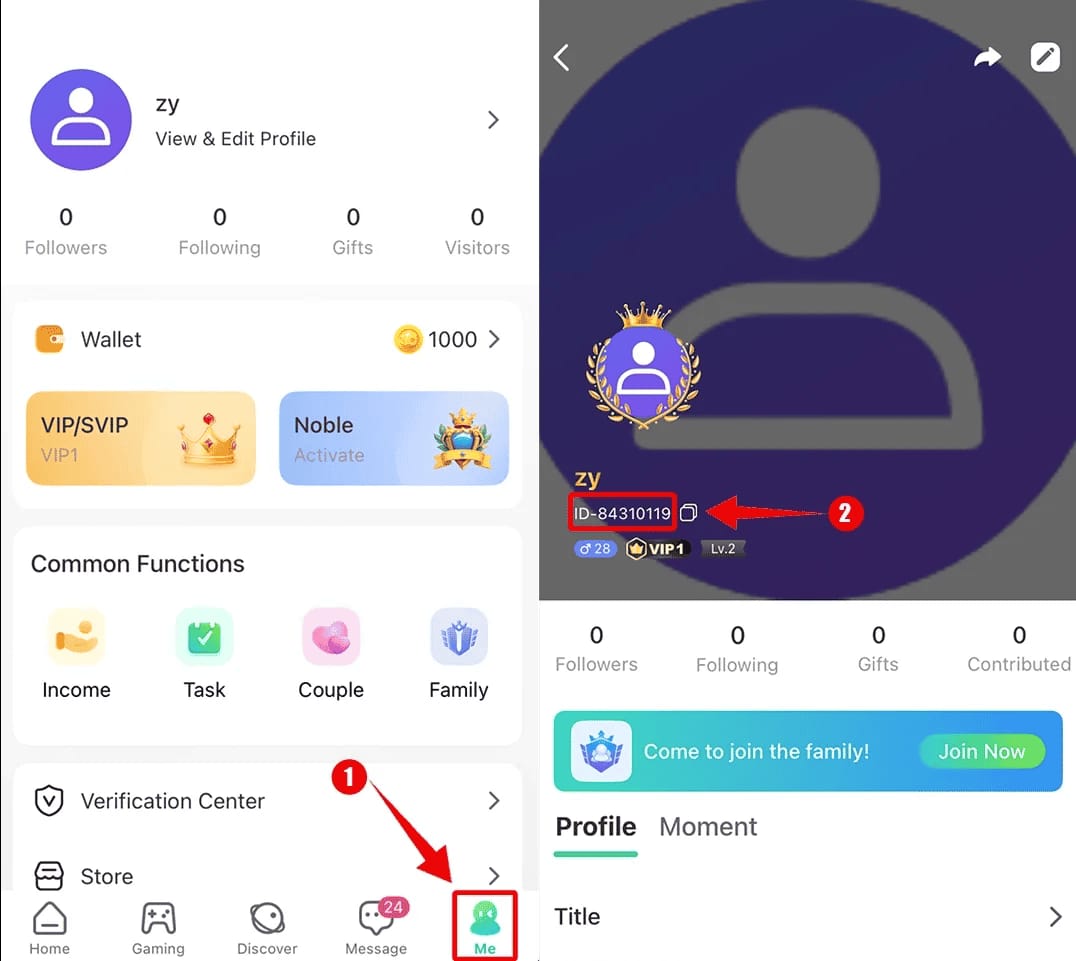
- Open the YoYo app and tap the Me tab.
- Find the User ID below your avatar. That string routes your coins.
- Copy it exactly. No spaces, no swapped digits.
- On the Codashop YoYo Malaysia page, paste the ID into the field, then select your coin amount.
- Re-read the ID against your app one more time before paying.
That last step feels paranoid. It isn't. The Codashop YoYo (MYS) page needs no registration or log-in to top up, which is why the ID carries so much weight. No account handshake double-checks that the coins reach you. The ID is the only thread connecting your payment to your inventory. Treat it like a bank account number.
A quieter trap sits next to it. If the game asks for a server or region alongside the ID, a correct ID paired with the wrong server routes coins to an account that doesn't exist on the realm you play. The ID looks right, the payment clears, the coins land somewhere you can't reach. Match both fields to your in-game profile.
Works when you copy-paste rather than retype, and confirm both ID and server. Fails when you trust your memory of a long numeric ID at 1am.
Play 2: run the standard eWallet checkout
Once you've locked the ID, the purchase runs short. Per Codashop's Malaysia store, you enter the YoYo User ID, select the coin amount, choose Touch 'n Go eWallet as your payment, and finish. Coins arrive instantly.
Here's the execution:
- With your verified ID in the field, pick a coin amount.
- Select Touch 'n Go eWallet at the payment step.
- Codashop redirects you to authorize the charge.
- Confirm, then watch for the success screen before you close anything.
- Hop back into YoYo and check your coin balance.
For first-timers, I'd push this path every time. A beginner doing a first top-up gets the simplest version of the whole thing: ID entry, instant coins, no app login to fumble, per the Codashop store. Nothing to register, nothing to remember.
Returning players who just moved their main spending wallet to TNG have it even easier. Your existing balance carries straight through Codashop's TNG support, so you skip any re-linking ritual. The store treats your wallet as a payment rail and stays out of the way.
One thing worth saying plainly: your TNG eWallet needs enough money before any of this works. If it doesn't, you bounce out of checkout. To load it, the TNG eWallet Help Centre walks through +Add money → eWallet Balance, where you use a Reload PIN, a debit/credit card, or a DuitNow transfer. You buy Reload PINs at 7-Eleven, KK Mart, pharmacies, and petrol stations, per TNG's official channels. Handy if you'd rather not link a card.
Works when your wallet is funded and the redirect completes cleanly. Fails when the balance is short, or you bail out of the authorization screen before the success confirmation renders.
Play 3: switch to DuitNow QR when the eWallet redirect stalls
If the native Touch 'n Go button hangs on a spinning redirect that never resolves on weak mobile data, fund through DuitNow instead of fighting the same stalling button.
Most guides blur the distinction. You select Touch 'n Go eWallet on Codashop to buy coins. DuitNow QR, per the TNG eWallet Help Centre, reloads the TNG wallet itself. The real fallback chain looks like this:
| Step |
TNG eWallet (direct) |
DuitNow route |
| What it does |
Pays for coins on Codashop |
Tops up your TNG balance first |
| Where it runs |
Codashop checkout |
Inside the TNG app |
| Speed |
Instant coin delivery |
Instant wallet credit, then buy coins |
| Common failure point |
Redirect timeout on weak signal |
Rare; QR scan is local |
Source: Codashop YoYo (MYS) page (2026); TNG eWallet Help Centre (2026)
A stalled checkout redirect usually points to a connection problem between Codashop and the wallet, not a money problem. Fund via DuitNow and you keep the action inside the TNG app, where the QR exchange runs local and rarely times out. A card or DuitNow reload credits instantly, per TNG's help centre, so you lose seconds, not the sale. Then you re-enter Codashop with a topped-up wallet and the eWallet button usually goes through on the second try.
I reach for the DuitNow path on patchy connections, because chasing the same frozen redirect three times is how players end up double-charging themselves.
Works when the eWallet redirect times out but your wallet logic is fine. Fails when the real issue was an unfunded wallet all along. DuitNow won't fix a balance you never loaded.
Play 4: confirm delivery before you reach for your wallet again
The most expensive mistake here isn't a failed top-up. It's a successful one you didn't wait for. Coins arrive immediately after payment on Codashop, per its Malaysia store, and "instant" describes the real behaviour. So if your balance hasn't updated the moment you tab back, give it a beat before you assume failure.
Confirm it like this:
- Wait for the on-screen success / order-complete message at checkout. Don't close on the spinner.
- Open YoYo and refresh your coin balance.
- If it's not there yet, wait a few minutes and refresh again rather than re-buying.
- Move to troubleshooting only if money clearly left your wallet and no coins arrived after a reasonable wait.
My read on the "instant delivery" debate: the claim holds up, and a short wait isn't a failure. Panic into a second purchase during a normal delivery lag and you turn one charge into two. The platform isn't slow. Your impatience is the risk. If you bought the smallest denomination first to test a new ID, a habit I'd recommend for any unfamiliar account flow, the cost of waiting calmly stays tiny.
Works when you treat a brief delay as normal and verify in-game before acting. Fails when "it's not there in 5 seconds" triggers a reflex re-purchase.
Play 5: recover a "money deducted, no coins" top-up without losing cash
If money left your TNG wallet and coins never showed, don't rebuy. Most of these resolve on their own or trace back to a fixable cause. Work through this symptom-to-fix map:
| Symptom |
Most likely cause |
Fix |
| Paid, no coins, after a real wait |
ID mistyped or wrong server |
Check the ID against your Me tab; contact store support with your reference |
| Checkout redirect froze, unsure if charged |
Connection timeout mid-redirect |
Check TNG transaction history before rebuying |
| Coins in wrong account |
Correct ID, wrong server selected |
Recover via support; verify server next time |
| Wallet short at checkout |
Insufficient TNG balance |
Reload via DuitNow/card, retry |
Source: Codashop support guidance; TNG eWallet Help Centre (2026)
One evidence step saves you, and almost nobody does it: save your TNG transaction reference. TNG's help centre warns that closing the app before saving a transaction reference may complicate disputes. That reference number is the fastest proof of what you paid and when. It's the difference between a resolved ticket and a "we can't locate your transaction" reply. Screenshot it before you close anything.
If you need to dig it up later, your TNG transaction history holds the record of the charge. Pair that reference with the User ID you entered, and a support team can trace where the coins went, including the painful case where a wrong server sent them somewhere unreachable.
Works when you have the reference and the ID to hand. Fails when you closed the app, kept no screenshot, and now hold only a memory of "I think it was around RM-something."
On fees, denominations, and whether to use a third party at all
Two questions land in my inbox constantly: what does it really cost, and should I use a store like Codashop or VGTopup instead of the in-app option?
On fees, the funding side stays cheap. Reloading TNG via debit card or DuitNow often costs nothing or close to it, based on user reports and TNG's official reload options. On exact RM denominations and coins-per-pack, Codashop's Malaysia page lets you select the coin value at checkout rather than publishing a fixed price grid, so read the live amounts on the page before you pay instead of trusting a number that may have shifted. I won't invent a per-coin value table the store doesn't publish. Anyone quoting you precise RM-to-coin ratios as gospel is guessing.
On the channel question, and here's the transparency line since this piece runs on VGTopup: judge any external store by whether it shows you the pricing and delivery status before you pay, and whether it supports the payment rail you use. For Malaysian TNG users, a third-party route like a Yoyo Coins top up earns its keep on exactly that: TNG eWallet support and a delivery status you read before you confirm. If the in-app store already does everything you need, use it without guilt. The point isn't where you buy. Verify your ID, save your reference, don't double-charge in a panic. Those habits matter more than the logo on the checkout page.
My verdict: for a Malaysian player living in TNG, the eWallet route brings the least friction, and I'd avoid card payments where possible, since 3DS authentication failures on cards cause more checkout headaches than the wallet flow ever does. Lead with the wallet. Keep DuitNow as your backup. Test a new account with a small amount first.
Frequently Asked Questions
What's the minimum I can top up Yoyo Coins for?
Codashop's Malaysia store lets you pick from the coin values listed at checkout rather than enforcing one published minimum, per its YoYo page, so the smallest tier on the page at the time of purchase sets your floor. For a brand-new account ID, buy that smallest tier first as a test before you commit to a larger reload.
Do I need my server as well as my User ID?
If the game presents a server or region field, yes, and players underestimate this one. A correct User ID paired with the wrong server sends coins to an account that doesn't exist on your realm, which you can't recover without support. Match both fields to your in-game profile, not your assumption.
Is paying with TNG eWallet safer than a card?
For Malaysian players, the wallet flow brings the least friction and sidesteps the 3DS card-authentication failures that derail a lot of card checkouts. Both work; the wallet just stalls less often. Whichever you use, screenshot the transaction reference. That record, per TNG's help centre, speeds up any dispute.
My money was deducted but no coins arrived — did I lose it?
Almost certainly not. Wait through a normal delivery lag first, since coins credit instantly on a successful order per Codashop's store and a brief delay isn't a failure. If it truly didn't land, check your TNG transaction history for the reference and raise it with support. Don't rebuy, or you risk a genuine double charge.
That's usually a redirect timeout on weak mobile data, not a payment rejection. Rather than hammering the same frozen button, fund your wallet through DuitNow inside the TNG app. It credits instantly per the TNG help centre and the QR exchange runs local. Then return to checkout, where the eWallet option usually clears on the next attempt.









Comments