Two ledgers, not one: where the coins actually sit
Yoyo coins are stored server-side on your account, and that's the only reason cross-platform migration works at all. The app's in-app purchases bind to your user account, per the Google Play YoYo app page. Buy or earn coins and the balance latches onto your account ID, not the iPhone, not the Apple ID. Pull that same account up on an Android handset and the identical number loads.
The thing that refuses to travel is the platform wallet. Apple's App Store credit and your Google Play wallet are two separate books kept by two rival companies, and no bridge runs between them. Google's own Android switch guide says it plainly: iOS App Store credit doesn't slide over to a Google Play wallet when you change phones. Picture $15 of Apple gift-card credit sitting in your Apple ID, earmarked for coins. That $15 stays Apple's. It never became coins, so it doesn't follow your account. Apple money in, Apple money out.
This one distinction separates a calm move from a frantic one. Coins you earned or bought are account-level, so they're portable. Credit you never spent into coins is platform-level, so it's trapped. Cleaner version below:
| Item |
Carries over to Android? |
Why |
| In-game coin balance |
Yes (if account is linked) |
Stored server-side on your account ID |
| Earned/free coins |
Yes |
Same account ledger |
| Unspent App Store credit |
No |
Apple wallet ≠ Google wallet |
| iOS purchase history / receipts |
No |
Tied to your Apple ID |
| Account progress, level, friends |
Yes (if linked) |
Server-side account data |
Source: Google Play YoYo app page (2026); Android switch guide (2026).
Look how much of that left column reads "yes (if account is linked)." That little parenthetical carries the whole table, and it's the exact spot where newer players get scorched. They skim "yes, coins carry over," breeze past the linking line, and hop devices on a guest account.
Bind first, before the new phone ever turns on
One thing to hold onto: link your account to an email or social login before you wipe or trade the iPhone. Not after. Before.
A guest or unlinked account has no recovery handle at all. The long-running migration threads keep flagging the same thing, that guest and unbound accounts risk permanent loss the second you switch devices, and that binding to email or social is the fix you do beforehand. The reasoning is structural. A guest account is identified by its install on that one device. Erase the device, kill the install, and there's no email, no username, nothing left for the system to match you against. The coins still exist on some server. You just no longer hold a key to the door.
Here's the running order on the old iPhone, before it goes anywhere:
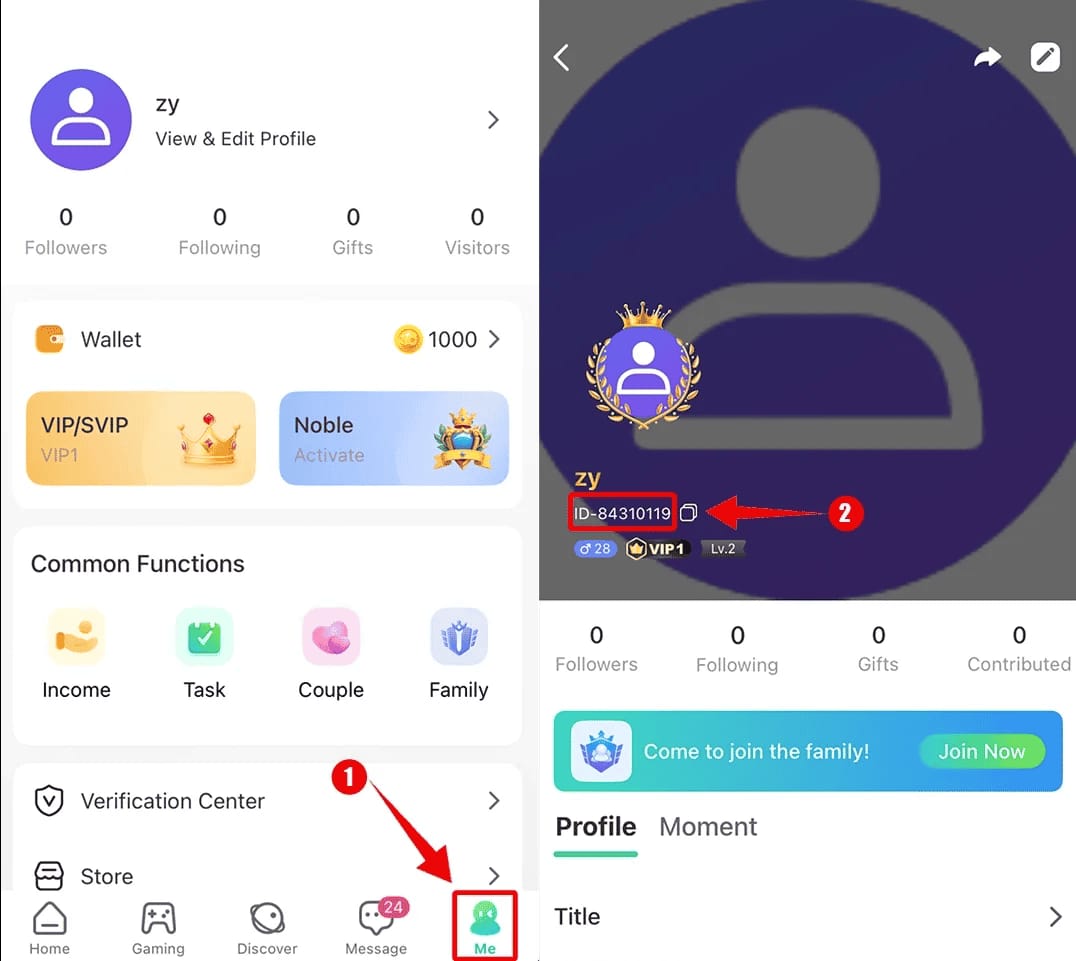
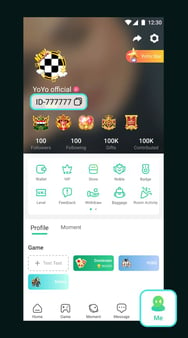
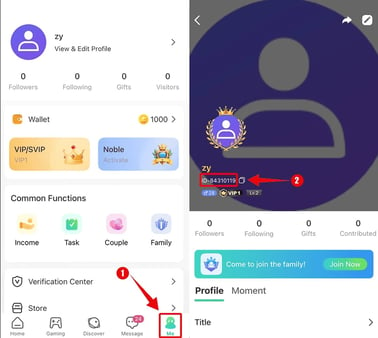
- Open YoYo, head to your profile / Me section.
- Note your User ID. Write it somewhere or screenshot it. It's your identity, and you'll want it for support if things go sideways. The VGTopup guide lists finding this ID as step one of a clean transfer.
- Bind the account to an email and/or social login if it isn't already.
- Screenshot your current balance and last purchase date. That's your reference point on the other side.
Done. Two minutes, and you've turned the account from "tied to a phone I'm about to brick" into "tied to a login I own."
My read, after years of this: bind to email on day one whether or not you're switching anything. People treat guest mode as fine right up until they don't plan to change phones, but phones break, get lifted, get swapped on a whim mid carrier deal. An unbound account is a clock you started without noticing. The OS change doesn't create that risk. It just finally drags into the light the account you should've linked months back.
Logging in on Android and reading the number right

Grab YoYo from the Play Store on the Android phone and sign in with the same method you bound. Same email, or the same social account. Then check the coin total against your screenshot. For a properly linked account, that's the whole migration, start to finish.
Two snags catch people here, and neither is a genuine loss.
The first is the wrong-login trap. Sign in with a method that isn't the one your progress is bound to and YoYo builds you a brand-new empty account instead of loading the original. Bound to email but tapped "continue with [social]" out of muscle memory? The app happily conjures a fresh zero-coin account that looks exactly like total wipeout. It isn't. Your real account sits there untouched under the correct login. You knocked on the wrong door, that's all. Sign out, sign in with the precise method you bound, and the balance comes back.
The second is region and server match. A lot of migration confusion traces to region or server mismatch at least as much as to the platform hop. Make sure the new install lands on the same server region as your original. A different region can surface what looks like a different account because, functionally, it is one. Confirm your region pick on Android lines up with where you first played before you assume anything's broken.
Topping up after the switch without paying twice
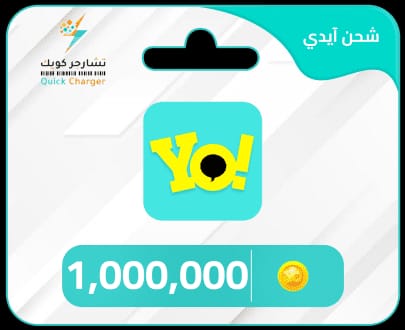
Fresh top-ups on Android run through Google Play, clean and supported. Your old iOS receipts mean nothing now. You aren't continuing some Apple purchase, you're making new ones on the account that already holds the balance. Buy coins in-app through Google Play, watch them land in the wallet, done.

The double-charge dread is mostly imaginary once the two ledgers click for you. You can't accidentally re-buy coins you already own, since those are already sitting on the account. What you can do is throw money at "recovering" coins that were never gone (more on that shortly). The only real cross-platform friction is that stranded Apple credit, which no Android top-up method can ever touch.
This is also where a web or alternative channel earns its spot. Instead of wrangling two store wallets, you top up the linked account directly by its User ID and region, so the purchase attaches to the account, not to whatever OS you happen to be holding. To be upfront about it, that's the lane third-party services like Yoyo Coins top up sit in, and the practical pull after a switch is that it routes straight to the account ID and ducks the Apple-versus-Google wallet split completely. The non-negotiable with any channel, store or web, is confirming your User ID and region first, because a recharge fired at the wrong region or a fat-fingered ID is the one thing that truly won't deliver.
| Channel |
Cross-platform validity |
What to verify first |
| Google Play (in-app) |
Coins attach to logged-in account |
You're logged into the correct linked account |
| Web / direct-to-account |
Attaches to account ID regardless of OS |
Exact User ID + matching region |
Source: synthesized from Google Play YoYo app page (2026) and VGTopup (2026) top-up steps.
One honest warning on recharge reliability, and it lands on the official store too. There are user reports on the Play listing of big recharges where coins never showed and support went quiet, a May 2026 review describes exactly that. My take: top up amounts you'll actually burn through soon instead of parking a giant balance, hang onto the receipt and your User ID screenshot, and treat one enormous lump-sum recharge as the riskier play on any platform.
When the balance reads zero: sync delay vs. wrong account
A fresh login flashing zero coins is, from everything I've watched in these threads, almost never deletion. It's one of three things, ranked by likelihood, and the dumbest possible reaction is panic-buying before you check them.
1. Sync delay. A server-side balance can need a beat to populate on a brand-new login. The coins are on the account, the new client just hasn't pulled them down yet. Force-close the app, wait, reopen. Don't buy anything to "replace" what's still loading. That's how a non-problem becomes an actual charge.
2. Wrong linked method. Covered above, but it's the most common false alarm going. You're gawking at a freshly minted empty account, not your real one. Log out, log back in with the exact method you bound on the old phone.
3. Region/server mismatch. Same coins, wrong server selected. Flip the region back to match your original and the balance loads.
Only when all three come up dry does this turn into a recovery case. And whether recovery is even on the table comes down to one hard line:
- If the account was ever bound to email or social, you're fine. Worst case, you re-authenticate with the right method, or you reach official support with your User ID and the balance/purchase screenshots you (hopefully) grabbed. Slow, but it gets there.
- If it was a pure guest account you switched off before binding, official support is the only legitimate road, and there are no promises, because there's no identity handle to prove the account was ever yours.
That asymmetry is the whole case for binding early. A bound account converts "lost forever" into "annoying support ticket." An unbound one never offers you that door.
A note per type of player, since the right move genuinely shifts:
- F2P with earned coins only. You have the least to lose in dollars but the most in hours. Bind anyway. Re-grinding a balance beats a two-minute email link every time, and not in a good way.
- Player sitting on unspent paid store credit. Accept it now. That Apple credit is staying on Apple. Spend it into coins before you switch, or write it off. There's no porting it.
- Guest-account player who never linked. Stop reading and go bind this second, before you even glance at a new phone. You're the exact profile these horror stories get written about.
Frequently Asked Questions
Do Yoyo Coins transfer from iPhone to Android automatically?
Coins follow the account, not the device, so they "transfer" the moment you log into the same linked account on Android. No manual export step exists. What never moves on its own is anything Apple-side: unspent App Store credit and your iOS receipts stay with your Apple ID, per the Android switch guide. If the account wasn't linked first, nothing transfers, because there's no account to log back into.
Can I use the same login on both iOS and Android at once?
You sign in with the same bound credentials on whichever device you're holding, but treat it as one account reached from one place at a time, not a synced dual-platform session. The danger isn't using both. It's accidentally signing in with a different method on the second device, which spins up a separate empty account that masquerades as lost progress. Always use the identical email or social login you originally bound.
Region weighs more than the OS does. A top-up routed to a region or server that doesn't match your original can fail to deliver or seem to land on a "different" account, since the server region is part of how the account gets identified. Google Play or web channel, confirm your region matches your original before you pay. A region mismatch breeds more migration confusion than the iOS-to-Android change itself.
Unspent coins stay on your account and load on Android normally. Unspent store credit, meaning Apple gift-card balance you never converted into coins, does not, because that sits in Apple's wallet and can't cross to Google Play. Convert any leftover Apple credit into coins before you switch, or you forfeit it.
How do I recover a Yoyo Coins account if it shows empty on the new phone?
Clear the three false alarms first: wait out a possible sync delay, log out and back in with the exact method you bound, and confirm the region matches your original. Still empty and the account was previously bound to email or social? Contact official support with your User ID and any balance screenshots. Slow but legitimate. If it was a pure guest account never linked before the switch, support is your only option and recovery isn't guaranteed.









Comments