


How to Top Up GIGB Chronal Nexus With USDT Safely
The most expensive mistake in a crypto top-up has nothing to do with price. You send USDT on a network the receiver can't accept, and the funds burn for good, even when the address is correct. Topping up Chronal Nexus with USDT safely comes down to one discipline: match the network (TRC20 is the cheap default), send to a verified platform, and confirm against your in-game ID before you do anything else. The currency works fine. You are the threat.
Every guide I've read on funding this currency with crypto skips the part that costs people money. They list steps, slap a "100% risk-free" badge on the page, and never explain why a player who did everything right still watched their stablecoin vanish. That gap is why I wrote this.
What Chronal Nexus actually is before you spend a cent on it
Chronal Nexus is the paid premium currency inside Genshin Impact's Miliastra Wonderland mode, working as the Genesis Crystals of that mode for special events and in-mode purchases, according to the Genshin Impact Wiki. It converts 1:1 to the Arcane Keystone, so the unit you buy maps cleanly to what you spend in-mode. No mystery exchange rate buried in a menu.
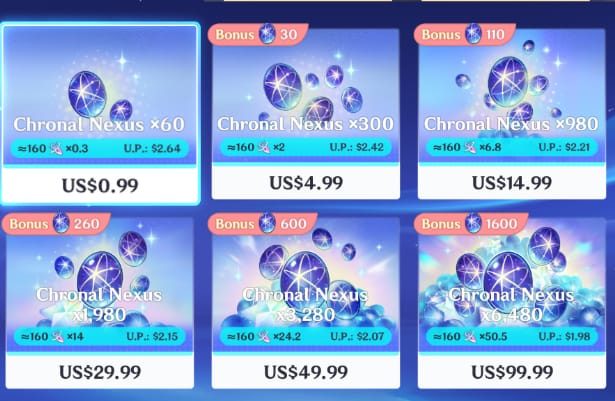
Pricing tracks the main game's Genesis Crystal tiers. The platform supports direct purchase at rates consistent with main-game crystals, per ldshop.gg blog, and a 980 Chronal Nexus package sits on both the Xbox and PlayStation stores, per the official Xbox Store listing. Most players anchor to that 980 tier as the familiar mid pack.
For a USDT buyer, the fixed in-game value means the only variable you control is the route you pay through. The currency you receive stays the same. The cost to acquire it shifts, and that's where network choice and seller verification decide whether you got a deal or got clipped.
I price these packs the same way every time now. Lock the in-game amount first, then optimize the payment rail underneath it. Treat the route as the variable instead of the currency, and you stop overpaying.
Why no-bank players reach for USDT, and where it saves money
USDT belongs in this conversation for one blunt reason: it works when a bank card doesn't. Third-party platforms accept USDT for Chronal Nexus packages with instant delivery, per topuplive.com and a VGTopup guide from Apr 2026. A player without a linked card, in a region where the official store won't process their payment method, or someone already holding crypto, gets the difference between buying and not buying.
The savings come with conditions, and most guides oversell them. USDT on the right network carries a low flat fee that doesn't scale with purchase size, while card processing and regional markups stack. VGTopup recommends USDT on TRC20 or BEP20 for lower fees (Apr 2026). On a small pack, a flat sub-dollar network fee beats percentage-based card costs. On a large pack, the gap narrows because the flat fee becomes rounding error either way.
There's a quieter benefit nobody frames right. People pitch crypto's selling point as anonymity, and for top-ups that gets it backwards. The traceability protects you. Every USDT transfer produces a transaction hash, a permanent on-chain receipt. When a credit stalls, that hash lets a platform's support trace your payment in minutes instead of arguing over a screenshot. The first time I lined up "anonymous" against "traceable," I saw the trace is the feature you're paying for.
By spender profile:
- F2P / low-spender — TRC20 wins outright. On small packs, a high ERC20 gas fee can rival the value of the pack itself, so the cheap network becomes the only sane choice.
- Mid-spender — Network fee matters less; verification matters more. On a larger order, paying a few cents extra to route through a checked platform is irrelevant noise against losing the whole transfer.
- No-bank-access player — USDT is your primary rail, not a novelty. Your discipline has to run the highest because you'll do this repeatedly.
The TRC20 default, and the wrong-network trap that eats funds

TRC20 is the correct default for nearly every Chronal Nexus top-up, and the reason is fee-to-value math. ERC20 transfers ride Ethereum gas, which fluctuates and can spike to a level that, on a small pack, eats a meaningful chunk of what you're buying. TRC20 and BEP20 carry low, stable transfer costs, which is why VGTopup recommends them as the rails for cheaper top-ups (Apr 2026).
Now the trap. Sending USDT on a network the receiver doesn't support risks permanent loss of funds even when you paste the correct wallet address, per that same Apr 2026 warning. Every step-by-step guide omits this failure mode. The address looks right. The amount is right. You hit send. If the platform's deposit address only accepts TRC20 while you sent ERC20-USDT, the funds land somewhere unrecoverable. No refund button exists, because no refund mechanism can exist. The chain has no undo.
The sequence that prevents this is non-negotiable:
- Read the platform's deposit screen and note the exact network it specifies for USDT. Not "USDT," the network (TRC20 / ERC20 / BEP20).
- In your wallet, select that same network when sending. Mismatched networks cause permanent loss more than anything else.
- Confirm the receiving address character-by-character, or scan the QR. Never hand-type.
One more detail that catches careful people: USDT's peg drifts by a hair, and platforms sometimes reject an underpaid deposit. If the quote says send 9.99 USDT, send a touch over rather than exactly to the cent. A few cents of overpayment beats a stuck deposit you have to chase through support.
After the send, you wait on blockchain confirmations, then the platform credits Chronal Nexus to your game ID. The platform advertises instant delivery once confirmed, per topuplive.com, but "instant" starts after the network confirms, not the second you press send. Keep the transaction hash open until the currency lands.
The verification checklist that does the actual work
"Risk-free" is marketing language, and you should stop believing it. With irreversible crypto payments, no platform can technically guarantee zero risk. They can make verification easy. So the realistic goal is managed risk, and that's on you to handle before you pay.
Here's the green-flag / red-flag split I run before sending anything:
| Signal | Green flag (proceed) | Red flag (stop) |
|---|---|---|
| Network clarity | Deposit screen names the exact USDT network | "Just send USDT" with no network stated |
| Delivery key | Asks only for your game ID | Asks for your login / password |
| Price | In a sane band vs. official package tiers | Dramatically cheapest seller on the internet |
| Proof | Gives you an order ref + accepts your tx hash | No order tracking, "trust me" delivery |
| Support | Reachable channel before you pay | Vanishes until money is sent |
Source: synthesized from VGTopup blog (Apr 2026) safety guidance and topuplive.com (Oct 2025) delivery practices.
Two rows carry most of the weight. A legitimate top-up needs your game ID, never your login. Handing over your GIGB account credentials to "speed up" delivery is the worst move a player can make; a real platform credits to your account ID without touching your password. Treat any login request as the transaction ending.
The second row: cheapest isn't safest. The lowest USDT price on a board signals an unverified seller fishing for a transfer far more often than a genuine deal. Because the in-game currency value is fixed, nobody can legitimately sell it for dramatically less without a catch. A price a little better than official, through a platform that passes the checklist above, is your sweet spot.
For a no-bank player who tops up often, building this five-row check into muscle memory matters more than shaving the last cent off a fee. It's the difference between a hundred clean transactions and one catastrophic one.
If you'd rather not freelance the wallet-and-network guesswork, GIGB top up routes Chronal Nexus through USDT with network guidance built into the flow. It's a transparent option, and one I'd still price against your own wallet route before committing. Disclosure: VGTopup publishes this article, so weight that accordingly and let the neutral checks above carry the decision.
What to do when the credit doesn't land
Most delayed-top-up panic comes down to one artifact you already have: the transaction hash. Keep it and support traces a delayed credit far faster than any screenshot. Players routinely close the tab the moment they hit send, deleting their only proof.
A delayed credit usually means one of three things, in descending order of how fixable they are. The network is still confirming, so wait it out, since congestion stretches confirmation times on busier rails. The order needs manual review, and the hash unsticks it. Or you sent on the wrong network, the reason the earlier checklist exists. The recovery flow stays the same regardless: don't re-send, don't pay again, paste the transaction hash to the platform's support with your game ID, and let them trace it on-chain. A second payment to "fix" a stuck first one doubles your exposure.
Refunds deserve blunt honesty. Crypto payments reverse for nobody by design. No chargeback, no card dispute, no bank to reverse the rail. That cuts both ways. Verification before sending matters more than any guarantee badge after, which is why I keep every transaction hash until the currency sits in my account. The hash is your receipt, your dispute evidence, and your fastest path to a fix in one string. Don't delete it early.
USDT top-up for Chronal Nexus is worth the small friction for the players who benefit, no-bank and fee-sensitive low-spenders, as long as they internalize that the danger was never the coin. The wrong network and the unverified seller are the threats, and you control both.
Frequently Asked Questions
Which USDT network should I actually use for a GIGB top-up?
TRC20 is the default for most players because its low, stable fee preserves value on small packs, and VGTopup recommends it as a rail (Apr 2026). BEP20 works as a fine alternative where a platform supports it. Avoid ERC20 for small purchases, since Ethereum gas can swing high enough to rival the pack's value. Always send on the exact network the deposit screen names.
How long does the credit take to show up after I send USDT?
Platforms advertise instant delivery once the transfer confirms on-chain, per topuplive.com (Oct 2025), but the clock starts after network confirmations, not the moment you press send. During congestion, confirmation stretches from seconds to several minutes. Once it's run long past the typical window, the transaction hash is your fast-track to support tracing it.
Can I get a refund if my top-up fails or I sent the wrong amount?
Realistically, no. Crypto transfers reverse for nobody, so there's no chargeback path. An underpayment from peg rounding may sit pending until you top up the difference, which is why sending a hair over the quote helps. A wrong-network send is the unrecoverable one. Verification before you press send is your only real protection.
What information does a legitimate platform need from me?
Your game account ID and your USDT payment, that's the delivery key. A real service never needs your GIGB login or password. Any request to share or "link" your account credentials to speed up delivery is a hard stop; credit lands on your ID without anyone touching your login.
Is buying Chronal Nexus with crypto safe for someone without a bank card?
It works as a primary method. Third-party platforms offer USDT top-ups with instant delivery, per topuplive.com (Oct 2025), but you earn "safe" per transaction rather than receiving it as a guarantee. Run the network match and the seller checklist every single time. For no-bank players doing this repeatedly, that habit is the whole game.





Comments