Why "just fix the in-app store" backfires the moment you're abroad
The app-store-first reflex makes sense on paper. It's the checkout people already trust, receipts drop into Apple or Google where they're easy to find, no unfamiliar site to size up. Payment sheet gone? Change whatever broke it. Fair enough.
Except look at what that setting actually governs. Your app-store region and your Poppo account region are two unrelated things, and it's the gap between them that buries the payment options in the first place. Most troubleshooting writeups never say this part out loud. Apple and Google gate in-app billing by the store's region and whatever local payment rails exist there. In a restricted market those rails aren't on offer, so checkout either vanishes or just fails. Web ID recharge sidesteps the whole mess by billing you directly instead of through app-store regional billing, a point echoed across third-party recharge writeups in 2026, Lootbar included.
So "fixing" the store usually means flipping its region, and that's the trapdoor. Switching app-store regions can freeze your existing balance or block you from switching back, going by community warnings making the rounds in 2026. You can land worse off than you started: still-flaky payment options, and now shaky access to coins you already own. Watch someone burn an afternoon toggling App Store countries to coax back a payment sheet that never fully returns, while the web recharge has already credited the account, and you've watched the entire argument play out.
When is it genuinely a bug rather than a wall? If the sheet flickers, times out, or behaves on Wi-Fi but sulks on cellular, that's transient. Retry later. If your country shows no payment method, consistently, that's a regional design limit, not a hiccup, and no amount of in-app prodding changes it. Stop troubleshooting the store and change tools.
The web ID recharge wins the cross-border fight cleanly
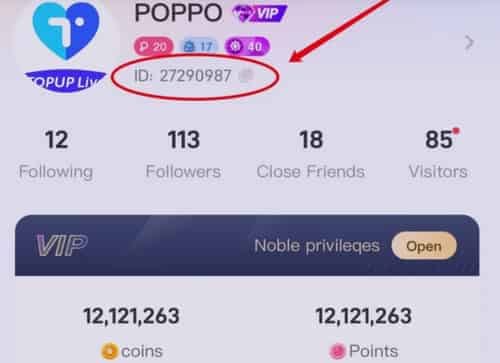
Recharge bound to your Poppo ID is the most dependable workaround for exactly one reason: it ignores the variable that wrecks everything else, your device's billing country. The ID is an 8–10 digit number sitting under your nickname, and the top-up posts to that account from any browser, anywhere on the map.
Finding it takes ten seconds. Open Poppo Live, tap the profile icon up top-right, copy the ID under your nickname, per the step-by-step on Topuplive.com and confirmed across reseller walkthroughs in 2026. After that, the flow is boring in the way you want money to be boring:
- Copy your Poppo ID from the app (Me/profile icon → ID below the avatar).
- Open a trusted web recharge portal in any browser.
- Pick a coin pack.
- Paste the Poppo ID, then verify it, character by character.
- Pay via PayPal, Visa, Mastercard, or a regional wallet.
- Wait a few minutes; coins post to the account, not the device.
That verify step deserves your full attention. Check the number before you pay, because one wrong digit credits a stranger with no tidy way to claw it back. Every reseller guide in 2026 waves a flag here, and it's the cheapest screwup to never make.
Here's the comparison that matters if you're deciding this minute:
| Method |
Region-flexible? |
Payment options abroad |
Speed |
Main risk |
| In-app store |
No — locked to app-store region |
Often hidden/blocked |
Instant if it works |
Region mismatch hides checkout |
| Web ID recharge |
Yes — bound to account |
PayPal, cards, regional wallets |
Coins in ~5–10 min, often faster |
Wrong ID; unvetted site |
| Region-switching |
Technically |
Risky, FX-laden |
Slow, friction-heavy |
Balance lock, no switch-back |
Source: synthesized from Lootbar.com, Topuplive.com and Bittopup.com guides (2026).
The fair knock on web recharge is that you've got to pick a trustworthy portal, which I'll cover below. But that's a one-time vetting chore, not a recurring regional dice roll.
The payment methods that actually clear from abroad
Foreign cards decline way more than people brace for, and the culprit is rarely your bank slamming the door. It's usually a region mismatch between your card's billing country and the merchant's regional setup, plus FX friction, per recharge writeups from 2025 through 2026. So before you blame a fraud hold, look at the dumber explanation first.
Three things travel well:
- PayPal, the most reliable abroad, because it papers over your card's billing region entirely. For a traveler who just wants a working top-up right now, this is what I reach for.
- Visa/Mastercard, which do function but carry the steepest decline odds on a region mismatch and can tack on an FX margin.
- Regional wallets, GCash (Philippines), STCPAY (Saudi Arabia), PIX (Brazil), and friends, part of why Poppo's payment stack reportedly stretches across 123+ countries and currencies, according to Bittopup.com.
| Payment method |
Works abroad? |
FX fee risk |
Decline risk |
| PayPal |
Yes |
Low–moderate |
Low |
| Visa/Mastercard |
Usually |
Moderate |
Higher (region mismatch) |
| Regional wallet (GCash/PIX/STCPAY) |
In supported markets |
Low |
Low |
Source: Bittopup.com payment-methods data and reseller guides (2025–2026).
A card declines? Don't hammer the retry button. Re-submitting a charge that's pending-but-not-failed is exactly how a double charge is born, the same caution that runs through the community fix threads (Bittopup, 2026). Hop to PayPal or a local wallet instead.
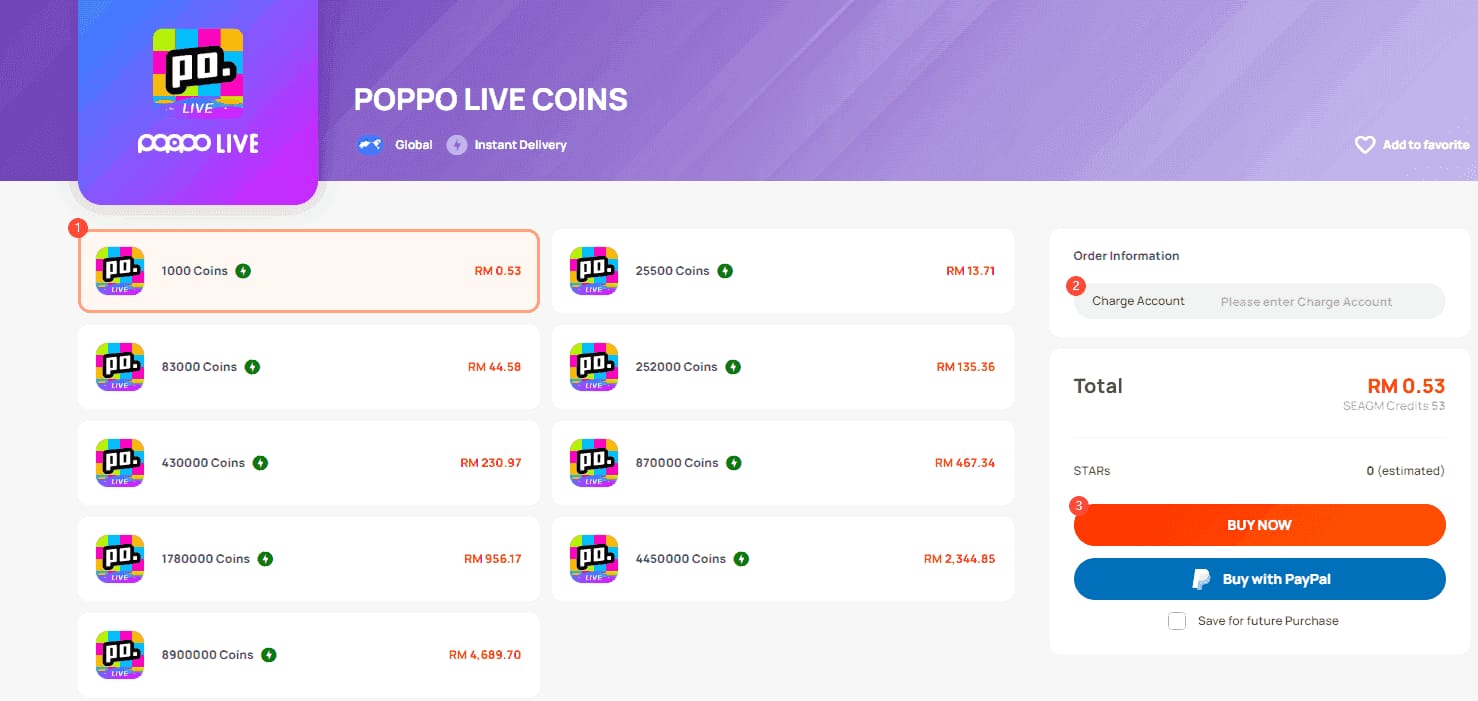
About currency conversion: web recharge won't make FX vanish, but it hands you a clean USD pack price to anchor on. Official packs run 83,000 coins for $10, 252,000 for $30, 430,000 for $50, 870,000 for $100, and 1,780,000 for $200, per the Topuplive.com price-list snapshot from April 2026. Know your number in USD first, and any conversion becomes a small, predictable delta rather than an ambush at checkout.
When the coins don't show up: a recovery timeline that prevents double charges
Wait before you panic. Wait again before you retry. That's basically the whole recovery discipline. Coins usually credit within a few minutes; community guides put it at a 5–10 minute window (sometimes as quick as 2–3) before a not-credited ticket is even justified, per Gyftwala and Bittopup guidance (2025–2026). On plenty of third-party portals the credit is effectively instant.

Run it in order:
- First ~10 minutes: Sit on your hands. Most "missing" coins simply haven't posted yet. Do not re-pay.
- Confirm the ID: Re-open Poppo, re-read your ID, line it up against what you typed. One transposed digit shipped your coins to someone else, and that's the most common real failure, not a system fault.
- Save the order ID and payment proof: The single best habit for anyone buying across borders. The receipt, transaction ID, and timestamp are your entire leverage in any dispute.
- Escalate only after the window closes: For official escalation, Poppo lists contact@poppolive.com as its support email, per the Google Play listing (2026). Paid through a portal? Use its order-status support first, order ID in hand.
Why patience earns its keep: most delayed credits sort themselves out, and a jumpy retry on a still-pending charge is what turns one purchase into two. Sitting still here is literally money in your pocket.
The "cheaper in another region" myth, with the numbers

Region-hopping app stores to chase cheaper coins nets out worse for casual spenders once FX and re-region friction enter the ledger. I'll say that flatly. The "save by switching regions" advice is mostly survivorship folklore, repeated by the people it happened to work for.
Where a real price gap exists, it isn't coming from app-store regions. It's third-party web recharge. Community pricing pegs third-party packs at roughly 70% below the in-app equivalent: 1,000 coins around $0.11, 10,000 around $1.10, per Bittopup.com. That gap towers over anything region-switching could ever hand you.
Now stack the region-switching costs against it:
- FX margin on a foreign-denominated pack.
- Time and hassle re-regioning two separate systems (the app store, plus your payment setup in practice).
- The documented risk of locking your balance or being unable to switch back.
For a small spender grabbing one $10-equivalent pack, whatever theoretical regional discount existed evaporates against conversion fees alone, and the downside (a stranded balance) is lopsided against you. The lever that actually moves the price isn't which country's store you buy from. It's whether you touch the store at all versus a web ID recharge. That's the real decision, and it's where transparent third-party pricing, including services like Poppo Live Coins top up via VGTopup, which recharges from your Poppo ID across most countries, earns a look when the app flat refuses to show you a checkout. (Disclosure: this piece is published by VGTopup. Weigh the buying advice on its own merits and compare a couple of portals before you commit.)
Staying safe: scams, bans, and which resellers to trust
A blocked-in-app user is the easiest scam mark in this space, because frustration makes a sketchy site look like rescue. Two rules keep you upright.
Stick to established portals. Reseller guidance through 2025 and 2026 keeps steering people toward vetted, long-running operators instead of sites that materialized last Tuesday (Topuplive.com seller guide). Bail-now red flags: no clear order-status or support path, prices too good even against the ~70% third-party benchmark, no recognizable payment processors, pressure to pay by irreversible methods. A legit portal takes PayPal or major cards, hands you an order ID, credits your Poppo ID, and never once asks for your password.
Never hand over your account to dodge a regional block. Giving your login to a friend abroad so they can top up for you flirts with a ban, per community guidance (2026), and you can lose the coins and the account in one stroke. The whole charm of ID recharge is that it never asks for your credentials to begin with. No flavor of account-sharing is worth that.
On the VPN grey zone people keep poking at: using a VPN just to reach a web recharge page is a softer move than spoofing a region to game pricing, but the cleaner road skips the question entirely. The Poppo ID web recharge needs no VPN. It bills your account directly no matter what chair you're sitting in. If you don't need the workaround for the workaround, why take on its baggage?
So here's my advice, plainly: abroad or in a restricted region, the in-app store is the worst place to top up, not the first stop. Make the Poppo ID web recharge your default, pay with PayPal or a regional wallet, verify the ID before you tap pay, log the order ID. Do that and the border quietly stops mattering.
Frequently Asked Questions
Why is Poppo Live top up not showing in my country?
Because your app-store region doesn't carry the local payment rails Poppo's in-app billing needs there, so the checkout hides rather than breaks. It's a regional design limit, not a bug you outwait by retrying. The account-level Poppo ID web recharge isn't subject to that store gating, which is why it keeps working when the in-app sheet is blank.
Can I buy Poppo Live coins with a foreign card?
Often yes, though Visa/Mastercard carry the steepest decline odds abroad thanks to billing-region mismatch and FX, per 2025–2026 recharge guides. If a card bounces, don't re-submit a possibly-pending charge; that's how double charges happen. PayPal is the safer bet abroad because it pulls your card's home region out of the picture.
What do I do if my Poppo coins didn't arrive after paying?
Wait first. Credit usually lands within 5–10 minutes, sometimes 2–3, per Gyftwala and Bittopup (2025–2026). Re-verify the Poppo ID you entered, since a wrong digit is the most common real cause. Only once the window passes should you escalate with your saved order ID, or email contact@poppolive.com (per Google Play, 2026) for official support.
Are Poppo Live coins cheaper in another region?
For small spenders, region-switching the app store doesn't pay off once FX, conversion fees, and re-region friction are tallied, and it can freeze your existing balance. The real discount lives in third-party web recharge, reported around 70% below in-app (Bittopup, 2026), not in which country's store you buy from.
Does my Poppo ID work for top-up in any country?
That's the entire point of it. The ID binds to your account, not your phone, so a web recharge against it posts from any browser regardless of where you are or how your app-store region is set. Just copy it fresh from the app each time and confirm every digit before you pay.





Comments