Golden Stars today: what they buy, and what the Super Pass quietly covers
Golden Stars are the premium currency. You spend them on skins, pets, emotes, and cosmetic flexing, per the game's own copy and the Super Sus Wiki Fandom. They buy presentation, not power. That line matters more than it reads, because the most common wasted first purchase comes straight from mixing up Golden Stars with the seasonal Super Pass.
Here's the overlap people whiff on. The Super Pass is a battle-pass track, and its premium tier already drops Golden Stars on top of the cosmetics. Season 6 packed 400 Goldstars in with cookies, donuts, and tokens; Season 20 ran the same count alongside role cards and similar consumables, per the wiki's season pages. So a cosmetics-first buyer should work in this order: see what the live Pass hands you, then judge whether a separate Star top-up is even necessary.
A cosmetics-only player who buys a Star pack before claiming the Pass is paying twice for the same currency stream. If you log in across a whole season, the Pass is the smarter anchor for a first spend. Reach for Golden Stars when there's something you want right now that the Pass track can't deliver in time. That's the legit use case.
Before any portal will take your money, though, it needs one scrap of account data the in-app route never bothers to ask for. That part's next.
Finding your Space ID — the step most guides skip
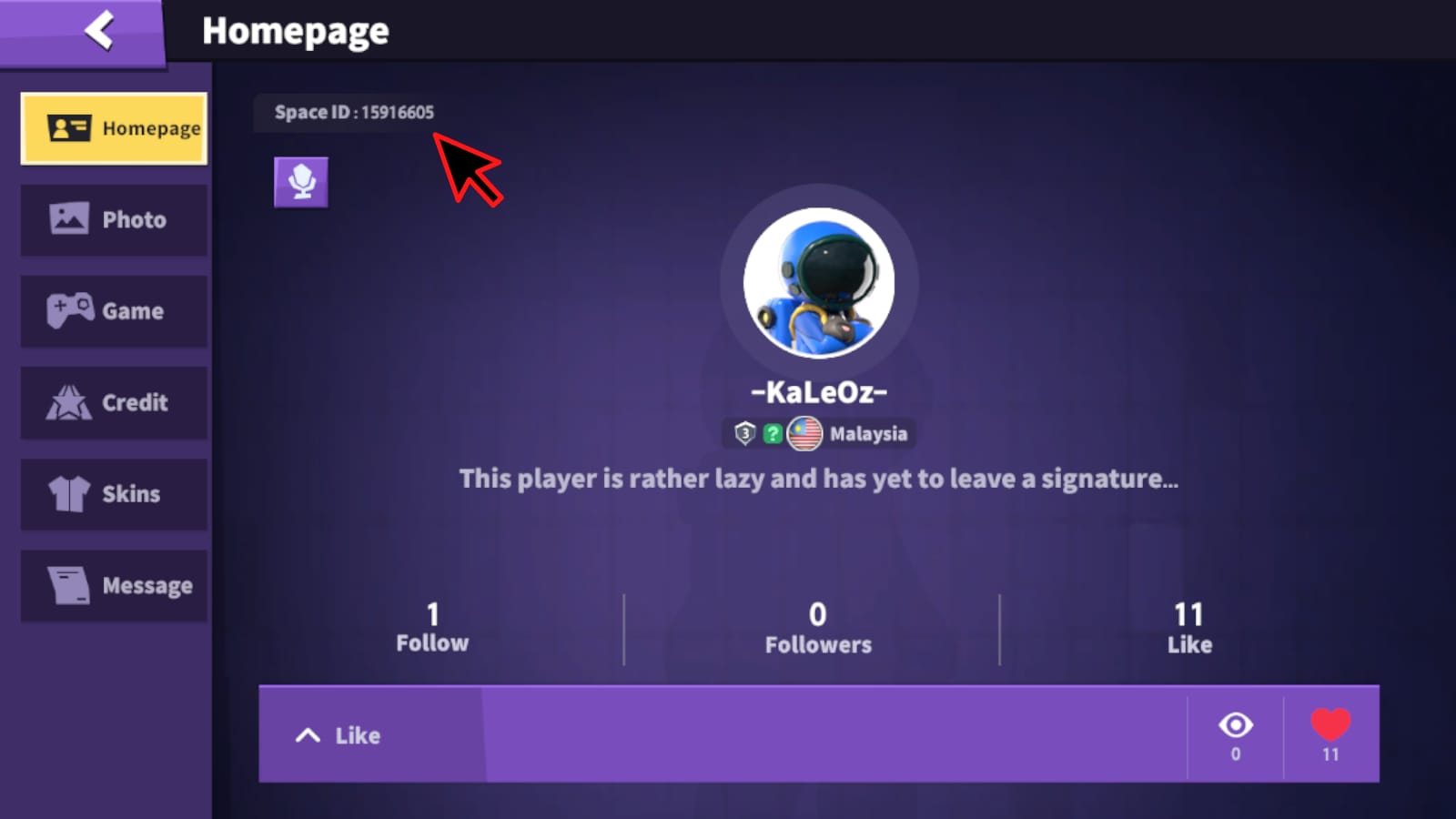
Your Space ID is the account identifier a recharge portal leans on to deliver Stars, and it's sitting right in front of you once you know the spot. Per Codashop (2026): log into the game, tap your avatar or the settings cog, and read the Space ID printed under your profile picture. Three taps. No support ticket.
Why does this trip people up? The in-app Store never requests it, so beginners assume it's pointless, blow past it, then fumble the one field that decides where the order lands. The ID is the single most common failure point in player-ID top-ups, and it has nothing to do with payment.
Burn this one in: the Space ID cares about exact input. A trailing space or one mistyped character spits out an order that looks dead even though the charge cleared. The Stars just had no valid place to land. Copy-paste instead of retyping, and trim any whitespace before you confirm.
ID in hand, you've got two honest routes to that first batch. Let's price them.
The in-app route, start to finish
The in-app Store is the default because it's the fewest steps and the billing rails are ones you already trust. Open the Store, choose a Golden Stars bundle, confirm through your platform's native checkout (Apple Pay or a linked card on iOS, Google Play on Android). Stars hit your balance the second the charge succeeds, which doubles as your receipt that it worked.
The full US ladder, lifted straight from the official listing:
| Bundle |
Price (USD) |
Golden Stars |
Per-Star Cost |
| 30-GS |
$0.29 |
30 |
~$0.0097 |
| 100-GS |
$0.99 |
100 |
~$0.0099 |
| 300-GS |
$2.99 |
300 |
~$0.0100 |
| 500-GS |
$4.99 |
500 |
~$0.0100 |
| 1000-GS |
$9.99 |
1000 |
~$0.0099 |
| 2000-GS |
$19.99 |
2000 |
~$0.0100 |
| 5000-GS |
$49.99 |
5000 |
~$0.0100 |
Source: Super Sus App Store listing (2026)
Now clock what isn't going on. The per-Star cost runs essentially flat top to bottom. The official figures put both the 100-GS and 1000-GS bundles at the identical $0.0099 a Star. That's weird. Most mobile economies tank the per-unit rate as you climb, which is the whole reason the biggest pack gets crowned "best value." Super Sus barely honors that rule. The little 30-GS pack actually undercuts several larger tiers per Star.
So the straight answer: buy the bundle that fits what you genuinely plan to spend on, not the one some blanket "always grab the biggest pack" reflex points you at. No real per-Star penalty for going small here, no documented reward for going big. The flat curve quietly nukes the main excuse to overspend on a first buy.
If the store price reads strange in your market, that's your signal to weigh the other lane.
Player-ID top-up, and the regional angle that justifies it
The portal route exists for one down-to-earth reason: app-store conversion isn't always gentle. The same listed bundle can wear a quietly inflated local tag once your store layers on its exchange rate and rounding. No official per-region gap is published in current sources (searches turn up no country-by-country price spreads for these bundles), so I won't feed you a made-up percentage. But the markup habit is real enough across mobile storefronts that checking a portal's upfront price against your store price before a first buy is just common sense.
The portal flow is short. Per Jollymax: pick your product and payment method, punch in your Space ID, hit buy, Stars arrive once payment clears. Codashop's India page and other global portals run the same ID model, and the official recharge center at pay.supersus.io has shown up in the game's own event posts, per Super Sus Facebook. Read that as the tell that ID-based recharging is a first-party-blessed method, not some sketchy backdoor.
How the two lanes really stack up for a first-timer:
| Factor |
In-App Store |
Player-ID Portal |
| Steps before payment |
Fewest (no ID needed) |
Requires Space ID lookup first |
| Payment options |
Apple Pay / Google Play / card |
Cards, wallets, regional methods |
| Price clarity |
Subject to store FX conversion |
Upfront listed price you can compare |
| Delivery |
Instant to balance |
Instant on successful payment |
| Main failure point |
Standard payment decline |
Mistyped / space-padded Space ID |
Source: Codashop (2026), Jollymax (2026)
For transparency, the publisher of this article, VGTopup, is itself one of those Space-ID portals, so weigh the analysis with that in mind. If you'd rather eyeball an upfront price before committing, putting a SuperSus Golden Stars & Passes top up next to your in-app total is a fair five-minute sanity check, especially in higher-conversion regions. This isn't loyalty to a channel. It's that a clear price beats a converted sticker you can't audit.
Which drags us to the bonus question gnawing at most first-timers, and the answer's tamer than the search box hints.
The "first-purchase bonus" question, answered honestly
There is no confirmed first-purchase double bonus in Super Sus. Across official listings and current searches, no first-time multiplier or bonus figure turns up documented anywhere. So the "save your first buy for the biggest pack to max the multiplier" plan, repeated in stacks of generic mobile guides, has nothing solid to hang on in this game.
This is precisely where a bad assumption bleeds money. Believe in a phantom multiplier, grab the 5000-GS tier "to make the most of it," and you've dropped $49.99 chasing a bonus no source backs. Flip it instead: judge each tier on its flat per-Star merit, buy only what you'll actually burn, and let any genuine bonus surface in-client at checkout rather than pre-committing to a fat pack on faith.
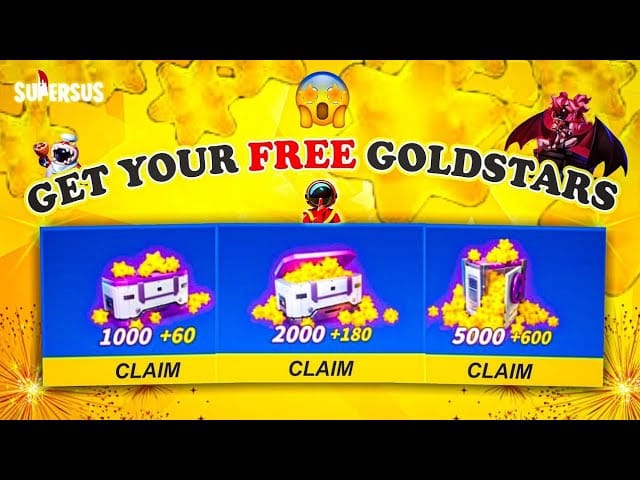
What does exist is event currency, and it's free. The Asian Festival event handed out up to 1200 free limited-time Goldstars, per supersus.io, and earlier recharge promos tied rewards to spend (the April 28–May 3 event coughed up a Ruby Skin set for recharging 1000+ Golden Stars). For an F2P-curious first buyer, the smart order is: ride free logins and event drops to stack Stars first, then pay only for what events won't reach. That's the genuinely value-maxing opener, not some imaginary multiplier.
Knowing all that, here's how I'd handle a first buy when the payment hiccups.
When the payment clears but the Stars don't show
You paid, the balance didn't budge. Nine times out of ten the cause is identity, not money. On the portal lane, the prime suspect is a Space ID typed with a trailing space or a wrong character. The charge processed; the delivery had nowhere valid to go. That's why ID accuracy outranks every other check. On the in-app lane, a real payment decline is the likelier offender, and it'll usually show its face in your platform's purchase history.
A workable recovery checklist for a first-timer:
- Confirm where Stars should land — on a clean payment they post to your balance instantly, per the delivery behavior documented in the Codashop and Jollymax guides. No balance change after a few minutes is the genuine red flag.
- Re-verify the Space ID against Settings, character by character, hidden whitespace included.
- Check your platform purchase history (App Store / Google Play) to see whether the charge truly cleared.
- Keep the confirmation — the order receipt or a screenshot. The players who skip this struggle hardest when they need to prove an order during recovery, and it's the cheapest insurance going.
That last step isn't bureaucratic busywork. A missing-order claim with a receipt is a fast fix; the same claim without one turns into a back-and-forth slog. Screenshot the success screen on your first buy out of habit. Costs nothing, deletes the worst-case headache.
Which leaves what's actually likely to shift here, and what isn't.
What's still in flux heading into the next patch cycle
The steadiest thing in this whole picture is the pricing ladder. That flat ~$0.0099-per-Star shape has held in the 2026 listing, with little sign it's about to splinter into tiered discounts. The genuinely moving parts are the Super Pass contents and the event calendar. Pass seasons have reliably bundled 400 Goldstars (6 and 20 both did), but the rest of the rewards rotate season to season, which means the "is the Pass redundant with a Star buy" question resets every time. Recheck it when a fresh Pass drops.
Event Goldstar drops are the real wildcard worth watching. A single festival has dumped four-figure free Star counts into players' laps before now. Time a first paid top-up to land on top of an active event instead of ahead of it, and you come out richer without spending a dollar more. My standing advice for anyone who isn't in a hurry: bank the free event Stars, claim the Pass currency, and only then decide whether a paid top-up still buys you anything you don't already own.
Frequently Asked Questions
Where exactly do I find my Super Sus player ID for a top-up?
Tap your avatar or the settings cog inside the game and read the Space ID printed under your profile picture, per Codashop (2026). It isn't buried in a submenu. If a portal order looks like it failed right after a clean charge, the ID is the first thing to recheck. Copy it rather than retyping, since hidden whitespace is a frequent silent culprit.
Is the first-time top-up bonus actually worth chasing?
Nothing to chase. No first-purchase multiplier is confirmed in any official 2026 source, so don't size your first buy around one. The real "bonus" value lives in events: one festival promo offered up to 1200 free Goldstars, per supersus.io (2025). Slot a paid top-up after event drops, not before them.
What's the cheapest way to buy Golden Stars?
Per-Star, the tiers barely differ. Both the 100-GS and 1000-GS bundles land at ~$0.0099 each on the US App Store listing (2026), so "cheapest" mostly hinges on your regional store conversion. In a high-conversion market, comparing a Space-ID portal's upfront price against your converted store total is the move that can genuinely trim the cost.
Should I buy Golden Stars or just grab the Star Pass first?
Cosmetics-focused player? Check the Pass first. Its premium tier has bundled 400 Goldstars per season alongside other rewards, per Super Sus Wiki Fandom (2026), so a separate Star buy can be partly redundant. Buy Golden Stars straight up when there's a specific item you want now that the Pass track won't reach in time.
Can I top up without using the app store at all?
Yes. The Space-ID portal route never touches Apple or Google billing. You enter your Space ID, choose a payment method, and Stars post on a clean charge, per Jollymax (2026). The official recharge center has popped up in the game's own event posts, so ID-based recharging is sanctioned, not a workaround. Just guard that ID input like it matters, because it does.












Comments