
Super Sus Top Up for Golden Stars and Passes
Super Sus: Who Is The Impostor combines social deduction, strategic role-play, and intense team communication on the spaceship. To customize your character with legendary outfits, gain access to the seasonal SUPER PASS, or acquire exclusive role skins, you need premium in-game currencies. A direct Super Sus top up on VGTopup gives you immediate access to Golden Stars and passes without requiring sensitive account passwords.
All top-ups on VGTopup use your unique Super Sus Space ID. This keeps your personal account credentials completely private while crediting your in-game wallet directly. Whether you need a small Golden Star bundle for a lucky spin or want to activate the latest 2026 SUPER PASS tier rewards, you can select your package, enter your player details, and complete your checkout securely.
How to Top Up Super Sus Golden Stars and Passes
Recharging your Super Sus balance through VGTopup takes only a few quick steps. Follow this guide to ensure your Golden Stars or game passes reach your account immediately:
- Choose Your Package: Browse the available denominations on this page and select the amount of Golden Stars or the specific pass you want to purchase.
- Enter Your Space ID: Type your numeric Space ID into the designated input field. Make sure to double-check the numbers to avoid sending items to another player.
- Review Available Options: Check the live pricing and selected package details displayed on the checkout interface.
- Complete Payment: Select your preferred payment method and finalize the order.
- Check In-Game Balance: Launch Super Sus on your device, check your top-bar balance or in-game mail, and use your new resources.
Where to Find Your Super Sus Space ID
Your Space ID is your unique game identification number assigned by the Super Sus game servers. You do not need to share your login email, phone number, or social media bindings to complete an order.
To find your Space ID:
- Open the Super Sus app on your mobile device or PC emulator.
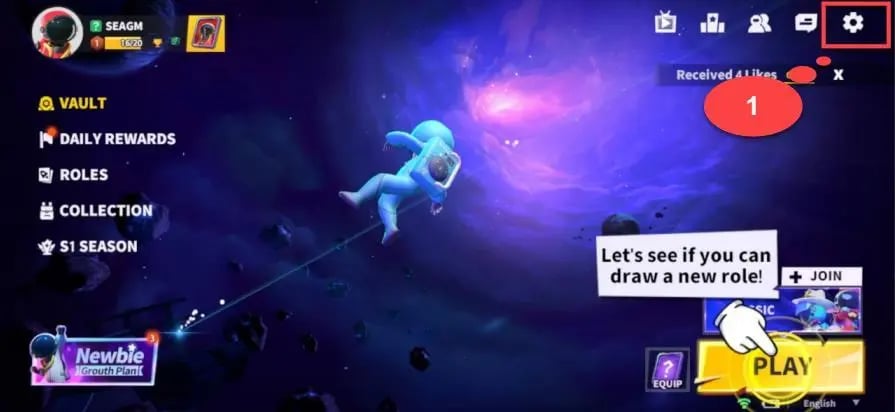
- Tap your Avatar/Profile icon located in the upper-left corner of the main lobby screen.
- On your player profile page, locate the Space ID section directly beneath your username and character display.
- Tap the Copy icon next to your numeric Space ID to save it directly to your clipboard.
- Paste the ID into the Space ID field on VGTopup.
Always use the in-game copy button rather than typing out the numbers manually. This eliminates typographical mistakes and ensures your delivery is sent to the correct astronaut.
Super Sus In-Game Purchases: Golden Stars vs. SUPER PASS
Super Sus features multiple in-game currencies and premium membership options. Understanding what each item provides helps you pick the right top-up option for your gameplay goals.
| Item Type | Primary Use | Key In-Game Benefits | Delivery Method |
|---|---|---|---|
| Golden Stars | Premium Store Currency | Role skin gacha, direct outfit purchases, lucky wheel spins, emotes | Direct balance credit |
| SUPER PASS | Seasonal Progression Track | Exclusive seasonal outfits, kill animations, extra challenge rewards | Direct pass activation / pack |
| Super Pass Plus | Advanced Battle Pass | Instant tier skips, exclusive pass badges, seasonal avatar frames | Direct activation |
| Weekly / Monthly Card | Sustained Resource Flow | Daily Golden Star collection, daily login bonuses, rebate perks | In-game daily claim |
Golden Stars
Golden Stars represent the primary premium currency in Super Sus. You can spend them on:
- Role Gacha: Pull for exclusive visual sets for roles like Spacecrew, Impostor, Sheriff, Joker, and Arsonist.
- Direct Fashion Bundles: Buy weapon skins, hats, back accessories, and spacesuit costumes in the store.
- Lucky Wheel Events: Participate in limited-time prize draws featuring mythic costumes and spaceship decorations.
SUPER PASS
The SUPER PASS is the seasonal progression system. As you play matches, complete daily missions, and finish weekly challenges, you level up your pass. Unlocking the premium SUPER PASS converts standard tier rewards into exclusive seasonal character sets, custom sound packs, and animated emojis.
Safe Space-ID-Only Top-Up Process
Account safety is a major priority for online gamers. VGTopup relies strictly on direct server-side top-up via your Super Sus Space ID.
- Zero Password Sharing: We will never ask for your account password, security questions, two-factor authentication codes, or linked social media credentials.
- No Login Handoff: You do not have to log out of your account or give temporary account access to anyone.
- Official Game Crediting: Golden Stars and passes are credited directly to your player profile through direct system delivery.
- Protected Privacy: Your personal email and sensitive payment details are handled via secure payment gateways without exposing your gaming profile.
Never share your Super Sus login credentials with third parties promising free Golden Stars or unauthorized generators. Using your official Space ID on VGTopup is the legitimate and secure method to reload your account.
Delivery Time and In-Game Balance Verification in 2026
Orders placed on VGTopup are processed automatically. In 2026, direct Space ID top-ups are credited almost immediately after your payment is confirmed.
How to Verify Your Delivery
- Check the Top Currency Bar: Open Super Sus. Look at the Golden Star counter in the top-right corner of the lobby screen. Your balance should reflect the added amount.
- Check the In-Game Mailbox: Some special event bundles or pass activations send a confirmation notification or claimable item directly to your in-game mailbox.
- Refresh the App: If your balance does not update instantly, close Super Sus completely from your device background apps and reopen it to force a server synchronization.
- Check Your VGTopup Order History: You can track the status of your transaction at any time from your VGTopup profile using your order ID.
Live pricing for every package size is displayed directly on the selection panel. Check the live prices on the product cards above to select the best bundle for your current needs.
Troubleshooting Common Super Sus Top-Up Issues
While direct Space ID top-ups run smoothly, occasional delays or user errors can happen. Here is how to handle common scenarios:
1. The Balance Has Not Updated After Checkout
If your Golden Stars have not appeared within a few moments, your game client may still be holding a cached balance. Close the Super Sus app completely, restart your device or internet connection, and launch the game again. Also check your in-game mail tab in case the system deposited the pack as a claimable attachment.
2. Typo in the Space ID
If you accidentally entered an incorrect Space ID, check the transaction status in your VGTopup order history. If the order has already been processed by the automated system to the entered ID, the transfer cannot be reversed on the game server. To avoid this problem, always copy and paste your Space ID directly from your in-game profile before clicking purchase.
3. Game Server Maintenance
If the official Super Sus game servers are undergoing maintenance or patch updates, in-game deliveries may pause temporarily. Once server maintenance concludes, the queued balance will sync directly with your character.
4. Contacting VGTopup Support
If you experience any transaction discrepancy, keep your VGTopup Order Number and your Super Sus Space ID ready. Reach out to our 24/7 customer support team through the help center for prompt resolution.
Frequently Asked Questions
How do I find my Super Sus Space ID?
Open Super Sus and tap your player avatar in the top-left corner of the main lobby. Your Space ID is the numeric code shown beneath your character name. Tap the copy icon next to the number to copy it to your clipboard.
Do I need to share my password to top up Super Sus Golden Stars?
No. VGTopup only requires your numeric Space ID. You never have to share your game password, linked Google/Facebook accounts, or login verification codes.
How long does it take for Super Sus Golden Stars or Passes to arrive?
Deliveries are processed automatically. Under normal network conditions, Golden Stars or Passes arrive in your in-game account shortly after payment confirmation.
What can I buy with Golden Stars in Super Sus?
Golden Stars can be used to unlock premium role skins, spin limited-time event wheels, buy outfits and accessories in the store, purchase renaming cards, and obtain seasonal cosmetic bundles.
Can I buy the SUPER PASS directly with just my Space ID?
Yes. You can purchase the SUPER PASS directly by selecting the corresponding pass option on VGTopup and submitting your Space ID at checkout.
What should I do if I entered the wrong Space ID during checkout?
Check your VGTopup order status immediately. If the order has not yet been processed, contact VGTopup customer support right away with your order number and the correct Space ID. Once an order is fulfilled by the game network, it cannot be recalled.
Select Denomination
Tax, payment fees and eligible coupons are calculated at checkout.
| Package | Price |
|---|---|
| 100 Golden Stars | USD 0.64 |
| Weekly Card | USD 0.75 |
| 310 Golden Stars | USD 1.92 |
| 520 Golden Stars | USD 3.21 |
| SUPER PASS | USD 3.21 |
| 1060 Golden Stars | USD 6.49 |
| SUPER PASS Bundle | USD 6.51 |
| Monthly Card | USD 7.00 |
| Super VIP Card | USD 7.84 |
| 2180 Golden Stars | USD 13.35 |
| 5600 Golden Stars | USD 34.24 |